JSEnhancementsSome useful features for Visual Studio JavaScript and CSS editors - outlining and matching braces highlighting |

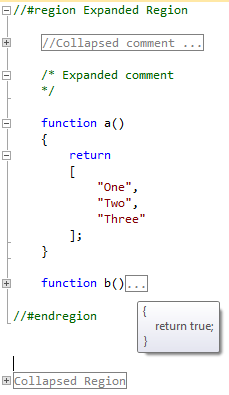
A version for Visual Studio 2012 can be found here This extension provides outlining and matching braces highlighting features for Visual Studio JavaScript and CSS editor. Works both in JS/CSS files and HTML script/style blocks. Outlining is like in C# editor. It outlines {}s, []s and #region tags. There's also an options page in Tools -> Options menu where you can specify what will be collapsed by default when you open a file.
CodePlex page: http://jse.codeplex.com/
Change log v 1.4.1 * "Collapse to definitions" now properly collapses all functions. * Added "Collapse to definitions" to CSS and JS editor context menus. v 1.4 + Options page. + "Collapse to definitions" support. It's pretty simple, just collapses top-level blocks, regions and top-level blocks in regions. Works in CSS too. * Some bugfixes. v 1.3.3 * Updates outlining when editor is idle, not while typing. * Better collapsed tooltip formatting. * Bugfixes. v 1.3.2 * Fixed conflict with devColor extension. * Fixed bug which sometimes caused error message while typing v 1.3.1 * Bugfixes v 1.3 * More intelligent outlining based on VS text classification system, doesn't outline inside strings, comments etc. + Multiline comments outlining
To see older versions, go to Codeplex |