Sando Code Search Tool

Free

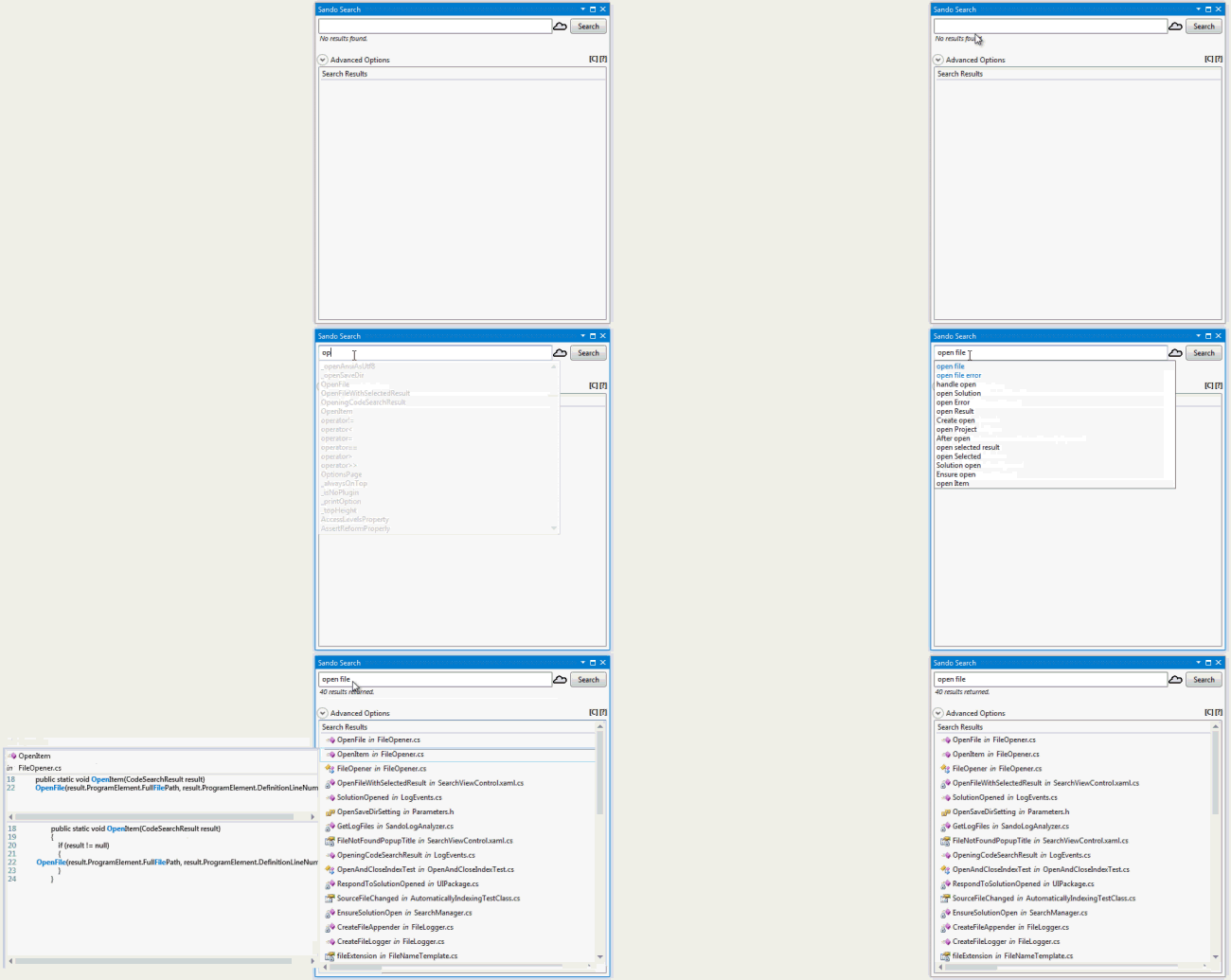
Search your C, C++, and C# Solutions using the latest advances in code search research. Sando provides a great replacement for Find in Files and even the Open Type Dialog. It leverages Lucene.NET to allow users perform a Google-like search over their source code.

(13) Review
Visual Studio
2012, 2010
Download (2,096)
4/25/2013
0.415
View
E-mail Twitter del.icio.us Digg Facebook
Add To Favorites
Description
Reviews (13)
Q and A (6)
Sign in to Write a Review
Sort By:

by chris.parnin | April 05 2013

Was useful for exploring an unfamiliar C# project and estimating how much it would cost to add new features.

by Manoj Parashuram | April 02 2013

Normal Search gives you all the references but again it is tedious to go to the relevant section of the code . Sando Search has provided some filters to filter by Element Type (Class,Methods etc. !!!) which will help me in reducing my search time.

During Code Inspection it helps me a lot as it gives me a code snippet where i can do my reviews without even going to the code files

Each time you change the filter you need to Click on the search Button which can be improved ...!!! search can begin after i apply the filter.

by mitach | April 01 2013

A great search companion! Conceptual autocompletion is pretty handy for exploring unfamiliar code. Thanks.

by WouterKl | March 29 2013

Nice tool, works as expected.
It's now my standard search tool

- I would add mouseover for detailed results.
- Add filetype to the advanced options seperate box. This would allow you to do multiple searches with the same advanced settings

David C. Shepherd March 29 2013
| Edit |
Delete

Very encouraging to hear Sando is your standard search tool now! Thanks for the comments, I've made tasks to address them:
http://sando.codeplex.com/workitem/271
http://sando.codeplex.com/workitem/272

by sanjap1 | March 28 2013

Speed is improved...now search is much faster than before. I liked that.
It is simple and easy to use and very useful addition. Thanks!

David C. Shepherd March 28 2013
| Edit |
Delete

Thanks for the review sanjap! My colleague Zhao Li is responsible for the 200-300% performance improvement (in indexing), I'll pass your compliments onto him!

by Judson White | January 11 2013

by Gopherbot | October 30 2012

Finally doesn't die on large solutions/files, and XAML indexing!

David C. Shepherd October 31 2012
| Edit |
Delete

Thanks for the review! I'm glad it is working for you now...

by Lucas_Moffitt | October 30 2012

by F2dk | October 30 2012

I really love the idea of this plugin. However, I don't believe it replaces any of the existing searches. But it is a very useful addition.

David C. Shepherd October 30 2012
| Edit |
Delete

Thanks for the review F2dk! My colleagues that have put lots of sweat and tears into this plugin are especially thankful ;)

I agree, this may not replace existing searches (everyone still has the occasion that they need the regex-based search of Find-in-Files). I find this plugin to be most useful when working with slightly unfamiliar code (e.g., someone else's project, someone else's sub-component, or really old code) because I can just type out some general search terms (e.g., "open file", "monitor solution", or "show results") and I usually get pretty good search results.

Thanks again,
David

by Isak Savo | August 13 2012

This is so much better than the standard "find in files" function that comes with Visual Studio.

by Oleh Zheleznyak | July 17 2012

-simple regex crashes visual studio
-character classes regex does not work
-fuzzy search does not work
-search results expand in different direction - a weir UI experience
-please make search results explicit, if nothing is found, it should be stated that nothing was found, otherwise I'm not sure if the search ran at all

PS: But it is a great idea, it will be very useful for the people who do not use add-ins like re-sharper, it just needs a little polish! Thanks!

David C. Shepherd October 30 2012
| Edit |
Delete

Hi Oleh,

Thanks for being an early reviewer! Would you mind downloading the latest Sando and providing an updated review? Sando has improved greatly since you last used it, with the 0.3 version just being released and we would *really* appreciate an updated review. Thanks for using Sando!

All the best,
David

by WillSullivan | July 12 2012

If you stick to searching for *whole words only* it works great. Anything else you might get nothing (where the normal search would have worked) or it crashes visual studio. Will probably be very good after a few version updates.

David C. Shepherd October 30 2012
| Edit |
Delete

Hi Will,

Thanks again for being an early adopter of Sando! We have just released 0.3, fixing lots of issues. Would you mind downloading the latest and updating your review? We would be really grateful if you would. Note that if you want to search for partial words just add an '*' at the end of your query (a new feature).

All the best,
David

by Spoelle | July 10 2012

Does NOT work in Visual Studio 2010 - VB code

David C. Shepherd October 30 2012
| Edit |
Delete

Hi Spoelle,

Would you mind updating your review, as we have just released a new version of Sando that is much improved. Sando still only works for C#, C, and C++, but I fear that this low rating is stopping other users that do use these languages from trying this free, open source software. Thanks for considering helping us!

All the best,
David

Sign in to Start a Discussion


  • Local Code Search
    2 Posts | Last Post April 04, 2013
    • This would be hugely useful if it was possible to add additional local directories to search for code, and perhaps show in a separate results list. There are no really good tools for searching a local machine for usages of a symbol, and lucene would be perfectly suited to the task.
      
      I'd be interested in helping make this happen, as it would make my life hugely better.
      
      Also, the labels and box backgrounds don't work well with the 2012 dark theme - might need to style them differently based on the theme selected.
    • Hi George,
      
      We'd be happy to work with you to create this feature.  There will be some challenges because we currently use Visual Studio's file events to keep our index up-to-date, but we could likely find a workaround. Feel free to start a discussion on http://sando.codeplex.com if you want to collaboratively sketch out a solution.
      
      > Also, the labels and box backgrounds don't work well with the 2012 dark theme - might need to style them differently based on the theme selected.
      
      Yes, we're aware of this annoyance (sorry!), but haven't had the resources to fix it yet.  We'll be getting more help this summer on the project so you  can expect this issue to be fixed in early summer at the latest.
  • VS2012 version anytime soon?
    3 Posts | Last Post March 29, 2013
    • Is a version for VS2012 coming soon?
    • Yes, we are working on this.  It is almost done, and a working version can be downloaded here: http://sando.codeplex.com/releases/view/97069 
      The only *known* issues with this *pre-release* is that the "expand" button on the right needs to be styled properly.  Let me know if you find any problems with it, as we are still in the testing stages.... full release VS2012 in next two weeks or so. 
    • The current version supports VS 2010 and VS 2012.
  • Sando toolbar seems to not remember where it is pinned
    6 Posts | Last Post August 30, 2012
    • Is this me, or is it everybody?  I notice it showing up floating over the main window when I open VS quite often.
    • I believe this is the same issue, or caused by the same problematic code as this: http://sando.codeplex.com/workitem/91
      
      I'm on vacation this week but hope to look into this next week. Thanks for reporting this problem!  I'm really glad that you're still using Sando, let me know if we can fix anything else.  FYI, we pushed out an update last week (0.2) which you can get by hitting update in the extension manager (i.e., Tools > Extension Manager).
    • FYI, this is fixed in version 0.21 which is available in the Visual Studio Gallery.  Let me know if the fix doesn't work for you.  Thanks again for reporting the problem!
    • FYI, this problem is actually not fixed.  I will try to fix it soon.
    • Sando v0.23 now only automatically shows the Sando View one time. So, it will show Sando once, when you open a solution after installing it, and then it should not reopen it (assuming normal usage).  See http://sando.codeplex.com/workitem/91 for details.
    • Will, thanks again for reporting this bug. It exposed a serious threading issue that I think I've finally fixed in Sando v0.24.  Let me know if you experience this problem again.
  • XAML files aren't indexed
    2 Posts | Last Post July 16, 2012
    • :|
    • Just raised the priority on this bug.  Thanks for reporting that it was a problem for you!  
      
      http://sando.codeplex.com/workitem/141
  • Doesn't work as expected when the dot operator is involved
    2 Posts | Last Post July 12, 2012
    • If, for example, I search for "Mouse" or "Capture" it finds the line "Mouse.Capture(this)", however if I search for "Mouse.Capture" it finds jack all.
      
      If I search for "Capture(" visual studio crashes hard.  
      
      Version .1 for sure.  I think you'll have something great at version 1.0.
      
      
    • Thanks for this report!  I bet we can fix this quickly.  I will update you when a fix is out (probably next week due to vacations).  Thanks again for the report, that really helps!
      
      http://sando.codeplex.com/workitem/165
  • No Search Results
    4 Posts | Last Post July 11, 2012
    • I install this package in VS Ultimate 2010, restarted, and typed in a search term with a C# project loaded. I get no results at all. Do I need to install anything else?
    • No, you don't need to install anything else. If you are working on an open source project let me know which one it is and I'll test it for you.  If it is a private project here's a few things you can look into:
      
      * Does Sando tell you "Sando is still indexing..." when you search? If so, Sando is still indexing the source code and may not return results until it is done.
      * Are you searching for a complete word or just a part of a word? Sando only handles complete word queries (e.g., "file", "find", etc.) and can't handle partial words yet (e.g., "fil" or "fin" will fail).
      * Is there anything else special about your C# files? If you can, send me one of your C# files for testing and I'll see if I can get Sando to parse and search it.
      
      Let me know if any of this helps!
       
    • I think it must have been the particular solution I was working with because it is working for others. I am uncertain of the replication steps, however with the solution I first tried Sando the projects failed to load (project paths had changed), and I had to re-add them from their correct paths.
    • Thanks for updating me!  I'm glad to hear it is working for other solutions. Let me know if you see continued problems with that project or if you run into any other problems.  Happy searching!