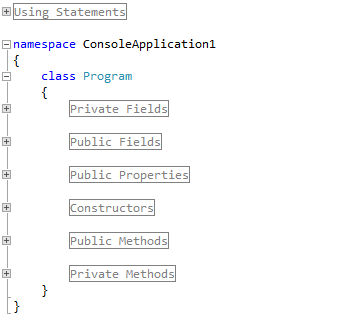
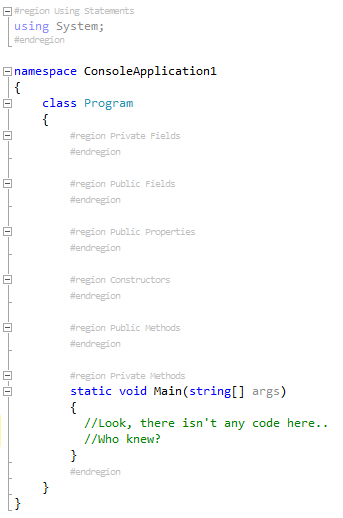
I love regions, but I hate how they look when expanded, mainly due to the region title text having the same color as regular code and no option to customize, which I find greatly interferes with readability.
With this extension regions are finally the way they should always have been: completely unobtrusive when expanded! Thank you!
I love you. I really and truly deeply hate regions and if it were up to me, this code base would be stripped of all regions. Until that happens - this extension will stop me from exploding!
collapsing braces should have been built into visual studio. The idea is great, but I didn't see collapsible blocks after i installed this add on to my VS2010. maybe it was something peculiar to my environment.
I don't think this extension should affect the collapsible blocks (the code basically just changes the text styles based on a string search, it doesn't do much with outlining extensibility). Take a look at this setting in Tools->Options->Text Editor->C#->Advanced->Enter outlining mode when files open. That should be 'checked'. There may be similar settings for other languages. Not sure what else could be causing you problems if that is not it.
I'll play around with it a bit more now that the color scheme doesn't clash. I've changed my rating to reflect that.
"I like how it minimizes the #regions TITLE text to make it non-obtrusive, but the glaring white highlight when you have your cursor over the collapse/expand button seriously contrasts with my color scheme. I searched through all of the color options and didn't find one that obviously matched (I would expect the color option to start with 'I', 'Hate', or 'Regions')." - old comment for historical purposes
That's odd, I enabled it again to try your suggestion by editing that color option and this time my color already worked as expected instead of clashing. Weird Visual Studio hiccup, I suppose. Changed the rating to reflect this.
Simply useless. Regions sucks when you have 10 lines of code per class. If you have 10.000 lines and need to split the class without using partial classes they simply do the work for you. Even If I don't want regions, I can clear the code, using an extension is simply useless, as I said.
And example for use of the regions: when you want to clearly declares zones inside your class, where you fit fields, properties, methods ecc... and you want them to be collapsed when not in use. Another example is for the code inside foreach or for cycles. If it's simply initialization code, and it's long, maybe you want to collapse it when you dont use it.
I am completely the opposite of you. I love Regions as they are the cure for spaghetti code.
My product, Regionizer, available at http://regionizer.codeplex.com formats C# code files into regions for private variables, methods, events and properties.
The events, methods and properties are all alphabetically sorted so you no matter the coding style of anyone on your team, the documents are all formatted the same way.
I can't stand code that ins't formatted using Regionizer, so to each their own, but if you like regions, you will like Regionizer.
The only thing I could not figure out was how to expand and collapse all regions using the DTE, if you know of a way please tell me.
I would like you to compare my source code to yours and you tell me if you like your style better after using Regionzer.
Download Rad Studio Code Generation Toolkit (http://radstudio.codeplex.com) to see a sample of code formatted using Regionizer.
Data Juggler Software
Houston, Texas
Hi, it is a great extension indeed, but i need exactly opposite functionality - I want to automatically collapse everything in the file on open. For instance, when I hit Ctrl+T (Resharper, navigate to type) and select some type a file with that class definition is opened and everything in that file should be collapsed except the "class MyClass" node.
How can I achieve this?
Hiya, that behavior is exactly what this extension is trying to prevent, haha. So you won't be able to do it with this one, but maybe there is another tool that will help? You could also write your own extension, all of the functionality is included in the Visual Studio 2010/2012 SDK APIs.
Hi.
Thanks a lot for this great Extension.
I have one problem with it. If I open a file and use the "Source Control" - "Annotate" Command from the ContextMenu an Exception is thrown, causing a popup message from VisualStudio.
The Exception is:
System.NullReferenceException: Object reference not set to an instance of an object.
at ShaneBlazek.DisableRegions.TextViewHandler.TextViewClosed(Object sender, EventArgs e)
at Microsoft.VisualStudio.Text.Utilities.GuardedOperations.RaiseEvent(Object sender, EventHandler eventHandlers)
I hope this helps to fix the problem.
Thanks.
Ok, I can't reproduce this, but I've updated some code that *should* fix it (based on the call stack you posted). When you get a chance, update to the latest version and let me know if that solves your problem. Thanks!
Hi
Thanks for your update.
It didn't fix the issue, but the StackTrace is now different. The new StackTrace is:
System.NullReferenceException: Object reference not set to an instance of an object.
at ShaneBlazek.DisableRegions.TextViewHandler..ctor(IWpfTextView textView, IOutliningManagerService outliningManagerService)
at ShaneBlazek.DisableRegions.TestViewCreationListener.TextViewCreated(IWpfTextView textView)
at Microsoft.VisualStudio.Text.Editor.Implementation.WpfTextView.<>c__DisplayClassd.<BindContentTypeSpecificAssets>b__a()
at Microsoft.VisualStudio.Text.Utilities.GuardedOperations.CallExtensionPoint(Object errorSource, Action call)
and it seams that the IOutliningManagerService is null. Maybe this is the case because the Annotate View doesn't support Outlining (at all) but looks like a normal TextView.
I hope this helps.
ddpommes
Ok, next attempt at fixing this is online, so you should be able to update. I *can* open annotate view and everything seems to still work, so unfortunately I can't reproduce to verify the fix. Maybe different TFS versions? Anyway, if you have time, let me know if it works or not. Thanks again.
I still have the same exception (with the same StackTrace).
Since the message box in VisualStudio opens only for the first exception of an extension I think I can live with that. The benefits of this extension still outweigh this one little popup message. :-)
Thanks anyway.
Ok, thanks for the help. I thought it was crashing Visual Studio, so that is better at least. I did just update a new version with some more null checks anyway, so it might be fixed now.
I get
System.NullReferenceException: Object reference not set to an instance of an object. at ShaneBlazek.DisableRegions.RegionLineTaggerProvider.CreateTagger[T](ITextView textView, ITextBuffer buffer) at Microsoft.VisualStudio.Text.Tagging.Implementation.TagAggregator`1.GatherTaggers(ITextBuffer textBuffer)
any file that I open.
@regisbsb - What version of Visual Studio are you using (2010, 2012, Express/Premium/Ultimate/Etc)? Are you using the Annotate function or just opening a normal file? What is the extension of the file you are opening?
Just an update on this, I plan to get this upgraded as soon as vs11 is released (later this month, I think). I have been waiting for the RTM version before installing. Until then, you can use AlbertWeinert's workaround.
Hello. Can you add configuration option which block changes color and font size of lines with #region and #endregion. I need tool which automatically expand regions, but without losing view of the beginning and end of each region.
There are options for this extension, but they aren't easy to find. If you go to Tools->Options, there is a category added in the options tree called "Disable Regions". In there you can set "Style Region Lines" to False which will cause the extension to stop making the regions harder to see by not making them smaller and gray, but it will still auto expand them.