More From 初音玲

ItaBackgroundImage

Free

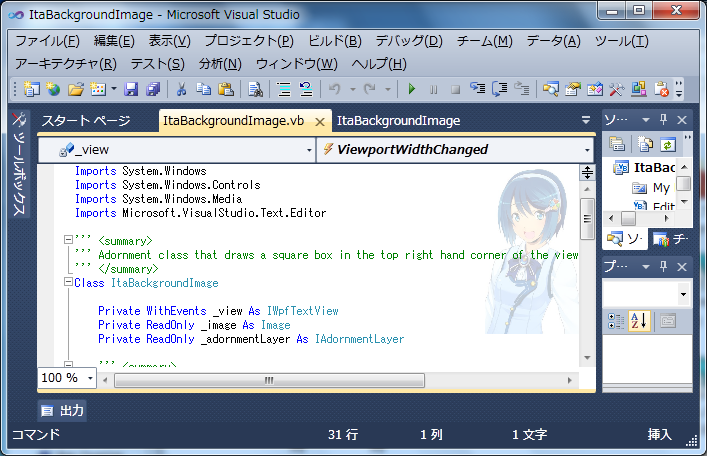
痛IDE extension to the Visual Studio Editor.

(0) Review
Visual Studio
2010
Download (4,679)
5/5/2010
1.41
E-mail Twitter del.icio.us Digg Facebook
Add To Favorites
Description
Reviews
Q and A (3)
Sign in to Write a Review

Be the first to write a review.

Sign in to Start a Discussion


  • How it works?
    2 Posts | Last Post October 31, 2010
    • Hello
      I've the same problem as 'livyathan'...
      I'm using C# and hadn't installed C.
      Is it just for VB?
      
    • If you use ItaStartPage, Visual Studio-> [Tools]-[option]-[Startup] -> Display Dialog -> Select 'ItaStartPage' for [Startpage Customize]Combobox.
  • VB Expressへの対応について
    2 Posts | Last Post September 30, 2010
    • VB Express 2010に対応なされるつもりはないのでしょうか?
    • VB Express 2010はIDE拡張できませんでした。
  • not works
    3 Posts | Last Post July 05, 2010
    • on screenshot provided looks great, but in not works for me.
      i'm using english Visual Studio 2010 Ultimate.
      when enabling this, Visual Studio hangs, mouse-over highlight effects with the VS UI disappers,
      UI does not react on input, code editor not shows up.
      i've only set the background of source editor to Silver, everything is by default.
      donno why it acts this way...
    • hello, xeonix_nya. thx use my IDE extentions.
      sorry, Visual Studio hangs. because '.NET Framework 4 RTM Recommended changes:Be sure to create a FileDialog control and call the ShowDialog method on the same thread.'.
      I try debug for it.
      If you use ItaStartPage and select background image, this problem dont issue.
      http://visualstudiogallery.msdn.microsoft.com/ja-jp/395c4cc0-0fb2-456a-8def-5e01d241e8da
      
      
    • I don't understand how this works. I installed both "ItaBackgroundImage" and "ItaStartPage", but nothing happens, nothing is different from before. Am I missing something? where can I choose the image to show?
      
      I'm using Visual Studio 2010 ultimate (btw, i didn't installed vb.net and c  )