TFS Administrators Toolkit for VS 2010

Free

A collection of tools to assist the TFS Administrator

(7) Review
Visual Studio
2010
Download (2,640)
11/15/2012
0.2.1.0
E-mail Twitter del.icio.us Digg Facebook
Add To Favorites
Description
Reviews (7)
Q and A (2)
Sign in to Write a Review
Sort By:

by dwnwd | March 14 2013

I basically just downloaded this for the "Find text in TFS files" feature, but I cannot fathom why it only seems to work from a project root level. This means a search that it is otherwise capable of performing readily instead takes a much, much longer time to peform in a large project.

Mattias Sköld March 30 2013
| Edit |
Delete

Thanks for your time and feedback, Ive implemented a source control context menu that lets you select and search in any source folder. You can find this at the codeplex project http://tfsadmintoolkit.codeplex.com/.

I'm currently testing a new release of the VS2012 extension, http://visualstudiogallery.msdn.microsoft.com/96a425aa-9ef0-4a92-b874-217d544a74bf, with this feature included.

by Rahul Garware | February 23 2013

Very useful. Got a recommendation for this tool from a admin team who were struggling with huge TFS DB sizes (300+ GBs).

by Crazy Brit | February 14 2013

I'm a newbie with TFS and was tearing my hair out trying to do what I thought would be a vary basic capability that's built into most products I've used during my many years in software development, find all files that contain a given string. This worked perfectly, thankyou.

Is there way to export the results of the search into a text or csv file?

by brthomas | October 02 2012

Good premise of the tool I like many things about it. Two pain points so far, When I go to look for test attachments screen I would like to select certain projects and then select a go button. Right now it takes off and so I have to wait for it to get to the info I want. Second pain point the subscriptions section pulls up the subs correctly however when I select and try to unsubscribe it gives a nasty error or crashes VS2010 Ultimate. This is the only tool I have seen for subs in 2010 so it would be great if you could fix it. Thanks for the hard work.

Mattias Sköld October 05 2012
| Edit |
Delete

I will take a look at it. Am I right to assume that you would put the Subscription crach as a higher prio ?

Just uploaded a new version - Enjoy :)

by KMoraz | August 28 2012

Helpful tools. Good job!

by MrHinsh | August 08 2012

by Gabian | April 19 2012

Not fully tested yet, but GUI should be inproved.
Cancel button is not working on UpdateWorkItemTypes dialog.
Components in Reports & WIT windows are not properly docked. Thus, expanding the window size is absolutely not useful.
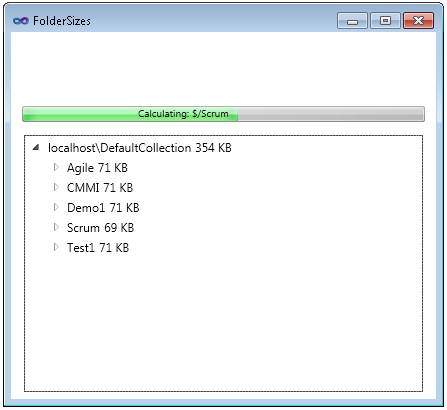
File/Folder size related windows are correctly docked but Size information is not right aligned. Not very easy to read.
About box is great ;-)

Mattias Sköld April 19 2012
| Edit |
Delete

I will take a look and try to fix the UI glitches,sorry for any inconvenience.
Edit, Just uploaded an updated version with most glitches fixed-

Sign in to Start a Discussion


  • Source?
    2 Posts | Last Post January 09, 2013
    • Is it possible to get the source of the tool? I would like to extend it with additonal functionality (e.g. file count per file type per team project)
    • The latest source is available @ codeplex, please refer to http://tfsadmintoolkit.codeplex.com/...
      
      Please get in touch if you want to push it into the official project/release
  • After install, where is this functionality?
    2 Posts | Last Post November 15, 2012
    • So I installed this extension and I don't know where to find the tool(s).  I'm particularly interested in the attachments cleaner.  Other than a brain, what am I missing?
      Thanks!
      Joe
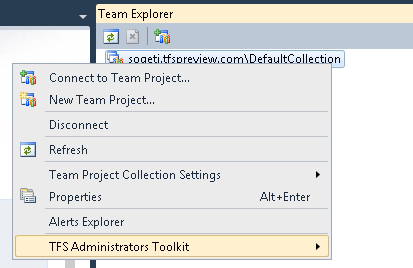
    • Just navigate to team explorer, and right click on the Team Project Collection node, you will find the TFS Admin Toolkit menu down at the bottom of the menu. 
      
      I also added an picture to the getting started section of the description :)
      
      If you have the option, I would recommend you to use the VS2012 extension...