More From Roman Kurbangaliev

Regex Tester

Free

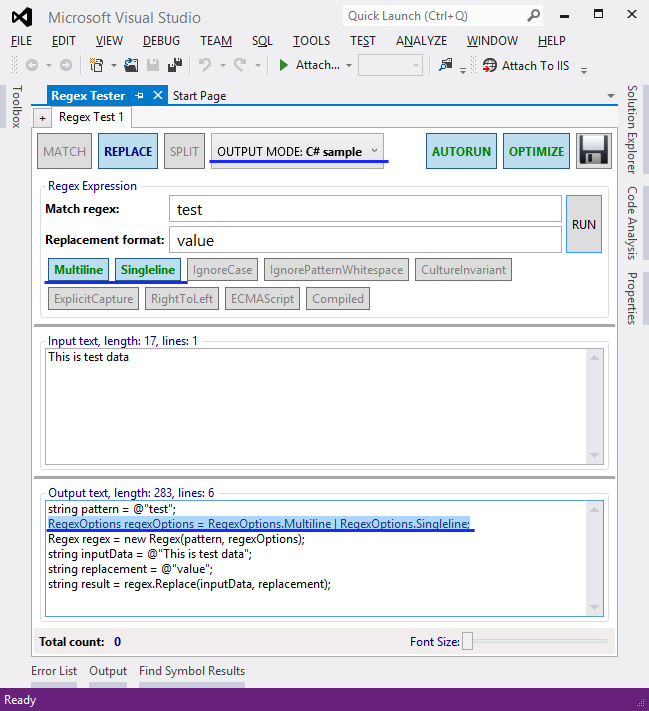
Regular expression tester for Visual Studio 2010.

(18) Review
Visual Studio
2010
Download (30,941)
2/27/2013
1.2
View
E-mail Twitter del.icio.us Digg Facebook
Add To Favorites
Description
Reviews (18)
Q and A (7)
Sign in to Write a Review
Sort By:

by Binori | October 17 2012

by Carlos Adriano Portes | July 29 2012

by GermánMC | April 07 2012

Great tool. Is useful for me that I'm learning Regular Expression.
Thanks for develop this tool =).

by Code Chief | April 05 2012

Great and essential considering the MS provided Regex extension doesn't open independently or on anything other than a Regex class. This tool is easy to access and provides all the necessary features to build expressions whilst programming.

by Margriet Bruggeman | February 21 2012

Always good to have

by Guillaume Venturini | January 30 2012

good but it seems not working with ^ and $ caracters and the multiline option activated :

Match regex : ^(100|[0-9]{1,2}(?:[.,][0-9]{1,10}){0,1})$
option multiline
input text :
90,00
11
103

output : nothing

I must remove $ to have something in the output field. It's not really what I espected.

Roman Kurbangaliev February 02 2012
| Edit |
Delete

Thank you for comment.
I used standard Regex class in C# code.
RegexOptions.Multiline property does not do what you think.

Here is answer:
http://stackoverflow.com/questions/7815063/multiline-regex-works-in-regexbuddy-and-online-tester-but-doesnt-work-in-c-sh

I changed you regex on:
^(100|[0-9]{1,2}(?:[.,][0-9]{1,10}){0,1})(?=\r\n|$)
It's worked with Multiline option.

by Andre.Ziegler | January 19 2012

good work, thanks :)

by Denis Kurbangaliev | January 08 2012

It's simple and useful tool. Thank you.

by 柳永法 | December 04 2011

good

Hope to add functionality:
1. real time process, not click
2. generation of various scripting functionality, such as: JS, VBS, c#, vb.net

by Nicolas Plourde | October 30 2011

by Andrei Csibi | August 31 2011

A better formatted results window would be a good improvement but for now the tool is very useful.

by Yasin Öner | July 21 2011

by Sinvicta | March 09 2011

I'm sure that there will be better Regex Testers at some point, but this does work. It provides for groupnames, Multiline/Singleline, case insensitive, etc. options and will show replacement string results. I see no problems with it and am thankful to have an integrated (free) tool.

by SAMSPAM | February 17 2011

Doesnt work, gives no results and no guidance.

Roman Kurbangaliev January 09 2012
| Edit |
Delete

What doesn't work? Give me please test data and regex for check it.

by Dmitry L Gilyaev | December 28 2010

Отличное расширение!
Кстати, было бы здорово добавить несколько темплейтов основных регекспов и мультитабность для тестирования в одном окне сразу нескольких регекспов.

by _coolblue | November 23 2010

by Dmitry Savostianov | July 20 2010

Роман, очень удобная штука, спасибо :)

И, да, если такое возможно, то было бы неплохо открывать несколько окон "Regex Tester".

by Sergey Zwezdin | July 12 2010

Sign in to Start a Discussion


  • Captured Groups
    2 Posts | Last Post April 22, 2013
    • Where/How does it show capture groups? Especially named groups?
      
      For example,
      Regex: <img\ssrc='(?<imagePath>/static/product_images/med/.+\.jpg)'>
      Input: <img src='/static/product_images/med/311-9836.jpg'>
      I should see a result that it matched the whole line and the captured group part (under its name)
      Results:
      <img src='/static/product_images/med/311-9836.jpg'>
      [imagePath] "/static/product_images/med/311-9836.jpg"
      
      I can only see the first result.
    • As a further example of what I'm talking about, plug this into RegExr
      http://www.gskinner.com/RegExr/ that page will list captured groups below the main match
  • Save presets
    2 Posts | Last Post February 27, 2013
    • Please add ability to save presets.
      Thanks.
    • Sorry, I was busy :)
      I returned again to work on this tool.
  • Issue with Regex Tester vs. VS2010 behaviour
    2 Posts | Last Post May 08, 2011
    • I have the following RegEx = ^(-{0,2}|/{0,1})(([0-9_]*[A-Za-z]+[0-9_-]*)+)(\b[^:,.=])([+-]?)  In VS C# Code it does not produce the same results. E.g. /debug or 12debug12 are not recognized in VS but in Regex Tester they are. Any idea? Same with other RegEx as well. Can mail a small test c# program if required.
    • Sorry, I didn't see the notification about your question.
      May be the problem in RegexOptions
      http://msdn.microsoft.com/en-us/library/system.text.regularexpressions.regexoptions.aspx.
      I think you had a small problem.
  • Port to VS2008
    4 Posts | Last Post December 28, 2010
    • Can you portage you extension to MSVS 2008?
    • Yes, I can do it. Please wait one week.
    • Tool ported on Visual Studio 2008, it's here http://visualstudiogallery.msdn.microsoft.com/en-us/0e443876-776b-4784-b3d7-f13740c387b4.
      Thanks you for your interest!
    • Thx. It works very well!
  • Does not seem to work?
    2 Posts | Last Post November 11, 2010
    • I took a snippet of working C# code:
      Regex xEin = new Regex("\\[[0-9]*\\]");
      Match me = xEin.Match(s);
      
      And tried your tester with
      Match RegEx:\\[[0-9]*\\]
      Result Format:
      Input Text:test [11] stuff
      
      Clicked Process and the Results were blank. What am I missing here?
    • try "Match RegEx":
      \[([0-9]*)\]
  • Highlighting matches
    2 Posts | Last Post August 27, 2010
  • named/numbered group replaces?
    2 Posts | Last Post August 27, 2010
    • I dont quite understand your result/replace format
      Using match = "\w(?<amount>\d+)\w" and result format = "${amount}" i dont get any substitution for my groups. 
      How do I get numbered or named groups substituted in the result?
      
    • Use square brackets, sample: $[name_group] or $[number_group].