IMPORTANT: Note about VS10x CodeMAP and Visual Studio 2017
VS10x CodeMAP is based on Microsoft's old EnvDTE-based (COM) parsing model that was shipped since Visual Studio 6. This model is not thread-safe, is incomplete, is failing in numerous cases and the change notification system is malfunctioning grossly - all to the point of hindering future development of this (and potentially other) tools.
As a result, two years ago we decided to make a switch towards a truly modern infrastructure, so we have written a multithreaded Roslyn-based centralized engine and redesigned and implemented CodeMAP from the grounds up as a really beautifully done, much faster, zero-lag subsystem of a wider-scope extension called Supercharger. So yes, among many other subsystems, there is a CodeMAP subsystem in Supercharger - it looks almost the same (with refinements actually) but has none of the old implementation's problems.
We do not have the necessary resources to backport al these to VS10x CodeMAP. As a result, the VS10x CodeMAP code base will continued to be maintained in terms of bug fixing, but new feature development and latest Visual Studio version (in this case, 2017) support will be exclusive to Supercharger's CodeMAP subsystem. Point is, if you are serious about continuing to use CodeMAP in the latest as well as future Visual Studio versions, then you should consider upgrading to Supercharger. You will get a lot more besides CodeMAP, i.e. AutoText, Code Highlighters, Editor Enhancer, Rich Code, Magic Comments, Phrasing Review, Spellist, SuperFind, Statistics etc etc.
Supercharger screenshots and details:
https://supercharger.tools
Supercharger can be found/downloaded from the Visual Studio Gallery:
/vsgallery/f58941e3-13c6-4e97-9235-195f6f380ea3
Thank you! VS10x CodeMAP is a Visual Studio extension that displays a graphical nested representation of the current code editor window (C#, VB, C++). It helps the developer visualize type nesting, implemented interfaces, regions, member type and scope, as well as quickly navigate to their respective positions in code. Have a look at the small sample below. Notice the implemented interfaces. The region sub-container is prefixed with a # symbol for easier identification. Members have distinctive icons, with special overlays for constructors, event implementations, virtual members, statics and members belonging to implemented interfaces. By default, VS10x CodeMAP will adjust its color to match the Visual Studio theme (dark, light, or custom). You can see below samples with the standard Light and Dark themes, as well as with the Solarized (dark) theme provided by the Color Theme Editor extension): - with the Visual Studio 2013 Light theme (detail: some icons are lighter because private members are dimmed): 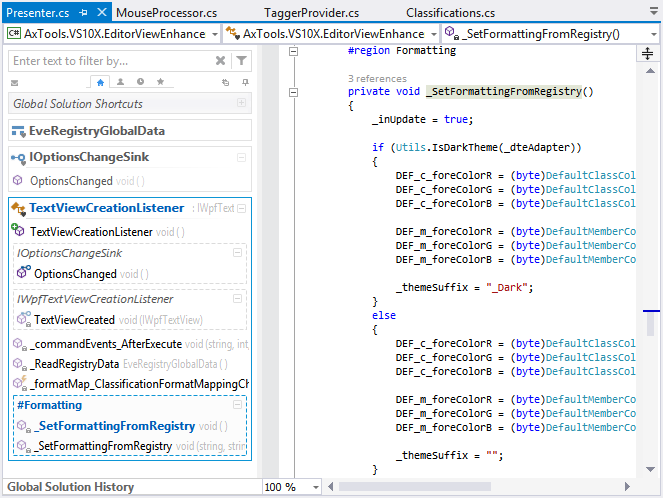
- with the Visual Studio 2013 Dark theme (detail: some icons is darker because private members are dimmed): 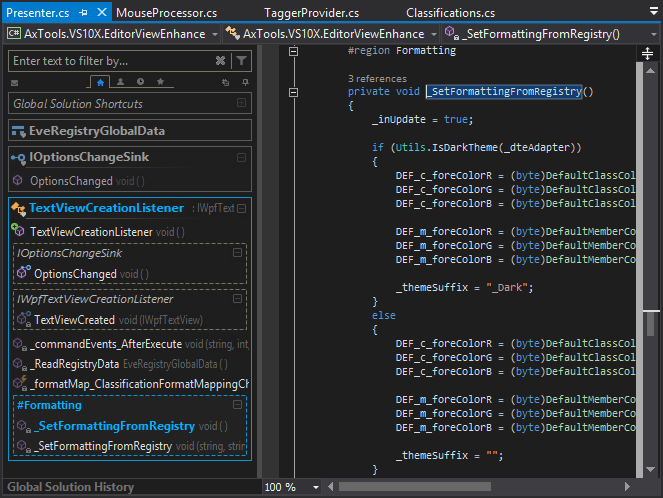
- with the Visual Studio 2013 'Color Theme Editor' extension's Solarized (dark) theme (detail: some icons is darker because private members are dimmed): 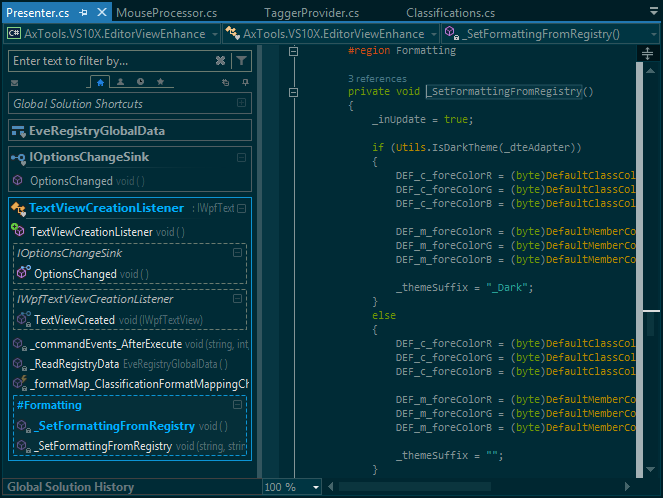
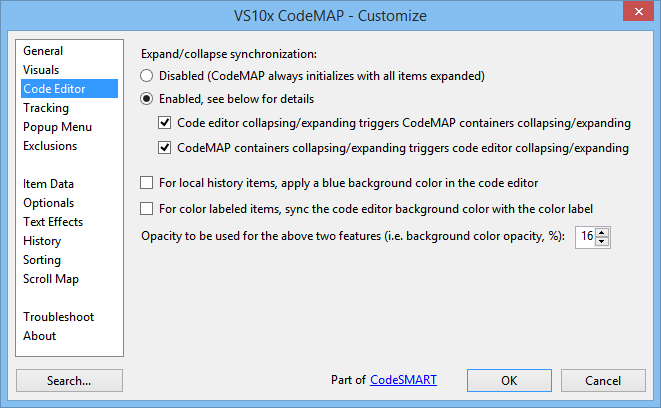
Containers can be collapsed in order to help you stay focused on items that are currently in development. What's worth to notice is that a collapse operation in CodeMAP will also collapse the corresponding part in the code editor. Moreover, it works both ways, so if you for example collapse a class in the code editor, the corresponding container in CodeMAP will get collapsed as well! 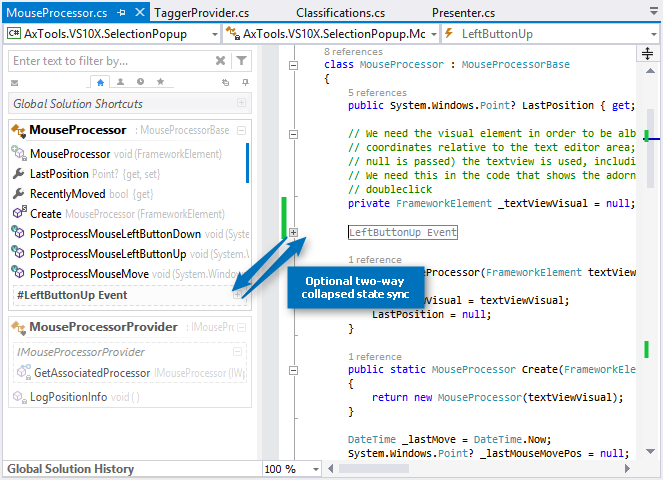
VS10x CodeMAP is also a navigational tool - if you double-click an item, its position in code will be brought into view. That is something you should expect, of course, but the CodeMAP also makes returning to the last viewed/edited members a breeze by highlighting the last 5 accessed or edited (C# only) items in various ways: - In CodeMAP, with a distinctive background color (grey in this example, but configurable) or with a variable opacity clock image.
- In the editor, with a bluish background color for the entire member body (can be turned off).
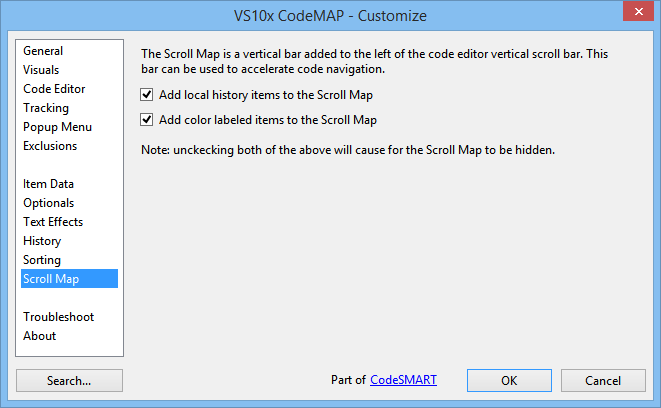
- On the scroll map (a special area added by CodeMAP to the left of the vertical scrollbar), blue rectangles are added to represent the member position relative to the entire code file (you can align the scroll thumb with the blue marker to bring the item into view) (can be turned off).
Please note that the above behavior is fully customizable, there's a CodeMAP options dialog where this can be done (details at the end of this page). 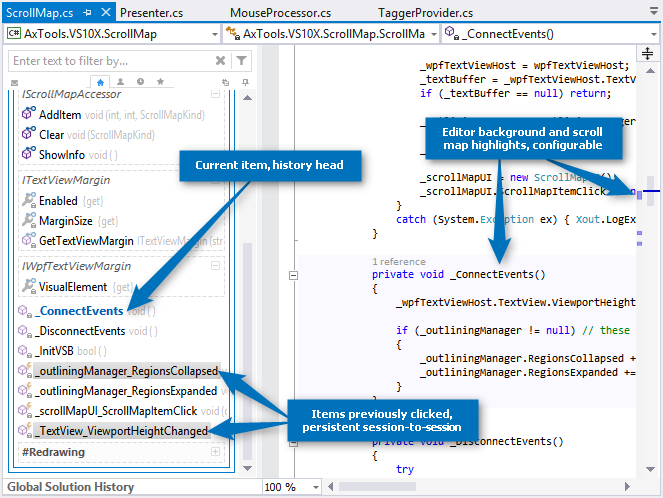
Now, highlighting recently accessed items may be good, but what if you have items you return to over and over? Well, you can specify a special highlight by applying a color label (yellow, red, green, blue, purple, gray). As with history, labeled items are emphasized in various ways: - In CodeMAP, with a colored background applied to the item's name.
- In the editor, with a colored background for the entire member body; the color is the same as the one used to highlight the item in CodeMAP (can be turned on or off by default from the "Customize" dialog, and can be later reset on a per-item basis by using the item popup menu).
- On the scroll map (a special area added by the CodeMAP to the left of the vertical scrollbar), red rectangles are added to represent the member position relative to the entire code file (you can align the scroll thumb with the blue marker to bring the item into view) (can be turned off).
The behavior for the above last two emphasizing techniques is customizable. 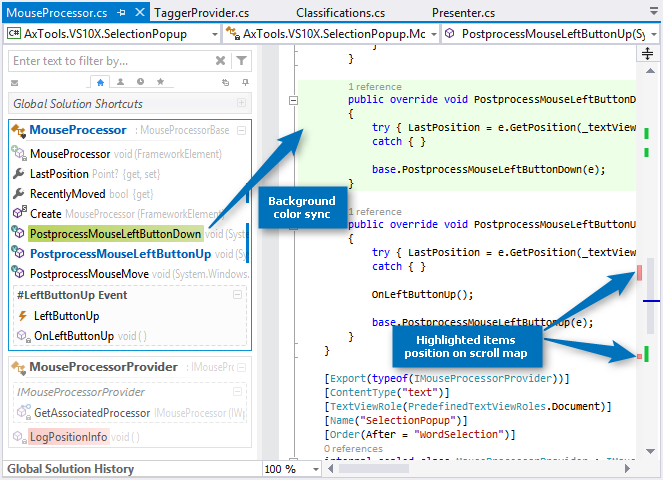
In large code files, a code elements-based CodeMAP might not be enough. If you find yourself looking over and over for certain positions in code, then named bookmarks are for you. Simply start a comment with the BMK token and then type in a meaningful name (this will end up with something like //BMK Some name here in C# or 'BMK Some name here in VB, with or without space after the comment start token i.e. // and ' respectively) and VS10x CodeMAP will pick that up and add the name at the top of the containing element, so that you can find it instantly. 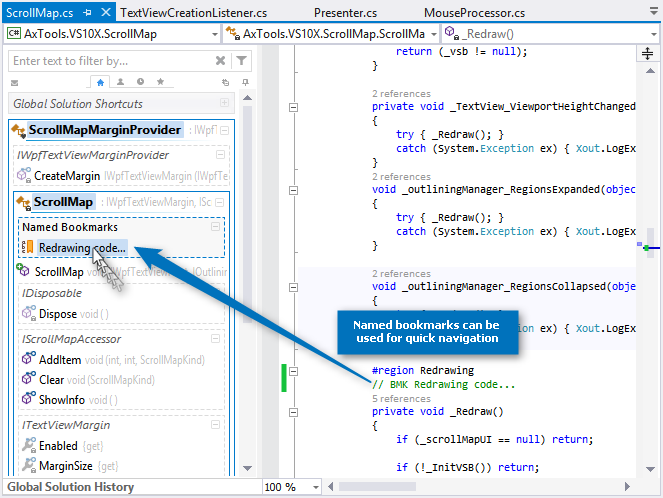
If the filter textbox is not visible (it can be configured to auto-hide) then just hover the mouse pointer over the narrow orange bar at the top of the CodeMAP area. In order to cancel an existing filter, either clear filter textbox by clicking on the x-button on the right side or press Esc while in the filter textbox. 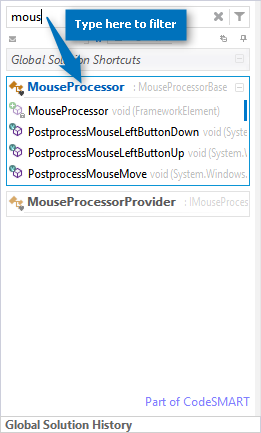
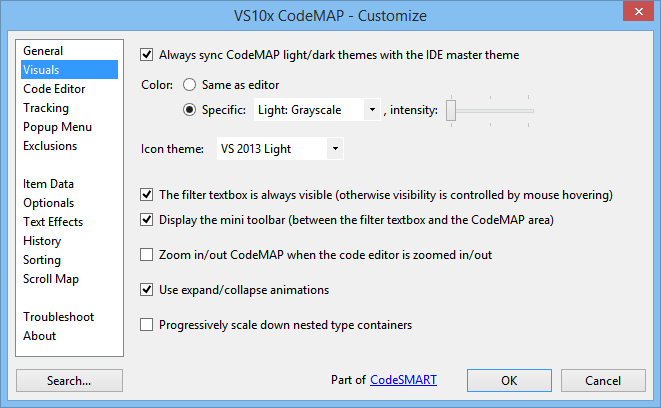
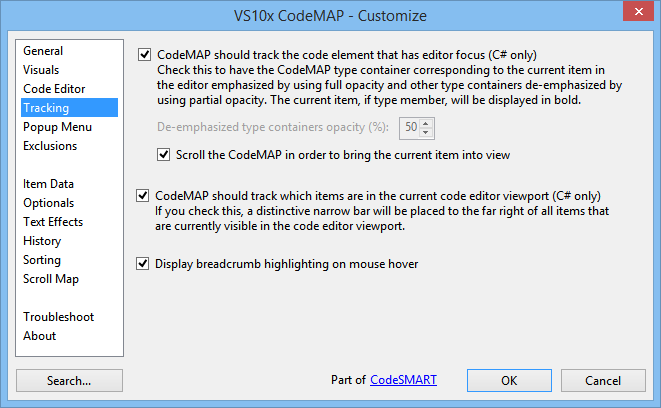
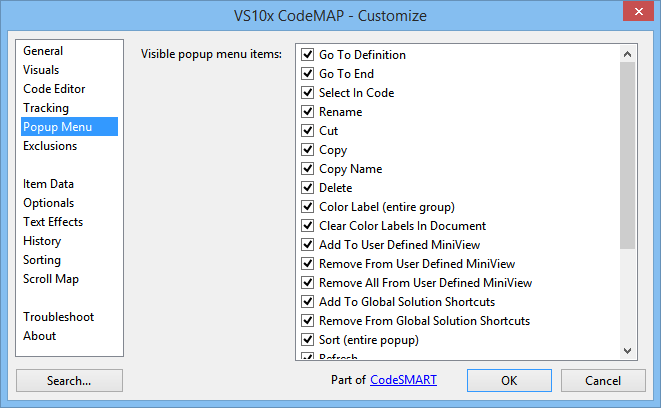
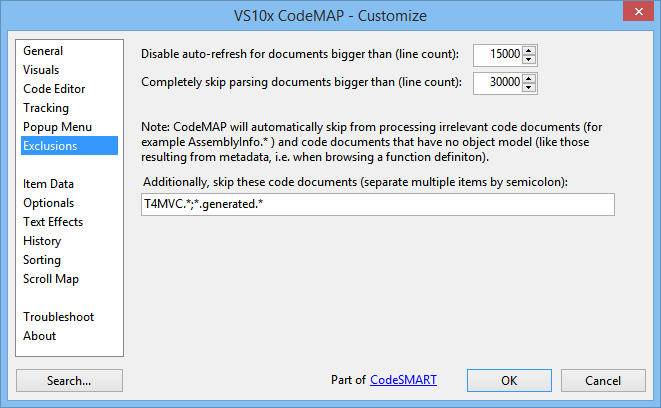
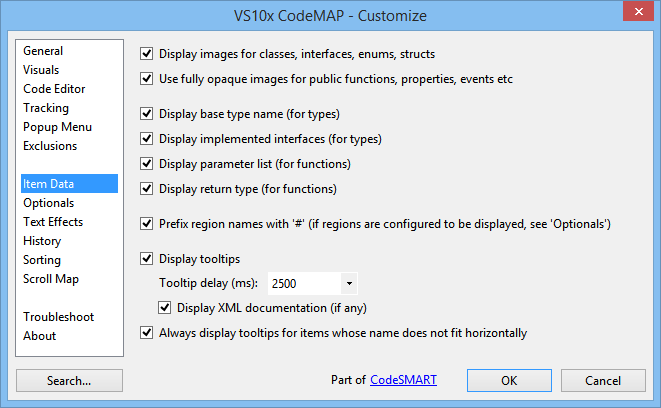
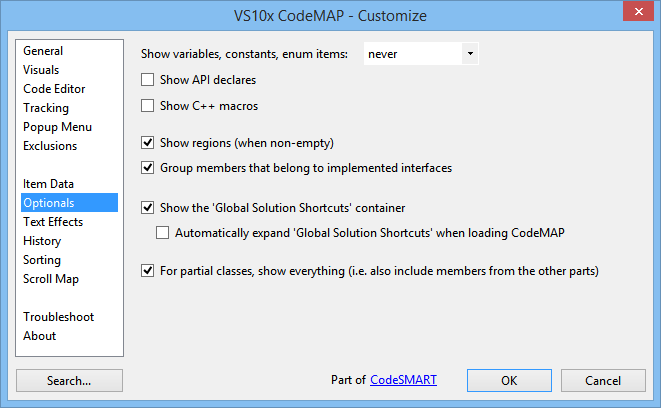
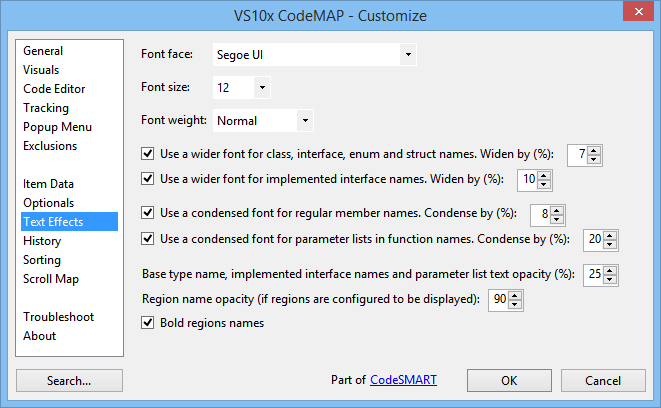
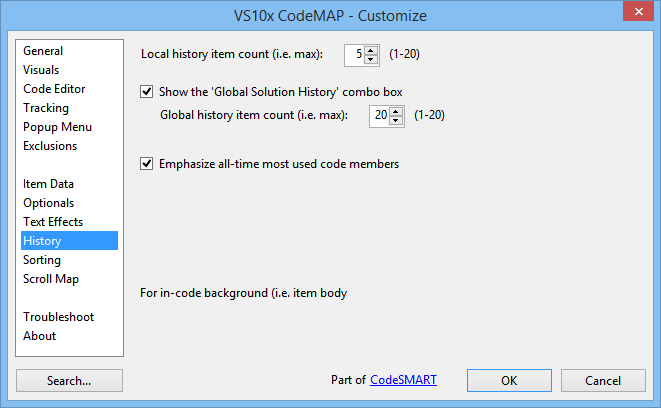
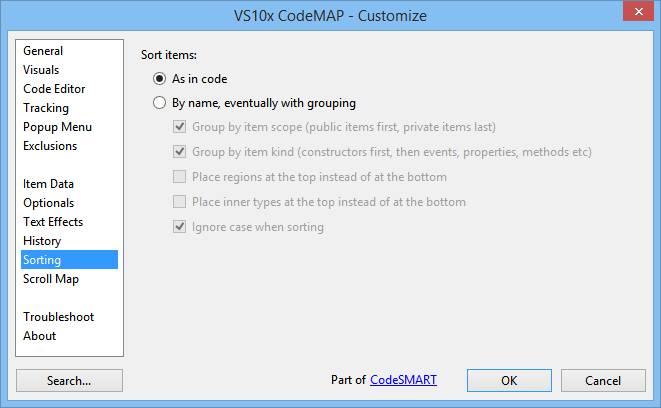
CodeMAP's appearance and behavior can be thoroughly customized by using the VS10x CodeMAP - Customize dialog box, which is accessible from the right-click popup menu over the CodeMAP area: 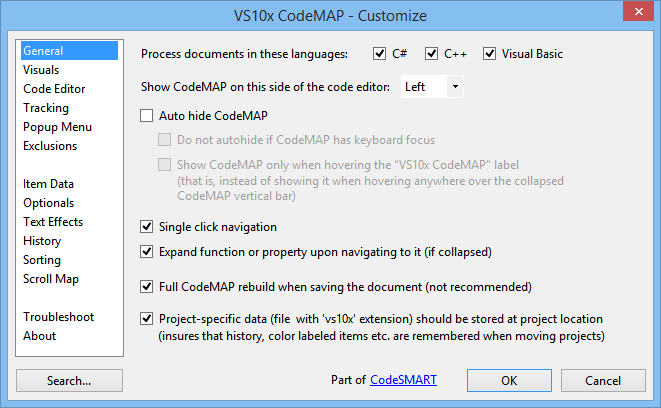
- 3.79 - Dec 07, 2015
- The Supercharger beta invitation box could not be closed on low-resolution systems.
- Decreased beta invitation box frequency to once a week.
- Beta invitation box not shown for C++ developers, as Supercharger does not support C++ unfortuantely.
- 3.75 - Feb 12, 2015
- Workaround for an extension exception that was reported by Roslyn-powered hosts (i.e. VS2015 Preview and VS2013 + Roslyn extension) when CodeMAP was enabled.
- 3.74 - Dec 08, 2014
- Added an option to control item click default behavior, i.e. go to last edit position or go to the definition line, with Alt+click calling the other corresponding action in each case. See the 'History' section in the 'Customize' dialog box.
- Fixed a problem related to dark theme detection.
- 3.73 - Nov 25, 2014
- New item-in-history visual emphasis
- Assigning history levels as a result of CodeMAP navigation or code edit was malfunctioning in terms of history item order
- 'Last Edit' per-member location history (i.e. moving the caret to a member's last edit point as a result of a CodeMAP item click) was not functioning properly
- Changed product name casing to CodeMAP in order to further differentiate from Microsoft's own 'Code Map' Visual Studio feature.
- Options dialog UI corrections
- 3.72 - Nov 21, 2014
- Attempting to install the extension for Visual Studio 2015 (i.e. VS 14) was failing. Fixed.
- 3.71 - Nov 03, 2014
- An unfortunate error was introduced in one of the previous updates, preventing the Options dialog from correctly loading user configuration.
- 3.70 - Oct 23, 2014
- Multiple 'VS10X' menu items were sometimes added to the main menu bar.
- Alt+Click (or double-click, as per user customization) *always* navigates to the member definition line.
- The 'Refresh' toolbar button is now always visible, replacing the 'Send Feedback' one. Feedback can still be sent by using the 'About' section in 'Customize'.
- Completely rewritten item move by drag-drop feature.
- Completely rewritten popup menu cut/remove/delete/select operations.
- 3.69 - Aug 27, 2014
- Disabling "For color labeled items, sync the editor background color with the color label" in options did not remove existing background color highlights in the code editor.
- The popup menu checkbox "Editor Sync" (i.e. the per-item color label sync setting) did not function properly, i.e. it got reset by changes to the global option and did not save its state correctly.
- The popup menu checkbox "Editor Sync" is now displayed only if there is an active color labeling for the current item.
- Some other minor fixes.
- 3.68 - Aug 20, 2014
- The navigation visual hint is now always displayed (i.e. not only when navigating to the last edit location).
- Find-tuned the mouse behavior on region etc containers - i.e. click on name navigates to definition, click anywhere else on the item switches the expanded state.
- 3.67 - Aug 14, 2014
- Added visual hint (with action to go to the definition point instead) when navigating to last edit location.
- 3.66 - Aug 05, 2014
- Incorrect return type information was displayed in most cases when the return type was using generics.
- 3.65 - Jul 31, 2014
- Fixed an issue in the services definitions package
- 3.64 - Jul 18, 2014
- Added an 'AutoHide' option in the CodeMAP popup menu for quick switch between docked and auto-hide mode
- Enum nodes now display the enum items as additional information
- Base class name is now displayed even if System.Object
- Some fixes
- 3.63 - Jul 09, 2014
- CodeMAP did not work properly with items in shared projects (i.e. in universal apps).
- 3.62 - Jul 02, 2014
- Since 'Update 2' (i.e. Visual Studio 2013 Update 2), querying code model objects at certain times caused lockups in C++ projects. Found and applied a workaround.
- Preliminary support for Visual Studio 14 (CTP).
- 3.61 - Jun 26, 2014
- Relocated some common VS10x extensions code to a common lib. Sync release with other VS10x extensions. Update highly recommended.
- 3.60 - Jun 18, 2014
- CodeMAP inherits its main color from the editor. Configurable, see "VS10x CodeMAP", the "Visuals" pane.
- Breadcrumb hover highlighting. Configurable, see "VS10x CodeMAP", the "Tracking" pane.
- Breadcrumb 'currently edited item' tracking highlighting (C# only).
- Text condensing effect is canceled for the currently selected code member, thus making it more visible if active tracking is set to 'on' (C# only).
- The CodeMAP scroll map now plays nicely on dark themes
- Countless minor visual tweaks.
- 3.59 - Jun 11, 2014
- CodeMAP items corresponding to functions and properties now display return type and type information respectively. 'On' by default, can be turned off (see the 'VS10x CodeMAP - Customize' dialog, 'Item Data' section). Supported documents: VB, C# and C++.
- Parameter information was not displayed for C++ documents. Fixed.
- 3.58 - Jun 04, 2014
- A bug was causing the filter textbox tooltip to grow by having a prefix added repeatedly
- Optimizations in command filtering
- CodeMAP now dynamically refreshes its UI in accordance to theme changes by the Color Theme Editor extension
- A duplicate separator was sometimes displayed in the CodeMAP popup menu
- Dark theme version for the shortcut glyph added to members implemented in other parts (i.e. for partial classes)
- 3.57 - May 28, 2014
- The main background color is now inherited from the editor background, with failsafe values specific for light and dark themes.
- The vertical split bar exhibited repaint problems after changing the VS theme from light to dark or vice-versa. Fixed.
- 3.56 - May 22, 2014
- Edit history was not being recorded properly.
- Default behavior on item click is now navigating to the member's last edit point instead of navigating to the definition line. When choosing 'Go To Definition' from the popup menu, the last edit point is reset and thus further item clicks will navigate to the item's definition line.
- 3.55 - May 14, 2014
- A little bit more spacing for better readability.
- More realistic backgrounds for color-labeled items.
- 3.54 - May 07, 2014
- Automatically expand members (methods, properties) on navigating to them (i.e. members that are collapsed in code). Configurable - see the "VS10x CodeMAP - Customize" dialog, "General" pane.
- Further refinements in "VS10x CodeMAP - Customize".
- 3.53 - Apr 30, 2014
- Simpler and clearer option naming for items in the 'Customize' dialog.
- 3.52 - Apr 16, 2014
- For C++ documents, code editor collapsed elements were inadvertently expanded in case of edits and other trivial operations
- 3.51 - Apr 10, 2014
- Minor tweaks
- Easter Special for registered users
- 3.50 - Apr 02, 2014
- CodeMAP graciously reacts now to project item (i.e. code file) rename operations
- Fixed a crash when renaming a code file in a C++ project when using VS2010
- Dragging the windows split button (in order to split the code window horizontally) in VS2010/C++ refused to work correctly
- 3.49 - Mar 26, 2014
- Pixel-perfect light and dark themes for the CodeMAP popup menu.
- 3.48 - Mar 19, 2014
- Further UI optimizations (for example, colors to more accurately blend with the standard VS themes) and small fixes.
- 3.47 - Mar 12, 2014
- 3.46 - Mar 06, 2014
- The "auto-hide" pin toolbar button did not work properly when a dark theme was used.
- Tooltips can be displayed always for items whose name does not fit into CodeMAP. See "Customize" / "Item Data".
- The new options controlling tooltips were not taken into account by the "Customize" dialog's "Search" feature.
- 3.45 - Feb 26, 2014
- When expanding a region for the first time, almost always all contained items were wrongly marked as "in current viewport" even if part of them were not.
- Sometimes when clicking on a container's "collapse" button, the container was collapsed just to be immediately expanded back.
- Fixed a crash when processing nested partial classes.
- C++ code files with nested classes were sometimes parsed incompletely.
- Processing optimization on the solution close event.
- 3.44 - Feb 19, 2014
- Some people complained about tooltips as being too obtrusive. Hence, the tooltip delay can now be customized, plus tooltips can be completely disabled if desired. See the "Item Data" section in the VS10x CodeMAP - Customize" dialog.
- 3.43 - Feb 12, 2014
- Aggressive optimizations throughout the entire code base.
- 3.42 - Feb 05, 2014
- Changed name from "VS10x Code Map" to "VS10x CodeMAP" (i.e. no space) to solve name collision with Microsoft's Code Map feature in VS2013 Ultimate (we were not looking for this...)
- Moved to a non-obtrusive "welcome to version ..." message
- Optimized the region-detection routines (codemapping code with regions should be faster now)
- 3.41 - Jan 30, 2014
- Modern selection colors are used now for Visual Studio 2012 and 2013
- The top mini toolbar was revised from a UI standpoint (both light and dark themes)
- Popup menus work better now on dark themes
- When in auto-hide mode under a VS dark theme, the "VS10x Code Map" text is now displayed using an appropriate foreground color
- 3.40 - Jan 24, 2014
- Changed commandbar popup icons with VS2013/VS2012-style images.
- 3.39 - Jan 08, 2014
- Happy New Year :-)
- CPU load was significantly reduced on automatic refresh operations. Highly recommended update!
- Fixed situations which lead to an empty Code Map when editing code.
- 3.38 - Dec 26, 2013
- Added an option to control automatic theme (i.e. light/dark etc) sync with the IDE. See the "Visuals" section in "VS10x Code Map - Customize".
- 3.37 - Dec 18, 2013
- CodeMAP color theme sync with the IDE, i.e. the CodeMAP theme changes accordingly when the IDE theme is changed to dark, light or blue (if applicable).
- Internal "color theme - icon theme" automatic sync.
- Fault tolerant calling system for the automatic refresh.
- 3.36 - Dec 11, 2013
- If auto-refresh is completely disabled (by using the corresponding option in Customize / Troubleshooting) then a "Refresh" button will be displayed to right side of the mini-toolbar at the top of the Code Map view.
- Increased container visual separation by using darker border colors for all themes (except the "dark" one of course).
- 3.35 - Dec 04, 2013
- When "...track the code element that has editor focus" is set to "on" (C# only) then the global history will be fed with the current code element no matter what was the operation that lead to activating that code element (in other words, the global history will not include only items navigated to from Code Map, but any item that's been made current).
- The "...track the code element that has editor focus" is not set to "on" by default.
- Active item bold highlighting was causing widening of item titles. Counteracted this with a negative scaling on the OX axis.
- 3.34 - Nov 27, 2013
- Option changes in the "VS10x Code Map - Customize" dialog are now reflected in other Code Map panes (cross-document and cross-session, i.e. VS session).
- Clicking on the top-right pin button in order to switch Code Map between docked and auto-hidden now applies to all documents.
- 3.33 - Nov 20, 2013
- Variables/constants/enum items, API declarations and C++ macros can now be controlled separately in terms of visibility.
- Code Map item color highlighting has been revised for a more modern look.
- 3.32 - Nov 14, 2013
- CodeMAP now also mounts API declare items (i.e. Declare/DLLImport)
- 3.31 - Nov 08, 2013
- Fixed both the light and dark VS2012/VS2013 icon sets (in terms of main contents definition against various background colors).
- 3.30 - Oct 30, 2013
- File name masks in the "Exclusions" tab in "Customize" were not working.
- 3.29 - Oct 22, 2013
- The code member having editor focus was inappropriately displayed by CodeMAP in terms of font weight, i.e it was using a "Black" font wight instead of "Bold".
- 3.28 - Oct 13, 2013
- Fix for a crash (i.e. System.AccessViolationException) upon refresh for certain component types.
- Items in "Global History Shortcuts" did not follow an eventual icon theme change.
- After changing an option in "VS10x Code Map - Customize", items in "Global History Shortcuts" were continuously removed and added back.
- The 'static' icon adornment was covering most of the item's image in the VS2010 icon theme.
- Also revised the VS2012 icon theme 'static' icon adornments for greater visibility coupled with less overlapping over the main image.
- 3.27 - Oct 04, 2013
- Sync release with CodeSMART 10.17
- When part of CodeSMART, now VS10x Code Map works appropriately with this one's licensing system.
- Region items now use a bold font (configurable)
- 3.26 - Sep 27, 2013
- Critical: Due to a bug introduced in version 3.25, Code Map was locked (i.e. put into unregistered mode, generally expired) on machines having a licensed copy of CodeSMART 10 installed.
- An eventual user-specified font face was not propagated to all Code Map UI elements.
- 3.25 - Sep 25, 2013
- The Global History combo-box was not using the (custom) font size specified in the 'VS10x Code Map - Customize' dialog. Fixed.
- Increased the opacity of de-emphasized containers in the Code Map.
- 3.24 - Sep 18, 2013
- Fixed several UI glitches, mostly on the dark theme.
- Refresh scanning optimization - Phase I
- 3.23 - Sep 04, 2013
- Code Map behavior on large documents can now be better adjusted i.e. (1) by disabling auto-refresh at a certain threshold, set to 15,000 lines by default and (2) by completely disabling Code Map parsing at a secondary threshold, set to 30,000 lines by default.
- If Code Map skipped a file because it was too large, the "Customize" popup menu as well as the "Help" and "Customize" hyperlinks did not work. Fixed.
- 3.22 - Aug 27, 2013
- The static adornment image was causing confusions due to its color and draft rendering
- When hovering a private item, its image incorrectly got additionally de-emphasized on mouse out
- Dark theme fixes (main background and foreground color, items color and gradients, hovered item highlight color, class title underline etc)
- If a type contained a method (regular, constructor etc) with the same signature in both static and instance variants, CodeMAP only mounted the first one that it encountered
- 3.21 - Aug 20, 2013
- Static items can now be distinguished in the Code Map based on their icon adornment
- The 'Filter By Item Kind' list view now has images to illustrate each item's... well, kind
- The 'Filter By Kind' dialog did not scale well on HiDPI systems
- 3.20 - Aug 13, 2013
- Sometimes when editing code, the Code Map contents was suddenly disappearing completely
- Added a 'filter by item kind' feature, see the button placed to the right of the 'Filter by' textbox (next to the 'Clear' button). This feature will likely be extended in the near future.
- The filter textbox hint text was not dimmed at Code Map initialization
- Changed the regular button hover visual effect and mouse cursor on the mini toolbar in order to distinguish from tabs
- 3.19 - Aug 06, 2013
- A small touch of beauty: animated fade-in/fade-out for active item tracking and mouse hovering. The 'inactive' opacity level is statically set for now at 50%.
- 3.18 - July 30, 2013
- Incredible, but items at root were never sorted by Code Map. By 'root' I don't mean a container root, i.e. a class etc, but the document root - for example, a document that contains more than one type, or a C++ document with class definition and multiple defines, etc. Fixed.
- Minor bug fixes..
- 3.17 - July 16, 2013
- Parsing C++ code stopped when encountering functions with return types defined in the same class, thus yielding an incomplete Code Map view.
- 3.16 - July 07, 2013
- Added VS 2013 support.
- Added "jump to option" functionality to the "Customize" dialog (that is, a search-for-option dialog where option names are filtered by some text, with a quick jump to the selected one, see screenshots).
- 3.15 - July 02, 2013
- Items placed at root level were incorrectly processed in terms of global history.
- C++ macro statements (for example, #define...) are now displayed by the Code Map if "Display variables, constants and enum items" is on in the "VS10x Code Map - Customize" dialog, the "Optionals" section.
- 3.14 - June 24, 2013
- Added an option to control case sensitivity when sorting by name (see the "Sorting" section in "VS10x Code Map - Customize").
- The "Sort By Name" popup menu entry now clearly states in the menu text that sorting is eventually done with grouping and if case is ignored or not.
- The "More sort options" popup menu entry did open the "VS10x Code Map - Customize" dialog with the wrong section selected.
- Code Map data was not persisted sometimes (unfortunately this is a regression bug introduced with the previous update).
- Option changes that still required a Code Map restart did not inform accordingly sometimes.
- 3.12 - June 17, 2013
- The Options dialog setting to disable expand/collapse synchronization (and thus have all items expanded by default at CodeMAP load) was not functioning. Fixed.
- 3.11 - June 09, 2013
- Entire sections from the Code Map were disappearing sometimes when editing code (i.e. when the current document was temporarily in a non-buildable state).
- The sorting algorithm was changed so that items are now sorted in a case-sensitive manner.
- 3.10 - May 31, 2013
- Added the ability to change the font size used by Code Map to render its UI (see the 'Text Effects' section of the 'VS10x Code Map - Customize' dialog).
- Small bug fixes and improvements.
- 3.09 - May 23, 2013
- 'Cut' and 'delete' popup menu operations as well as item 'move' by drag-and-drop could destroy code when the project was not buildable.
- Completely revised 'cut', 'copy', 'delete' and 'move' operations in terms of status reporting and messaging.
- 3.08 - May 13, 2013
- Moving a project to a different location caused for color labeled items, history items etc to be lost even if the project-specific data (.vs10x file) was stored at the project location. Before moving a project, please make sure you have opened that project at least once while having CodeMAP 3.08 or later installed and active, as a new key system will be put in place and data will be transferred upon first project-specific data access.
- 3.07 - May 03, 2013
- All-time most used items visual emphasis was ineffective when a dark theme was used. Fixed.
- Items in history are now displayed with a light foreground color when a dark theme is specified.
- Solved a visibility issue on light themes when the "black" history highlight was specified.
- 3.06 - Apr 26, 2013
- From this version Code Map starts collecting code members (i.e. functions, properties, etc) usage data with the goal of emphasizing all-time most used items as soon as usage levels exceed a certain threshold. This feature can be controlled from the 'History' pane in the 'VS10x Code Map - Customize' dialog. As this is a feature that will show its usefulness over time, please be patient with it!
- When clicking on items in the Code Map, local history contents kept trimming unnecessarily.
- Corrected a typo in the favorites miniview descriptive text.
- 3.05 - Apr 16, 2013
- Expanding/collapsing a region by clicking on the corresponding Code Map item (i.e. not on the plus/minus sign, but on its title) did not synchronize in the code window.
- Global solution history items corresponding to members in C++ code files used an incorrect separator character in their title.
- Global solution history items corresponding to types/members in C++ code files did not function at all.
- Tooltips for C++ code file types and members were incorrect.
- 3.04 - Apr 09, 2013
- Code edit window-triggered Code Map refreshes now have an almost zero interference with edits.
- Decreased initial scanning time by approx. 20% (through optimizations and deferring non-essential processing).
- Added "Remove All From User Defined MiniView" popup menu entry
- 3.03 - Apr 02, 2013
- Critical: Disabling all languages in the 'Customize' dialog lead to the awkward situation of not being able to access the dialog any more (and thus not being able to bring Code Map back). Fixed.
- Excluded t4-generated items in their corresponding partial class from being listed in the main class.
- When using a dark theme, item detail text (i.e. type bases, function parameters etc) were unreadable for highlighted items. Fixed.
- When using a dark theme, the filter text was rendered with a black foreground, thus making it nearly invisible. Fixed.
- 3.02 - Mar 27, 2013
- Ghost items in ascx and aspx files are no longer displayed by the Code Map.
- Code Map can now be enabled/disabled on a language basis (for supported languages, i.e. C#, C++ and VB).
- Color labels and history highlighting made items very difficult to read on the dark theme. Fixed.
- 3.01 - Mar 14, 2013
- Added an option to specify the method used to ask for Code Map to be brought into view while in autohide mode; that is hover over the "VS10x Code Map" text label only, or hover over the entire collapsed Code Map vertical bar.
- The mini toolbar at the top now draws a tab outline in order to further identify the currently selected view.
- 3.00 - Mar 05, 2013 - (Note: Licenses purchased for v2 are perfectly valid for v3)
- Full support for Visual C++ documents (MC/VC). Both .h and .cpp files are processed, while navigation is always done to the member implementation position.
- Members in partial classes that are automatically generated by VS are not mounted anymore in the Code Map.
- Added an option to completely enable/disable partial classes processing. Please note that disabling might not be necessary given the fix listed immediately above.
- 'Items in history' background choices were inappropriate for dark themes; added a special choice for that.
- Opening (i.e. navigating to) a CodeMAP item that was in a partial class which wasn't open had no result (that is, the item did not open).
- Unchecking "For local history items, apply a blue background color in the code editor" did not take effect immediately.
- 2.99 - Feb 26, 2013
- Code Map now fully supports partial classes. A "shortcut" image is overlayed on the item-kind image if the item is defined in another file.
- Fixed combobox, trackbar and numeric up-down vertical misalignments in the "VS10x Code Map - Customize" dialog when large fonts (high DPI) were configured to be used by the OS.
- The tooltip was not displaying the item's eventual static access modifier.
- Dismissing the twitter invitation in a code window automatically closes the invitation box in all windows.
- 2.98 - Feb 19, 2013
- Fixed a conflict between the new 'Items in history' highlight system and color labels (coupled with in-code background highlighting).
- Further optimizations to the newly-added 'Items in history' highlight system.
- 2.97 - Feb 12, 2013
- New: 'Items in history' highlight kind selection, with new visual emphasis style choices inspired from the color labels feature. Can be configured in the "VS10x Code Map - Customize" dialog box (see this blog post).
- 2.96 - Feb 06, 2013
- New: Track editor viewport i.e. emphasize all items that are currently visible in the code editor. See this blog post for details.
- Revised: When set to autohide, now only the "VS10x Code Map" text area is sensitive to mouse hovering (instead of the entire collapsed margin) for showing the Code Map.
- Fix: In the 'Customize' dialog, several child options' enabled states were decoupled from their parent option (in terms of UI controls).
- 2.95 - Jan 29, 2013
- In case of an initialization failure, debug information was repeatedly written to the Code Map window.
- Fixed an exception condition when checking if a member is part of an (eventual) implemented interface.
- 2.94 - Jan 17, 2013
- "Rename" refactoring can now be triggered directly from the Code Map popup menu (i.e. on the selected Code Map item).
- BugFix: when opening a C# document of a reasonable size with "active tracking" enabled, if the popup menu was quickly opened (i.e. before the active item was tracked in the Code Map) then any operation launched through that popup menu was executing on the newly tracked item instead of the Code Map selection.
- BugFix: Storing CodeMAP settings at project root location failed sometimes.
- 2.93 - Jan 10, 2013
- The Code Map popup menu is customizable now (see the 'Customize' dialog).
- Full redesign of the 'Customize' dialog box, both in terms of categories and organization.
- Code Map did not persist its data (color labels, history) anymore. Fixed.
- 2.92 - Jan 03, 2013
- Added an option to allow customization of the folder where Code Map stores its data file (i.e. the 'vs10x'-extension file). As a small note, this file holds project-specific data, i.e. history, color labeled items, etc. Some people might prefer to have this out of their way (it can be stored at an AppData-based folder under a GUID-based file name) while others might prefer to have it in the project root folder ( as a 'project_name_and_ext.vs10x' file) for backup and project copy/move purposes.
- Slight reorganization on the first two tabs of the "VS10x Code Map - Customize" dialog box, as a result of the above.
- 2.91 - Dec 19, 2012
- Load time optimizations in certain scenarios for C# documents.
- 2.90 - Dec 11, 2012
- Filtering the Code Map contents (i.e. by using the 'Enter text to filter by...' textbox at the top of Code Map) was not displaying class-type matches.
- Implemented generic interfaces were incorrectly represented by Code Map if the code document was a Visual Basic file.
- Event interface implementations were incorrectly represented in the Code Map if the code document was a Visual Basic file.
- In C# documents, filtering was incorrectly including all explicit interface member implementations for implemented interfaces whose names matched the filter.
- Generic interface type names/tooltips and implemented generic interface names/tooltips now display the more easily distinguishable short type names instead of CLR names.
- Implemented generic interfaces were not fully displayed (i.e. they did not include generic parameter information) in a class container's name and tooltip.
- 2.89 - Dec 05, 2012
- When using solution folders to organize projects, Global Solution Shortcuts were not persisted between VS sessions.
- It was not possible to delete two Global Solution Shortcuts consecutively.
- 2.88 - Nov 26, 2012
- If loaded in VS 2012, Code Map will display optimized UI elements (i.e. square corners, minimal or no gradients, blue selection). This is not a customizable.
- Some changes to UI elements when displayed in VS 2010, while maintaining the VS 2010 look-and-feel.
- 2.87 - Nov 19, 2012
- Critical: Code Map initialization could end up in a loop in certain conditions. Fixed.
- Fixed a versioning issue, especially important to users having the full CodeSMART suite or other VS10x extensions installed.
- Started to use the bottom row (which contained the version info label) for actions. Currently, fast access to the Customize dialog and to this web page are provided.
- 2.86 - Nov 06, 2012
- Added color labeling support for region items.
- Added a popup menu to the filter textbox with standard cut-copy-paste items plus an "Always Visible" checkable menu item.
- When the mouse pointer moves out of its area, the filter textbox stays visible a little longer (that is, when not instructed to be always visible).
- Some visual tweaks to the filter textbox.
- 2.85 - Oct 31, 2012
- Icons for member overrides (i.e. functions, properties with "override") have a distinctive glyph now.
- The constructor icon glyph was difficult to read when using the "VS 2012 Dark" icon theme. Fixed.
- Non-"code element" type items now have informative tooltips.
- Attempt to fix the not-initializing Code Map issue (i.e. an empty Code Map with only a "Not active (not scanned yet)" message being displayed).
- 2.84 - Oct 25, 2012
- Icons for container-type items (i.e. for classes, interfaces, enums, structs, delegates) now have access scope glyphs.
- Filtering the Code Map yielded no effects on the "Global Solution Shortcuts" contents. Fixed.
- A more detailed message for items that could not be scanned.
- 2.83 - Oct 15, 2012
- The Code Map now also displays delegates.
- In order to avoid confusions, type icons are displayed by default now for container items. This can be changed in the "Customize" dialog.
- The "What's new" balloon info appeared multiple times if both VS 2010 and VS 2012 were installed on the same system and they were using different versions of VS10x Code Map.
- 2.82 - Oct 08, 2012
- When manually refreshing from the Code Map popup menu, settings changed in other Code Map windows were not automatically taken into account. Fixed.
- Added an option to control whether the 'Global Solution Shortcuts' should be expanded by default or not (see the 'VS10x Code Map - Customize' dialog, the 'General Settings' section).
- 2.81 - Sep 27, 2012
- The "Filter by" textbox background color did not change according to the theme (i.e. it was white on the dark theme). Fixed.
- Tooltips for VB property-type code map items had no item kind detail text. Fixed.
- 2.80 - Sep 21, 2012
- Tooltips for C# and VB function-type code map items had no scope detail text if the underlying function was non-public. Fixed.
- Tooltips for C# and VB property-type code map items had no scope detail text if the underlying property was non-public. Fixed.
- Tooltips for VB property-type code map items had no type detail text. Fixed.
- 2.79 - Sep 10, 2012
- Further tuning of the "VS 2012 Light" and "VS 2012 Dark" icons themes.
- 2.78 - Aug 31, 2012
- Visual Studio 2012 icon themes (for both light and dark VS 2012 UI themes). Code Map defaults to the "VS 2010" icon theme for Visual Studio 2010 and to the "VS 2012 Light" icon theme for Visual Studio 2012, but these can be overriden "VS10x Code Map - Customize", the "View" category.
- If two implemented interfaces had members with the same name, Code Map would only mount one of the members. Fixed.
- Members belonging to generic interface implementations were not represented correctly in the Code Map. Fixed.
- Generic interface implementation containers were not represented correctly in the Code Map. Fixed.
- 2.77 - Aug 27, 2012
- Nasty problem: Fixed situations with perfectly normal C# and VB files that displayed the "VS10x Code Map is not available in this document" message, obviously with no Code Map available when that happened..
- 2.76 - Aug 21, 2012
- Improved the initial scanning time + subsequent refresh time for most documents.
- Fixed several problems with the VS 2012 integration.
- 2.75 - Aug 14, 2012
- Added the possibility to trigger a full Code Map rebuild on each document save operation (turned off by default, can be found on the first category page of the "VS10x Code Map - Customize" dialog. This is a temporary solution to the problem that region changes are not immediately visible in the Code Map.
- The VS10x Code Map visual theme is now persisted and restored per VS version, that is Visual Studio 2012 and Visual Studio 2010 can now be configured with different VS10x Code Map visual themes.
- 2.74 - Aug 08, 2012
- Hovering a nested class container caused for both itself and its parent(s) to be dimmed.
- The Code Map UI was loosing focus immediately after a refresh operation explicitly asked for by using the Code Map popup menu.
- 2.73 - July 30, 2012
- Emphasized expanded type names with a gradient underline, color-sensitive on type container mouse hover. Extremely useful with nested types.
- Fixed problems with the blue theme.
- Reverted by default to the lowest color intensity.
- More uniform formatting for region container names and implemented interface container names.
- When collapsing a container, the operation was reversed (i.e. the container was expanded back) in some situations when the Code Map scroll bars disappeared as a result of the collapsing operation.
- 2.72 - July 19, 2012
- Renaming a project or a project item sometimes still resulted in orphaned global solution shortcuts. The same applies to project item removal operations.
- A problem prevented regions to be correctly mounted in the Code Map (rare situations, when name casing mismatches appeared).
- Global solution shortcuts were not always persisted.
- Navigating to global solution shortcuts sometimes failed with an "invalid workbench item" message.
- Adding named bookmarks to the global solution shortcuts folder did not function.
- 2.71 - July 10, 2012
- Changes in locally defined interfaces were not correctly represented by CodeMAP in types that implemented those interfaces.
- Auto-scroll to selected item is now performed with a 50 pixel tolerance (standard is 0, which means the item is often brought into view at lower or upper view limits).
- 2.70 - July 02, 2012
- Renaming a project or a project item that contained global solution shortcuts resulted in global solution shortcuts data being corrupted.
- "Add To Global Solution Shortcuts" popup menu entry was incorrectly visible for global solution shortcut items.
- 2.69 - June 22, 2012
- Unfortunately a nasty bug was introduced with the previous (i.e. 2.68) update: After a manual refresh or after changing some options, the currently active class was always displayed as semi-transparent (i.e. the entire Code Map was displayed as semi-transparent). Fixed - and a big thank you to all those who reported it. Please update!
- 2.68 - June 18, 2012
- New 'current context' emphasizing visuals, i.e. the type container that currently has the cursor in the code editor is represented with full opacity, with all the other type containers displayed semi-transparent. Mouse hover also shows the container at full opacity. The feature can be configured in the "VS10x Code Map - Customize" dialog, the lower area of the "Syncing" tab. Also, the currently selected member (if any) is now emphasized with bold font (non-scaled on the horizontal axis) for better visibility. Feedback is welcome (please direct it to supportATaxtoolsDOTcom). Supported for C# documents only.
- 2.67 - June 11, 2012
- It was impossible to remove invalid global solution shortcuts. Fixed.
- Trying to navigate to an invalid global solution shortcut gave absolutely no feedback. Fixed.
- Implemented interface container titles were drawn by using a bigger font size that the one used for other Code Map items. Fixed.
- The green UI theme had inadvertencies in terms of border color intensities. Fixed.
- 2.66 - May 31, 2012
- All color themes have been revised (both in terms of gradient 3D look and color values) for a more refined look.
- An error was reported sometimes when dropping multiple items at the top of their container (in a sorting by drag-and-drop operation).
- 2.65 - May 24, 2012
- Color labeled implemented interface members were not displayed in the Color Labeled Items Mini View. The same was true for the User Defined Mini View and the Local History Mini View. Fixed.
- When removing the last color labeled item, the Color Labeled Mini View was shown as a blank area (i.e. with no information message). The same was true immediately after clearing the local history and after removing the last item from the User Defined Mini View. Fixed.
- The new-style information box at the top of the Code Map was obstructing access to the mini view selector area until it was made invisible by the animation block. Now it hides as soon as the mouse enters its area so that the mini view selector can be accessed immediately.
- Some options changes which did not require a restart were still not visible immediately after pressing OK in the VS10x Code Map - Customize" dialog box. Fixed.
- 2.64 - May 15, 2012
- Added multiple selection processing to the drag-and-drop code sorting feature.
- Further refinements to the multiple selection system.
- Visual enhancements for the area used to display non-intrusive messages at the top of the Code Map window.
- Increased verbosity after certain actions by giving non-intrusive messages in the above mentioned area.
- 2.63 - May 08, 2012
- Code Map multiselection implemented (by using Ctrl+click for now). Currently, operations that can be applied to a multiple member selection are: cut/copy (all member bodies are placed in the clipboard), delete, apply/remove color label, add to mini view, add to global solution shortcuts.
- Choosing "Clear Color Labels In Document" did remove color labeling in the Code Map but did not remove colored backgrounds in the VS code editor. Fixed.
- 2.62 - May 02, 2012
- The autohide/docked display modes can now be controlled by using a "pin" button at the right side of the top mini toolbar (before that the only way to change display mode was to open the "Customize" dialog box). Very useful when horizontal screen space is scarce.
- The "Collapse all regions" button on the top mini toolbar now functions in a "switch" mode, i.e. after collapsing all regions it turns itself into an "expand all regions" button and vice-versa.
- With an user preference (VS-specific) of hiding the editor vertical scrollbar, even if the VS10x Code Map “Represent local history items on the scroll map” and “Represent labeled items on the scroll map” options were set to off, VS10x Code Map was forcing the horizontal split tool button to be displayed together with a blank vertical bar. Fixed.
- 2.61 - Apr 26, 2012
- Fixed some issues in the Global Solution History subsystem.
- Second-phase optimizations in the Code Map contents refresh code.
- 2.60 - Apr 18, 2012
- The 'Customize' dialog now has a last-accessed section persistence system built-in (a smart one, i.e. it only restores the last accessed section fore reasonably recent usage).
- 2.59 - Apr 11, 2012
- Syncing Code Map zoom in/out with the code editor zoom in/out is now configurable (by default set to off); see the"View" category in the "VS10x Code Map - Customize" dialog.
- Global solution shortcuts were not persisted in certain situations.
- 2.58 - Apr 05, 2012
- The emphasized active item foreground color is now customizable (separate colors can be specified for dark and light themes, please see the "Syncing" tab in "VS10x Coed Map - Customize").
- Added a "collapse all regions" button at the far right on the top selector bar (opposite to the "feedback" envelope button).
- Improved top selector bar user experience on non-switch type buttons click.
- 2.57 - Mar 29, 2012 (quick fix)
- Unfortunately, we have introduced a bug with the previous (2.56) update, i.e. the item foreground color was incorrectly set when using the dark theme. We apologize for this.
- 2.56 - Mar 26, 2012
- Emphasizing the current code editor item in the Code Map (C# only) is now done by using a foreground highlight. Also, emphasizing was extended to parents, plus it also works for cases when the current item is a class/interface/struct/enum (i.e. not a property/method).
- Added a "Clear Color Labels In Document" menu option in order to help visually declutter documents that were previously highlighted with color labels.
- Removed several unnecessary complete refreshes on CodeMAP popup menu operations.
- 2.55 - Mar 19, 2012
- Upon user request, added an option to fully disconnect the Code Map items expanded state from the code editor (i.e. will start fully expanded, and will not sync their expanded state with the code editor and vice-versa). The option is available in the new "Sync" options category.
- 2.54 - Mar 12, 2012
- The Global History combo did not change its color on-the-fly according to the Code Map theme (i.e. immediately after changing the Code Map theme)
- The Code Map splitter color was not adjusted on-the-fly when switching from a non-dark theme to a dark one and vice-versa.
- When the Code Map theme is grayscale, the Global History is rendered with a grayscale theme as well.
- On VS11, Code Map defaults now to the grayscale theme.
- In-code highlight areas were not repainted correctly when the code window was scrolled so that the beginning of the marked area was outside of the current viewport (regression bug unfortunately).
- 2.53 - Mar 07, 2012
- Private code members with the same names and signatures as implemented interface members were incorrectly included in the respective interface containers.
- The Global History combo box appeared at an incorrect position on VS11 Beta.
- Other fixes for VS11 Beta.
- 2.52 - Feb 28, 2012
- Interface implementation containers are collapsible now.
- Due to a WPF collection control design issue, KeyUp/KeyDown keyboard navigation did not work correctly in the Code Map. Workaround found and applied. As a side note, if you love keyboard navigation then do not forget to disable "single click navigation" so that you can more easily set focus to the Code Map (i.e. single click to focus, double click to navigate).
- 2.51 - Feb 21, 2012
- Labeled items, history items etc were not persisted when the Code Map view was filtered.
- Nested regions found at different code levels were not mounted correctly (i.e. the region at the lowest level was multiplicated in the Code Map hierarchy).
- Some contexts displayed incorrect popup menu entries.
- 2.50 - Feb 14, 2012
- Linked colored labels to method block highlighting (i.e. the code element body in the code editor is given the same background color as the label). Can be configured to be on or off by default through an option in the "VS10x Code Map - Customize" dialog, and can be re-set on a per-item basis from the item popup menu.
- When navigating to a method/property (i.e. click in VS10x Code Map on the corresponding item) the "item in history" highlighting was not applied to its body in the code editor. Fixed.
- Navigating to a code element (either from the Code Map or from the Scroll Map) was always forcing for the code element's start line to be re-centered vertically in the code editor (i.e. even if it was already visible). Fixed.
- 2.49 - Feb 07, 2012
- Persistence for labeling, history, etc did not work for method overloads.
- Navigation highlighting (brief colored background fading) was changed to apply only to the definition line instead of the whole element body.
- 2.48 - Feb 02, 2012
- Preliminary support for VS11 (VS 2012?).
- 2.47 - Jan 19, 2012
- Region containers now expand on header click (instead of navigating at region start point). Normally I should have put this under an option, but I realized there is minimal reason for navigating to a region's definition (plus, if really wanted, "Go To Definition" in the popup menu *will* do that).
- Tooltips on properties now display which accessors are implemented.
- Region contents listed in region tooltips now include a friendly kind name for each item, making the info actually useful.
- Code Map items for events and variables were not displaying tooltips. Solved.
- The "Do not autohide as long as CodeMAP has keyboard focus" checkbox was not enabled/disabled as a result of its parent checkbox being checked/unchecked. Fixed.
- 2.46 - Jan 11, 2012
- When collapsing regions in code, the Code Map was correctly synchronizing the corresponding items' expanded state; however, a refresh in the Code Map reverted these items back to an "expanded" state (thus out of sync with the situation in the code editor).
- More informative, rich formatted tooltips.
- The tooltips stay open for a longer period of time.
- Remove the stray "Options" menu item on the "Global History" popup.
- Cancel a drag'n drop operation by pressing Esc was missing; it's fully implemented now.
- Various UI tweaks.
- 2.45 - Jan 02, 2012
- Fixed UI elements scaling issues (when custom DPI settings were used) in the "Customize" dialog.
- 2.44 - Dec 22, 2011
- Due to a .NET Framework problem, a "System.Windows.Documents.Hyperlink is not a Visual or Visual3D" was reported if trying to use a VS10x mmain menu entry *immediately* after Clicking on the "Close" or "Visit" hyperlinks belonging to the "What's new" baloon notification (i.e. with a hyperlink being the last focused item). Workaround found and applied.
- In the quest for informative but less obtrusive tooltips, part 1.
- 2.43 - Dec 13, 2011
- The Named Bookmarks container was (incorrectly) always visible
- Added container highlighting for regions
- On hover container slight background highlighting
- Refresh in mini views caused for mini view contents to be emptied
- Filtering (by using the filter textbox) did not work in mini views
- Icons were displayed incorrectly (i.e. scaled down) in the mini view selector
- Item navigation (i.e. go to definition on click/doublec-click, etc) from mini views did not function correctly
- Scrolling mini views with the mouse wheel did not function correctly
- The popup menu in mini views was incorrectly initialized
- Added a 'whats new' information box with a link to the Changelog on VS10x Code Map's Visual Studio Gallery page
- Feedback email implementation (image to the left of the mini view selector)
- 2.42 - Dec 02, 2011
- Fixed some flaws in the region expanded state synchronization system (Code Map towards the code editor).
- 2.41 - Nov 26, 2011
- Extended the mini view concept with two more filtered views, i.e. "items in local history" and "color labeled items".
- Refined the visuals of the mini view switcher.
- All views are loaded on-demand.
- Fixed the flickering "licensed to" text issue.
- 2.40 - Nov 22, 2011
- Added the 'Mini View' concept, i.e. a secondary view where a custom Code Map subset can be built; this can be extremely useful for large code files. Switching between views can be accomplished by using the bubble-style selector at the top of the Code Map area. The Mini View and bubble selector can be disabled by using the Customize dialog.
- 2.39 - Nov 16, 2011
- The Code Map updates now even if the code file is not compilable.
- Some optimizations.
- 2.38 - Nov 08, 2011
- Items in nested regions (i.e. region level greater or equal to 2) were not restored in terms of color labeling, history and expanded state.
- Named bookmarks container item expanded state is now remembered between sessions.
- When adding the first named bookmark, the named bookmarks container is expanded.
- Fixed UI problems on systems with a color depth of less than 32 bits per pixel (usually visible in RDC sessions).
- 2.37 - Nov 01, 2011
- Color labeling extended to class items (class names) as well.
- Representing history items on the scroll map was not functioning properly.
- Labeled and recently used class-type items are not highlighted in code anymore, as this would overwrite scroll map markings for their children.
- Items labeled in gray color were not restored properly when the document was reloaded.
- When changing a method's parameter, in most of the cases the Code Map did not refresh its contents accordingly.
Have suggestions ore require assistance? Please write us at support@axtools.com - we *will* get back to you! Also, it would be our pleasure to have you as a guest at www.axtools.com where you will be able to find other developer tools we have created. Thank you!
| |


