VSBuildStatusAddin display the status of a build/clean/deploy operation.
Installation
The archives has two folders, '2005' and '2008 & 2010', the first containing the necessary files for Visual Studio 2005, and the later the files for Visual Studio 2008 and Visual Studio 2010. Extract the content of the appropriate folder from the archive to your Visual Studio 2005, 2008 or 2010 add-ins folder. You can configure that from Tools > Options > Environment > Add-in/Macros Security. You can also extract it to any folder and then add that folder to the Add-in File Paths list.
Startup
The add-in is configured to start when the Visual Studio starts. However, the first you start Visual Studio, after you installed the add-in, you have to go to the Tools menu and use the VSBuildStatusAddin command to show the tool window. For future runs, Visual Studio remembers the position, docking style and visibility. If the add-in window was opened the last time you closed Visual Studio, the next time it starts is automatically shown at the last position.
Usage
On the add-in window toolbar there are four check buttons that are used to select what projects can be shown in the list (depending on their build status) and the number of projects in that state:
- Done: show projects there were successfully built/cleaned/deployed; displays the number of successfully done projects;
- Failed: show projects that failed to build/clean/deploy; displays the number of failed projects;
- Skipped: show projects that were skipped for the build/clean/deploy operation; displays the number of skipped projects;
- Pending: show projects that were not yet built/cleaned/deployed or are currently building/cleaning/deploying; displays the number of projects not yet done
When a build/clean/deploy operation is executing, a progress control shows the progress status, in percentage of completed project out of the total number of projects.
A fifth button, Cancel, is available during the execution of an operation and can be used to cancel the operation.
Button Settings is used to display a properties page where you can set some options.
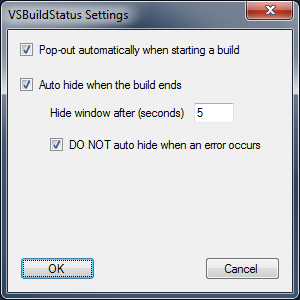
- To enable the automatic show of the add-in window when a build/clean/deploy operation starts, checkPop-out automatically when starting a build
- To enable the automatic hiding of the add-in window when the build/clean/deploy operation ends, checkAuto hide when the build ends
- you can set a delay interval for the hiding, varing from 0 to 300 seconds; if the delay is 0, the window is hidden immediatelly after the build ends
- to keep the window shown when error(s) occurred during the build/clean/deploy operation, checkDO NOT auto hide when an error occurs
The projects list shows the name, configuration, target platform, status and completion time for a project. Projects are grouped under solution folders, if any.
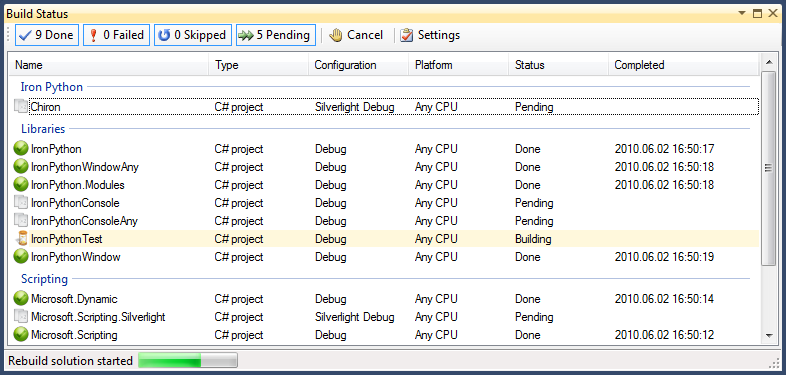
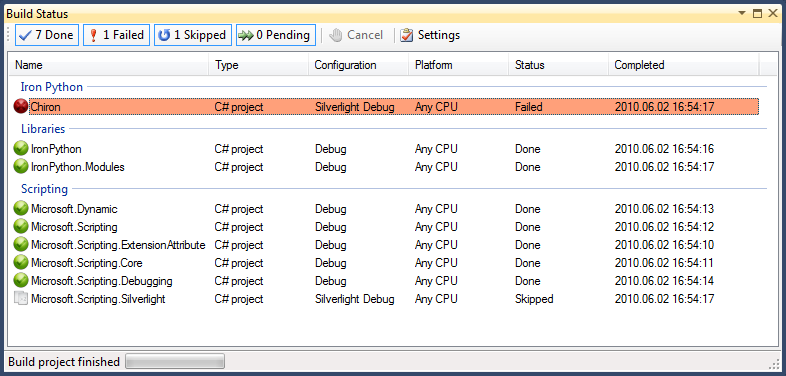
The image above shows a solution called IronPython with a project, Chiron, directly under root. It has two solution folders, Libraries and Scripting, having five and four projects. The second image shows the result of a build operation with one failed project and nine successfully built.
Starting version 1.2, when running on Windows 7, the addin displays the progress of the build/clean/deploy operation on the taskbar item corresponding to the Visual Studio instance. The images bellow show no progress, some progress, and an error during the build.




History
- 1.0.1, December 3, 2008
- fixed bug with grouping projects with relative paths
- 1.0.2, December 11, 2008
- fixed bug with projects displayed though not built
- fixed bug displaying no status when selecting a solution folder for build
- 1.0.3, December 12, 2008
- support for Visual Studio 2005
- 1.0.4, December 19, 2008
- display a different icon for a project while building and use a background color to highlight it
- status for the projects that were building when the build was canceled is set to Cancel instead of Skip
- cleared the list and the counters on the filtering buttons when a solution is closed
- fixed bugs related to displaying the status at the projects at the end
- 1.0.5, May 7, 2009
- project dependencies are now correctly resolved for a selection build; all projects that need to be built are shown in the list when the build starts, instead of the list being populated on the fly, when each dependent project is built
- status for project configurations built with a batch build is correctly shown (instead of Canceled)
- corrected visibility toggle for project configurations from a batch build
- 1.1.0, May 20, 2009
- displays the build/clean/deploy progress on a status bar
- shows information about latest available version with link to download page
- works on Visual Studio 2010
- 1.2.0, December 8, 2009
- on Windows 7 shows the progress of the build/clean/deploy operation
- 1.3.0, June 2, 2010
- introduced add-in settings with options for auto show when build starts and auto hide when build ends

