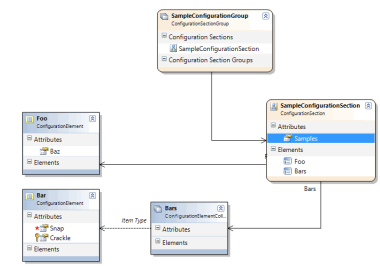
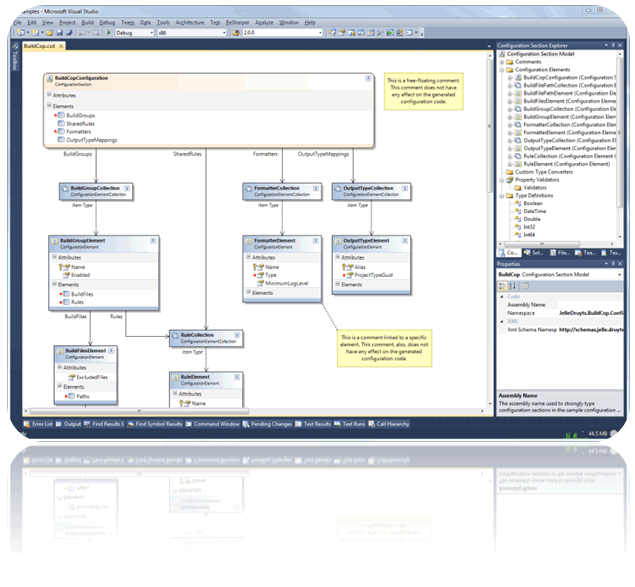
A Visual Studio add-in that allows you to graphically design .NET Configuration Sections and automatically generates all the required code and a schema definition (XSD) for them.
This is such a brilliant timesaver!!! Configuration sections with all the trimmings are such a PITA - I don't do them often enough to remember all the ins and outs, and usually end up with rubbish appSettings entries. This makes it a joy to create full-featured sections with intellisense that will ensure others use your config properly. And you know that appSettings is just evil, right? :) This one is on my 'A' list.
18.07.2011 16:48:00 - Searching for applicable products...
18.07.2011 16:48:00 - Found installed product - Microsoft Visual Studio 2010 Ultimate
18.07.2011 16:48:00 - The extension with ID '9f16956e-2232-4f80-9ebb-4165929ef3ef' is not installed to Microsoft Visual Studio 2010 Ultimate.
18.07.2011 16:48:07 - The following target products have been selected...
18.07.2011 16:48:07 - Microsoft Visual Studio 2010 Ultimate
18.07.2011 16:48:07 -
18.07.2011 16:48:07 - Beginning to install extension to Microsoft Visual Studio 2010 Ultimate...
18.07.2011 16:48:07 - Install Error : System.IO.PathTooLongException: C:\Documents and Settings\i.skomorokh\Local Settings\Application Data\Microsoft\VisualStudio\10.0\Extensions\The Community\ConfigurationSectionDesigner\2.0.0.0\ItemTemplates\VisualBasic\General\1033\ConfigurationSectionDesigner.zip: VisualBasic.vstemplate
at Microsoft.VisualStudio.ExtensionManager.ExtensionManagerService.BeginInstall(IInstallableExtension installableExtension, Boolean perMachine, AsyncOperation asyncOp)
at Microsoft.VisualStudio.ExtensionManager.ExtensionManagerService.InstallWorker(IInstallableExtension extension, Boolean perMachine, AsyncOperation asyncOp)
That is very strange... It appears that the extension, when installed on Windows XP, exceeds the path char limit. I will look into this. It looks like we may have to shorten the name of the extension to prevent this in Windows XP. - andym1978, CSD contributor
I just did some more research on this issue. It turns out that a lot of VSIX extension developers run into this issue on Windows XP. The problem occurs because Windows XP requires an astonishing 75 ADDITIONAL characters to create the same path as Windows Vista/7 (Due to 'documents and settings' etc...). The main solution I have seen is quite a Kludge, so I'm going to opt to create an installer to wrap around this package to handle this issue. I will try to have this ready this week. For those who want to try the kludge, I learned about it at the following URL:
http://www.telerik.com/community/forums/wpf/vs-extensions/error-installing-wpf-vsextensions-2011-1-422-0.aspx
I uploaded a new VSIX package that fixes this "path too long" issue for most Windows XP users. The fix involved shortening the template ZIP file name. If you have successfully installed the 2.0.0 R2 release, there is no need to install this update. For those with unusually long user account names, this fix may not be enough. Please let me know if you encounter this issue and I will prioritize my permanent fix, which will use an installer wrapper.
UPDATE: I have removed the R3 release for now. By shortening the file name, Generation of the config sample file fails due to a file not found error. I will work on a better fix...