Code Sorter
 Introduction
CodeSorter is highly customizable extension that allows its users to sort C# code itby various conditions such as names, types (method, class, struct, ...), visibility modifiers (private, public, ...), constness modifiers (const, static, readonly) and virtuality modifiers (virtual, override, new, ...).
It is possible to assign multiple search criteria to have the same priority, for example place protected and private members first, and then publics and internals.
Names are compared in a way that leading "m_" and "_" is stripped. This allows fields and properties (eg. _foo and Foo) to be right next to each other.
One-lined declarations are placed without delimiting blank line, while multi-lined declarations are separated by a blank line. The exception is that one-lined field followed by a multi-lined property without comment of the same name will be placed without the delimiting blank line.
Instructions
'Tools -> Sort Code' sorts the actual document.
'Tools -> Sort All Files in Project' sorts all opened documents.
'Tools -> Code Sorter Options' opens configuration dialog.
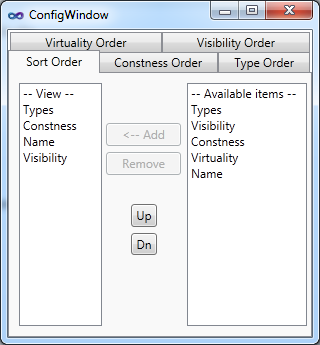
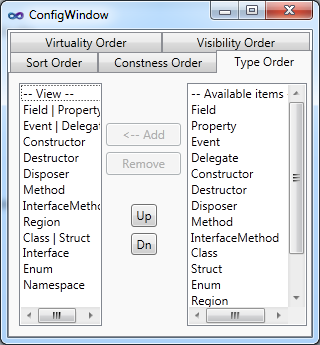
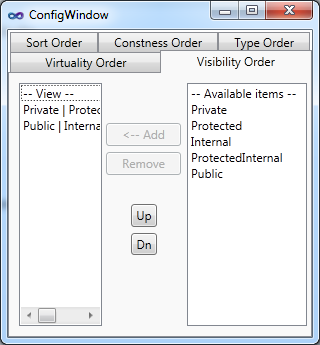
The right listview contains all available values, the left one contains the currently set order. Select item in the right view and press 'Add'. You can also move orders by selecting which item to move in the right panel and a line to move in the the left panel. Selecting items in the the right panel allows to place more than one value on a line in the left panel.
Commands can be invoked from menu or by setting hotkey to commands Tools.SortCode and Tools.SortAllFilesinProject.
To exclude a class from the sorting process, write comment just before the class containing: "[CodeSorter: exclude]". Structs with attribute [StructLayout(LayoutKind.Sequential)] are also removed from the sorting process.
Known limitations
- Sorting document removes all bookmarks and breakpoints on that document. (I currently don't know solution for this - or if a solution exists - so be sure, that u don't run the sort command if you don't want to lose bookmarks and breakpoints)
- All directives except #region and #if are excluded from the sorting process. If you use such directives, they may appear in wrong positions.
- Regions that are not correctly nested, e.g. #region directive is in class but #endregion directive is in method, may cause problems.
- Only C# is supported.
If an exception is thrown (message box appears), press Undo button (Ctrl+Z). CodeSorter uses "UndoContext" and all operations are reversible.
Claims stating "your extension crashed my Visual Studio" are absolutely wrong as VS Packages can't crash Visual Studio. Unhandled exceptions in extensions are caught by Visual Studio and shown in message box, they never cause a crash.
Please rate and post comments.
Updates
1.1
- Bug fixes
- Elements with attributes are now sorted correctly.
- Comments are now handled a little bit better.
- Regions should not cause so much trouble (but still not flawless).
- Other bug fixes.
- New features
- If a class (or struct) is marked with attribute [StructLayout(LayoutKind.Sequential)] or its comment contains "[CodeSorter: exclude]", then it's child elements are not sorted.
- Added support for "extern" modifier to the constness order.
1.2
- Bug fixes
- Regions
- Fix in the last build caused regions to not sort at all.
- Regions' contents should now be sorted correctly.
- Regions in nested elements (region in class in class for example) were being sorted multiple times.
- Elements with attributes
- Now correctly parsing all element's modifiers.
- The [CodeSorter: exclude] comment tag is now working as expected.
- Other bug fixes.
- It still sometimes show messagebox with uncaught exception. If you find such bug, please send me email with instructions how to reproduce that behavior (and possibly code that caused it).
- New features
- New "Misc" tab in options, allows to set some settings that were previously hardcoded.
- The [CodeSorter: exclude] comment tag can be applied also to regions.
- Changes
- Completely rewritten class that generates text back from sorted elements, this allows to customize the sorting process a little bit more.
1.3
- Bug fixes
- Bug showing message box with error message that appeared when user attempted to sort code without code window active has been fixed. This also fixes a bug causing to incorrectly indent members.
- New features
- 2 new checkboxes in the configuration window.
- Changes
- Method definitions in interfaces and abstract methods are now not separated by empty lines.
1.4
- Bug fixes
- Limitation which restricted stream comments was removed. This fixed bug that caused source file corruption when user attempted to sort file containing comment in form described in known limitations.
- Removed bug causing to delete all comments from classes not containing any DOM elements.
- Sometimes a message box stating that undo context was not closed properly popped up. This bug was removed.
- Fixed bug caused comments to not be indented.
- New features
- Added support for Visual Studio 2012 and 2013
- Added support for the new async keyword
1.5
- Bug fixes
- Fixed error that sometimes prevented code to be sorted (mostly when elements contained attributes)
- Fixed bug that caused "Constness Order" sorting to be ignored
- Changes
 Product Screenshots