Follow us on Facebook!
Looking for a version for Visual Studio 2015? Productivity Power Tools 2015.
Productivity Power Tools 2012
April 2013
This update fixes a bug that can cause the Editor to go blank after reloading a solution.
February 2013
This update includes a couple of bug fixes including a crashing bug in the Custom Document Tab Well on debug.
November 2012
Productivity Power Tools 2012 for Visual Studio 2012 is an extension pack that brings powerful tools for improved developer productivity.
New additions for Visual Studio 2012:
Quick Tasks
Power Commands
Color Printing
In addition to:
Enhanced Scrollbar
Middle-Click Scrolling
Organize Imports for Visual Basic
Custom Document Well
Tools Options Support
Auto Brace Completion
HTML Copy
Fix Mixed Tabs
Ctrl + Click Go To Definition
Align Assignments
Move Line Up/Down Commands
Column Guides
Colorized Parameter Help
Quick Tasks
The Quick Launch Tasks extension provides easy access to commonly used options (EG: toggling line numbers) as well as popular functionality to VS (EG: collapsing/expanding regions). To activate Quick Tasks, access Quick Launch and write@tasks followed by one of the following options:
Option | Description |
CollapseRegions | Collapses all #region tags in the current document |
ExpandRegion | Expands all #region tags in the current document |
TxtFont- | Decreases the text editor’s font size by 2 (min 6) |
TxtFont0 | Resets the text editor’s font size to the default 10 |
TxtFont+ | Increases the text editor’s font size by 2 (max 60) |
TxtFontReset | Resets all text editor font settings to their default values (based on current theme) |
EnvFont- | Decreases the environment’s font size by 2 (min 5) |
EnvFont0 | Resets the environment’s font size to the default 9 |
EnvFont+ | Increases the environment’s font size by 2 (max 59) |
EnvFontReset | Resets all environment font settings to their default values (based on current theme) |
InsTabsOff | Inserts spaces instead of a tab whenever a tab is inserted (all languages) |
InsTabsOn | Keeps the tab that is inserted instead of inserting spaces (all languages) |
LineNumOff | Turns off line numbers in the text editor (all languages) |
LineNumOn | Turns on line numbers in the text editor (all languages) |
PresentOff | Turns off presenter mode and returns the environment and text editor fonts to their pre-presentation values |
PresentOn | Turns on presenter mode which increases environment and text editor font sizes, and sets them to certain font families, so that VS is easier to see and read on a projector |
ResetToBasic | Resets VS to Visual Basic development settings |
ResetToC++ | Resets VS to Visual C++ development settings |
ResetToC# | Resets VS to Visual C# development settings |
ResetToF# | Resets VS to Visual F# development settings |
ResetToGeneral | Resets VS to General development settings |
ResetToJavaScript | Resets VS to JavaScript for Windows 8 Apps development settings |
ResetToLightSwitch | Resets VS to LightSwitch development settings |
ResetToSQL | Resets VS to SQL Server development settings |
ResetToWeb | Resets VS to Web development settings |
ResetToWebCode | Resets VS to Web (Code Only) development settings |
SwitchCode | Switches between designer/code behind or header/source files, opening the file if Necessary |
TabSize- | Decreases the tab and indent size by 2 (all languages) |
TabSize0 | Resets the tab and indent size to the default 4 (all languages) |
TabSize+ | Increases the tab and indent size by 2 (all languages) |
WordWrapOff | Turns off the text editor’s word wrap (all languages) |
WordWrapOn | Turns on the text editor’s word wrap (all languages) |
NOTE: The ResetTo… tasks are added based on the languages installed with Visual Studio
Power Commands
Power Commands is a set of useful extensions for the Visual Studio 2012 adding additional functionality to various areas of the IDE.
Individual power commands can be enabled or disabled from the Power Commands page in Tools -> Options in Visual Studio. It can be found under the Productivity Power Tools category. Most Power Commands are enabled by default. Below is a list of the commands included in Power Commands for Visual Studio 2012.
Format document on save
Enables formatting of tabs, spaces and other characters in a document to be saved. It is equivalent to using Format Document command under the Edit->Advanced menu. Disabled by default.
Remove and Sort Usings on save
Removes unused using statements and sorts the remaining using statements in the C# document being saved. Disabled by default.
Clear All Panes
Adds a button on the toolbar of the Output window that enables the user to clear all output panes at once.
Copy Path
Enables the file path of solutions, projects, folders and projects items to be copied from Solution Explorer via right-click menu.
Email CodeSnippet
Creates an email with the currently selected text. Available via right-click menu in the source code editor.
Insert Guid Attribute
Adds a Guid attribute to the selected class via right-click menu when the current selection is in class scope.
Show All Files
Shows the hidden files in all projects displayed in Solution Explorer when the solution node is selected. It enhances the Show All Files button, which would otherwise show the hidden files in the selected project node.
Undo Close
Reopens a closed document, returning the cursor to its last position. Recently closed documents can be reopened through the Edit menu and clicking Undo Close or by using the CtrlShiftZ shortcut.
Reopening any other recently closed document by opening the Undo Close window through View->Other Windows->Undo Close Window. Double-clicking any document in the list will reopen it.
Collapse Projects
Collapses a project or projects in the Solution Explorer starting from the root selected node. This option resides in three different places on the Solution Explorer: Solution, Solution folders and Project nodes respectively.
Copy/Paste Class
Copies/Pastes a selected class entire content to/from the clipboard. When pasting a class, it is renamed to avoid a compilation error. It can be executed from a single project item or a project item with dependent sub items.
Copy/Paste References
Copies/Pastes one or more references to/from the clipboard. It can be executed from the references node, a single reference node or set of reference nodes.
Copy As Project Reference
Copies a project as a project reference to the clipboard. It can be executed from a project node.
Edit Project File
Opens the MSBuild project file for a selected project inside Visual Studio. It combines the existing Unload Project and Edit Project commands.
Open Containing Folder
Opens a Windows Explorer window pointing to the physical path of a selected item. It can be executed from a project item node.
Open Command Prompt
Opens a Visual Studio command prompt pointing to the physical path of a selected item. It can be executed from four different places: solution, project, folder and project item nodes respectively.
Unload Projects
Unloads all projects in a solution. This can be useful in MSBuild scenarios when multiple projects are being edited. This command can be executed from the solution node.
Reload Projects
Reloads all unloaded projects in a solution. It can be executed from the solution node.
Remove and Sort Usings
Removes and sort using statements for all classes given a project. It is useful, for example, in removing or organizing the using statements generated by a wizard. This command can be executed from a solution node or a single project node.
Extract Constant
Creates a constant definition statement for a selected text. Extracting a constant effectively names a literal value, which can improve readability. This command can be executed from the code editor by right-clicking selected text.
Clear Recent File List
Clears the Visual Studio recent file list. The Clear Recent File List command brings up a Clear File dialog which allows any or all recent files to be selected.
Clear Recent Project List
Clears the Visual Studio recent project list. The Clear Recent Project List command brings up a Clear File dialog which allows any or all recent projects to be selected.
Transform Templates
Executes a custom tool with associated text templates items. It can be executed from a DSL project node or a DSL folder node.
Close All
Closes all documents. It can be executed from a document tab.
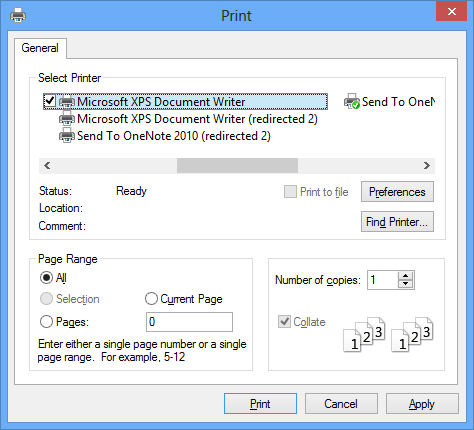
Color Printing
Adds support for printing code in color.
Known Issues
- There is no option to hide collapsed regions. Collapsed regions are always printed as though they were expanded.
- There is no explicit option in the print dialog to print line numbers. Line numbers will be printed if and only if the line number margin is turned on via Tools->Options.
- The margins for the printed page (top/bottom/left/right margins) are not customizable.
- Printing in high contrast black modes may require users to manually update the background color for Plain Text in Tools->Options->Environment->Fonts and Colors->Printer. This is because the VS color settings for printers will use the black background color from the high contrast theme.
Enhanced Scroll Bar
To improve the experience of navigating source code files, our solution displays a source map to allow developers to more easily see and navigate to the artifacts in source files including edits, breakpoints, bookmarks, errors, and warnings. This feature includes several modes:
- “Scroll bar only mode” (default) overlays icons onto the standard scrollbar to allow viewing of artifacts.
- “Source map mode”, changes the scroll bar to enable developers to navigate to artifacts via mouse-click in addition to providing a preview of the document when hovering the mouse.
- “Detailed source map mode” allows developers to zoom out to see an entire file.
Users are cycle through the modes by right-clicking on the scroll bar or visiting Tools Options>Productivity Power Tools>Enhanced Scroll Bar where other options can be configured as well.
Middle-Click Scrolling
Enables you can press down on your scroll wheel and the move the mouse to quickly scroll through your document!
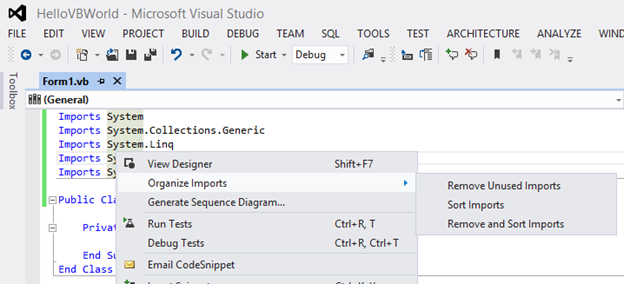
Organize Imports for Visual Basic
Enables Visual Basic developers to sort Import statements logically as well as remove the ones unused ones.
Custom Document Well
This extension allows users to change the behavior of their document tabs. Users can customize the behavior and look of the tabs via the Tools > Options dialog.
- Scrollable tabs
Maintain spatial consistency of the documents that are included in the document well. - Vertical tabs
Document tabs are shown vertically, allowing you to fit more tabs than are normally visible when shown horizontally. - Show close button in tab well
Show the close document button in the document well that will close the active tab, similar to Visual Studio 2008. - Tab Behavior
- More Commands for Navigation
Using Ctrl+Alt+Page Down and Page Up to navigate between tabs (including pinned) in visual order.
Activate a specific pinned tab by Ctrl+Num Pad 1 through 0
Activate a specific regular tab by Ctrl+Alt+Num Pad 1 through 0
- Sorting
- Sort tabs by project
Tabs will be sorted by the project they belong to, thus keeping them always together in the document tab well. - Sort tabs alphabetically
Tabs will be sorted alphabetically. When Sort By Project is turned on, tabs will be sorted first by project and then alphabetically.- Tab UI
- Color tabs according to their project or according to regular expressions
This option permits tabs to be colored according to the project they belong to. This is particularly useful when sorting tabs by project, as it allows you to immediately identify different groups of project documents.
You can also configure regular expressions and assign a color to each one. If the name of a tab matches the configured regular expression, it will be colored with the assigned color.
- Miscellaneous options that modify tab UI
- Show close button in tab
- Modify dirty indicator style
This option allows you to select from a set of different dirty indicators that you might prefer over the asterisk. - Modify minimum and maximum tab size
Allows you to modify minimum and maximum tab size. Try setting minimum and maximum sizes to the same value, and you will have evenly spaced tabs.
Tools Options Support
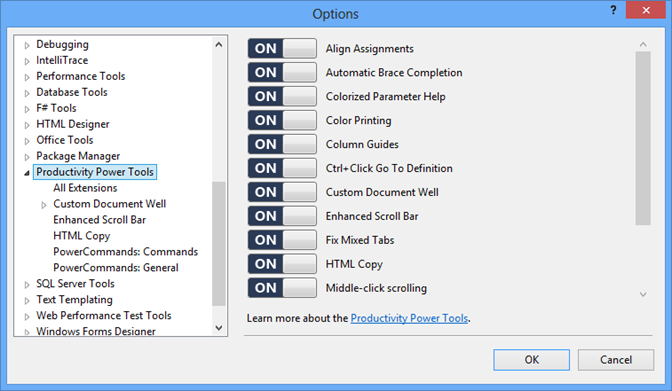
As much as we try, some experiences in the Productivity Power Tools are not for everyone. If you want to shut off an extension, go to Tools | Options | Productivity Power Tools and find the extension on the right (remember to scroll!). By toggling the slider to Off and restarting Visual Studio, that extension will no longer be loaded and you will revert to the default Visual Studio behavior.
Auto Brace Completion
Automatically inserts the closing code construct when an opening construct is typed for VB & C#. Features include:
- Support for the following constructs: (), {}, [], <>, “”, and ‘’.
- Use <TAB> to navigate past the next enclosing brace.
- Enables using SHIFT + ENTER for automatic completion of a statement in C#. inserting the closing semi-colon and moving the cursor to the next line .
HTML Copy (More Info)
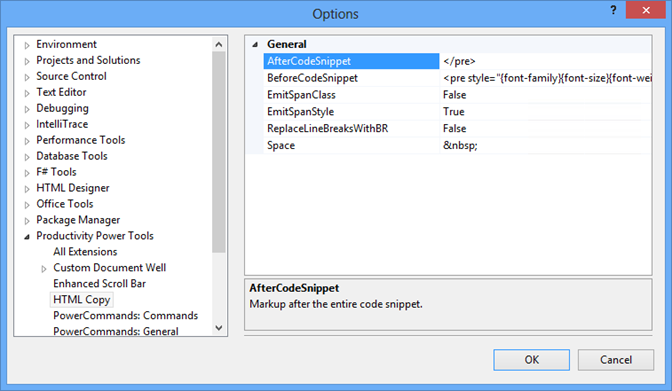
Provides support for the HTML Clipboard format when cutting for copying code from the editor. This means there is no need to fix up the formatting of code when pasting it into a TFS work item form or another HTML based control. It is possible to modify the html format which gets copied to the clipboard. Users can customize the behavior in Tools > Options > Productivity Power Tools > HTML Copy.
Fix Mixed Tabs
Warns users when a file opened or saved that contains a mixture of tabs & spaces. Adds an information bar to provide an easy way to fix the file if desired.
Ctrl + Click Go To Definition
Enables clickable hyperlinks to symbols in source code in your code by holding down the Ctrl key when hovering with the mouse.
Align Assignments
Aligns assignment statements by typing Ctrl+Alt+]. For example, typing Ctrl-Alt-] when the following is selected:
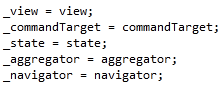
Transforms it into this:
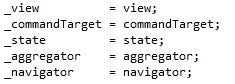
Note! This may conflict with your formatting settings. E.g. in C# you will need to disable: Tools->Options->Text Editor->C#->Formatting->Spacing->"Ignore spaces in declaration statements"
Move Line Up/Down Commands
Maps the Alt+Up Arrow & Alt+Down Arrow keys such that they will move the current line of code or the selected lines up and down through the editor.
Column Guides
Draws a vertical line in the code editor to remind developers that their full line of code or comments may not fit one a single screen. Simply place the cursor at the appropriate column and select Add Guideline from the context menu
Colorized Parameter Help
Adds syntax highlighting to the contents of the Parameter Help window for C#& VB. Syntax highlighting colors can be customized using the display items prefixed with “Signature Help” in the “Fonts and Colors” menu.
Thank you


