About Visual Studio 2010 to 2015 Compatability Unfortunately, due to the way the new VSIX file is structured, I had to abandon the backwards compatability with Visual Studio 2010 to 2015. The old version, which has exactly the same features and works in VS 2010-2015, is available here. Download Version 0.12 (to use with Visual Studio 2010 to 2015)
A Note For Visual Studio 2015 and 2017 Users Good news! Microsoft has actually added this ability natively for XAML - no extension required. Unfortunately, their implementation is a little more restrictive than my implementation. To get regions in XAML without an extension, make your regions look like the following: XAML Edit|Remove xaml <!--#region My Region --> XAML Goes Here <!--#endregion--> <!--#region My Region --> XAML Goes Here <!--#endregion--> Pay special attention to the lack of space between the #region and #endregion and the "<!--". Also, it appears Microsoft's implementation is restricted to only XAML, and does not work for XML.
Updated in 0.17
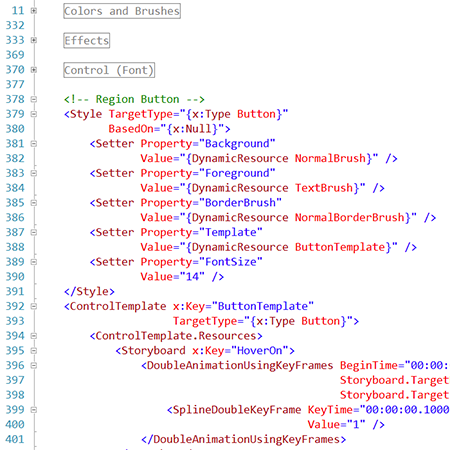
A small extension that adds the ability to define collapsable regions in XAML & XML code. It recognizes region definitions that are defined inside of XML comments so that code designed using this extension will have no problems compiling in environments that do not have this extension. Using XAML Regions There's nothing particularly complex about using this extension. I wanted to make it so that people without this extension didn't have trouble working with code from people who did have the extension. I chose to make it so that XAML regions were defined in XML comments. One would start a XAML region by having a few lines that consist of XAML Edit|Remove xaml <!-- Region (Any Text You Want) --> Your Code <!-- EndRegion --> <!-- Region (Any Text You Want) --> Your Code <!-- EndRegion --> Spacing, prefix hash characters, and description text are all generally optional. All of the following uses are supported: XAML Edit|Remove xaml <!-- Region Hello World --> Your code <!-- End Region --> <!-- RegionHello World --> Your code <!-- EndRegion --> <!-- #Region Hello World --> Your code <!-- #End Region --> <!-- #Region Hello World --> Your code <!-- #EndRegion --> <!-- Region Hello World --> Your code <!-- End Region Hello World --> <!-- Region: Hello World --> Your code <!-- EndRegion: Hello World --> <!-- Region Hello World --> Your code <!-- End Region --> <!-- RegionHello World --> Your code <!-- EndRegion --> <!-- #Region Hello World --> Your code <!-- #End Region --> <!-- #Region Hello World --> Your code <!-- #EndRegion --> <!-- Region Hello World --> Your code <!-- End Region Hello World --> <!-- Region: Hello World --> Your code <!-- EndRegion: Hello World --> That's all there is to it!
|