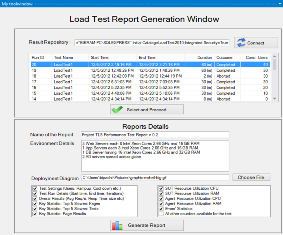
Source Code at http://magicreports.codeplex.com/
Report generator for Load Test in docx format. It can create all graphs for counters and present as a docx report.
The path in the second page says this: C:\Users\bipadhi\Pictures\graphic-mshell-big.gif which refers to a path on your own system. Hence I can't use that. Is it any jpeg that will work?
Secondly, everytime I run it, it gets 2/3 of the way through the retrieving results and it encounters a problem and needs to close Visual Studio. Thus I've never had a report complete.
Thanks!
Ken
Hi Ken,
I am looking into completely avoiding the pic.
And yes, any jpg shud do.
for the crash issue, what version of VS and what Os u r on, i will try to reproduce.
thx
Bikram
Hi Ken,
I have given a patched msi. Tested it on similar configuration as yours.
Hope it should work well.
I have also fixed the gif issue.
Thanks
Bikram
Thank you that worked! Can you tell me exactly what you changed? I am interested in chasing another issues with Visual STudio that has the same kind of problem, but its not your program doing it.
I will be taking a more detailed look at this in the near future and may have some suggestions for improvements. Any chance you might put this out on CodePlex?
Thanks!
Ken
New bug I think. I loaded this on a system I have SQL Server 2012 instead of 2010. The load test report window connects but doesn't list any runs.
Also somewhere please put the version number in the extension itself UI. That way we can tell which one we are running :-).
Thanks!
Ken
Hi Kabaker551111,
I tried with SQLExpress 2012. Gave following conn string. It worked.
Data Source="vm1\SQLEXPRESS";Initial Catalog=LoadTest2010;Integrated Security=True
If u could send some repro steps it will be great.
Thanks
Bikram
Actually that instance (in a VM) was 2008 R2. New instance on a physical controller, brings up the needing to close comment again even though it displays the list. Needing to close is when selecting to do report. What directory was missing before? I can look and see if it is there or not.
The 2012 installation is working locally. Will not connect to a remote machine though.
This is version 1.1.2.
Thanks!
Ken
Hi Kabaker551111,
It tries to refer a diretory c:\Templates
It creates the structure while installation. You might want to check it in a system where it worked.
Thanks
Bikram
Hi There,
Checked that. Is exists I gave it full read and write permissions for everyone in case that was it. That particular system won't show the entry in the tools menu anymore. Even with the add-ins directory added to the options. Don't know why. That is a VS2010 Install. IN both 2010 and 2012 on my laptop it works fine. GO figure.
Now that I have it generating reports from my laptop (connected to the SQL server 2012 instance that has the load test db, here's what I see in the resulting report:
1. The name entered on the report details tab doesn't show up anywhere in the report.
2. None of the SUT/Agent/Error information shows up in the report.
3. Nothing from all other counters shows up in the report.
4. Pages do not partition correctly. The TOC starts in the middle of the page for example.
5. The diagram you pick form the selection box does not show up in the report.
Otherwise it appears to be doing the other things it should do.
Thanks!
Ken
I have published the code at https://magicreports.codeplex.com/
Please use it. Mean while I am trying to reproduce the issues reported by you.
Thanks
Bikram
Hi Bikram,
I have several feature enhancement requests that I'd hope get your help:
1. For "All other counters available for the test", can we add a feature to store those selected counters as a template (a file maybe?) so that I don't have to re-select those counters for every single test?
2. Is it possible to include the average value of the key performance counters such as %Processor time, Available Memory in MB, Disk Transfer/sec, %Disk Idle time, Total Network Bytes/sec, and others for SUT machines?
Thanks,
Xafox
Hi Bikram,
1. Checking the 'All other counters available for the test' doesn't display any graphs in the word document.
Is there any additional configuration to be done to view the graphs.
Thanks,
Nagesh
Hi,
There are lot of improvement areas.
Please use and let me know your feedback or enhancement request.
I will be happy to provide an update.
Thanks
Bikram
At my current engagement we have automated something very similar to this. We noticed the Tests Running metric(concurrency) is in fact setup incorrectly in the repository. It takes the last value recorded in the test, instead of the average. This can give the concurrency value really messed up results. I don't know if you have accounted for this already but it is something to look out for. In our implementation we calculate this value instead from the timestamps and average it out correctly.
Dear rttstester,
I am not printing neither getting this value from DB. Could you plz let me know if any out of the box feature in VS shows this value, and the mapping to which column.
I can take it up with VS product team to fix. Alternatively you can raise a bug in VS TFS. I don't remember the link. Will post sometimes later.
Thanks
Bikram
It calculates it fine in the report in the program, like say if you want to add it to a chart. The only time you ever see it is in the test running category columns of all the repository tables. If you check the cumulative value of those lines they are incorrect.