Configuration Transform

Free

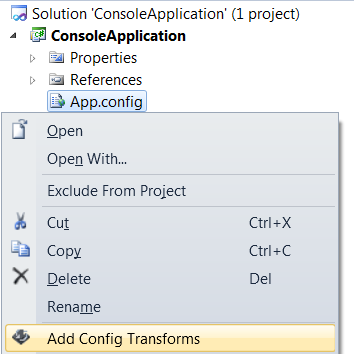
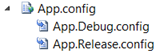
Automatically transform app.config during build process. Once the transformation is set, it will run on other build machines without the extension.

(7) Review
Visual Studio
2012, 2010
Download (2,830)
5/3/2013
1.2
View
E-mail Twitter del.icio.us Digg Facebook
Add To Favorites
Description
Reviews (7)
Q and A (4)
Sign in to Write a Review
Sort By:

by korolei1 | June 12 2013

Works like a charm!
Thanks Golan!

by 0v3rCl0ck | May 10 2013

works as expected, for me is a must tool!

by John Calvert | April 05 2013

Useful and lightweight tool that has no impact on other devs in the same team. Highly recommend it. Very small glitch that requires a minor hand edit to fix a path.

Golan Avraham May 03 2013
| Edit |
Delete

glitch was fixed in version 1.2
thanks

by Alfontz | January 08 2013

Very nice. A must have! Thanks.

by Cy Moehl | November 27 2012

Clean and simple. Big benefit for us is that no 3rd party software is required once projects are updated.

by KenC0000 | July 16 2012

Works great! Thank you for building this.

by Tepper Amir | May 28 2012

Great extension! works as expected, practical and saves a lot of time!

Sign in to Start a Discussion


  • v$(VisualStudioVersion) instead of v10.0/v11.0
    5 Posts | Last Post May 17, 2013
    • Because VS2012 & VS2010 now can open the same solutions/projects, could it be better to change the UsingTask from this:
      
      <UsingTask TaskName="TransformXml" AssemblyFile="$(MSBuildExtensionsPath32)\Microsoft\VisualStudio\v10.0\Web\Microsoft.Web.Publishing.Tasks.dll" />
      
      <UsingTask TaskName="TransformXml" AssemblyFile="$(MSBuildExtensionsPath32)\Microsoft\VisualStudio\v11.0\Web\Microsoft.Web.Publishing.Tasks.dll" />
      
      to this:
      
      <UsingTask TaskName="TransformXml" AssemblyFile="$(MSBuildExtensionsPath32)\Microsoft\VisualStudio\v$(VisualStudioVersion)\Web\Microsoft.Web.Publishing.Tasks.dll" />
      
      idea took from this thread: http://msdn.microsoft.com/en-us/library/jj860450(v=vs.103).aspx
      
      Thanks.
    • thats exactly what i did in version 1.2
      thanks for the tip
    • using v$(VisualStudioVersion) doesn't work when you're building outside of Visual Studio (i.e., msbuild from the command line) you end up with "v" instead of "v10.0" or "v11.0"
    • thanks for the tip against the msbuild, I will take in mind and actually in the build server maybe I need to push the library "Microsoft.Web.Publishing.Tasks.dll" as a custom dll, I don't know if on the team foundation service for example, there's that dll installed in that folder, i will check...
    • In our case the file is there, but I guess we need to specifically pass the VisualStudioVersion property to msbuild as "11.0" so this works properly
  • VS2012 Support
    5 Posts | Last Post May 03, 2013
    • Do you plan to add VS2012 support to this? I'd love to use it with 2012.
    • Hope to do so soon
    • VS2012 is now supported in version 1.1
    • I have a small issue with the VS 2012 support. When I invoked "Add Config Transforms" the proj file was updated with a build task that references $(MSBuildExtensionsPath32)\Microsoft\VisualStudio\v10.0\Web\Microsoft.Web.Publishing.Tasks.dll
      which is not a valid path, it should be "v11.0". Once I edited that by hand everything worked great. Thanks
    • thanks John, path issue solved in version 1.2
  • Command Project.UnloadProject not available!!!
    3 Posts | Last Post February 08, 2013
    • I haven't been able to use your extension yet.
      
      I get several initial errors with the message "Command Project.UnloadProject not available" that after change to info messages saying that "No changes were made".
      
      Can you advise?
    • Update: uninstall / reinstall / new problem
      
      I uninstalled the downloaded extension, restarted VS2010, went to extension manager and intalled it from there, restarted VS2010 again.
      Now the problem id "Object reference not set to an instance of an object"!
    • are you tring to do this using the Solution Navigator?
      if so try using the Solution Explorer.
  • Web.config
    3 Posts | Last Post November 24, 2012
    • Hi,
      
      When I tried to do the Add Config Transforms to a web project's Web.config it created the following XML in the project file, so I had to edit it manually. ItemGrop not being valid. Otherwise, wonderful extension!
      
      <ItemGrop>
          <None Include="Web.Debug.config">
            <DependentUpon>Web.config</DependentUpon>
          </None>
          <None Include="Web.Release.config">
            <DependentUpon>Web.config</DependentUpon>
          </None>
        </ItemGrop>
        <UsingTask TaskName="TransformXml" AssemblyFile="$(MSBuildExtensionsPath32)\Microsoft\VisualStudio\v10.0\Web\Microsoft.Web.Publishing.Tasks.dll" />
        <Target Name="AfterCompile" Condition="Exists('Web.$(Configuration).config')">
          <!--Generate transformed app config in the intermediate directory-->
          <TransformXml Source="Web.config" Destination="$(IntermediateOutputPath)$(TargetFileName).config" Transform="Web.$(Configuration).config" />
          <!--Force build process to use the transformed configuration file from now on.-->
          <ItemGroup>
            <AppConfigWithTargetPath Remove="Web.config" />
            <AppConfigWithTargetPath Include="$(IntermediateOutputPath)$(TargetFileName).config">
              <TargetPath>$(TargetFileName).config</TargetPath>
            </AppConfigWithTargetPath>
          </ItemGroup>
        </Target>
    • I had the same problem with the misspelled elements. It adds the elements <ItemGrop> (missing the 'u'). This has to be manually changed to <ItemGroup>. Other than that, works perfectly. Now TFS Build transforms the app.config properly. Before, the transform was only working with local builds in Visual Studio.
    • misspelled <ItemGroup> element was fixed in v1.1