Luminous Controls

Free

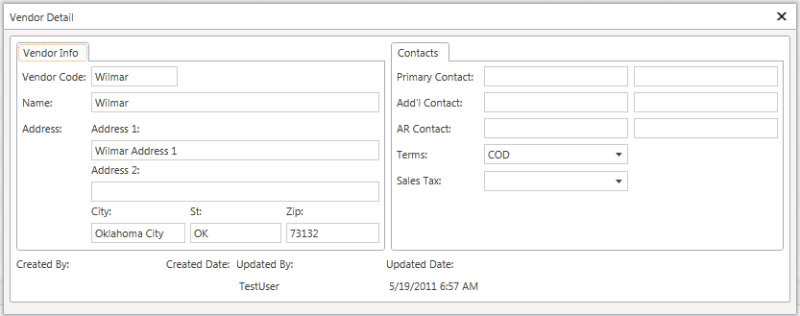
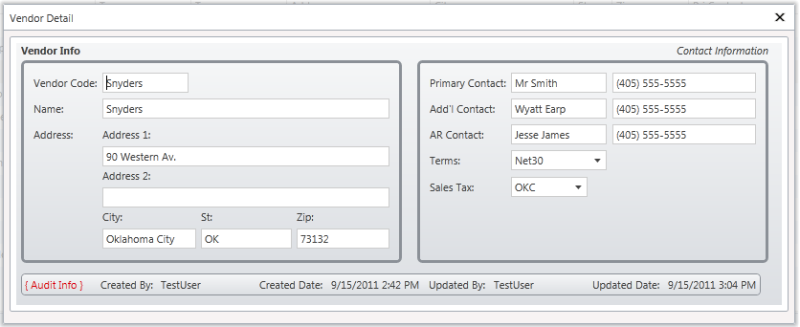
A small collection of LightSwitch custom controls, currently comprising a TextBlock control, & a GroupLayout control.

(21) Review
Visual Studio
2012, 2010
Download (7,127)
6/28/2012
1.0.24
E-mail Twitter del.icio.us Digg Facebook
Add To Favorites
Description
Reviews (21)
Q and A (9)
Sign in to Write a Review
Sort By:

by T2Mac | April 18 2013

Some really useful controls.

Yann Duran April 19 2013
| Edit |
Delete

Thank you!

by RKage | March 13 2013

by Dave A Gordon | October 29 2012

by Nehemiah Willis | April 26 2012

only used grouplayout so far, very valuable!

by Jan Van der Haegen | January 25 2012

by VidyaVigna | January 19 2012

Just simply brilliant and useful!

But Small change required... Title must be with in the border like ordinary group box.

Thanks for these controls.

Yes. Ordinary group box doing the Same thing. But it is not Beautiful like your control.

by David Corbett | January 18 2012

Hi Yann,

I've been using your GroupLayout Control in all shapes and sizes and it makes my screens look good!

If I can suggest maybe allowing more of a background gradient for larger boxes?

Thank you for your work.

YannDuran January 18 2012
| Edit |
Delete

Hi David,

Thanks for the feedback, I really appreciate it. The next release (soonish) will have more choices for the background. Please don't hestitate to suggest any other improvements as well.

Also, if you feel like you've benefitted significantly, you could make a donation if you like - http://lightswitchcentral.com.au/Donations.aspx.

by wstrasse | December 18 2011

Hi Yann,
thanks for these controls! The GroupLayout is one of my favorite custom controls within LightSwitch!

Cheers,
Wolfgang

YannDuran December 18 2011
| Edit |
Delete

I'm so glad to hear that. Thanks!

by ITPSB | October 18 2011

Hi Yann. Excellent! I hope your book is coming out on Amazon Kindle. Are you able to confirm this please.
Many thanks, Mark.

YannDuran October 18 2011
| Edit |
Delete

Hi Mark, thanks for asking the question! I want to know that myself, lol. I've just sent an email to the publisher, & I'll let you know what comes back as soon as I hear. Have you seen the recently updated "Luminous LightSwitch Types"? I've added a "Password"
type, & a "Link" type. You may find them helpful.

The answer I got was "Yes, absolutely, as well as on the Nook, in the Apple Store for iPhone and iPad, and in ePub, MOBI, and just about every other e-format you can think of".

by Babloo1436 | October 17 2011

by DarkSideOfN | October 07 2011

Wow,amazing.. Im looking for this inside LS, this will be very useful. Im getting more excited in learning more about LS. Goodluck and more power.

YannDuran October 07 2011
| Edit |
Delete

Thank you! I'm glad you find the controls useful. Good luck with your learning.

by Kivito | September 28 2011

very very useful, especially group layout control, complete different feel of application and information presentation..

YannDuran September 28 2011
| Edit |
Delete

Thanks, that's what I was aiming for, so I'm really pleased to hear that I got it right!

by Kostas Christodoulou | September 21 2011

No comments. Great job...

YannDuran September 21 2011
| Edit |
Delete

Thank you!

by tsiakk | September 21 2011

+1

by DanielGilbert | September 19 2011

by Dave Vorgang | September 17 2011

Excellent work Yann!

Thank you so much for providing these controls to us mere mortals.

YannDuran September 18 2011
| Edit |
Delete

Thank you Dave! But there's no-one as "mere mortal" as me, I assure you. I just happened to have a good idea at the right time, that's all.

by Cromanty | September 17 2011

Just simply brilliant and useful! This shows another glimpse of what the future holds and the immense potential most of us believe LightSwitch holds. Again, without any coding :) (my favorite part) you can give your app a very personal, but professional, appealing and unique look and feel.

Useful indeed.

Helping to fulfill the LS tag line of "coding optional."

Yann, thanks again for sharing this with the community. And another thanks to the LS team for making all this possible.

YannDuran September 17 2011
| Edit |
Delete

Thank you for the very kind words! I'm so glad that the controls are living up to what I had hoped they would achieve.

by ADefwebserver | September 17 2011

YannDuran September 17 2011
| Edit |
Delete

Thanks for the rating.

by CrasHthe2nd | September 16 2011

YannDuran September 17 2011
| Edit |
Delete

Thanks for the rating.

by PowerBala | September 12 2011

My fav hero is back with bang. Enjoying every bit of it!!! These two controls dramatically changing my app's look and even I started to love my app.

This gives us a tremendous hype on what we could expect in your upcoming book title. Can't wait read ur book.

Great work as usual.

YannDuran September 13 2011
| Edit |
Delete

I don't think I've ever been a "hero" before! Does that mean I have to wear tights now? No, wait, thta's a super hero, never mind, lol. THANKS!

1 - 20 of 21 Items   
Sign in to Start a Discussion


  • TextBlock control
    1 Posts | Last Post May 30, 2012
    • Hi Yann,
      
      Many thanks for the controls! Could you explain how it may be possible to change the TextBlock 'Text' property at runtime? The control does not seem to implement the controlAvailable event and therefore I am unable to cast the proxy from 'findControl'.
      
      Many Thanks in advance.
      
      Ian Mac
  • ControlAvailable does not trigger on an Luminous GroupLayoutControl
    1 Posts | Last Post April 10, 2012
    • Hello Yann,
      First of all thanks for your nice controls. I can give my screens a more personal look now with less effort!
      
      I only have a problem when I try to change some properties of a GroupLayoutControl.
      
      Definition:
      Private AGroup As Luminous.Controls.Presentation.Controls.GroupLayoutControl
      
      in _InitializeDataWorkspace:
      AddHandler Me.FindControl("MyGroup").ControlAvailable, AddressOf MyGroup_Available
      
      Subroutine:
      Private Sub MyGroup_Available(sender As Object, args As ControlAvailableEventArgs)
          AGroup = CType(args.Control, Luminous.Controls.Presentation.Controls.GroupLayoutControl)
      End Sub
      
      In some other routine:
      ...
                  If Not IsNothing(AGroup) Then
                      Microsoft.LightSwitch.Threading.Dispatchers.Main.BeginInvoke(
                          Sub()
                              If Me.Application.User.HasPermission(AllAllowed) = True Then
                                  AGroup.HorizontalAlignment = Windows.HorizontalAlignment.Left
                              Else
                                  AGroup.HorizontalAlignment = Windows.HorizontalAlignment.Stretch
                              End If
                          End Sub)
                  End If
       ...
      
      Problem is that the "MyGroup_Available" is never triggered.
      (I doublechecked that "MyGroup" is an existing control)
      Do you have any idea what causes this problem?
      
      Thanks in advance,
      
      Albert
      
      
  • Problem Hide/show a pile of GroupLayout controls
    2 Posts | Last Post March 27, 2012
    • Hi Yann,
      
      I have created a modal wizard dialog. Each wizard page contains a page RowLayout container control and under that one a pile of GroupLayout controls. The navigation buttons hide/show the different page Rowlayout controls. It works nicely the first time with proper spacing between grouplayout panels, however when showing a previously hidden page suddenly much more space is added between the GroupLayout controls and I cant seem to figure out what is causing the problem, do you have any idea of what could cause this effect?
      
      Best Regards
      Tommy
    • Hi again
      
      I have now found out that the problem is the TextBlock(Title)object which is included in the GroupLayout control. In my case I dont use the title so I left it empty and initialy when the modal dialog is created the title height is 0 and everything is fine. However after the parent RowLayout container has been toogled between visible/not-visible/visible suddenly all TextBlock(Title)objects gets a height of 14.631 showing nothing. How can I avoid this? I have tried to get access to the GroupLayout control from code for manipulation but the ControlAvailable is not fired on such objects for some reason. My approach was to set the Visibility property to Collapsed for the Title object or something.
      
      All ideas are appreciated?
      
      Regards
      Tommy
  • Log Off issue
    1 Posts | Last Post February 20, 2012
    • Yann,
      
      Have you found a solution to the log off issue? I've checked all of the forums/blogs where I've found Luminous Controls listed but haven't seen anything.
       
      Specifically:
      Server Error in '/' Application.  
      The resource cannot be found.
      Requested URL: /Luminous.Commands.Server;component/LogOff.aspx
      
      Thanks
      
      Chuck
  • cannot add item to group control
    8 Posts | Last Post January 10, 2012
    • Hi Yann!
      I came across your controls, and they looked like just what I needed. 
      I installed them, but after adding the group control to my screen I can see no possibility to add an item to it. I cannot drag and drop an item there (like an existing rows layout, or a data item), and there is no + Add link like for other layout controls. 
      What am I missing here? 
      Regards, Elke
      
    • Hi Elke,
      
      The current version only allows a single control. So it requires a "container" control to be added to it (like a RowsLayout, or a ColumnsLayout) if you want to add multiple controls instead of just one. 
      
      I actually would have thought that you'd be able to drag an extisting RowsLayout, but I have to admit that I haven't tried that.
      
      I'm working on a newer version that hopefully should remove that requirement, but it's not ready to be released yet.
      
      I know that the documentation for the exisiting controls isn't that great (I was busy working on a LightSwitch book), so I'll try to give better instructions with the next version. Please do let me know if you still can't figure out how to use the controls from this explanation.
    • Hi Yann!
      Thanks for your reply!
      How do I add a rowslayout then? 
      After having added the group layout control I have not any possibility to add anything: 
      no drag and drop, no add link, and when I right click the control I have the 
      following menu items: add button, cut, paste and delete. 
      If I click the Add layout item link while having the group control selected I have the items button, group control (disabled) , custom control (disabled) 
      
      If I change the data for the new custom control to something other than "Screen" (I know this does not really make sense,but i tried this anyway) I have the group control item in the right-click menu, but disabled.
      I can add a button, but thats not what the control is for....
      
      Is there another way to add controls??
      
      I could use the textbox control right away, only I have not yet found out how to change the width (I've got a longer text to display). But this might have something to do with the position of the field in the general layout. Or is there an inherent limitation on the width?
      
      Regrads, Elke
      
    • Hi Yann!
      I have found out somehting else: I tried to use the pixata custom controls, and I cannot use them really either, because the additional properties which should be in the Appearance section e.g. for the StylableStaticLabel are not there. So it looks as if something basic is missing in my Lightswitch installation which probably is the cause of my problem with your controls, too.
      What I have installed: no full visual studio, only lightswitch itself, version is: 
      Microsoft Visual Studio 2010
      Version 10.0.40219.1 SP1Rel
      Microsoft .NET Framework
      Version 4.0.30319 SP1Rel
      Installed Version: LS Standard
      And I am using a VB Project. Is there something else I need to have installed or activated? 
      Regards, Elke
    • Hi Yann!
      I figured it out: when adding the group layout control I did use Add layout Item, then custom control and then chose your control from the custom controls tree... This does not work (and does not for the pixata controls, either). But when I did choose Add layout item, then Group, and then changed the type to "Group Layout" ( = your control) , then it does work. So I took just the wrong way to add your control.
      Now I can do some nice groupings on my screen, thanks!
      Regards, Elke 
    • Hi Elke,
      
      Sorry I didn't get to answer before you had to go through all that, but in all honesty I don't think I would have been able to come up with your solution, I would never have imagined that somebody would have tried to add my control as a "custom control", lol, so I wouldn't have known why the "add" options weren't there. But that's my fault for not having better documentation. I'm so glad you found the answer yourself! I'll make sure that I point out in the documentation for the next version not to add it as a custom control.
      
      I hope you like what you can do with the two controls. Please don't hesitate to ask any questions, or suggest any improvements.
    • Hi Yann!
      I have not yet that much experience with Lightswitch, so I thought, well they're custom controls, so I have to add them like that. I only realized that that was wrong when the pixata controls showed up with their name (pixata xxx) in the drop downlist together with the standard Lightswitch controls and then I realized that yours where there, too. 
      But your controls and the pixata ones make layout so much easier.....
      Regards, Elke
    • Yes, I originally named those controls, so that they would "fit in" seamlessly with the existing controls, but new releases will all have a "Luminous" prefix, for exactly that reason, so that people know that they're NOT built-in controls. Oh well, you can't get it right all the time, lol.
      
      Good luck with your LightSwitch apps, & I hope you enjoy your experience. LightSwitch is an amazing product!
  • Source code
    2 Posts | Last Post November 21, 2011
    • Hi Yann,
      
      These controls are really awesome. I just started using them, but they're very mature and blend in well with the default controls. Well done!
      
      I'm wondering if you'd consider sharing the source code of your extensions or sources of information to learn more about creating more advanced controls. I'm trying to understand LSML in order to create highly configurable controls and I guess your controls would show me in the right direction.
      
      I'm defintely looking into ordering your book :)
    • Hi Sander, Thanks for the compliment, I really appreciate hearing this like this! Sorry it's taken me a while to get back to you (I normally answer these questions straight away, but somehow this one slipped through the cracks). The book will hopefully explain what you need to know to be able to create extensions like mine, but I don't have any plans to release the actual source code. I would have thought that making the controls available for free would have been enough, lol.
  • Problem to get Luminous Controls running
    3 Posts | Last Post September 20, 2011
    • Hi Yann,
      
      I stombled over your Extension for LS and thought - thats, what I need for displaying an static text field. So, I installed the extension an mark it as active in the Project Properties. After confirmation of the upcoming Dialog "Microsoft VS/LS should restart to use the new extension" (or so similar), I got the following error message box (I try to translate it from german to english):
      "Adding the Reference for these extension is not possible because:
      The Extension <<Luminous.Controls>> could'nt load. The model fragment for the extension <<Luminous.Controls>> could'nt load. The fragment has an error in row 0, column 0. The unknown member <<Microsoft.Lightswitch.Model.Storage.Control.IsViewer>> can not be determined.
      The reference fo this extension was removed. ... Restart MS VS to apply the changes."
      
      I'm still using the Beta 2 of Lightswitch.
      
      Any suggestions about the reason for this error?
      
      Thanks in progress.
      
      Thommi
       
    • Hi Thommi, I believe that this is a problem with all extensions working with Beta 2, not just mine. There's not really anything I can do about that though I'm sorry. B2 is due to expire on October 11th, so it's probably a good idea to download & install the RTM version as soon as possible anyway. You can get a 90-day trial (30 days initially, plus a 60-day extension for registering).
    • Hi Yann,
      
      thanks for the reply!
      I feared, that the problem results of using the B2.
      So, I go conform with your proposal to using the RTM in future.
      Thanks again!
      
      Best regards 
      
      Thommi
      
  • Can you set the group background?
    4 Posts | Last Post September 14, 2011
    • I can't see a way of changing the background for the group control. Can this be done?
      
      Thanks
    • At the moment, the background is themed to be the same as a non-active screen tab (which is a 2-color gradient). While this doesn't *have* to be the choice, I felt that it was best to use something that was likely to be harmonious with the page it was being displayed on.
    • OK, that's a good logic. The only problem with this is that the group can be quite a bit bigger than the tab, and the gradient looks a bit out of place at that size.
      
      Not a huge issue, but would definitely be an improvement if we could (at least) remove the gradient, or (even better) set it to something of our own choice.
      
      Thanks again.
    • I'm happy to take suggestions for an different theming element that would suit better than the one I've chosen.
  • Group Title's Position
    8 Posts | Last Post September 14, 2011
    • Yann,
      
      Is there any plan on giving more flexibility to Group's title positions?  Such as
      
      1. Title inside the border
      2. Align vertically on the side (inside/outside)
      3. Title alignments on Top & Bottom
      
      I'm pretty pleased with what I'm looking now.  But human mentality. :)
    • Yann, I think I found an issue. 
      
      In order to overcome with my query #1, i tried to put one group layout under another group layout (and removed border for the inner group) and now there are two Titles showing up.
      
      One from the "Title" property and another from "Display name" property (Display Name property align's to the left).  They both displays from the same inner 'group layout' control.  If I clear the "Display name", it change to Control's name.
    • Guess what, I just gave a 'space' as my inner group layout's name and solved it temporarily, and achieved my #1 goal.
      
      Thx again for this wonderful control and contribution Yann. 
    • Hi Bala, Thanks for the feedback, I really appreciate it. I hadn't considered some of the title options that you mention, but I certainly will if there's enough requests for it. 
      
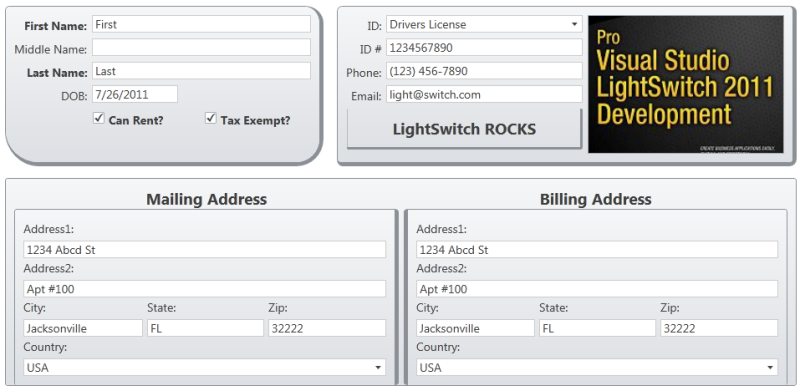
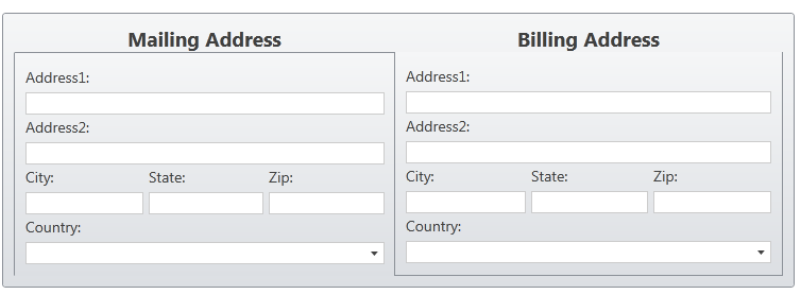
      You can simulate a title inside the GroupLayout (see the first group in the screen shot), by adding a left-aligned TextBlock control as the first control in the group (in the screen shot it's been centered). 
      
      I must admit, I didn't anticipate having GroupLayouts within GroupLayouts, & I can't even imagine what that must look like, lol, but the problem you'll be seeing is that the inner group's "Label" is being displayed, whereas as a GroupLayout usually has its label hidden. 
      
      I think if you manually set the inner group's label position to "Collapsed" the problem should go away. Using a space as a group's display name is a little trick that helps align two groups horizontally (like in the screen shot), where one shows its title & the other one doesn't.
      
      I'll be spending some time today, working on a sample that will explain things better. I'll let you know here when I've uploaded it.
    • Thx for the detailed answer Yann. However (1) I'm looking to use GroupLayout's Title property, rather than using a 'TextBlock' as my Title. Using 'TextBlock' requires a Screen (string) Property (or an entity property), I believe.  Please correct me if I'm wrong. ======= (2) GroupLayout doesn't have 'Label Position' property unless I miss something. If you clarify the above two, I believe I got the idea how the layout works, as I already created few complex designs (not the one I sent you though :) ) that is impossible without your controls!!
    • Actually, yes you're right. Placing the GroupLayout inside another GroupLayout *displays* the title (it's a "technical issue" that I'm trying to sort out), but the LabelPosition setting is still "hidden". So no, you won't be able to do what I suggested. Thanks for pointing that out. Fair comment about the extra property required to use a TextBlock inside the GroupLayout as a title. I'll see what I can do about making a title available inside the group. Thanks again for the excellent feedback! Hearing "that is impossible without your controls" is like music to my ears. It's what I only *dreamed* would be the result for people, when I decided to create those controls. And there'll be more coming!
    • And there'll be more coming! - That's symphony!!!! Well then here is my 'feature request' for the GroupLayout control then. All other layout group controls support multiple children. Since your's support just a child, I'm creating a RowLayout/ColumnLayout for each GroupLayout and place multiple GroupLayout underneath it. For sure, this is not a big deal.  But would be simpler and clean if less hierarchy tree.
    • It wasn't my "first choice" to have only one child control, but it was all I could find at the time. I'm looking inot how to make the GroupLayout control act more like a ColumsnLayout/RowsLayout. When I find what I need, I'll update the control. Thanks again for the feedback.