Hello, I know this process template is well done and necessary for my team BUT ! It doesn't work on a french TFS Server with it's french portal. I tryed 1000 things I still have the TF249033 error
le modèle de site n'est pas disponible pour l'identificateur de paramètres régionaux (LCID). Le nom du modèle de site est : TFS2010 Agile Dashboard. Le LCID est : 1033. (type TeamFoundationServerException)
The process template is not available for this LCID... bla bla bla ... LCID is 1033
I absolutely need this process template and the sharepoint and reporting services.
Please, publish a procedure to install this project template on a French TFS Server.
Event Description: TF30162: Task "WITs" from Group "WorkItemTracking" failed Exception Type: Microsoft.TeamFoundation.Client.PcwException Exception Message: Object reference not set to an instance of an object
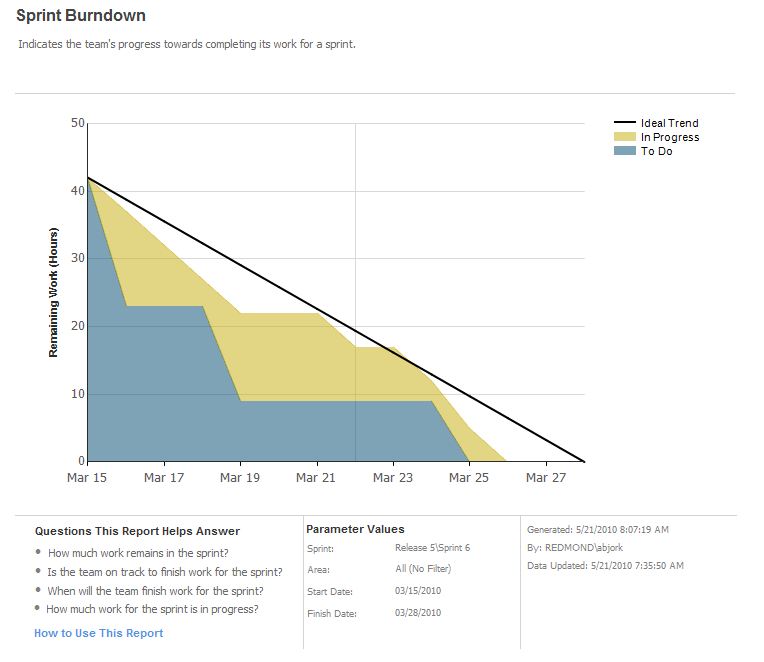
A good template for running scrum projects, the burndown detects current sprint and makes it much easier to change sprint. One thing that could be improved is support for multiple teams.
Great job!. But i have a question. today is the end of a scrum project. I want an amount of all initial task time. so that i can get if my team member's work good or bad. and so that i can make a report to my boss: how much works we finished.
now, in this project, the "remaining work" field is changed from "10" to "3", at last, when the state changed to "Done", the remaining work field's value is no longer exist.
Hi,
I installed this project on my new Sharepoint 2010 site and it's working fine. Except..when I open the 'Backlog Overview' Report and it doesn't have the data from my product backlog page.
It had data in it this morning and I deleted the old data and created new test backlog items from the grid within my Sharepoint page.
I'm pretty sure that I just need to process 'the cube'? or something else to refresh the data in the report.
I don't know how to process the cube..or to be honest if there is even a cube to process. I open SSAS and I don't see anything under 'Databases or Assemblies'
Can anyone help me?
Does the Scrum product work with Visual Studio Express? I downloaded both products but don't see a way to get Extension Tracker to recognize the Scrum template. Please advise. thx
It is very helpful when during a Sprint we can see what is currently being worked on at the PBI level. The state In Progress is very helpful to get visibility at the PBI level since the queries we use to view the Sprint Backlog also include the PBIs. Currently, we are forced to inspect every PBI breakdown to get a sense of what's happening.
Similarly, during Sprint the state Ready for Test is also helpful as it gives visibility to The Team to tackle these right away in order to close PBIs as soon as they are ready.
Are their any plans to add states such as In Progress and Ready for Test to the PBI? These would be applicable between Committed and Done.
Thanks Leo. There aren't plans at this point. My feeling has always been that it feels like overkill... you can do this with a directed links query to look for stories with tasks that have been started. How do others feel?
Leo and Aaron,
We're trying to find a good approach to determine when PBI is ready for test. During our last project, we set up a directed links query to show us a listing of PBIs and the associated tasks which <> Done. If we see a PBI shows up with no children tasks listed, it is ready for test. This has proven challenging to our team members. They have to scan through many PBIs, check children tasks, etc. I'm curious to hear how others are working through this as it seems to be our primary area of confusion (when is a PBI ready for validation). Thanks much,
Scott Walker
I am in the process of starting a new project with the Scum 1.0 template and having used the Agile template on previous projects I'm trying to make sense of how the Scrum template handles work items that are "ready for test". The Agile template included "Fixed In" field which the automated builds updated for work items that were marked resolved since the last build. This allowed for easy tracking of what work items are ready for test. When a PBI is marked as Done it is difficult to see how the team will easily query for a list of PBI's that have been incorporated into a QA build. How are others using the Scrum 1.0 template to provide the Test team with a query showing only the PBI's that are available in the latest (or any previous) QA build? Maybe I'm just not wrapping my Agile template head around the Scrum template yet. Thanks for any suggestions! Steve
"ready for test" is a very useful state.
We had a query which showed all items which were fixed and which required testing. At the end of our Sprints a test team would simply look at this query and test each item, then marking them as Complete.
How should we show which items need external/regression testing?
We have worked around this by creating generic users named ScrumMaster and SystemTester. PBI state is set to Done when Definition of Done is reached, and the item is assigned to ScrumMaster. It rests there pending deployment to test environment.
Once delivered to Test, AssignedTo is changed to SystemTester. As a specific tester starts testing a particular PBI, he or she assignes it to himself/herself.
Once all tests are completed AssignedTo is cleared, leaving the PBI with state Done and AssignedTo [None] - thus completed and tested with passing results.
We use the same process for Bugs.
This is not a good workaround and we are considering altering the template. We have done so in earlier versions of TFS and had a few problems as a result. The major being unability to apply upgrades and fixes of the original template. I am not sure if this would still be an issue with TFS 2010, but changing the template meets great resistance in my organization at the moment so for now we are stuck with this workaround.
As for regression testing, I have not seen any good way to do this based on work items created for developers. What we do is we have our testers build a regression test plan with every iteration that progresses the product. This plan is first rewised and then copied when starting regression test period (usually every 4-6 iteration), and the original plan is rewised again after completing the regression test period, to serve as a base for further addition during the sprints to come. Our main regression test plan is in effect a template to use in every regression test period and constantly maintained.
The primary way to know which items need external or regression testing is to have your testers working tight with your developers so that they know what legacy functionality is being affected. This can be complemented with (but not replaced by!) Test Impact Analysis functionality in Test manager.
When I try to create a SharePoint Site with TFS Powertool for an existing TFS project, I get an error:
All provided settings are valid.
---begin Exception entry---
Exception Message: TF250035: A feature for SharePoint Products could not be found with the following ID: 469f4e7e-4ee1-4d4f-94b8-1f5d6a4c5f3e. Verify that the feature is installed on every server in the SharePoint farm for the following Web application: https://url/site/. (type TeamFoundationServerException) Exception Stack Trace: at Microsoft.TeamFoundation.Client.SharePoint.SharePointTeamFoundationIntegrationService.HandleException(Exception e) Inner Exception Details: Exception Message: TF250035: A feature for SharePoint Products could not be found with the following ID: 469f4e7e-4ee1-4d4f-94b8-1f5d6a4c5f3e. Verify that the feature is installed on every server in the SharePoint farm for the following Web application: https://url/sites. (type SoapException)SoapException Details: <detailexceptionType="TeamFoundationServerException" /> Exception Stack Trace:
--- end Exception entry ---
I have no idea what the feature with ID '469f4e7e-4ee1-4d4f-94b8-1f5d6a4c5f3e' could be.
When I create a new TFS project, the SharePoint site is created without any troubles.
Can anyone help me?
Kind regards,
David
I had the same issue.
I fixed this by doing the following:
1. Export Scrum Project Template to local filesystem
2. In the file "Microsoft Visual Studio Scrum 1.0\Windows SharePoint Services\WssTasks.XML" remove the lines:
<activateFeatures>
<feature featureId="469F4E7E-4EE1-4D4F-94B8-1F5D6A4C5F3E" optional="true" />
</activateFeatures>
3. Import Scrum Project back into TFS
4. Run tool again. It should now bypass the feature above and creates the portal.
I suggest reverting to the original scrum project template (with the activated feature) after running the tool, in case this feature is ever available.
I think the issue is that the TFS Powertool does not adhere to the optional attribute in the activate feature. This is why it works fine when creating a new Team Project but fails when running the TFS Powertool.
AC
No, the term used by the scrum template is Product Backlog Item, but they are essentially the same.
For more info about Product Backlog Item, please refer to this post http://blogs.technet.com/b/chrad/archive/2011/02/06/tfs-2010-msf-agile-vs-visual-studio-scrum-1-0-smackdown.aspx
Hi,
I wanted to segregate "Project Owner" role. The purpose behind this is to control and approval and removal of backlog items.
Are there any settings to apply security on the "State" and other fields in Backlog item?
Any help with this is highly appreciated.
You could create a tfs group "ProjectOwner" and then modify the PBI tempalte by only allowing the ProjectOwner group to make certian transistions, using the for syntax
<TRANSITION from="Resolved" to="Closed" for="[Project]\ProjectOwner">
Yes, but you need to bind those sprints to different iterations, and the burndown will still select a sprint as default.
If you need to support multiple teams I would recomend you to create Iteration trees for the different teams, and then modify the BurnDown report by adding a parameter for TeamIterationPath, filtering iterationpath to thouse under TeamIterationPath. Bydoing so you can have a burndown chart for each team, without needing to change sprint each time you want to see your burndown.
So I installed the new Scrum Template and created a brand new Team Project using that template. All is good with respect to accessing the portal; however, on the how page of the portal where the Burndown graphs are shown I am getting a Reporting Services error. Specifically the error is shown below. I get the same exact error if I try to run the report from with the ReportServer Manager on the actual server machine. Digging around the Report Server Log files, I discovered the error but have no idea how to resolve. It almost seems like SQL tables were not updated or something. If anyone can help it would greatly be appreciated as this is what I believe is the last thing keeping me from moving forward with this new template. The errors are shown below.
ERROR SHOWN ON PORTAL:
"An error has occurred during report processing. (rsProcessingAborted) Get Online Help
Query execution failed for dataset 'dsBurndown'. (rsErrorExecutingCommand) Get Online Help
For more information about this error navigate to the report server on the local server machine, or enable remote errors"
ERROR SHOWN IN REPORT SERVER LOG FILE:
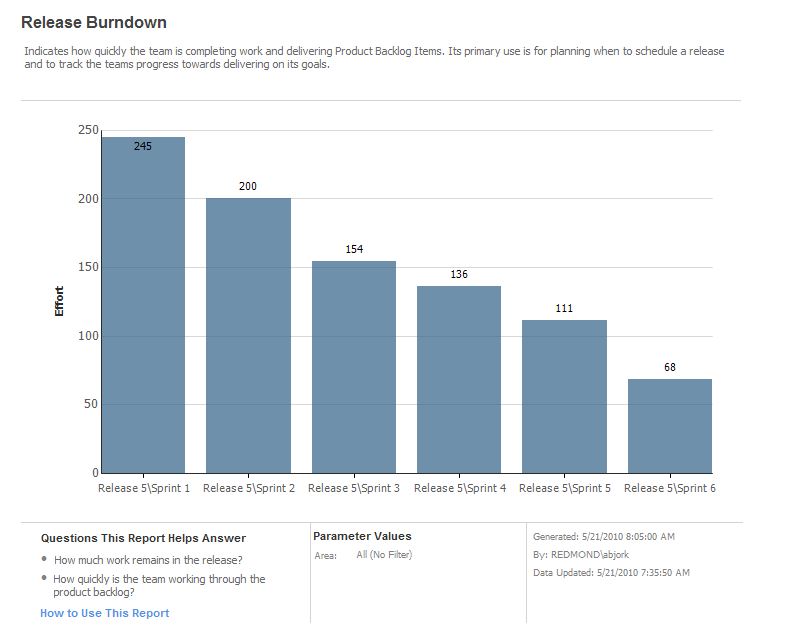
Processing!ReportServer_0-5!1364!08/18/2010-11:44:16:: e ERROR: An exception has occurred in data source ‘dsBurndown’. Details: Microsoft.ReportingServices.ReportProcessing.ReportProcessingException: Query execution failed for dataset ‘dsBurndown’. - Microsoft.AnalysisServices.AdomClient.AdomErrorResponseException: Query(3,2) The member ‘[Microsoft_VSTS_Scheduling_Effort]’ was not found in the cube when the string, [Measures].[Microsoft_VSTS_Scheduling_Effort], was parsed.
If this is a new project on a brand new server the error is likely caused by the fact that your cube doesn't have any data in it yet. Try adding some data to the project and processing your cube. That should eliminate the error.
I still have this problem. It has been weeks since I upload the scrum template, I have manually processed the cube several times. We have a few hundred work items (tasks and product backlog) that we have been working and updating and still I can't get the report to run. When I go into the report builder and look at the measures under work item [Measures].[Microsoft_VSTS_Scheduling_Effort] does not appear but Microsoft_VSTS_Scheduling_CompletedWork, ..OriginalEstimate, and ..RemaingWork all appear.
It is as if the template only half installed. Any hints where else could I possibly look?
Has anyone run into this issue and actually fixed it?
"Failed to instantiate file 'dashboardlayouts.aspx' from module 'ScrumDashboardPages': The specified list does not exist.
Hi ,
i have the same problem. The Sharepoint Features can not be activated. Then always get the error message:"Failed to instantiate file 'dashboardlayouts.aspx' from module 'ScrumDashboardPages': The specified list does not exist.
I have German TFS2010 with SP1 and German Sharepoint 2010 with SP1 Version.
Help me please.