Hello, I know this process template is well done and necessary for my team BUT ! It doesn't work on a french TFS Server with it's french portal. I tryed 1000 things I still have the TF249033 error
le modèle de site n'est pas disponible pour l'identificateur de paramètres régionaux (LCID). Le nom du modèle de site est : TFS2010 Agile Dashboard. Le LCID est : 1033. (type TeamFoundationServerException)
The process template is not available for this LCID... bla bla bla ... LCID is 1033
I absolutely need this process template and the sharepoint and reporting services.
Please, publish a procedure to install this project template on a French TFS Server.
Event Description: TF30162: Task "WITs" from Group "WorkItemTracking" failed Exception Type: Microsoft.TeamFoundation.Client.PcwException Exception Message: Object reference not set to an instance of an object
A good template for running scrum projects, the burndown detects current sprint and makes it much easier to change sprint. One thing that could be improved is support for multiple teams.
Great job!. But i have a question. today is the end of a scrum project. I want an amount of all initial task time. so that i can get if my team member's work good or bad. and so that i can make a report to my boss: how much works we finished.
now, in this project, the "remaining work" field is changed from "10" to "3", at last, when the state changed to "Done", the remaining work field's value is no longer exist.
Have a brand new tfs 2010 install. uploading fromclient machine using VS and get this in the log:
---begin Exception entry---
Time: 2012-01-13T17:23:40
Module: Engine
Event Description: TF30162: Task "WITs" from Group "WorkItemTracking" failed
Exception Type: Microsoft.TeamFoundation.Client.PcwException
Exception Message: Object reference not set to an instance of an object.
Stack Trace:
at Microsoft.VisualStudio.TeamFoundation.WorkItemTracking.WitPcwPlugin.PcwPluginComponentCreator.Validate(ProjectCreationContext ctxt, XmlNode taskXml)
at Microsoft.VisualStudio.TeamFoundation.ProjectCreationEngine.TaskValidator.PerformTask(IProjectComponentCreator componentCreator, ProjectCreationContext context, XmlNode taskXml)
at Microsoft.VisualStudio.TeamFoundation.ProjectCreationEngine.RunTask(Object taskObj)
Hi,
The installation of the template worked without problems, including the commands for Sharepoint. However, after the installation, when I try to activate the Team Foundation Server Scrum dashboard feature, I have the following error:
'Failed to instantiate file "dashboardlayouts.aspx" from module "ScrumDashboardPages": The specified list does not exist.
Troubleshoot issues with Microsoft SharePoint Foundation.
Correlation ID: d3648c74-5a37-4772-a79c-fd51c11c24ac'
Furthermore, for any existing project, if I try to activate any of the pre-existing dashboards if gives the following error:
'A list, survey, discussion board, or document library with the specified title already exists in this Web site. Please choose another title.
Troubleshoot issues with Microsoft SharePoint Foundation.
Correlation ID: 1ca207b6-fa72-4564-9757-70e4d6e6e506'
It is needless to say that it's a quite serious problem, as we cannot enable the dashboards for any of our other agile projects.
We have tried to uninstall the Scrum template, and to repair the Sharepoint installation without any success.
Thank you for any help, regards,
Carlos
Hi, I have the exact same error on my setup.
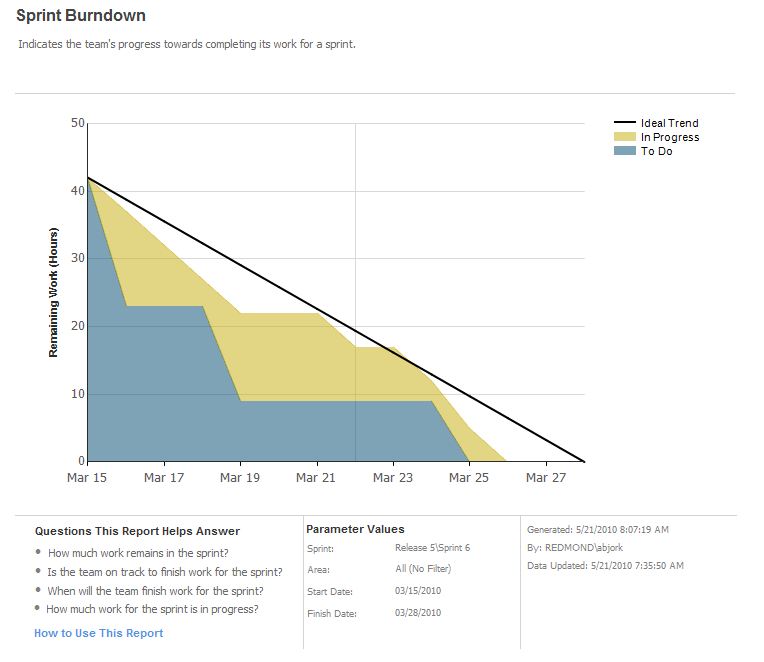
SSRS always displays "no Data", althought WE DO have data as the Sprint advances.
After I activated the feature on the server, I got the same error as Carlos Boneti.
Did anyone found the solution ? this is so frustrating.
Thanks
* All Sprints have Begin/End Dates
* Backlog items in sprints have been committed
* Backlog items all have efforts assigned
* Sprint item states are assorted - some are To Do, some In Progress and some Done.
* I've refreshed TFS Warehouse multiple times over multiple days
* I've tried viewing the Query in the query designer of Report Builder and nothing is returned.
What's going on? Why isn't it working?
Thanks,
Joshua
We like to use VS Scrum 1.0 template to an existing project where we have multiple folders. There's any way to install this template for existing Projects in TFS?
Thanks,
Hello, I'm testing TFS in terms of our company and meet one difficultie:
How to configure this process template to meet following pattern:
We have a lot of teams which works on same system.
This teams have sprints which starts on different time (one tema have 1week sprints, another - 4 weeks, etc).
In other case we have project iterations (feature).
Is it possible to configure Scrum template to be able to make TLs of teams able to plan their own sprints, PMs look for whole feature and for per-team burndown?
could you give some advices for how to configure it?
I did the following. I updated Release1\Sprint1 to have a start date of 8/22/2011 and an end date of 8/26/2011. I then added a new work item and assigned it to this sprint. I gave the work item 20 for the remaining work and then I set the status of the work item to In Progress. I then updated the cube by call ProcessWarehouse on the WarehouseControlService.asmx. I then closed and reopeneded VS. The report still shows no data. What am I missing? It looks like no matter what you do nothing shows up on the report?
I get the following error when trying to create a scrum project. MSF For Agile v5 works just fine. Any hints on what to look at. Just got a bunch of security issues resolved so wondering if this might be an issue.
Error
TF30170: The plugin Microsoft.ProjectCreationWizard.WorkItemTracking failed during task WIs from group WorkItemTracking.
Explanation
Plugin error text: “TF26213: Saving work items failed. Check the log for more details.”
User Action
Contact your Team Foundation Server administrator.
Hi all, I am currently assessing a TFS Template for our future use. We are currently using a very modified CMMI process, but we're really only using it for bug tracking.
I have a feeling I know the answer to this question, but I'd like confirmation. Looking at the bug states available for MS VS Scrum 1.0, I've noticed that the available states are "New", "Approved", "Removed", "Committed", and "Done". What I want to know is why there is no conept of "Closed". "Done" to me suggests that the necessary tasks have been completed to fix the bug, whereas "Closed" is a kind of final sign off by a tester to say that this bug has been verified as fixed in the current build of the software. Am I mis-interpretting these states?
Hi. I use and love this template. However I miss a possibility for printing cards for the scrum board. So I have made a small tool for doing this:
http://taskcardcreator.codeplex.com/
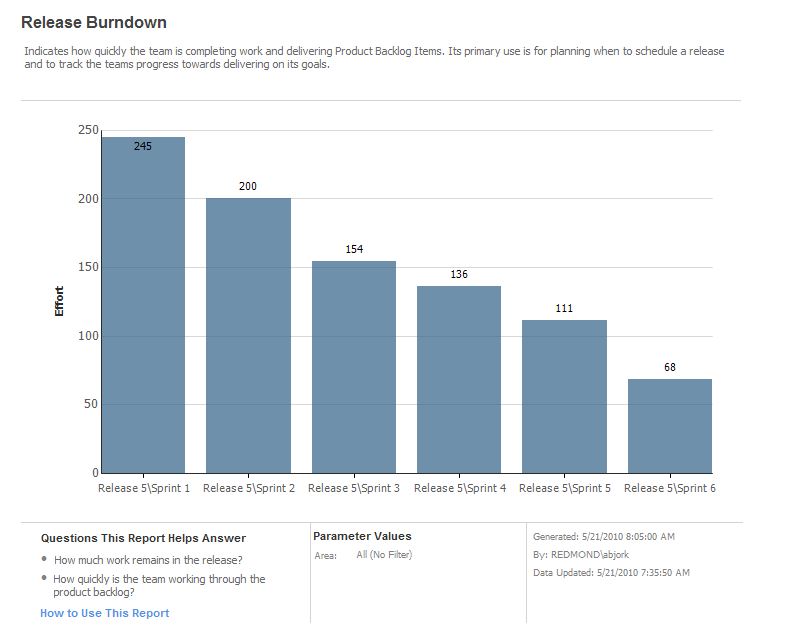
How do I show newly added PBIs in Release Burndown chart? For example: When I started Sprint 4 I have PBIs with an effort of 80. If I complete 10 effort points in Sprint 4 and add another 8 effort points, Release Burndown will show that I have 78 effort points remaining in the beginning of Sprint 5. This is ok but how do I show that I have completed 10 points and added 8 new ones. Is there a way to show that using this template?