Hello, I know this process template is well done and necessary for my team BUT ! It doesn't work on a french TFS Server with it's french portal. I tryed 1000 things I still have the TF249033 error
le modèle de site n'est pas disponible pour l'identificateur de paramètres régionaux (LCID). Le nom du modèle de site est : TFS2010 Agile Dashboard. Le LCID est : 1033. (type TeamFoundationServerException)
The process template is not available for this LCID... bla bla bla ... LCID is 1033
I absolutely need this process template and the sharepoint and reporting services.
Please, publish a procedure to install this project template on a French TFS Server.
Event Description: TF30162: Task "WITs" from Group "WorkItemTracking" failed Exception Type: Microsoft.TeamFoundation.Client.PcwException Exception Message: Object reference not set to an instance of an object
A good template for running scrum projects, the burndown detects current sprint and makes it much easier to change sprint. One thing that could be improved is support for multiple teams.
Great job!. But i have a question. today is the end of a scrum project. I want an amount of all initial task time. so that i can get if my team member's work good or bad. and so that i can make a report to my boss: how much works we finished.
now, in this project, the "remaining work" field is changed from "10" to "3", at last, when the state changed to "Done", the remaining work field's value is no longer exist.
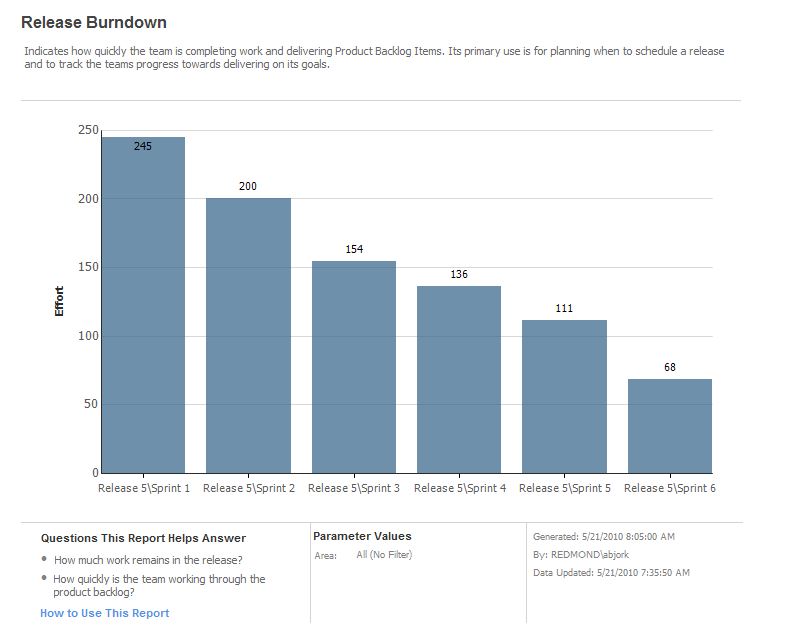
My Release Burndown chart does not show any bars even though the x-axis shows all the sprints that I have defined. The product backlog includes PBIs with the status of New, Approved, Committed and some Done. I am currently on the first Sprint and the Sprint Burndown seems to be working fine. I was expecting that the Release Burndown will show the total effort remaining before I started Sprint 1. Subsequently, after the end of Sprint 1, I expect that the bar showing remaining effort for Sprint 2 will show up in the Release Burndown chart. So far, I haven't seen any bars at all. Is there something that I am missing?
I created the product backlog list after the start date of Sprint 1. I figured that is why there is no bar in Release Burndown for Sprint 1. Starting Sprint 2 it showed up fine.
Hi Aaron,
I write an open source tool for TFS called Scrum Sprint Monitor and I was looking into your process template in order to give early support for it. One thing I noticed is that the template for Tasks does not track the work that has been done on that particular task (Microsoft.VSTS.Scheduling.CompletedWork), only the remaining work. Is that something you are considering adding to the template?
Thanks,
Pedro
We have considered it, but have purposely left it off (for now). Most Scrum teams I talk to are concnerned only with remaining work. Completed work is "interesting"... but remaining work is what drives a Scrum team through a sprint. Our goal with the template was to nail the basics that apply to all teams. I'd love feedback on this however. Are others interested in completed work?
IMHO, Completed Work is noise in Scrum. I am even glad to see that Estimated Work is not used in the template. What we have seen is that Developers would have a tendency to simply subtract Remaining Work from Estimated Work (i.e. MSF Agile) and apply that to Completed Work just for sake of filling the field. You get no real benefit of tracking just a false sense of where you are. Reality is that you can be at 99% completed for 50% of the time it really takes to complete a Task.
Hi Aaron,
I understand your point lefting CompletedWork field off, but when I try to view the Sprint Tasks inside MS Project I get the following error message related to this field:
---------------------------
Microsoft Office Project
---------------------------
TF82024: The following fields could not be mapped because the fields could not be found on the server: Microsoft.VSTS.Scheduling.CompletedWork;Microsoft.VSTS.Scheduling.OriginalEstimate
---------------------------
OK
---------------------------
What can I do?
@Juliano, have you considered copying the definitions of these fields from the Task work item in the MSF Agile 5.0 process template? That will allow you to open the query in MS Project and see the Tasks. You can also decide whether or not you need to display these in the UI through the Work Item editor. You can use the Process Template Editor that is part of the TFS 2010 Power Tools, if you did not already know about it, to make these definition changes visually.
@Aaron, perhaps there's an improvement to the Task work item in the TFS Scrum process template where these fields are included but not displayed in the UI in order to support MS Project without errors. The problem is similar to what Donovan described earlier regarding the builds. Maybe there's a case here for compatibility.
Aaron, I brought up Microsoft.VSTS.Scheduling.CompletedWork by mistake. What I meant to ask is about an original estimate. It is very important for my tool to have an idea of what the original estimate was for a given task (and I believe it is beneficial for anyone who is looking at a task to know that as well).
I have noticed a tendency of some developers to have just "1 day remaining" on a task every day for weeks. We were using a tool previously that allowed you to enter the effort spent today, and it would add that to the completed work field. That is useful in determining how (a) the project manager's initial estimate (b) the programmer's detail estimate and (c) the actual amount of time spent compare. This allows project manager and programmer to see weaknesses in estimating and work to improve. How can I do that with the TFS Scrum template?
the tendency to leave "1 day remaining" is a missunderstanding of how remaining work is identified perhaps. looking back, if there was really one day remaing it would be completed. so developers are often unwilling to update the days remaining by ADDING days such that it would now say 2 days or 3 days remaining. rather than leaving it 1 day and trying to invisibly catch up. right after SCRUM the first day that this is not zeroed out..SCRUM MASTER and developer should discuss what the actual remaining is and update accordingly.
My release burndown chart is showing the cumulative effort for all iterations including those outside the current release. Only Release 1 iterations are shown in the Sprint drop down if I go to the Report site, but it seems to have little affect. What would cause this?
I'm also having some issues with the Release Burndown showing more points remaining than I have in my Product Backlog. Any news on an update? Am I misreading this report?
I just got into the same problem...
Seems like a known issue:
http://connect.microsoft.com/VisualStudio/feedback/details/642836/vs-scrum-release-burndown-does-not-filter-by-release
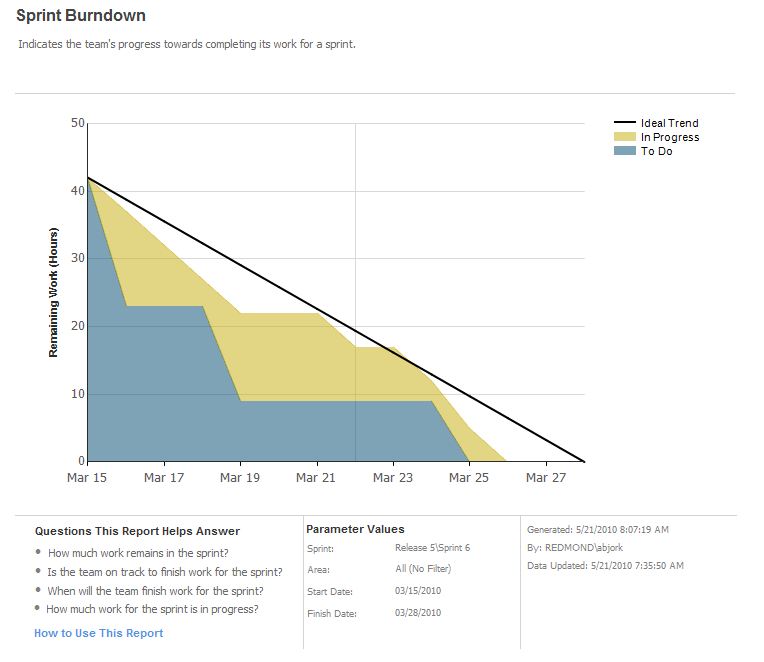
Our current Sprint (first running with this template) show a Sprint burndown with only "In Progress" tasks, none of the todo items are shown, even if the report states it should...
What can we do to get the full report? Are we missing something in the setup or are there other issues we should look at to solve the issue?
There should be no extra steps needed. Here is a few things that you can check:
* Make sure that the Todo items has the correct sprint in iteration path. Two sprints in different releases can have the same name which can make it hard to spot the error.
* Make sure that you do not have overlapping sprints by running the sprint query and verifying the dates
* Make sure that the cube is up-to-date by confirming the "Data Updated" timestamp in the button of the burndown is reasonable present.
I hope that you resolves the issue.
/ Tore Østergaard
Unfortunately that did not help. I've also tried to create a task on a user story/product backlog item that contained in progress tasks. These are show in the report but the new task did not show up either.
I raised this over in the 'Team Foundation Server -General ' forum on MSDN.
However, since I am using the Microsoft Visual Studio Scrum 1.0 template, the Microsoft representative that replied suggest I also raise it here....
http://social.msdn.microsoft.com/Forums/en-US/tfsgeneral/thread/ddc5f1cd-d211-43b0-92d1-c099056c28a7
Essentially some TFS users are loosing access to TFS project each night and when I try re-add the the next morning using Team Explorer I get the following error
TF50235: The group Contributors already has a member [UserFirstName UserLastName].
SAME error occurs when using TFSSecurity.exe and "TFS Administration Tool 2.1"
The work around is to run the g- command and then the g+ command even though TFSSecurity does not list the user!
Has anyone experienced this issue?
Much appreciatedl.
The current version of the template does not work with Team build. Team build cannot create a bug because the reason 'Build Failure' is missing see error below. Granted it is a easy customization (which I have already made) however, it should be in all templates so Team build does not error out.
TF42097: A work item could not be created due to a field error. The following fields have incorrect values: Field: 'Reason' Value: 'Build Failure'
Donovan
Glad to hear. It appears you instead of using the out of the box priority field you created a new one for Backlog priority which leads to the following.
TF42095: Failed to update 'Priority' field. Error message: TF26027: A field definition Priority in the work item type definition file does not exist. Add a definition for this field or remove the reference to the field and try again.
You may consider using the built in priority field common to the majority of templates and just changing the label to Backlog Priority on the screen. I simply updated my build template to not set the priority and allowing Backlog Priority to take the default value.
One more thing about bugs created during the build. Once you add the “'Build Failure” reason and remove the Priority assignment from the build template none of the bugs are owned by anyone. The build template is trying to set AssignedTo.
I installed the scrum package and also can create new projects. When I switch to the team portal and try to activate the dashbord it returns
Failed to instantiate file "dashboardlayouts.aspx" from module "ScrumDashboardPages": The specified list does not exist.
Can anyone help with this?