Hello, I know this process template is well done and necessary for my team BUT ! It doesn't work on a french TFS Server with it's french portal. I tryed 1000 things I still have the TF249033 error
le modèle de site n'est pas disponible pour l'identificateur de paramètres régionaux (LCID). Le nom du modèle de site est : TFS2010 Agile Dashboard. Le LCID est : 1033. (type TeamFoundationServerException)
The process template is not available for this LCID... bla bla bla ... LCID is 1033
I absolutely need this process template and the sharepoint and reporting services.
Please, publish a procedure to install this project template on a French TFS Server.
Event Description: TF30162: Task "WITs" from Group "WorkItemTracking" failed Exception Type: Microsoft.TeamFoundation.Client.PcwException Exception Message: Object reference not set to an instance of an object
A good template for running scrum projects, the burndown detects current sprint and makes it much easier to change sprint. One thing that could be improved is support for multiple teams.
Great job!. But i have a question. today is the end of a scrum project. I want an amount of all initial task time. so that i can get if my team member's work good or bad. and so that i can make a report to my boss: how much works we finished.
now, in this project, the "remaining work" field is changed from "10" to "3", at last, when the state changed to "Done", the remaining work field's value is no longer exist.
Hi Leo
I needed that as well and found a workaround. I have changed the trendline to be flat in weekends. It is not that tricky to do since the code behind it is visual basic and the rdl file can be edited in a normal text editor.
Here is a way to do this.
1. Right click Reports in your team project and select "Show report site".
2. Find the Sprint Burndown file and click the triangle in the right side of it.
3. Select "Download" and place it somewhere on your local disk.
4. Open the downloaded file in your favorite text/xml editor
5. Search for "Function Burndown" and replace the entire function with two functions in my next post.
6. Save the file and upload it by selecting "Upload file" on the Report Site
7. Sometimes the Data Sources gets changed when downloading. You can fix this on the Report Site by clicking "Manage" from the triangle menu on your file. Look for the Data Sources tab and browse to the correct data sources.
Enjoy!
/ Tore Østergaard
Function Burndown(ByVal val As Object, ByVal valDate As Date, ByVal endDate As Date)
If valDate < firstDate Then
firstValue = Double.NaN
firstDate = DateTime.MinValue
End If
If Double.IsNaN(firstValue) Then
If Not val Is Nothing And val <> 0 Then
firstValue = val
firstDate = valDate
numDays = Math.Max(1, Weekdays(valDate, endDate))
Return firstValue
End If
Else
Return (Weekdays(valDate, endDate) / numDays) * firstValue
End If
Return Nothing
End Function
Function Weekdays(ByVal fromDate As Date, ByVal toDate As Date)
Dim i As Integer
Dim intTotalDays As Integer
Dim intWeekDayCount As Integer = 0
intTotalDays = DateDiff(DateInterval.Day, fromDate, toDate)
For i = 1 To intTotalDays
If Weekday(DateAdd(DateInterval.Day, i, fromDate), FirstDayOfWeek.Monday) < 6 Then
intWeekDayCount = intWeekDayCount 1
End If
Next i
Return intWeekDayCount
End Function
Sorry for the extra posts... You need to web incode the < and > signs in order for it to work. I had to make back into the "real" characters in order to be able to post them here.
Awesome! I tried it and I got the following error: There is an error on line 35 of custom code: [BC30205] End of statement expected. (rsCompilerErrorInCode)
Could it be that the line "Weekday(DateAdd(DateInterval.Day, i, fromDate), FirstDayOfWeek.Monday) < 6" is meant to call "Weekdays" instead of "Weekday"? Thanks!
I found the error. The problem is in the next line "intWeekDayCount = intWeekDayCount 1". It is missing the " " as in "intWeekDayCount = intWeekDayCount 1". It loaded now.
When I run the report it shows a flat line for each weekend day. Is there a way to exclude these weekend days altogether? This is good. It's almost there. Thanks for sharing!
My boss does not want it to appear to the team as a work item option. I don' mind hiding it from everyone's view, or deleting it. However, deleting it from the Process Template Editor causes the Project Creation to fail, as it is looking for Sprint.xml
What is the proper way to use product backlog items and tasks, to get correct results (or results at all) to the sprint burndown report?
For example I have created a product backlog work item X and have added some tasks to it. Then I have set the Iteration value of the product backlog item to sprint we are on currently and assigned the item to someone + state of the item is 'Committed'.
So now I have sprint backlog item with some tasks in the TODO state. If I now run the sprint burndown report, I have nothing (I used the web services according to MSDN instruction to get the data available for reports).
So what I try to ask is, what do I need to change and set, so that I will get correct results to the sprint burndown report?
Does the tasks need to be assigned to someone? Does the remaining work of a task need to be set also? If a tasks remaining work is always hours, how does it reflect to the backlog item effort or is there any relation with this?
Should backlog item be assigned to the product owner always and tasks to developers or to anyone who is going to complete the task?
Just trying to understand how we are supposed to use the template to get the best out of it and not just have it as something people need to do and get no benefit out of it ;)
Hi Kornelius
I will try to answer some of your questions.
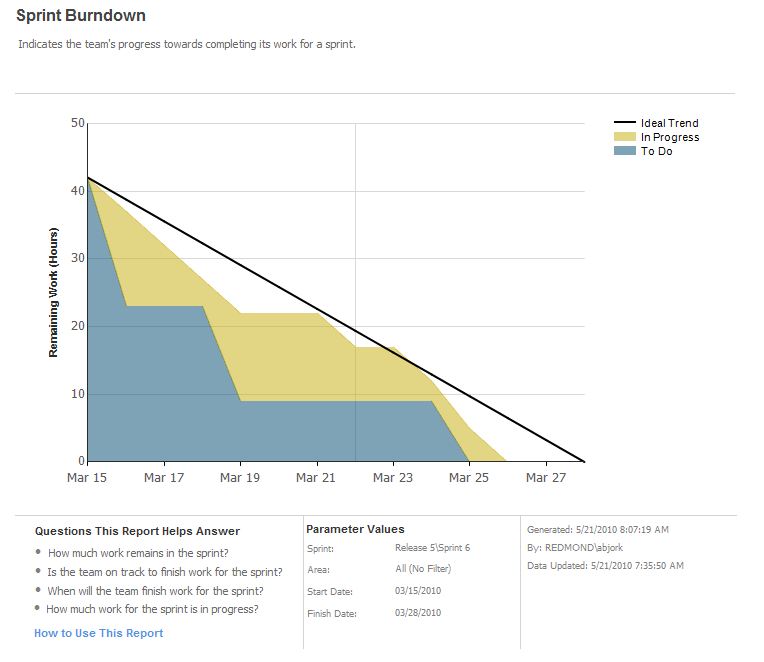
The Sprint Burndown report will show you a summarization of the Remaining Work of all tasks that have the Iteration Path set to the selected sprint.
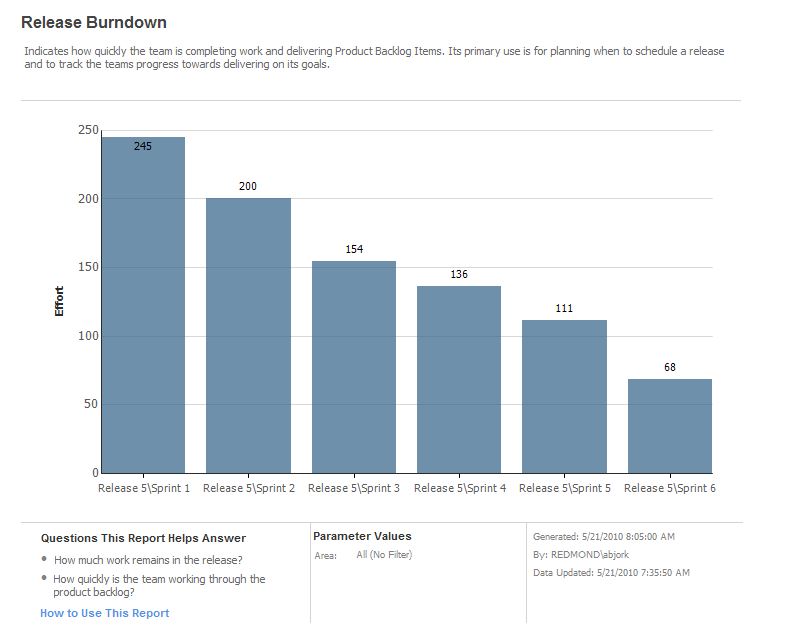
There are no relations enforced by the template between Effort on a Product Backlog Item and Remaining Work on a Task. This is really something that your team decides upon. Usually Effort (by some called Story Points) is a product owner term which uses any unit. Remaining Work is used by developers to track what is left in the current sprint and is usually in the unit of man hours. The product owner can then observe the velocity of Effort done in each sprint and then estimate how many tasks can be done for each release.
Hope that this helps a bit.
/ Tore Østergaard
Hi
Thanks for the reply. This confirmed what I thought (after I had experiment enough with the to do and inprogress states of a task and setting the remaining work for all of them).
My problem with this chart is that the assignment of work items to the iteration (sprint backlog) must be done at precisely on or before the first day of a sprint, otherwise the chart looks like a two-sloped mountain, not a right-triangle one is expecting.
Sometimes it happens that we update TFS a day or two later (the tasks are already on the white board and being worked on) and as far as I can see there is no way to assign the sprint items retroactively - TFS always timestamps them with the current date.
Would be nice to be able to specify the beginning date of a task.
Hi aoleynikov
With the danger of sounding religious (or ridiculous :-) I will answer that updating the tasks retrospectively is not really how Scrum is done. You are supposed only to look ahead and see what work is remaining.
You are right though, that it could be a problem that the burndown is calculated static based on the data on the sprint start date, if one forgets to assign tasks to the iteration. We solve this by using a query to plan your work that only shows tasks that are included in the sprint you are planning for.
/Tore Østergaard
@Kornelius -
Sounds like you are on the right path, did you create an actual Sprint Workitem with the start and end date of your sprint? You have to create one for every sprint and is key to the burndown chart.
Hope this helps!
Christe
We really want to use this template and are moving to TFS 2010 for it. We cannot however afford to move to Visual Studio 2010 yet. Is TFS the only requirement? Will this work with TFS 2010 and Visual Studio 2008?
Hello,
I deployed TFS2010 x64 french with SharePoint Services 3.0 French by default on a single server with Windows Server 2008 R2 x64 French, SQL Server 2008 R2 Standard x64 French.
Then I installed the Microsoft Scrum Process Template 1.0.
But when I try to create a Team project with the Scrum process template from a Visual Studio 2010 French on a client machine, I get the TF249033 error on SharePoint :
"le modèle de site n'est pas disponible pour l'identificateur de paramètres régionaux (LCID). Le nom du modéle de site est : TFS2010 Agile Dashboard. Le LCID est : 1033. (type TeamFoundationServerException)
English translation : The site template is not available for the locale identifier (LCID). The site template name is: TFS2010 Agile Dashboard. The LCID is: 1033. (Typ TeamFoundationServerException)
I installed the English language pack for SharePoint Services 3.0 + English Langage pack SP2, but the problem is always the same.
Thank you for your help.
Hi,
I just downloaded and tried to install this. There's a bug in the install where it's insisting on looking for the install program at C:\Temp\Microsoft_Visual_Studio_Scrum_1.0[1].msi. I tried renaming the install and putting it in THAT location, and it installed.
Just an FYI...
Now to figure out where the heck is it... :)
Why are there updates to this template without a version change?
If you are going to change it (ie add a project portal, etc) you need to up the version and include a change list.
I get bored of doing a diff on each part of the template each time the "Last Updated" changes. (Especially because I had to customize the template.)
We are trying to structure a project in TFS that has multiple teams (4) and the teams are working toward a set of incremental release of functionality (one in November, one in December, one in January). Each 'sprint' we conduct (a cycle of planning and delivering an increment of functionality), is two weeks in duration. We are trying to represent this in the TFS Scrum template, and are not quite sure of the relationship between the TFS artifact of the Sprint Work Item and the Iteration Path.
How should we set up our Sprint Work Item and the Iteration Path so that we can get reporting on our progress toward completing backlog items?
Hi Dan, did you figure out what to do here? We are struggling with the same problem. We are debating whether to (1) represent our teams as areas or (2) represent them in the iteration hierarchy somewhere or (3) create a custom field for each team. The requirements are confusing in that we want our teams working on the same schedule for sprints and releases. We sometime want to be able to see the progress of each individual team and in some places want to look across teams to see all the stories in a sprint for instance. Any luck so far?
Hi
We have been working with this template for a couple of sprints using the Area field as our Team indication. For now we have only created PBIs as a copy of our "real" Product Backlog in Excel. This has sort of worked fine, but now we want to transfer the Excel Product Backlog to TFS as well and need the Area field to indicate profeccion and theme of the PBI. To my limited knowledge it seems to be the best solution to keep Area for this purpose and create a new field for Team handling.
I anyone out there has a recipe to help us create the needed functionality around a new Team field, please post it here.
/ Tore Østergaard
I believe there is a bug - not sure if it is SCRUM template or TFS.
1. Set up SCRUM project
2. Delete some of the default iterations. They will be gone from "Areas and Iterations > Iteration".
3. Now run "All Sprints" from Team Queries. You will still see deleted iterations in the result of the query.
4. The only difference I see between deleted and existing queries is that "Authorized As" for deleted queries set to "NETWORK SERVICE" where for active Iterations it is whoever created them.
5. If you go to the detail of the deleted iteration you see in History that Iteration Path old value was empty and new value equal to the Team Project name.
Yes, Anri, I have the same problem with deleted sprints! very annoying. I'm using TFS Workbench from EMC http://www.scrumforteamsystem.com/product-news/tfs-workbench-v2-1-released which is a great free tool as workbench for TFS Scrum 1.0 which is missing. But those phantom sprints are polluting the display...
Can someone from Microsoft confirm this ? and provide some workaround ASAP?
Many thanks
Charles