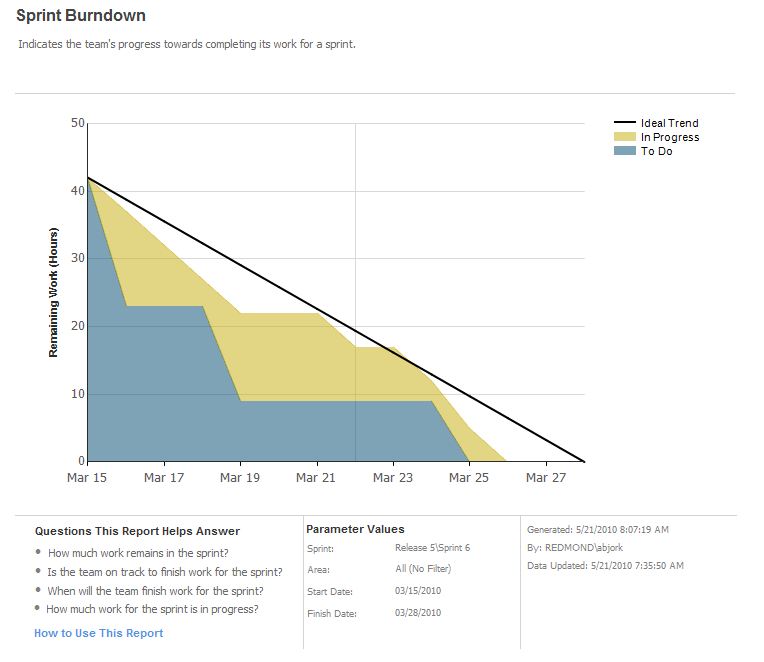
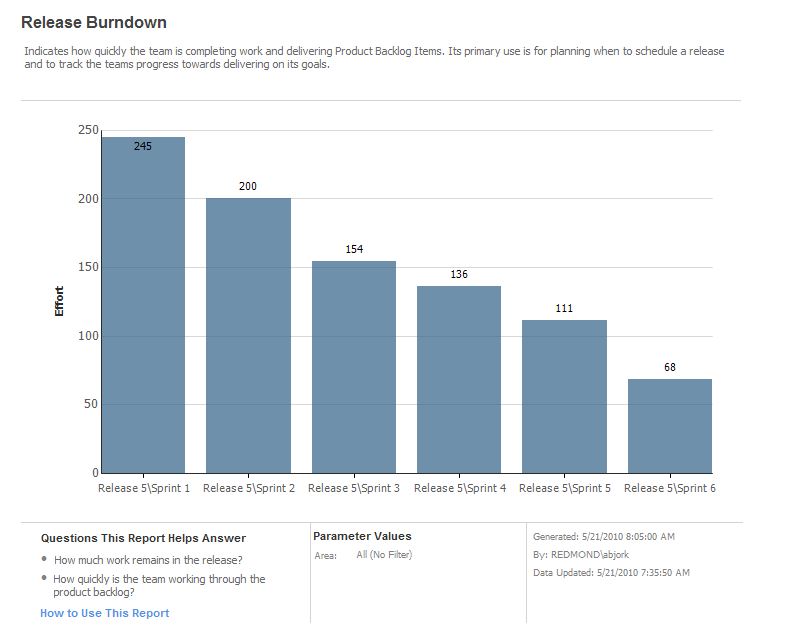
Hello, I know this process template is well done and necessary for my team BUT ! It doesn't work on a french TFS Server with it's french portal. I tryed 1000 things I still have the TF249033 error
le modèle de site n'est pas disponible pour l'identificateur de paramètres régionaux (LCID). Le nom du modèle de site est : TFS2010 Agile Dashboard. Le LCID est : 1033. (type TeamFoundationServerException)
The process template is not available for this LCID... bla bla bla ... LCID is 1033
I absolutely need this process template and the sharepoint and reporting services.
Please, publish a procedure to install this project template on a French TFS Server.
Event Description: TF30162: Task "WITs" from Group "WorkItemTracking" failed Exception Type: Microsoft.TeamFoundation.Client.PcwException Exception Message: Object reference not set to an instance of an object
A good template for running scrum projects, the burndown detects current sprint and makes it much easier to change sprint. One thing that could be improved is support for multiple teams.
Great job!. But i have a question. today is the end of a scrum project. I want an amount of all initial task time. so that i can get if my team member's work good or bad. and so that i can make a report to my boss: how much works we finished.
now, in this project, the "remaining work" field is changed from "10" to "3", at last, when the state changed to "Done", the remaining work field's value is no longer exist.
Hi,
Let say I have the following Iteration tree:
Release 1
Sprint 1 - Aug 1-15, 2010
Sprint 2 - Aug 16 - 30, 2010
Sprint 3 - Sept 1 - 15, 2010
Sprint 4 - Sept 16 - 30, 2010
Release 2
Sprint 1 - Oct 1 - 15, 2010
Sprint 2 - Oct 16 - 31, 2010
And some urgent bug from customer and we need a hotfix for Release 1 while Release 2 development is on going. How should I capture and plan for the hotfix effort? Should I
i) create a sprint under Release 1: Sprint 5 - Oct 16 - 31, 2010 (so 2 sprints will have the same time frame)
ii) include work items in Release 2 -> Sprint 2 - Oct 16 - 31, 2010 (have to distinguish the work items somehow? by area?)
iii) in the Scrum world, we decide what to release to customers and not the other way around? =P
Thanks,
I was just wondering about the drivers behind your decision to use the "System.AssignedTo" field over the "Microsoft.VSTS.Common.OwnedBy" (used in beta 1).
I preferred the use of "Owner" over "Assignment" because it feels much more scrumy. As you know in scrum tasks are not "Assigned", instead the empowered team members take "Ownership" of the available tasks in the sprint backlog.
The reason I spotted this change was because the new "Scrum Masters Workbench" dashboard app was setup to use the "Microsoft.VSTS.Common.OwnedBy" field and I just had to change it!
This was a difficult change, but we reverted back to "AssignedTo" because we found quite a few features in VS and 3rd party apps that expected the AssignedTo field. I completely agree on the terminology... and like I said, it was a tough decision to change back.
Does the Microsoft Visual Studio Scrum 1.0 process template exists only in english version ?
I'm a french consultant and I wonder if it does exist a french version of this process template...
Here is a description of my customer TFS environment :
- a TFS 2010 server instance (language = french)
- a MOSS 2007 server instance with TFS2010 extensions for SharePoint products installed and configured (language = french)
- some Team Explorer instance for creating projects based on the MS VS Scrum 1.0 template
The process template is in english but the related sharepoint portal is in french and all elements has been traducted in french : for example, task = tâche, bug = bogue etc...
So, my SharePoint dashboard uses wrong custom request that are not suitable for MS VS Scrum 1.0
Does exists a solution for downloading / using a localized version of the template.
My customer don't want to translate the template himself...
If any solution don't exist, I will be forced to use the MSF for Agile 5.0 template who exists in french.
THANK'S A LOT IN ADVANCE FOR ANY SUGGESTIONS
Best regards
Greg, from France
Hi all.
I'm following this guide here: http://visualstudiomagazine.com/articles/2010/07/27/installing-scrum-process-template.aspx to install the MSVS Scrum 1.0 template. I've managed to add the template to the Process Template Manager without a problem. But when I try to install the Sharepoint component via command(run as administrator): stsadm -o addsolution -filename Microsoft.TeamFoundation.SharePoint.Scrum.wsp I receive the error:
Object reference not set to an instance of an object.
Microsoft.TeamFoundation.SharePoint.Scrum.wsp: The Solution installation failed.
Any idea about what this might mean? The TFS version is 2010, same version for VS so pretty sure it's not a versioning issue.
Would appreciate some feedback.
Regards,
James.
Hi JamesAtEcho
"Object reference not set to an instance of an object." is a generic error during the wsp file installation process...
1-
Are you sure the NT account used to execute the command line is member of the "Farm administrators" SharePoint group ?
To ensure the account has this privilege, go to the Central SharePoint Administration, in the "Operations" tab, in the "Security settings" section, => "Update the farm administrators group".
If necessary, add the account in this group.
2-
Are you sure the NT account used to execute the command line is member of the "local administrators" on the related SQL Server database engine ?
By adding the account in the local administrators group on the SQL server, you ensure an access to the SharePoint databases during the wsp deployment process.
3-
You can also open the system event viewer to check the application log.
It might have some more explicit information about the encountered error.
Regards
Greg, from France
Hi again,
In my case it turned out to be the rights to the SQL databases that were missing. I think it would be solved by what you describe in "2-" :)
/Kenneth
Hi,
I keep getting this kind of errors when accessing he reports:
An error occurred during client rendering.
An error has occurred during report processing.
Query execution failed for dataset 'dsBurndown'.
Query (3, 2) The member '[Microsoft_VSTS_Scheduling_Effort]' was not found in the cube when the string, [Measures].[Microsoft_VSTS_Scheduling_Effort], was parsed.
I created just one product backlog item with one task. All assigned to one sprint. Effort and remaining work filled in.
Regards,
Rob
Hi Rovaro,
I encountered the same problem yesterday... I found an answer on the Internet and I solved my problem.
Here is the solution:
- the Tfs_Analysis cube must be processed to be up-to-date
- the Tfs_Analysis OLAP database CAN'T be processed in SQL Server Management Studio the first time
- go to the URL http://localhost:8080/tfs/TeamFoundation/Administration/v3.0/WarehouseControlService.asmx
- click on the "ProcessAnalysisDatabase" method
- set the value "Full" for the "processingType" parameter
- click the "Invoke" button
These steps will process the cube...
For processing the cube again, you should be able to use SQL Server Management Studio without problem.
Regards.
Greg, from France
Hi,
i have TFS 2010 installed on a machine with Windows 2008 R2. WSS 3.0 runs on the domain controler which is a Windows Server 2003 SBS. I have installed your template to use with TFS 2010. I was finally able to create a project successfully, and even the portal page within sharepoint was created successfully. But when i open the portal page, all webparts show the following error message:
Web Part Error: A Web Part or Web Form Control on this Page cannot be displayed or imported. The type is not registered as safe.
I found out that i have to add a line to the SafeControls-section of the web applications web.config file. But i couldn´t find out the exact values i have to insert here. The best choice was the following:
<SafeControl Assembly="Microsoft.TeamFoundation.WebAccess.WebParts.CompletedBuildsWebPart, Version=10.0.0.0, Culture=neutral, PublicKeyToken=b03f5f7f11d50a3a" Namespace="Microsoft.TeamFoundation.WebAccess.WebParts" TypeName="*" Safe="True" />
But this doesn´t resolve the issue and i asume that i have taken the wrong values. So here are my questions:
Am i on the right way, or is there a different cause for this error?
How can i find out the correct values for the above line?
What else do i have to do to register the webparts as safe?
Any help is much appreciated. If you need further informatione, please ask. I will try to give you as much as i can.
Best regards
Christoph
Hi Christoph
This sounds like a problem related to the configuration between your TFS server and SharePoint web application. There is a web-applicatin scoped feature that adds the required "SafeControl" entries called "Visual Studio Team Foundation Server Configuration". This is normally activated when you configure the TFS instance to work with your SharePoint web application.
My suggestions is to try using the "Repair Connection" option for the given web application in the "SharePoint Web Application" node of the TFS Administration Console. This should try to reactivate the necessary features for the connection.
Phil
We installed the new Scrum 1.0 and everything works great except… If you view a report the Sprint Selection and the Area Selection are empty with no Errors. We are able to assign the Iteration on the Product Backlog. I verified my account is in the Project Administrators group.
Does anyone know why this is?
Regards,
Brian K. Williams
Brian, the reports are populated with values that have been processed by the cube. In this case, it's likely that the cube isn't processing... and therefore the report parameters are empty.
I had similar problems: all the filters in my reports were empty. For example, in the Velocity report, the "Iteration" and "Area" filters only contained "No Sprints" and "All (No Filter)". I suspect that this is related to the fact that I have more than one project collection on my TFS server.
Here is how I fixed the problem:
- Open a web browser at http://Your_tfs_server_name/reports
- Browse to your broken report
- Click on the drop down arrow and select "Manage"
- Go in the "Parameters" tab
- Click on the "Override default" button next to the "ReportPath" parameter
- In the "Default value" edit box, enter //YourTeamProjectName
- Click on the 'Apply' button
I will send the full details of the problem to Microsoft so that they can fix the problem.
Hi, we are developing with more than ONE team. How can we handle several teams? Would it be possible then to execute the reports for all teams and seperated by team? Can't find "team" as an attribute in any work item?
Kind regards,
Robert
Robert, TFS doesn't have the notion of team. My recommendation is to use the Area Path field to map things that belong to different teams. All the reports support Area Path and allow you to filter them by that field.
Hi,
We are in the process of moving from Conchango V2 to this new template that looks very promising. Each project has multiple teams and the Area field is used heavily to track the area of the PBI or Bug: Rendering, Data base, Component X, UI, Localization... that is critical to identify the areas of problems or Improvements. What else would you suggest so that we can have a smooth migration in the future? Create a new Field? Use the "Assigned to" for PBIs and Bugs?
Thanks
Hi,
we want to migrate away from SfTS 2.0 so I evaluated three options:
1 - MSF Agile 5.0
2 - SfTS 3.0
3 - Microsoft Visual Studio Scrum 1.0
I was getting very excited with the third option because it has all we need without useless/complex features that can only confuse our teams. This template is very lightweight and focus on the essence of Scrum.
But then, when I looked at how it could handle multiple teams working on the same backlog, I got very disappointed. I am currently working on a single product that has a single product backlog (obviously) but multiple teams are working on that backlog at the same time. Given that structures, we would need the following additional reporting capabilities:
- Release burndown per team
- Sprint burndown per team
- Velocity per team
- Build success over time per team (note that each team have the same build definition but in different branches)
- Build Summary per team (same comment as above)
- Test Case Readiness per team
- Test Plan Progress per team
Note that we CAN'T use the area path to act as a team filter path the teams are cross functional and can work on any area of the application. Also, in case you ever want to support our scenario, note that our teams sprint do not start on the same day and may not have the same sprint duration. This scenario is properly supported by SfTS 3.0.
Because of all these limitions, I think that we will not be able to use Microsoft Visual Studio Scrum 1.0... unless you have a viable work around or a new version coming out soon ;)
Regards,
Maxime
@DpQuark - My recommendation would be to create a new field. If the area path field is already used heavily to track functional areas of the product, then a new field is likely the best choice.
@mabead - You're right. We are working on better team support for multiple teams. My recommendation right now would be to add a new field that is used specifically to track team.