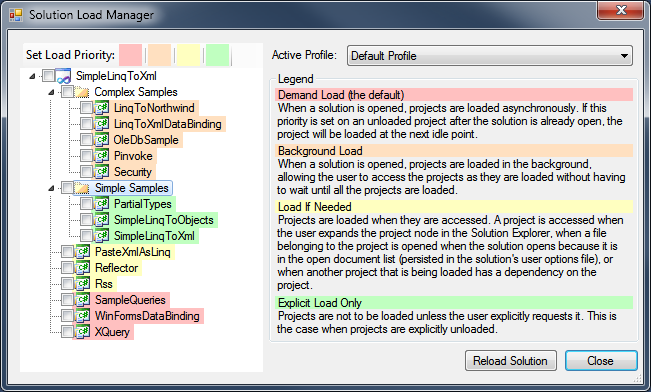
This extension provides access to project load priority settings, i.e. it is possible to choose whether specified project should be loaded during solution "start up" or not. The extension allows dramatically reduce solution load time and memory pressure.
When I am trying to get latest version from server and if any project file has been changed, then some time it creates problem in build or application. So I have to close solution and reopen the solution. Now this is possible with only a single click. Thanks!!!
very nice and useful extension. Now i just load only the product that i work on and the dependent projects that too if needed.. i can clearly see the time difference with out this extension..
I cannot think of another extension for Visual Studio which I love more than this! I can now load my solution in 10 seconds, where it previously took 2+ minutes! Thank you!
Very good and helpful, works like a charme in the final version of VS 2010 Premium and saves us plenty of loading time, loading finally only 12 projects instead of all 21 of our web solution.
By selecting the option 'Solution Load Manager', occurs the following error
'Kolos.SolutionLoadManager.Settings.XmlSettingsManager.SolutionLoadProfile.Project' (readonly)
Full Stack Trace. Unable to generate a temporary class (result=1). error CS0200: No se puede asignar la propiedad o el indizador 'Kolos.SolutionLoadManager.Settings.XmlSettingsManager.SolutionLoadProfile.Project' (es de solo lectura)
Solution Structure. 16 Projects
Solution Load Manager version 0.4
Windows 7 Ultimate
Worked in the previous version. There were already two profiles, one with all the projects demand load and one with all the projects explicitly load.
It turned out to be an issue with xml serialization in RTM version of Framework 3.5 (should be fixed with SP1). Nevertheless, please check updated version, it should work correctly.
Hi,
Just wanted to report what appears to be a bit of a deal-breaker for me in using what seems to be an otherwise useful extension.
In my use case I have 56 projects - but I need to build them all at least once a day. It appears I have to set the projects back to "load always" to do this (otherwise it will only compile those loaded projects [7 of 56 from cold]) - but then I would have to reconfigure the projects back to how I want them to load and this would take far too long.
Any possible solutions for this?
Highlight the solution in the Solution Explorer and hit the asterisk key (*) on the numpad. This will cause all the child nodes to expand, and in turn cause all the dependent projects to load too.
Check out new version of the add-in with profiles support.
Basically you can define "Full Solution" profile that always loads all projects and switch to this profile when you need to build the solution. You can have arbitrary number of profiles and easily switch between them.
Using VS 2010 Premium with SP1
I installed the extension, but when I click on the tools menu item, or right click the solution file and select from the context menu I just get the error in the subjetc of this post. Anyone else get that?
What I want to do:
I am working on a large solution, I can unload the projects not necessary for me by using VS's built in "Unload project" option. but there is one project for creating a helpfile, an .shfbproj file and I don't have or need the dependancy to open or build this project. However, as it won't load in the first place I can't choose the "unload project" option on it. I was hoping Solution Load manager might allow me to do that.
When Solution Load Manager is enabled, visual studio no longer detects external file changes. I can consistently break/fix by enabling/disabling the extension. It's a shame as it's a deal break as we do a lot of work back and forth between blend and visual studio and having to keep re-opening files is a major pain. Is anyone else seeing this issue?
I like your extension, however, i'd like to know if you're planning to do (maybe can't be done) about offline project metadata. For example, if i've got several projects to load when needed, right now all of the files aren't indexed by resharper (not even by the cache). So, if i have some projects that i don't always use but sometimes do, i'd like to be able to use resharper's quick find feature with filename, and then when navigating to the file, the project would load. it's not very practical to have to remember in which project is which file, or what should I be loading manually when i need a specific file
thanks!
Not sure if anybody has this issue or not. I had to uninstall this tool because of small but annoying issue. Whenever project is loaded (either on background or by expanding it) it jumps to the top of the project list under solutions. This is annoying as hell since people are used to particular order of projects in solution.
Unfortunately it is a Visual Studio limitation. Here is discussion on StackOverflow: http://stackoverflow.com/questions/2244765/project-order-in-visual-studio-solution
This is something I'd really like to use, because we have a large solution (50+ projects) but normally only change a subset of it at a time.
Unfortunately when installed VS just crashes as soon as I try to load any solution, even a very small one with only a couple of projects. I've got the StyleCop and ReSharper add-ins for VS so maybe it's conflicting with one of those?
If there's any info I can send to help, please let me know.
Hello Greg! If you could provide information about VS and addin versions (I mean StyleCopy and Resharper) it would be very helpful.
Additional info about crash itself will also help. Is there any message before the crash? What kind of projects are you trying to open (c#, vb, wep sites, etc.)?