SlowCheetah - XML Transforms

Free

This package enables you to transform your app.config or any other XML file based on the build configuration. It also adds additional tooling to help you create XML transforms.. Written by: Sayed Ibrahim Hashimi, Chuck England and Bill Hiebert

(70) Review
Visual Studio
2012, 2010
Download (69,206)
2/23/2013
2.5.5
View
E-mail Twitter del.icio.us Digg Facebook
Add To Favorites
Description
Reviews (70)
Q and A (164)
Sign in to Write a Review
Sort By:

by Philippe Truche | May 08 2013

Excellent tool. Maybe the next Visual Studio Service Pack will include it so that it becomes an out of the box feature.

by Brad Deem | May 03 2013

by Zahid Iq | April 30 2013

excellent !!
a long awaited extension

by straightener | April 09 2013

We had several self-inflicted wounds with accidentally testing applications that had config entries that pointed to production instead of the quality assurance environment. Because of this we searched and found Slow Cheetah that let us separate the configs into Development, QA, and Production. Things are a lot safer now. Thanks for creating this.

by rovsork | March 19 2013

This just makes life that much easier.
Powerful and simple, and it gives you a feature that feels so natural you would thought it was already there!

by arcainatwork | March 14 2013

This extension is one of the most useful in my toolbox. If MS doesn't roll this functionality into VS, it could be considered a crime.

by Damian Penney | March 06 2013

This works really well - exactly what I was looking for. Thanks guys!

by Daniel Mackay | March 05 2013

Watched the Visual Studio Toolbox video on this some time ago, but have only just installed it. The tool is great and Its saving me heaps of time! No more building and deploying just to diff config files. Thanks for the work on this extension!

by bargz | March 04 2013

This an a most excellent extension. Very helpful to preview and publish configuration transforms for development, test and production environments.

by Caio de Arruda Campos | March 03 2013

Awesome! Exactly what we needed.
Love how it creates files for each publish profile as well as debug/release.

by Jaybirdbsu | February 26 2013

I love the way this works on the build servers!

by Yuri Shpakov | February 16 2013

Hi,

That is a cool stuff. That is to be installed on a develoer computer (VS). But how can I install on build server? Do you have any installation program for that?

Thank you

Sayed-Ibrahim-Hashimi February 17 2013
| Edit |
Delete

Hi Yuri, see my blog post at http://sedodream.com/2012/12/24/SlowCheetahBuildServerSupportUpdated.aspx regarding how to get it working for build servers.

by James Alexander | February 04 2013

Thank you so much for adding support for Azure Worker Roles!

by Erick Mendonça | January 25 2013

It's cool, but does not work for web.config as good as it works for app.config.

Sayed-Ibrahim-Hashimi February 02 2013
| Edit |
Delete

It's on the backlog https://github.com/sayedihashimi/slow-cheetah/issues/39. Should be the next major feature I work on. For web projects this support is much trickier than non-web projects.

by Mike Gledhill | January 09 2013

Excellent. My app.config's are now updated with a Test, PreProd or Prod SQL Server connection string, even when running (rather than Deploying) my apps. A lifesaver - thanks!

by Emilio Gordo | December 07 2012

by rhizohm | December 04 2012

a life saver. thanks guys! great implementation!

by Dave Sexton | November 24 2012

by El Bruno | November 13 2012

Great tool !!!

by Citronas | November 04 2012

Awesome! I'm just so used to web.config transforms in ASP.Net applications that I also want this functionality in a WinForms Application.

Your add-in works like a charm. Keep up the good work. I hope this add-in will be included into VS 2012 sometime in the future, just like they did with Nuget.

Even debug sessions are effected by the transform, depending on the selecte d solution configuration! Really nice work.

Sayed-Ibrahim-Hashimi November 24 2012
| Edit |
Delete

It won't be included in VS2012, and at this time it likely wont ever make it into VS. If you think it should I suggest you make a suggestion at http://visualstudio.uservoice.com/ and have all your friends vote it up.

1 - 20 of 70 Items   
Sign in to Start a Discussion


  • config files in my web project are being transformed on build
    3 Posts | Last Post Thu 9:43 AM
    • Hi, 
        I have just installed slow cheetah. I have other config files such as connectionStrings.config in my web project. When I build they are getting transformed and updating the config files in my application route.. The default behavior is for them to only transform on publish? 
    • where can I download a previous version.. cant use nuget atm
    • Ok i have used nuget but can't figure out how to use slowcheetah version 2.5.1 without the plugin from this page.. 
      
      Any links to the 2.5.1 visx?
  • Slowcheetah keeps adding a 32bit log4net dll on building the project
    1 Posts | Last Post Thu 9:42 AM
    • If i have slowcheetah installed I keep getting a 32bit version of log4net added. This in turn breaks my app as I have a 64bit machine. 
      
      Is there any way round this?
      
      
  • How do You make this work on Web projects (MVC)
    2 Posts | Last Post Wed 8:17 PM
    • Hi, 
      
      I've been using this tool for windows apps and it works perfect.. 
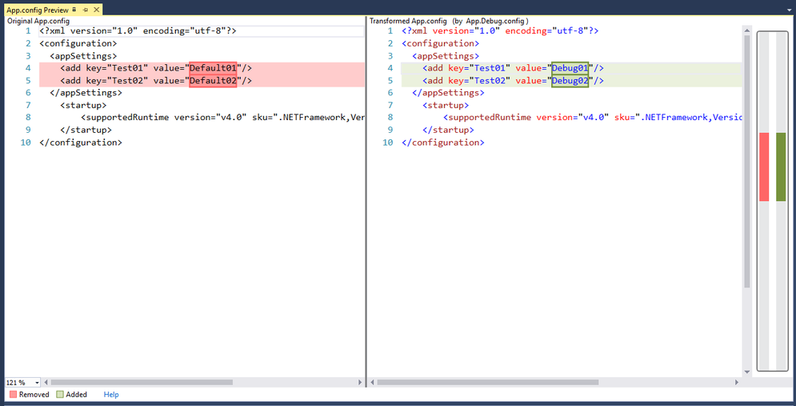
      What I was expecting though - that after I add it to the WEB-MVC project and hit "F5" (as the picture above says - the transform would be applied. 
      
      How do I make this work for WEB projects ? 
    • I was expecting this functionality as well.
  • Config transform files are hidden in VS2012 ?
    1 Posts | Last Post Tue 1:45 PM
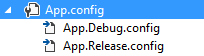
    • I'm running VS2012. After I add the transforms to either web.config or app.config, the only way to see the new transform templates is to "Show All Files" in solution Explorer. Why can't I expand the the .config files without showing all files? Am I missing a setting in VS2012 or ???
      
      Thanks
      Tony W
  • Transform based on machine name
    1 Posts | Last Post May 14, 2013
    • Hi, we are looking for a way to create different config files for different developers that work on the same solution. Is it somehow possible to transform the config file based on the machine name?
  • Build Fails
    17 Posts | Last Post May 02, 2013
    • I have WebApp I have been using  SC on successfully but after the 2.5.5 update the publish fails. I get "Could not write Destination file: access to the path******** denied.  The path is my connection.config file which as the transforms.  I remove the transforms and the build succeeds.  Is the 2.5.1 or 2.5.2 build available for download to see if the issue goes away?  I am using VS 2010
      Thx
      G
    • I've heard of this issue but have been unable to reproduce it. For a project which has this issue could you try the following. In the packages folder there is a SlowCheetah folder. Under that you will find a tools folder. Can you replace the SlowCheetah.Transforms.targets with the file at https://raw.github.com/sayedihashimi/slow-cheetah/1f90325f2d1a72f221fe116289c1a8c14c43ccfa/SlowCheetah/Resources/Install/SlowCheetah.Transforms.targets. After that close and re-open VS and see if the issue continues or not. If that fixes it I may ask you for some build logs to see what the difference is here.
    • I'm having the same problem. Worked on 2.5.3, but on 2.5.5 it fails for me. Also using VS 2012.
    • correction: VS2010
    • This seems to have worked.  I had to place the targets file under MSbuilds as I didn't have packages folder.   It did successfully build the solution and the transforms look correct.  I noticed a change of reference between the two targets files.
      G
    • Your recommendation for replacing the targets file did the trick. I saw that this file was using SlowCheetah.Tasks.dll vs SlowCheetah.Xdt.dll.
    • What version of VS are you guys running? From other reports this is happening on VS 2010 Premium. 
    • I'm using VS 2012 Premium Update 1 and 2.5.5 fails to apply the transform. Reverting back to 2.5.3 fixes the issue.  Did you want me to run any diagnostics?
    • Running VS 2010 Ultimate and just now getting the same error as reported above.  I did recently upgrade to 2.5.5 and this is the first deployment since the upgrade.
    • Sayid,
      
      This file: https://raw.git​hub.com/sayedih​ashimi/slow-che​etah/1f90325f2d​1a72f221fe11628​9c1a8c14c43ccfa​/SlowCheetah/Re​sources/Install​/SlowCheetah.Tr​ansforms.target​s
      
      It's not available.  I'm getting a 404 error on that site.
    • Has this been solved yet? I'm having the exact same problem. I have just setup xml transformation and on my first build on the build server I'm getting this access error.
      
      I'm using VS12 Update2. Changing that .targets file manually is not a solution for us because we are using package restore on the server. I don't want to check-in that slowcheetah package.
    • System: VS2010 Ultimate SP1, TFS 2010 (also build server), SlowCheetah 2.5.5
      
      On a brand new project, I added SlowCheetah 2.5.5 via NuGet to my web project.  As many others have stated, it did not build correctly when run on my MSbuild server.  It would continually error out with "... SlowCheetah.Transforms.Could not write Destination file: access to the path '(fullpath)\Application.Config' is denied."  Since I did not have a previous version also installed, I could not use the previously suggested .targets file since that requires the SlowCheetah.Tasks.dll library.
      
      Through the NuGet package manager, I removed v2.5.5 from my project and added SlowCheetah.Tasks.Unofficial instead.  After checking in all of the solution/project changes associated with switching versions and running a new build, the project built successfully.
      
      TL;DR: If you're using SlowCheetah 2.5.5 and getting the 'Destination file access denied' error, try switching to SlowCheetah.Tasks.Unofficial available in NuGet.
    • Addendum:
      
      After further testing, using SlowCheetah.Tasks.Unofficial was not correctly transforming files upon running MSBuild.  I reverted back to SlowCheetah 2.5.3.0 (via the package manager console), modified my build per http://sedodream.com/2012/12/24/SlowCheetahBuildServerSupportUpdated.aspx and everything is happy again - transforms work perfectly.
    • I'm still not able to reproduce this. I looked a log files from two different machines in which one works and the other doesn't and still was not able to see what the issue was. I was thinking that the issue was isolated to Visual Studio.
      
      This is the first that I'm hearing of this from a build server.
      
      Martin, could you help me out here? If you could that would be awesome. Could you produce a build log of a 2.5.5 project failing and then convert to 2.5.3 and succeeding?
      
      My email is sayedha@microsoft.com.
      
      Thanks,
      Sayed Ibrahim Hashimi
    • @Sayed-Ibrahim-Hashimi:
      
      Could this error be related as to whether or not you have 4.0 or 4.5 installed?
      
      I see this error on machines configured like mine using VS2010 Pro except that .NET 4.5 is installed on my and isn't installed on their machines (they have .NET 4.0 though)
    • @Sayed-Ibrahim-Hashimi:
      
      I think there might be an issue with .NET 4.5 not installed that is causing this.
      
      I did a clean install of VS2010, SP1, MVC 3, MVC4 and .NET 4.0.  The build wasn't working correctly with the MSBuild task for Slow Cheetah 2.5.5.   I then installed .NET 4.5 and the build started working fine with my setup and the MSBuild task for Slow Cheetah 2.5.5
      
      Please look into this if at all possible
    • I can confirm that this is an issue with .NET 4.5. I'm using VS2012 Professional with TFS 2010 as a build server. I checked in the SlowCheetah package and my build server got ""Could not write Destination file...." error. After installing .NET 4.5 on the build server the build is now working.
  • Add transform not appering in VS2012
    9 Posts | Last Post April 29, 2013
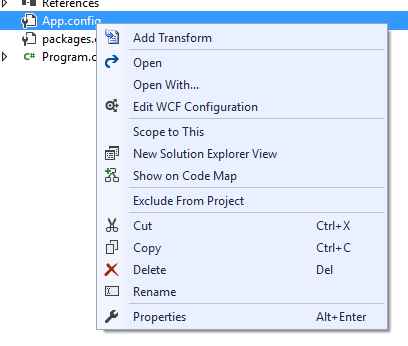
    • Hi, I'm trying to add a transform on an app.config file. When I right click the file add transform does not appear. I have tried to uninstall/install but can not get it to work. Can you plaese help?
    • That should work. If you have multiple versions of VS make sure you are installing the correct version. Try creating a new project (try a WPF project) and see if that works.
    • Same problem as Fredrik. I added a new WPF project to my sln and it still does not work.
    • OK so what's the common denominator here? Anything unique about your environment? I haven't heard much complaints about this.
    • Having the same issue as the users above.  Did anyone get this working?  I have a solution with a console app proj, a web app proj, and a test proj.  I used nuget to install SlowCheetah (2.5.5) in the console app proj.  It shows in the packages.config.  Right-clicking on my App.config file does not show Add Transform menu item.  Any help?
    • FYI-  I also just tried creating a brand new console app in VS2012.  Installed SlowCheetah from Nuget.  Same results.
    • I had only tried installing the Nuget package.  Downloading the extension from this site and installing solved my problems.  All works great.  Thanks.
    • Thanks, I think at the time you wrote the entry the NuGet package would only work with projects which had use the VS extension to add the Import. Since then I've fixed that and if you directly install the package it adds the Import.
    • Could you please elaborate on that? I just installed the VS extension and added the NuGet package instead, so that my team can use SlowCheetah without installing the extension. In doing that, the "Add Transform" disappeared.
  • How to transform files For DEBUGGING in web projects
    1 Posts | Last Post April 25, 2013
    • In the description of your tool it is said 
      "When you build your applicatoin the files are transformed and dropped into the output directory. "
      But 
      "For web projects the files are transformed ONLY when you publish or package your application."
      How can I invoked the transformation to debug web project without publish?
      
      I've asked the question on http://stackoverflow.com/questions/10332800/how-to-replace-web-config-with-transformed-for-debug-file-when-running-wap-in-vi, but haven't get a good suggestion.
  • ClickOnce problem
    2 Posts | Last Post April 24, 2013
    • Hi,
      i have a Wpf-project with SlowCheetah on board. The project include a folder with the settings.config file. It's an XML-file with different settings. I added a transform to it for the Release configuration. And it work when i build the project. With Debug build i have one config, and with release build i Have another. So far so good. But when i publish the project i always get Debug config. Can you help me?
      Some details: VS2012, SlowCheetah 2.5.5, the settings.config has Build Action=Content, and it is always copied into output. 
      There is a sample project to illustrate the problem but i don;t know how to attach it.
    • I'm not really shure what i've done but transformations don't work at all in the test project now. Nither on build nor on publish.
      
  • Can you use SlowCheetah with the Wix harvesting feature
    1 Posts | Last Post April 12, 2013
    • We are trying to use SlowCheetah with a Wix 3.7 installer project. When we try to use the Wix harvesting feature, the Wix build fails with the Heat error shown below. 
      
      We are new to SlowCheetah and also to Wix, so please accept our apologies if there is something obvious here that we are missing. Thanks in advance for any ideas and/or suggestions! 
      
      Here is the compile error received when we try to build the solution.
      
      Build error during harvesting: C:\Users\UserName\AppData\Local\Microsoft\MSBuild\SlowCheetah\v1\SlowCheetah.Transforms.targets(91,5): Could not open Transform file: Could not find file 'C:\Users\UserName\Desktop\Source\Applications\AppName\Branches\1.0.0.131\NET\MonikerInstaller\app.Debug.config'.
1 - 10 of 164 Items