
What
This package allows you to automatically transform your app.config (or any file) when you press F5 in Visual Studio. You can have different transformations based on the build configuration. This will enable you to easily have different app settings, connection strings, etc for Debug versus Release. If you want to transform other files you can do that too. Here are some other reasons why you might want to install this package.
Have you ever:
- Wanted to have different appSettings for debug and release when building your
app?
- Wanted to use different connection strings based on your build configuration
when building your app?
- Wanted to transform any XML file with a clean and simple syntax?
- Wanted to tweak WCF service configuration in a straight foward way?
- Wanted to preview your XML transform without building/publishing your app?
- Wanted to transform files in addition to web.config on publish for Web projects?
If you answered Yes to any of these then you should download this package.
How
Getting started is really simple, just install this package. Then in the solution explorer you can easily add your config transform by right-clicking and selecting Add Transform.
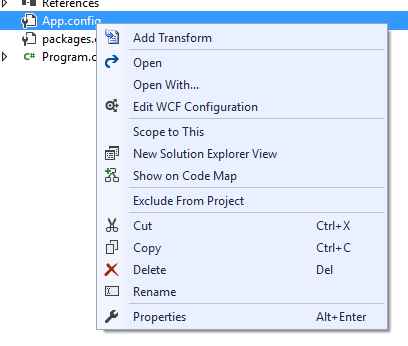
After you add the transform you will notice a transform for each build configuration.
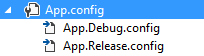
You can place your customizations inside of the transform files, for example if you want to tweak app settings and connection strings you might use the syntax shown below.
<?xml version="1.0" encoding="utf-8" ?>
<!-- For more information on using transformations see the web.comfig examples at http://go.microsoft.com/fwlink/?LinkId=214134\. -->
<configuration xmlns:xdt="http://schemas.microsoft.com/XML-Document-Transform">
    <appSettings>   <add key="appName" value="WPF Demo-Release" xdt:Transform="Replace" xdt:Locator="Match(key)"/>
        <add key="url" value="http://contoso.com/" xdt:Transform="Replace" xdt:Locator="Match(key)"/>
        <add key="email" value="release@contoso.com" xdt:Transform="Replace" xdt:Locator="Match(key)"/>
    </appSettings>
    <connectionStrings>
        <add name="RecordsDb" connectionString="db.contoso.com;Initial Catalog=RecordsDb;Integrated Security=true" xdt:Transform="Replace" xdt:Locator="Match(name)"/>
        <add name="InventoryDb" connectionString="db.constos.com;Initial Catalog=InventoryDb;Integrated Security=true" xdt:Transform="Insert" xdt:Locator="Match(name)" />
    </connectionStrings>
</configuration>
When you build your applicatoin the files are transformed and dropped into the output directory. If you are transforming the app.config then when the file is transformed it will be renamed in the output directory as usual to ensure that your application picks it up at runtime.
For web projects the files are transformed when you publish or package your application.
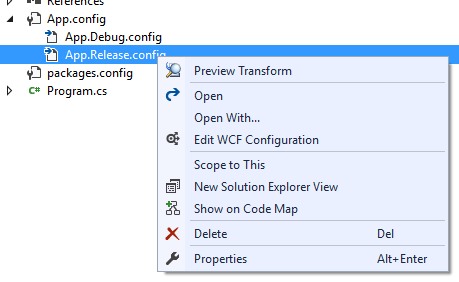
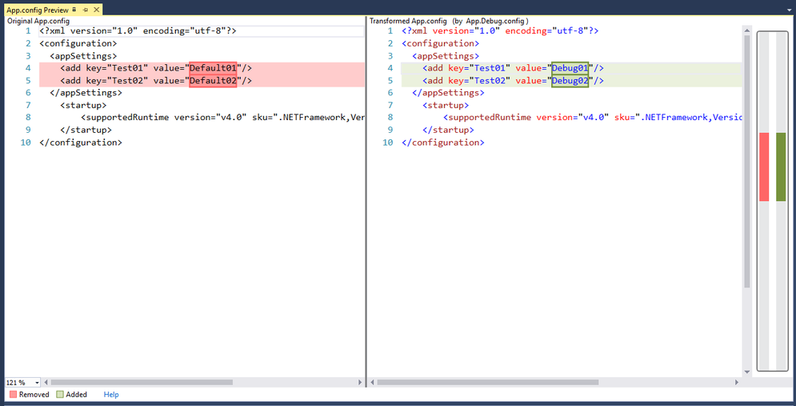
You can also quickly preview your transform using the Preview Transform context menu on the transform file.
Support for all project types
As of version 3.0.61, build-time transformations are handled by the SlowCheetah Nuget package. This means that all projects that support Nuget can now use SlowCheetah.
Getting Help
If you need some help please do not post in the QA here, instead use these methods.
- For new features or bug reports, please create an entry on our GitHub page.
Change History
- Transition to async package
- Support for VS 2019
- Nuget package fixes
3.1.69 - 7/18/2018
- Bug fixes related to Preview Transform
- Update links
- Preview transforms not associated with build configurations
- Performance improvements
- Nuget package improvements
- Support for all projects types that support Nuget packages
- Transformations for JSON files
- Auto-update project file from older SlowCheetah versions
- Other bug fixes
2.5.48 - 2/09/2017
- Adds support for Visual Studio 2015 and 2017 in addition to 2012 and 2013. Support for 2010 has been deprecated.
- More details can be found on the project release page.
2.5.15 - 7/22/2015
- Preview support for Visual Studio 2015, support for 2010-2013 can be found here
2.5.12 - 7/20/2014
- Fixed bugs related to CI builds
- Other bug fixes see for more info see closed issues
2.5.10 - 10/20/2013
- Change to check in the .targets file. This will enable a more streamlined process for build servers. For more info see the discussion on the project page.
2.5.9.1 - 10/6/2013
- Bringing back support for VS2010 (sorry guys, switching to 4.5 caused that)
2.5.9 - 10/6/2013
- Support for VS2013
2.5.8 - 9/8/2013
- Bug fix for projects using ClickOnce (and the cannot copy file error) https://github.com/sayedihashimi/slow-cheetah/issues/108
2.5.7 - 8/25/2013
- Important bug fixes
2.5.5 - 2/23/2013
- Updated to use the official XDT NuGet package
- Updated to install the SlowCheetah NuGet package by default
- This is good for team scenarios, other team members don't need to have SlowCheetah installed for the transforms to kick in
2.5.2 - 1/31/2013
- Support for executing transform for Azure Worker Roles
2.5.1 - 11/24/2012
- Bug fixes for web file system publish method
2.5 - 11/15/2012
- Update to copy referenced projects .dll.config to output path (issue #34)
- Support for web publish profiles (issue #46)
- Web support for command line file system publish (issue #24)
- Support for linked files and setup projects (issue #10)
- Bunch of bug fixes, for the full list see closed issues in 2.5
2.4.1 - 8/16/2012
- Fix for XML files not transformed on file systdm publish
2.4 - 8/15/2012
- Added support for VS 2012 RTM
- Fix for Preview command doesn't show up for all web.config transforms
- Fix for XML transforms not working with Azure SDK
- Fix for .config files do no transform in VS 2012 RC
- Fix for In web project, project File gets modified while adding transformation
- Fix for Add Transform should not show up for .settings files
- Fix for Transforms should be added as None
2.3 - 5/23/2012
- Preview support in VS 11
- Updating ClickOnce support for non-app.config file transforms
- Updating Setup projects to transform non-app.config files
- Updating Setup projects to transform Linked files
- Bug fixes
2.2 - 4/27/2012
- Support for VS 11
- Bug fixes
2.1 - 2/10/2012
- Bug fixes
2.0 - 1/29/2012
- Support for ClickOnce
- Support for setup projects
- Support for F# projects
- Support for a custom diff viewer (Tools -> Options)
- Support for XP / Windows Server 2003
- Bug fixes
1.1 - 9/8/2011
- Added support for ClickOnce
- Added support for Windows XP and Windows Server 2003
- Updated a critical bug related to XML documents with DTD elements
- Updated a bug which caused the task/targets to be overwritten too often


