New!! See a video demoing how the features of Web Essentials are ported to Visual Studio 11.
Report bugs |Suggest features | Follow on Twitter
The Web Essentials extension lets you perform common tasks much easier. This is a work in progress, and more features being added soon.
Follow me on Twitter to get up-to-date info about the frequent updates to this extension. You can also use
UserVoice to vote up new features that you would like in Web Essentials.
Features include:
Stylesheets
Live Web Preview
The Live Web Preview tool window loads your website/project in a browser and will update every time you save or build. You can turn on live editing for CSS which lets you see your CSS changes on your actual website as you type each keystroke.
Right-click your web project item in Solution Explorer and click "Live Web Preview" to show the window and load the website. You can also just type CTRL+ALT+Enter to do the same.
Vendor specific property generation
A lot of the new CSS 3 properties only work cross-browser if vendor specific properties are added. These include -moz, -webkit, -ms and -o.
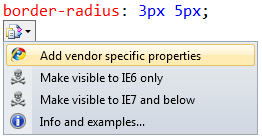
The result is the insertion of the missing vendor specific properties in the right order.
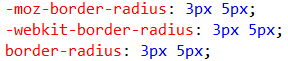
If one or more of the vendor specific properties are already present, then only the missing ones are added.
Up- and down arrows control numeric values
When the cursor is in or next to a numeric value such as 5px, .6em, 15% or just 23, you can use CTRL+UP to increase the number and CTRL+DOWN to decrease it. The feature is known from FireBug.

This works for CSS, SaSS, LESS and JavaScript files.
Embed url() references as base64 strings
This will take the referenced image and base64 encode it directly into your stylesheet. You have then eliminated an HTTP requst.
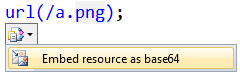
If the base64 string becomes to long, you can easily collapse it.

Comment and uncomment support
Use (CTRL+K, CTRL+C) to comment the selection and (CTRL+K, CTRL+U) to uncomment. This is the same keyboard shotcut as in the C#/VB editors.
Speed typing
Make typing much faster and easier with Speed Typing which is explained and demoed in this videohttp://madskristensen.net/post/CSS-speed-typing-for-Visual-Studio.aspx
TODO comments
A glyph in the left margin of the CSS and JS editor is shown whenever it finds the text "TODO" in any comment in the document.
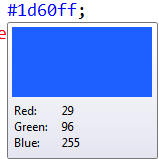
Color preview on mouse hover
Font preview on mouse hover
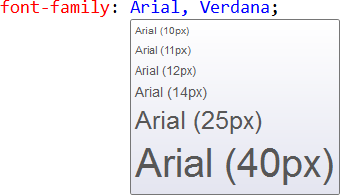
Image preview on mouse hover
Support for regions /*#region MyRegion */
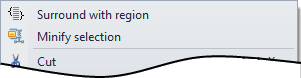
Select the text you want to surround with a region, right-click the selection and click "Surround with region". This will insert the region comments that makes it possible to collapse and expand regions as needed.

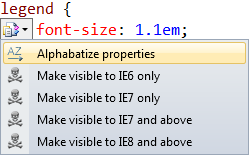
Alphabatize properties
A Smart Tag on every selector enables you to easily sort all the properties alphabetically within the rule.
Brace matching
Bracematching is now enabled for 3 types of braces: {}, [] and ()
Minify selection (removes whitespace etc.)
Will use the AjaxMin library to minify the selected text in the CSS editor
Code collapsing/outlining
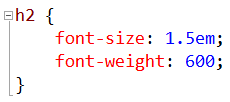
All rules and @-directives now get's code outlining which can be collapsed and expanded as needed.
Drag and drop support for imaged and fonts
Drag and image onto the editor from either Solution Explorer or your desktop and a background-image property will be inserted with the relative path to the image file.
Do the same with a font file, but in this case all font files with the same name but different extensions (.ttf, .eot, .woff, .otf) will be added to the same @font-face rule.
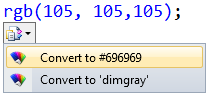
Convert easily between hex, rgb and named color values
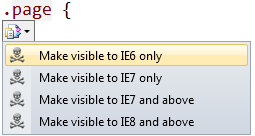
Adds SmartTags to selectors for targeting specific IE versions
Specific hacks can be used to target specific versions of IE on a selector level. These are all valid according to the W3C.
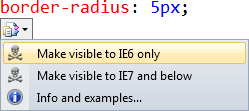
Adds SmartTags to properties for targeting IE6 & IE7
Makes it easy to apply the CSS hacks needed to target specific versions of IE.
JavaScript
Custom regions
You can add custom region by adding the following comments:
//#region MyRegion
function Example() {
}
//#endregion
Code collapsing/outlining
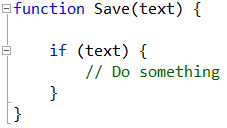
You can now collapse functions, if-statements, loops and other structures just like in C#.
Brace matching
To provide better overview over more complex functions and other structures, brace highlighting helps to quickly identify which braces belongs together.
Same-word-highlighting
All instances of the word that the caret is placed in will be highlighted. This makes it easy to see where variables are used.
Minify JavaScript
Will use the AjaxMin library to minify the selected text in the JavaScript editor
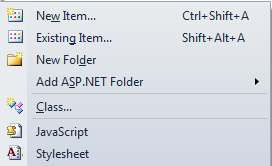
Right-click folder now includes Add JavaScript and Stylesheets
HTML
Drag 'n drop user control in the editor
When you drag a user control from Solution explorer onto a page, master page or another user control, you will now get a correctly registered and inserted reference. Before it would create an <a> element pointing to the user control instead of adding it as expected.
Drag and drop support for audio and video files
Change log
Version 2.7
- Fixed color preview in comments and selectors
- Fixed issue with converting image references to base64 data URI's
- Fixed issue that prevented Live Preview on build to be turned off
- Improved color span mapping
Version 2.6
- Speed typing added for CSS
- Bug fixes and performance improvements
Version 2.5
- Hex color preview fix
- Added vendor specific property generation
- Added CTRL+UP/DOWN modification of numeric values
- General performance improvements and bug fixes/tweaks
Version 2.4
- Performance improvements
- SaSS support with the Web Workbench extension
Version 2.3
- Major performance improvements
- Improved regular expression for hex colors
Version 2.2
- Added support for most of the features to .less files
- Added brace matching and same-word-highlighting to JavaScript files
Version 2.1
- Fixed the Live Web Preview to use IE9 rendering mode
- Fixed a bug when uncommenting CSS that isn't a comment
Version 2.0
- Added experimental support for cleaning and merging CSS rules
- Fixed a bug when named colors didn't get the color glyph
- Fixed an encoding issue when creating new .js and .css files
Version 1.9
- Added support for alphabetically sorting of CSS propeties
Version 1.8
- Fixed bug that opens a dialog box (turns out to be a VS bug, but I did a workaround)
- Made various performance improvements
Version 1.7
- Added support for user control drag 'n drop
Version 1.6
- Added the Live Web Preview tool window
- Added support TODO comments in both the CSS and JS editor
- Did substantial performance improvements
Version 1.5
- Added support for outlining in JavaScript
- Fixed various bugs for website project types
Version 1.4
- Added custom region support to JavaScript
- Fixed a crashing bug
Version 1.3
- Added color squares next to any hex, rgb and named color
- Fixed various bugs
Version 1.2.1
- Removed the same-word-highlighting until it can be controlled by VS color schemes
Version 1.2
- Added support for commenting (CTRL+K, CTRL+C) and uncommenting (CTRL+K, CTRL+U)
Version 1.1
- Added support for collapsing long base64 strings
- Fixed minor bugs
Version 1.0.1
- Fixed various bugs
- Improved reliability and performance
Version 1.0
- Added font and image preview on mouse hover
- Added minification support for CSS and JavaScript
- Added support for custom regions
- Fixed a bug in the base64 image generation
Version 0.9
- Added a "More info..." smart tag to CSS properties
Version 0.8
- Changed IE hack icons to be less obtrusive
- Fixed issue with hex color preview
Version 0.7.1
- Fixed an issue with the hover handler
Version 0.7
- Added color preview on mouse hover
Version 0.6
- Fixed a bug with image drag for CSS
- Drag and drop support for audio and video files in the HTML editor
Version 0.5
- Same word highlighting
- Code collapsing/outlining
- Drag and drop support for images and font files in the CSS editor
- Brace matching
Version 0.4
- Added hack glyphs to the left margin of the editor
Version 0.3.2
- Added selector hack support
- Added property hack support


