Unsurpassed Code Documentation comment authoring
C# - C++/CLI - C++ - Java - JavaScript - TypeScript - PHP - Python - Visual Basic
Better Docs - Better Intellisense - More time to write code!
As featured on Scott Hanselman's 2014 Ultimate Developer and Power Users Tools List.
Create top quality source-code documentation with minimal effort.
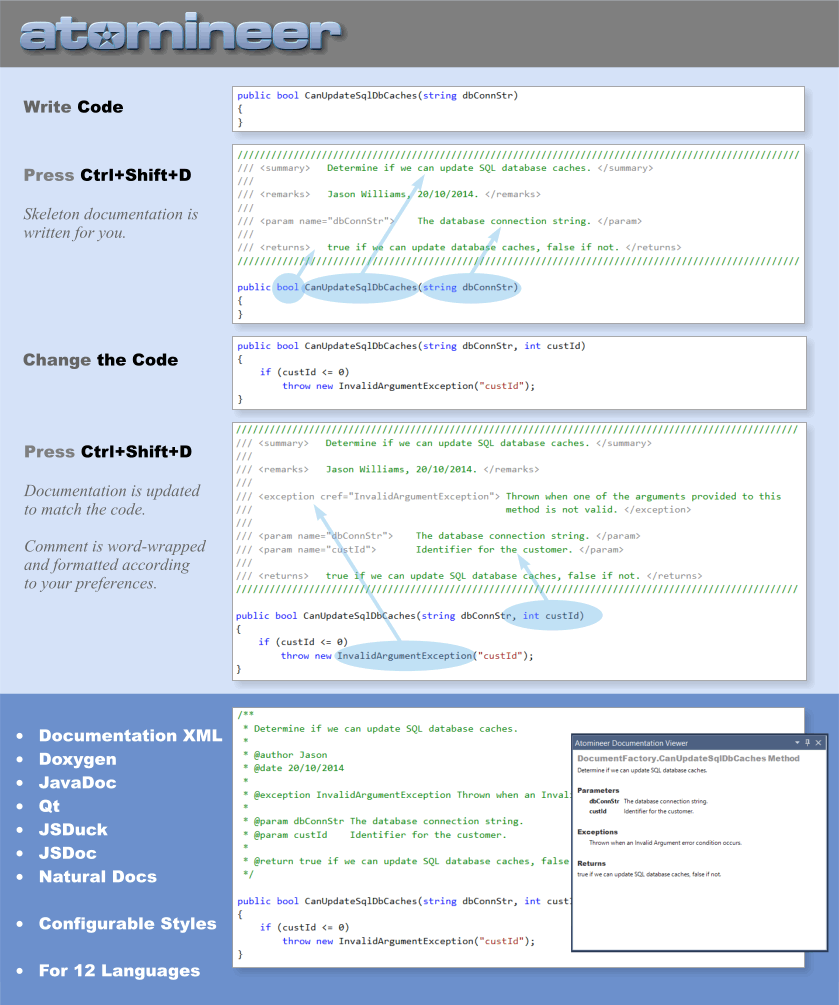
With a simple keypress or menu command, the Extension will instantly:
Create Documentation Xml, Doxygen, Qt, JavaDoc, JSDoc, JSDuck, or Natural Docs format documentation comments for one or all code elements (file, namespace, class, interface, template, generic, annotation, struct, union, enum, variable, property, event, delegate, method, extension-method, #define) in Visual Basic, C#, C++/CLI, C++, C, Java, TypeScript, JavaScript, JScript, Python, PHP & Unrealscript code.
Generate meaningful and readable documentation for code elements: summary, descriptions for parameters, type parameters and return values, listing exceptions thrown in a method, etc. Thousands of description generating rules provide a great start to your documentation.
Update documentation comments to keep them in sync with code changes - alterations to parameters, type parameters, exceptions thrown in a method, property/indexer set/get descriptions, code indentation, etc are all instantly brought up to date.
Intelligent automatic duplication of existing documentation for overrides of interface and base class methods, throughout groups of overloaded methods, and across related parameters within a class to maximise documentation consistency with minimal effort.
Optional and configurable helpers provide live documentation highlighting and typing aids, abbreviation expansion, whitespace control, word wrapping, punctuation correction, user-defined block layout and entry ordering, enforce 'legal' documentation entries and auto-correct invalid XML/HTML formatting.
An instant rich-text Documentation Viewer allows you to review and browse documentation in a human-readable form.
Extensive documentation conversion helpers make it easy to swiftly update legacy documentation from any format to a clean new Doxygen or Documentation XML format, so you can leverage the most popular documentation tools and Visual Studio's syntax coloring and intellisense systems without losing your existing docs.
Create/Update/Convert documentation comments for all code elements in a Solution, Project, Open Files, One File, or code Scope in a single pass for swift and easy documentation updating and conversions across large codebases. (This can optionally be restricted to process particular filenames, skip read-only files, add documentation for public, protected, and/or internal methods only, etc)
Check spelling as you type in comments (not currently included in free trial)
Align code (such as assignments, parameters, operators and tables of data values) into columns across blocks of similar lines to enhance readability and clarity.
Instantly word-wrap the text in any // or /* .. */ comment (C++, C#, Java, Typescript, JavaScript), any ' comment (VB), or any comment (XML, XAML)
Copy code to the clipboard in a clean (plain text) format with all unnecessary indentation removed. Ideal when pasting code examples into documents or emails.
The extension supports Visual Studio Enterprise, Professional and Community (2005 -2013), for C#, Visual Basic, C, C++, C++/CLI, Java, JavaScript, TypeScript, JScript, Python, UnrealScript, on Windows XP, Vista, 7, 8, 10 (32 & 64-bit).
Atomineer Pro Documentation is also available for Visual Studio 2022, 2019, 2017, & 2015
Visit atomineerutils.com for full details and a 30-day free trial download.
| |


