TeamPilgrim

Free

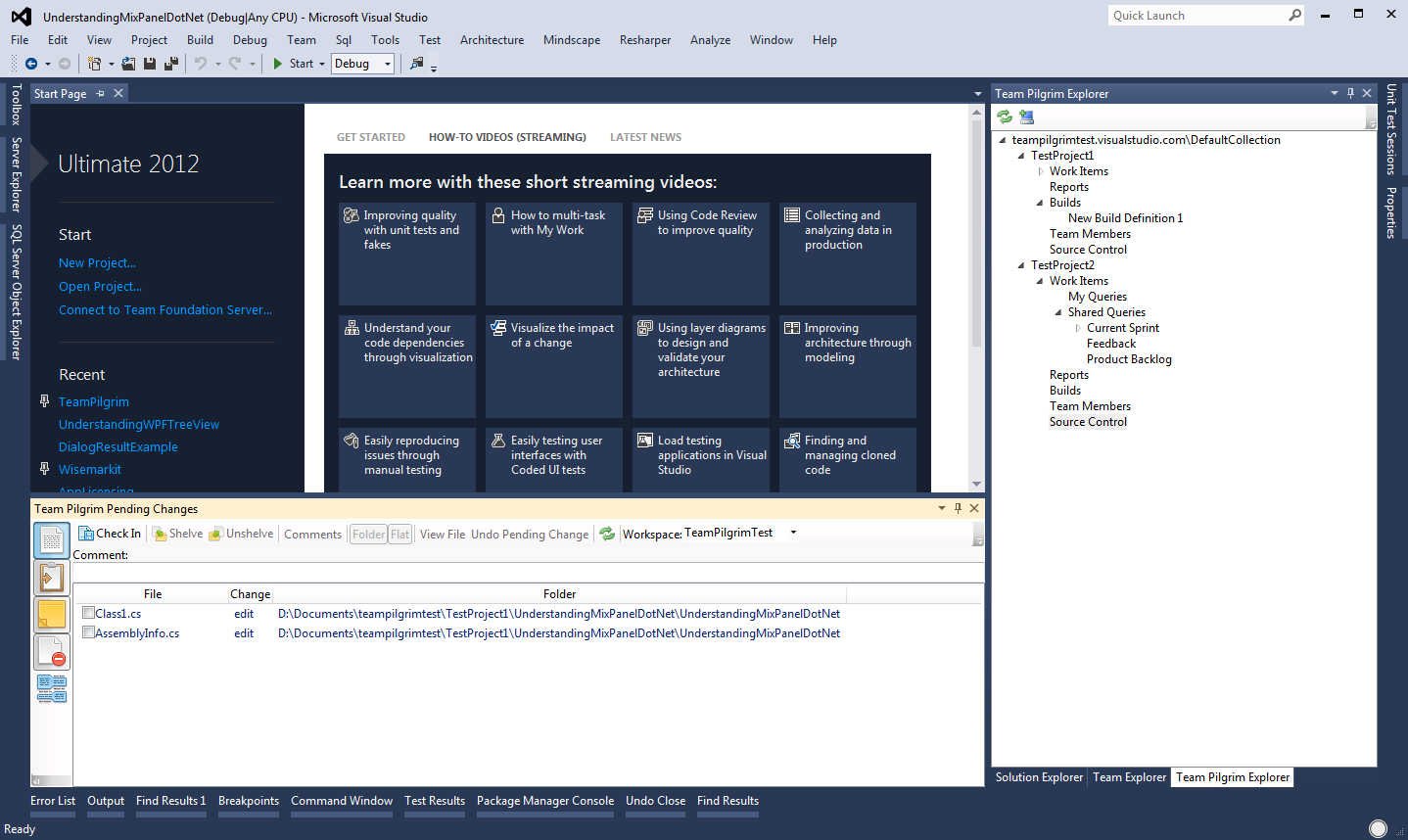
A replacement for Visual Studio 2012's Team Explorer inspired by the Visual Studio 2010's Team Explorer

(23) Review
Visual Studio
2012
Download (3,871)
1/31/2013
0.2.1
E-mail Twitter del.icio.us Digg Facebook
Add To Favorites
Description
Reviews (23)
Q and A (11)
Sign in to Write a Review
Sort By:

by EdmondSeattle | Fri 7:41 PM

Pending changes window works great. Nice to be able to sort alphabetically again. Kudos.

by agraham | June 12 2013

This would be cool but "Compare" doesn't work which unfortunately makes it unusable.
If I right-click a file and select "Compare" the menu stays open with the Compare option highlighted and nothing happens.

by G Snider | April 30 2013

Pro:
The pending changes window is way better than the VS2012 implementation.

Deciding Con:
After installing this, I was not able to merge branches any longer.

I kept getting "Error: This BackgroundWorker is currently busy and cannot run multiple tasks concurrently."

After disabling this add-on, it started to work again.

by B. Bauer | April 11 2013

Thank you! You rule.

by Mike Stortz1 | March 15 2013

Both "Compare... With Latest Version" and "Compare... With Workspace Version" from the Pending Changes window does not return the same results as <pertinent file>, right-click, Source Control, Compare, Latest Version, at least with TFS. :(

So, I just double click to open the file, and Compare from there.

Other than that, very nice.

by MBMBMBMBMBMB | February 26 2013

The latest version fixed a problem where no files were listed in the Pilgrim. I was forced to use the VS pending changes UI to check in files (painful).

If you get a chance, a button to compare files would be nice (it's in the VS2010 version). I know "compare" is in the right click menu, but if I wanted to use right click menus, I can us the Team Explore/Pending Changes UI.

Thanks again for the update. It's a real service to others...

by thnk2wn | January 14 2013

Pretty nice. I can't seem to resize the Comment box / file list in Pending Changes window but other than that it looks good so far. Thanks for the good support.

Stanley Goldman January 24 2013
| Edit |
Delete

Thanks for the feedback.
It's not you, that functionality isn't supported yet. But I will get it in there soon.

-Stan

by Luke Page | January 04 2013

I have windows 8/Visual Studio 2012 Premium. TeamPilgrim 0.1.9. After installing, I try to add either of the windows and I get a loading symbol that never goes away and I have to force close visual studio.

Have you considered putting the source on github? Then we can raise bugs and contribute instead of adding reviews with stars. If you point me how to get the log I can send it to you.

Stanley Goldman January 09 2013
| Edit |
Delete

Woah... That sounds crazy scary; sorry for any issues that may have caused. But I'm a bit confused, In my development experience, Visual Studio seems rather apt to cancel execution of any misoperating extensions.

The log can be found at:
C:\Users\sgoldman\AppData\Local\Microsoft\VisualStudio\11.0\Extensions\[Random]\teampilgrim.log

I still consider open sourcing this project, I'm just not sure yet.

As far as a better forum for bug reports, the Q&A section above works great. It's just that everyone starts writing where they see the most activity. I'll be sure to put a banner on the main tab, hopefully that will direct users to the Q&A section better.

by SamCPP | January 04 2013

Thanks for writing the plugin... will be watching this space with interest! Looking forward to full shelve, unshelve support!

Just using the extension now. The comments dialog should be multi-line. I don't know offhand what the character limit is.

Stanley Goldman January 09 2013
| Edit |
Delete

Thanks for the comments. Unshelve is getting there, its just so detailed.

Good point, I had a few other display issues in the beginning. That fell to the wayside. I'll be sure to get that in the next release as well.

by Nick Fitton | December 21 2012

I really appreciate the development, and I'd love to use it.

But checkin does not work with our TFS Powertools policy "Checkin comments".

I press the checkin button, no error message, but the checkin did not work and all pending changes remain unchanged. If I checkin from VS, the TeamPilgrim window refreshes to reflect the new pending changes.

In the meantime I will try some workarounds and modify my rating if we get this working. Thanks for your efforts!!

Stanley Goldman December 21 2012
| Edit |
Delete

Hey, thanks for trying it out.

I'm a bit surprised though, as I thought that was working. I'll take a look soon and see what I can do.

Edit 12/21/12:
My tests with the checkin policy are successful. I'd like to know more about the bug you are experiencing, please get in touch with me on twitter @TeamPilgrim

by Richard Guion | December 13 2012

Good work, Stan. I will give it 4 stars even though it needs some work. This extension is certainly needed. If you continue to improve I will increase the rating.

Besides the performance improvements and the need for a wait cursor, I see the need for the following:

1. Compare Latest button on Pending Changes window toolbar. There was a button in 2010 that allowed you to compare your pending file against the latest from the server.

2. Unshelve button next to the Shelve button on Pending Changes window toolbar. I went nuts last night trying to find unshelve in the Team Explorer and someone showed me it was in the Advanced sub menu. Arggh!

Stanley Goldman December 14 2012
| Edit |
Delete

Hey, Thanks for the 4 stars. It needs work for sure, but its always better to deliver something early...

The compare latest button, wasn't the highest on my list of TODOs, but now that I know that someone actually wants it, you'll have it sooner than later.

LOL, When I had to rediscover where Unshelve was for the fifth time, is when I decided that someone has to do something about this!

That said, Unshelve is my current feature target.
Stay tuned.

-Stan

by Infinitelurker | December 06 2012

I was about to start writing my own extension to do just this. This is great - thank you so much!

Sorting on click of column headings, start up speed improvements, and theme support will be icing on the cake!

Stanley Goldman December 15 2012
| Edit |
Delete

Thanks dude. I'm happy everyone is taking to it.

Those items are on my radar, look for them in future releases. And please keep the list coming.

Edit 12/15/12:
Improvements to the column headings are comings in the next release.

by Tushar G. Walavalkar | December 06 2012

Great work Stan.

But I wonder why people complain about the Pending Changes window. I have been using it from day 1 by going to View Pending Windows. But I use SVN/AnkhSVN for source control. May be TFS files don't get listed there. My friends from this community (you all) should clear my ignorance.

I found these bugs:
1. The Explorer shows me all the projects in TFS whether or not I have access to them. Is it possible to show just those to which I have access?

2. The Explorer also doesn't show me the Documents node. That is the one I use the most after Work Items.

3. The initial startup is slow (I know you know about it) and so you could wrap that code in a WaitCursor object. Check out http://www.codeproject.com/Articles/6287/WaitCursor-hack-using-using . This is a very clean design.

All the best friend !

Stanley Goldman December 07 2012
| Edit |
Delete

Hi Tushar, thanks for the review.

I'm not sure which window is View Pending Windows. I'm pretty sure you are talking about a different source control plugin at that point.

1. Thanks! I hadn't considered that yet... I will have to look at that.

2. The Documents node... are you referring to the Reports node? If so then yes the reports node is not yet supported, until we do I will remove it from the explorer as I'm sure it is misleading.

3. Performance is something I'm always looking to improve. I have a few ideas in mind.

Thanks for the support.

by ZarekP | December 05 2012

Looks good so far, some slight delays in the UI (a slight delay when you have multiple files selected, and you check one and then it checks all of them).

That being said, it seems to be very usable, and is exactly what I was looking for. I could easily check only the files I wanted to deal with and check them in.

Minor feature request: implement a dark theme to match the VS 2012 dark theme, as this looks a bit out of place on the dark theme.

Looking forward to shelve & unshelve working!

Stanley Goldman December 05 2012
| Edit |
Delete

Thanks.

That's a good catch, I'll see what I can do about improving the response there. Check-List-Grids aren't native to WPF and my attempt at one leaves a lot of room for improvement.

Ideally, I'd like TeamPilgrim to use the theme settings from Visual Studio. I use the light theme, but I imagine if you are using the dark theme it is a large eyesore. I'll see what I can do about it.

Shelve and Unshelve are BEASTS!... But I'm happy to say I'm testing Shelve functionality now. Hopefully you guys will get it next week.

Stay tuned.

by DavidAir | December 05 2012

Fantastic, thank you so much! I was going to try and write something like that myself, so unhappy I was with the new Pending Changes window, but this is awesome. Keep up the good job!

Stanley Goldman December 05 2012
| Edit |
Delete

Thanks for the 5 stars.

by amsmatt1 | November 29 2012

Let me start by saying this is great! The 2012 pending changes window, by default, is utterly broken (I don't need to see the hierarchy, its too clumsy to actually use with any speed).

My only complaint so far, is I wish you could have more configuration options for this extension... I want TeamPilgrim to completely take over the check-in buttons in 2012.

I really wish there was a "revert to 2010" interface button in 2012 .. but this, combined with VSCommands, and the Theme Editor.. its getting closer to 2010.

Thanks for the continued effort!

Stanley Goldman December 01 2012
| Edit |
Delete

I think for everyone that tries this extension, you are preaching to the choir. It's why I started this project.

I just got my first configuration option. Which really comes from something else that used to bother me about Visual Studio 2010.

http://social.msdn.microsoft.com/Forums/en-US/tfsgeneral/thread/3629326e-a858-41a7-bafa-f5e4233a7bba/

At the moment though, I'm not too sure what else I could make configuration for you. I'd be happy to hear any suggestions you may have.

by smackey330 | November 28 2012

This is the best extension for VS2012.

Stanley Goldman November 28 2012
| Edit |
Delete

Thanks dude, but don't stop here... go tell twitter ;)

I don't know that I've earned the "best extension" title yet, but I plan on getting there. Thanks for the 5 stars.

by Will3 | November 26 2012

Looks great. Wish we could do a "filter by solution", so only the items that belong to the currently opened solution could be seen.

Stanley Goldman November 29 2012
| Edit |
Delete

Thanks man.

I plan on adding that functionality to the pending changes window soon. Right now my focus is Shelve/UnShelve changes. Little by little we will get there.

Edit 11/29/12:
Got the functionality built, you will see it in the next release.

by BimmerJimmer | November 21 2012

Great stuff, you saved the VS2012 experience for me.

Look forward to the updates...

Stanley Goldman November 23 2012
| Edit |
Delete

Thanks.

I plan on keeping the updates coming. Follow me on twitter.. @TeamPilgrim

by themipper | November 21 2012

Exactly what I was looking for.
Can you change the workspace selector to default to the local machine workspace?

Stanley Goldman December 01 2012
| Edit |
Delete

Thanks for the 5 stars man. I'm glad to hear it works for you.

I'll increase the number of workspaces I use locally, hopefully I can find the bug you are talking about.

Edit 11/30/12:
Cool, I caught what you were talking about, I also found a bug with the workspace selector when changing servers. Look for it in the next release!

1 - 20 of 23 Items   
Sign in to Start a Discussion


  • Check-in crashes VS2012
    3 Posts | Last Post April 29, 2013
    • Hi,
      
      When I checkin code with TeamPilgrim Pending Changes window, it crashes VS2012 and restarting.
      
      but the check-in perform successfully.
      
      On another issue,
      
      After writing Reviewer Name and click TAB it send the focus to the top left square and not to next label / textbox in the same screen.
    • Here you can see the log:
      http://pastebin.com/DzPVC1Y4
      
      Thanks in advance,
      
      Lior
    • Exact same problem here.  
      log: http://pastebin.com/XCPDvAmM
  • Order of Build
    1 Posts | Last Post April 19, 2013
    • I really like the old school team explorer.  This is a great.  Can I put in a  request to get the builds to list out alphabetically?  Thanks, Nate
  • Exception has been thrown by the target of an invocation
    1 Posts | Last Post February 25, 2013
    • I can use TeamPilgrim at my home machine which is not included into any domain but connected to TFS server via VPN. However, i do have an exception at my work machine which is in domain. I wrote this information to be helpful for the solution.
      
      By the way thank you for developing this amazing plugin :)
      
      2013-02-25 16:37:35.2108   1 TeamPilgrimPackage DEBUG Start Constructor 
      2013-02-25 16:37:35.2108   1 TeamPilgrimPackage DEBUG Start Constructor 
      2013-02-25 16:37:35.2228   1 TeamPilgrimPackage DEBUG End Constructor 
      2013-02-25 16:37:35.2228   1 TeamPilgrimPackage DEBUG End Constructor 
      2013-02-25 16:37:35.2228   1 TeamPilgrimPackage INFO Initialization: 0.2.1 
      2013-02-25 16:37:35.2228   1 TeamPilgrimPackage INFO Initialization: 0.2.1 
      2013-02-25 16:37:35.2228   1 TeamPilgrimPackage INFO Initialization: 0.2.1 
      2013-02-25 16:37:35.2368   1 TeamPilgrimPackage DEBUG Start First Pass Initialization 
      2013-02-25 16:37:35.2368   1 TeamPilgrimPackage DEBUG Start First Pass Initialization 
      2013-02-25 16:37:35.2368   1 TeamPilgrimPackage DEBUG End First Pass Initialization 
      2013-02-25 16:37:35.2368   1 TeamPilgrimPackage DEBUG End First Pass Initialization 
      2013-02-25 16:37:35.2368   1 TeamPilgrimPackage DEBUG Start Second Pass Initialization 
      2013-02-25 16:37:35.2368   1 TeamPilgrimPackage DEBUG Start Second Pass Initialization 
      2013-02-25 16:37:35.2368   1 TeamPilgrimPackage TRACE IVsExtensibility: True 
      2013-02-25 16:37:35.2529   1 TeamPilgrimPackage TRACE IVsSolution: True 
      2013-02-25 16:37:35.2529   1 TeamPilgrimPackage TRACE Dte2: True 
      2013-02-25 16:37:35.3754   1 TeamPilgrimPackage DEBUG End Second Pass Initialization 
      2013-02-25 16:37:35.3754   1 TeamPilgrimPackage DEBUG End Second Pass Initialization 
      2013-02-25 16:37:35.4315   1 TeamPilgrimPackage TRACE OnShellPropertyChange Property:-9058, Value:True 
      2013-02-25 16:37:36.4438   1 TeamPilgrimPackage TRACE OnShellPropertyChange Property:-9058, Value:False 
  • Gated Checkin
    1 Posts | Last Post February 12, 2013
    • Is gated checkin not supported? Nothing happens when I try to click the "Checkin" button.
  • Getting error when i choose Team Pilgrim Pending Changes...
    3 Posts | Last Post January 29, 2013
    • Hi...
      I really didnt like the 2012 VS pending changes window. I do think, still, that the one of 2010 is better and simple.
      Although, when i click Team Pilgrim Pending Changes, i am getting this error:
      "The TeamPilgrimPackage did not load correctly.
      The problem may have been caused by a configuration change or by the installation of another extenstion.
      U get more information by examining the file....
      ActivityLog.xml
      
      Thanks in advance.
      Regards,
      Leo.
    • Hey 75Leo,
      
      Thanks for trying out TeamPilgrim and thanks for the bug report.
      
      There is a current bug where if you have pending changes in your workspace when you initialize TeamPilgrim, it will crash, until we get that bug fixed, try dealing with your pending changes first with the standard tools. After that TeamPilgrim will work fine with changes you make.
      
      Let me know if that workaround works for you.
      -Stan
    • Thanks a lot for the reply!
  • "Comment" field in Team Pilgrim Pending Changes
    2 Posts | Last Post January 29, 2013
    • I can not re-size "comment" text box in pending changes.  I quess , it is forgotten.
    • Hi Ali,
      
      I guess the workaround is working for you. Good.
      
      As for the resizeable and multi-line comments,
      It is not forgotten. It is something I plan on adding.
      
      -Stan
      
      P.S.
      WPF isn't always so fun. ;)
  • Error loading extension on VS2012 start
    2 Posts | Last Post January 29, 2013
    • activityLog.xml:
      
       <entry>
          <record>809</record>
          <time>2013/01/28 15:13:19.271</time>
          <type>Information</type>
          <source>VisualStudio</source>
          <description>Entering function CVsPackageInfo::HrInstantiatePackage</description>
          <guid>{F56B8666-3EF2-46E5-AC26-8AA0EFE1F484}</guid>
        </entry>
        <entry>
          <record>810</record>
          <time>2013/01/28 15:13:19.271</time>
          <type>Warning</type>
          <source>VisualStudio</source>
          <description>Unexpected system error mode before loading package [TeamPilgrimPackage]</description>
          <guid>{F56B8666-3EF2-46E5-AC26-8AA0EFE1F484}</guid>
        </entry>
        <entry>
          <record>811</record>
          <time>2013/01/28 15:13:19.271</time>
          <type>Information</type>
          <source>VisualStudio</source>
          <description>Begin package load [TeamPilgrimPackage]</description>
          <guid>{F56B8666-3EF2-46E5-AC26-8AA0EFE1F484}</guid>
        </entry>
        <entry>
          <record>812</record>
          <time>2013/01/28 15:13:30.719</time>
          <type>Error</type>
          <source>VisualStudio</source>
          <description>SetSite failed for package [TeamPilgrimPackage]</description>
          <guid>{F56B8666-3EF2-46E5-AC26-8AA0EFE1F484}</guid>
          <hr>80131604</hr>
          <errorinfo>Exception has been thrown by the target of an invocation.</errorinfo>
        </entry>
        <entry>
          <record>813</record>
          <time>2013/01/28 15:13:30.720</time>
          <type>Error</type>
          <source>VisualStudio</source>
          <description>End package load [TeamPilgrimPackage]</description>
          <guid>{F56B8666-3EF2-46E5-AC26-8AA0EFE1F484}</guid>
          <hr>80131604</hr>
          <errorinfo>Exception has been thrown by the target of an invocation.</errorinfo>
        </entry>
      </activity>
      
    • Hey tomer.rt,
      
      Thanks for the bug report, but that is the wrong log file.
      Let me know if you see the one at the expected location.
      
      C:\Users\[Username]\AppData\Local\Microsoft\VisualStudio\11.0\Extensions\[Random]\teampilgrim.log
      
      Also,
      There is a current bug in TeamPilgrim. As a workaround, you cannot go into TeamPilgrim with pending changes in your workspace. Let me know if the workaround does it for you.
      
      -Stan 
  • Loading bug
    9 Posts | Last Post January 26, 2013
    • So as I said, it just hangs with a wait cursor. the log says this...
      
      2013-01-14 10:01:49.3271 TeamPilgrimPackage DEBUG Start Constructor 
      2013-01-14 10:01:49.3739 TeamPilgrimPackage DEBUG End Constructor 
      2013-01-14 10:01:49.3896 TeamPilgrimPackage INFO Initialization: 0.2.0 
      2013-01-14 10:01:49.3896 TeamPilgrimPackage DEBUG Start First Pass Initialization 
      2013-01-14 10:01:49.3896 TeamPilgrimPackage DEBUG End First Pass Initialization 
      2013-01-14 10:01:49.3896 TeamPilgrimPackage DEBUG Start Second Pass Initialization 
      
    • Hey Luke, Thanks for coming back, but sorry to disappoint.
      
      The log is a major clue that I didn't have before.
      
      Do you have a twitter or an email where I could send you a debug build?
      
      -Stan
    • Here is a build that has a bit extra logging in the package initialization step, as well as being configured for a more detailed logging level.
      
      You will have to uninstall the current version first.
      
      https://www.dropbox.com/sh/3ss5n5zcu46lawo/IA0SOlBEeA
      
      Luke, or anyone else having problems during initialization is welcome to try this out.
      
      -Stan
    • I'm afraid I cannot try it out, since access to dropbox is blocked. I can access your site and I might be able to download it from there (depending on whether it thinks vsix is a binary)
    • my email is my name with .a. instead of the space, at gmail.com
    • Had the same issue and installed your VSIX. Here's what gets returned in teampilgrim.log :
      
      2013-01-22 17:09:50.8732 WorkspaceServiceModel TRACE EvaluateCheckIn 
      2013-01-22 17:09:50.9022 TeamPilgrimPackage FATAL Second Pass Initialization 
      System.Reflection.TargetInvocationException: Exception has been thrown by the target of an invocation. ---> System.Reflection.TargetInvocationException: Exception has been thrown by the target of an invocation. ---> System.ArgumentNullException: Value cannot be null.
      Parameter name: source
         at System.Linq.Enumerable.Where[TSource](IEnumerable`1 source, Func`2 predicate)
         at JustAProgrammer.TeamPilgrim.VisualStudio.Model.VersionControl.WorkspaceServiceModel.EvaluateCheckIn()
      
      [... rest of stack trace ...]
      
      [Int32 Microsoft.VisualStudio.Shell.Interop.IVsPackage.SetSite(Microsoft.VisualStudio.OLE.Interop.IServiceProvider)] => [Void Initialize()] => [Void CompletePackageInitialization()]
      2013-01-22 17:09:50.9672 TeamPilgrimPackage TRACE OnShellPropertyChange Property:-9058, Value:True 
      
      Hope it helps,
      Dominic
    • Hey Dominic,
      
      Thanks.
      That definitely helps a lot.
      
      I should be able to track down this issue for the next release.
      
      -Stan
    • It took me a bit to figure out how to reproduce the issue. Now that I have I can definitely say it will be fixed in the next release.
      
      I'm going to explain what causes the bug, and you can make some changes in the way you work with TeamPilgrim until then.
      
      The bug occurs when TeamPilgrm is initiated AFTER the solution is open AND IF you have pending changes.
      
      If you look at one of TeamPilgrim dialogs before you open the solution. TeamPilgrim will be properly initialized, and you can continue working.
      
      Let me know if this works out for you.
      
      -Stan
    • Nope, I completely spoke too soon.
      
      If you have pending changes when you initiate TeamPilgrim, you will definitely incur the error. I'll get this fixed ASAP.
      
      -Stan
  • It worked only once
    3 Posts | Last Post January 25, 2013
    • 2013-01-25 13:02:54.6952 WorkspaceServiceModel TRACE RefreshPendingChanges 
      2013-01-25 13:02:54.7264 WorkspaceServiceModel TRACE PendingChangesOnCollectionChanged 
      2013-01-25 13:02:54.7264 WorkspaceServiceModel TRACE PopulateSelectedPendingChangesSummary 
      2013-01-25 13:02:54.7420 WorkspaceServiceModel TRACE EvaluateCheckIn 
      2013-01-25 13:02:54.8355 TeamPilgrimPackage FATAL Second Pass Initialization 
      System.Reflection.TargetInvocationException: Exception has been thrown by 
    • System.Reflection.TargetInvocationException: Exception has been thrown by the target of an invocation. ---> System.Reflection.TargetInvocationException: Exception has been thrown by the target of an invocation. ---> System.ArgumentNullException: Value cannot be null.
      Parameter name: source
         at System.Linq.Enumerable.Where[TSource](IEnumerable`1 source, Func`2 predicate)
         at JustAProgrammer.TeamPilgrim.VisualStudio.Model.VersionControl.WorkspaceServiceModel.EvaluateCheckIn()
         --- End of inner exception stack trace ---
         at System.RuntimeMethodHandle.InvokeMethod(Object target, Object[] arguments, Signature sig, Boolean constructor)
         at System.Reflection.RuntimeMethodInfo.UnsafeInvokeInternal(Object obj, Object[] parameters, Object[] arguments)
         at System.Reflection.RuntimeMethodInfo.Invoke(Object obj, BindingFlags invokeAttr, Binder binder, Object[] parameters, CultureInfo culture)
         at GalaSoft.MvvmLight.Helpers.WeakAction.Execute()
         at GalaSoft.MvvmLight.Command.RelayCommand.Execute(Object parameter)
         at JustAProgrammer.TeamPilgrim.VisualStudio.Model.VersionControl.WorkspaceServiceModel.PendingChangesOnCollectionChanged()
         at JustAProgrammer.TeamPilgrim.VisualStudio.Model.VersionControl.WorkspaceServiceModel.RefreshPendingChanges()
         --- End of inner exception stack trace ---
         at System.RuntimeMethodHandle.InvokeMethod(Object target, Object[] arguments, Signature sig, Boolean constructor)
         at System.Reflection.RuntimeMethodInfo.UnsafeInvokeInternal(Object obj, Object[] parameters, Object[] arguments)
         at System.Reflection.RuntimeMethodInfo.Invoke(Object obj, BindingFlags invokeAttr, Binder binder, Object[] parameters, CultureInfo culture)
         at GalaSoft.MvvmLight.Helpers.WeakAction.Execute()
         at GalaSoft.MvvmLight.Command.RelayCommand.Execute(Object parameter)
         at JustAProgrammer.TeamPilgrim.VisualStudio.Model.VersionControl.WorkspaceServiceModel.set_SolutionIsOpen(Boolean value)
         at JustAProgrammer.TeamPilgrim.VisualStudio.Model.Vers
    • Hey Ali,
      
      Thanks for the bug report, it is the same as Dominic below.
      I'll be sure to get it fixed in the next release.
      
      -Stan
  • Pre-select last selected query in project\query popup
    2 Posts | Last Post January 15, 2013
    • Stenley, 
      
      I needed more than 140 chars to explain so I'm posting here. I understand that the last 5 queries are saved in the drop down. That's great!. The problem is, when one needs to select a new query and there are a lot of projects in TFS it takes time to re-find place in the project\query tree. The requested feature is to set the last selected query (or project) in the tree as the selected item. Since most likely the new query is in the same area as the last selected one it will be easy to find it.
      
      Let me know if you have any questions and thank you for a great plugin.
      
      Roman
    • Hey Roman,
      
      I understand, and it makes sense. I'll try to get that in place soon.
      
      -Stan


1 - 10 of 11 Items