TFS Administrators Toolkit for VS 2012

Free

A collection of tools to assist the TFS Administrator

(6) Review
Visual Studio
2012
Download (4,898)
3/30/2013
1.2.0.0
E-mail Twitter del.icio.us Digg Facebook
Add To Favorites
Description
Reviews (6)
Q and A (1)
Sign in to Write a Review
Sort By:

by Jerther | April 09 2013

We use VS 2010 here and would have loved to use the folder specific search in file feature but it's not available in the 2010 version of the extension and trying to install this one in VS 2010 gives me "The extension manifest is invalid."

Is this version of the extension supposed to be compatible with VS 2010 too? If not, will you continue to support the 2010 version?

Mattias Sköld April 15 2013
| Edit |
Delete

Hi Jerther, great to hear that you like the feature.
No, the 2012 package Is not supposed to work with Vs2010, in this case, it’s an question of the vsix package and the other functionality. The code for the FindInFiles extension should work on Vs2010.
My current goal is to continue to develop the 2012 version, and if needed, release accumulated updates to the VS2010 version. Unfortunately time is limited and I got a lot of community stuff going on, so I want make any promises on then you can have a 2010 update.
The source for both the 2010 and the new 2012 extension is available at codeplex, if you want to build your own version.

by HassellFree | February 20 2013

It is a nice tool that makes up the key missing features from original TFS.

Had the same frequent crashing issue as described by Clint Yarborough. When it happened, it brought down VS 2012 as well.

I downloaded today from http://visualstudiogallery.msdn.microsoft.com/96a425aa-9ef0-4a92-b874-217d544a74bf/view/Reviews, assuming I had the latest version. But I don't know how to select subfolder for searching

Mattias Sköld March 31 2013
| Edit |
Delete

Sorry for your inconvenience, the latest bits is always at the http://tfsadmintoolkit.codeplex.com/. I’ve now released an updated version (1.2) to VS Gallery with the Find In Files feature integrated into Source Control Explorer and hopefully that hopefully fixes your crashes.

by Clint Yarborough | February 05 2013

So far I've had several crashes that locked up VS and I had to end task.

The find in files function crashed, also it would be nice to be able to change to a subfolder to search instead of having to search the entire project.

The update work item types gives an error when I close the dialog (Iteration manager, RefreshTeamExplorer, MenuItemCallback).

Do you have a forum you would like to get feedback in, instead of here?

by KMoraz | November 12 2012

Mattias Sköld February 06 2013
| Edit |
Delete

Thanks for your time and feedback.
First of, if you want to provide feedback or try out the latest bits, go to the codeplex home http://tfsadmintoolkit.codeplex.com/

For your request to select a subfolder, it's already implemented :) Ive also fixed a bug regarding moved files. I don't know if it fixes your problems.

by Owin | September 28 2012

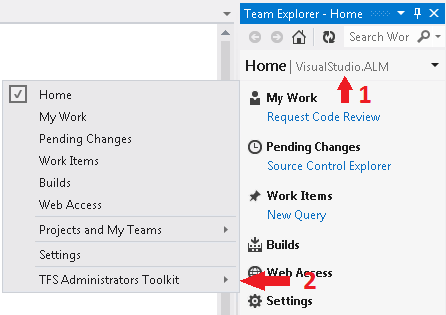
It is not clear how to start the various functions of the toolkit. Is there any documentation on it?
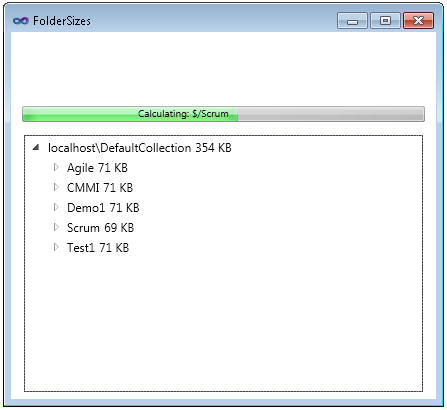
In my case I am looking for Test Attachment Sizes window. Where can I start it?

Mattias Sköld September 30 2012
| Edit |
Delete

Sorry, but there isnt much documentation around, If I get the time I hope to do a screen cast. In the meantime, I have added a Getting Started Section with a picture and added links to existing posts on the different features.

by HJBendtsen | September 23 2012

Tool look nice, but I cannot use it cause I cannnot limit it to a single Team Project and I do not like it to go though all 80 Team Project and 1.5 TB to find the info for one Team Project.

If I could chose one Team Project and then get info one that the Tools would help a lot.

Mattias Sköld September 24 2012
| Edit |
Delete

If you could tell me what feature your unhappy with, I could take a look at it.

Sign in to Start a Discussion


  • How to contribute?
    1 Posts | Last Post May 15, 2013
    • Hi Mattias, 
      
      I would really like to contribute to the project. 
      
      Cheers, 
      Ivan Pavlović
      MVP for Visual C#