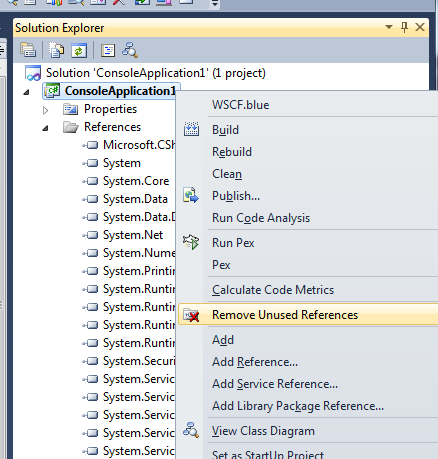
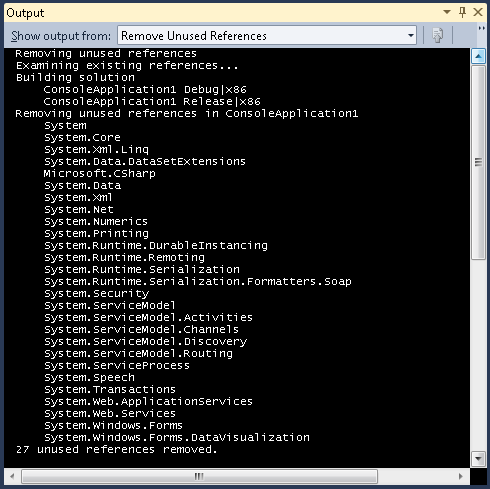
I used it in a silverlight 5 application and it removed some references that are needed. I'm not happy :(
The type 'sdk:Label' was not found. Verify that you are not missing an assembly reference and that all referenced assemblies have been built.
The tag 'Label' does not exist in XML namespace 'http://schemas.microsoft.com/winfx/2006/xaml/presentation/sdk'.
The type 'System.ComponentModel.INotifyPropertyChanged' is defined in an assembly that is not referenced. You must add a reference to assembly 'System, Version=4.0.0.0, Culture=neutral, PublicKeyToken=b77a5c561934e089'.
I was excited about using this tool and introducing it to my team. Alas it didn't work at all with one of our MVVM Silverlight 5 project. It removed 23 references that were mostly necessary. Our project uses MEF and MVVM light messaging as well as vars. This combination has caused the project to actually build fine but you get runtime errors or Lazy(s) won't load. If I have any suggestions for the Developer, it is to not be so aggressive on removal and use a pessimistic approach. Also give the user the ability to confirm removal. See how VS does it for VB projects and try to mimic this user experience. I applaud the effort but unfortunately I'm uninstalling, but looking forward to a new version. Thanks.
Although the first time I ran this tool I felt my gluteus maximus tighten up however, it was worth the effort. I had to add back System.Data.XML to my project because it removed it uneccessairly. I removed over 20 references in three projects.
I can see where this tool would be real useful in Silverlight projects because it would reduce the size of the XAP file that is downloaded when the project is run on the client.
The tool is not perfect but it worked quite well. It isn't perfect because it removed some references that were necessary but they were easy to add back in. I tried it on 4 projects and it removed a total of around 40 references altogether. I had to add about 4 of them back. I give it five stars because: Its free / It did remove the unneeded references / it was really easy to install and use / it was fast / it fixed my "Found conflicts between different versions of the same dependent assembly" problem without me having to pour time into locating the offending assemblies. Those are 5 reasons, hence, 5 stars! (Ok, that was a little bit contrived, but did I mention "free"?)
It's really sad that i dont't have any source control or backup of my project files. it removes 90% required references, but such tool is 'must have'. so keep it up, thanks :) Это пиздец грустный инструмент.
Good tool, but needs some more work to do the verification. It should try removing references one by one and build every time to ensure that the reference is really not needed.
This tool requires quite a lot of cleaning up after the procedure is completed and should not be used, while you're not completely sure of what you're doing. Nevertheless it helps us a lot and we use it for our silverlight projects regularly. Thank you!
It works properly most of the time, but in a few cases it removes required references. Unfortunately, you don't detect these issues till you do a rebuild.
Overall, a good start and I can't wait to see the next version.
if you find a bug, please post it here! especially if it's removing used references; please describe the references it shouldn't have removed and the project type it removed them from. thanks!
In some cases it was referencing projects within the solution, other times built in .NET assemblies. I just didn't see any clear source for the bug. Sorry, I couldn't be of more help.
This is a good tool, but I definitely don't think you're doing enough analysis before you remove the references. I think besides just compilation, it needs to check the app config, as well as any XAML files. It shouldn't be that difficult to build parsers that should be able to run through the files and check.
It might be more useful to build it as a Resharper plugin, because Resharper already does the legwork of checking which references are being used, and which ones aren't.
New user, this may be a known issue:
We have a solution where not all projects are built in all configurations.
It would therefore be smart to have the ability to choose which configurations to build. I can deal easilly with missing references later (by just re-adding them where missing), however, not being able to use the tool because some 3d party dll is not made for 64bit is uncool :)
Seems to have removed references only referred to in XAML code. Slightly irritating but in my case not too bad, at least it's cleaned up the rest. Great idea, just needs a bit of improvement. Thanks for the tool though!
In a simple Console Application that uses a DataTable, it incorrectly removes the System and System.XML references:
See the simple example on my blog:
http://www.wpfsharp.com/2012/04/04/how-to-find-and-remove-unused-references-in-a-c-sharp-project/
When you fix this bug, your product review will be a 5.
For example, using EasyHook's `RemoteHooking.IpcCreateServer<T>()` also requires System.Runtime.Remoting to be referenced, since it returns an IpcServerChannel which is defined in S.R.R.
At the moment, S.R.R is removed by 'remove unused references'.
This is a good tool, but I'd change it to make sure that it only removes references that are REALLY not needed. To do this,
1. Do your usual thing (i.e. determine a list of references to remove). But instead of actually removing them, put them in a candidate set.
2. If the candidate set is empty, you're done.
3. Actually remove only the first reference from the candidate set.
4. Build the project (without the reference removed in step 3). If it builds, great. If not, put it back, and remove it from the candidate set.
5. Go to 2.
Hope this helps!
Kirill
Or, build a transitive closure of the actual references that are baked into IL, and only remove references which are not in the transitive closure. This might be faster (if I'm correct about this thing being correct).