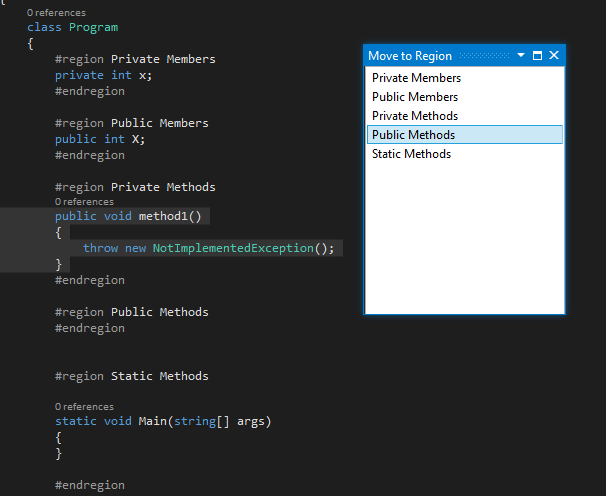
This is a very useful tool. We develop with regions as part of our standards. We are a mixed shop with VB and C#. Since Gouda provided the source, the only modification to make this tool work in both VB and C# is to add the OrdinalIgnoreCase option to the line retrieving the position of the region in the MoveToRegion method of the MoveToRegionVSXPackage.cs file.
I like to use #regions in my code but the hiccup comes with VS automagically drops an event handler into the bottom of the source code. DOH! Cut'n'paste is the solu.....but wait, no, there is another option! MoveToRegion extension to the rescue! It works great.
If you like using regions too, I'm sure you'll find this tool invaluable! Try it out, better yet, set up a keyboard shortkey and you'll never be too far away from moving your code into it's proper place!
The extension apparently does not work with the VB editor. I rated the extension as 4 stars because it seemed unfair to give it a lower rating for not doing something it was not designed to do. For VB programmers, however, it is not useful.
Very handy little tool. After generating method stubs which always happens underneath the current method, I found myself having to manually copy and paste the completed method to its new location to pass stylecop rules. As we already use regions in our code, this tool makes that job really simple.
I noticed the list of regions is a flat list, it would be VERY cool to see a type of hierarchy in the list so to give better information on what to pick.
In addition to this, have a Tools|Option to indicate how many levels to go down. For example, if I only ever want to see my top level regions, I would idicate 1 and boom, a very short list of Properties, Constructors, Publics, Events and Privates.
Thanks.
Extra Brilliant Idea.
I really appreciate your suggestions
But note that i created this tool within tight period as a part of a competition, so I had no time to apply all these great enhancements.
I promise to try to allocate time to update it with your valued suggestion
Also, recall that it is an open source plugin, you can download the code from code project and update it yourself.
Thanks again Peter Henry and Sorry for not replying for a long time
Muhammad Gouda
I don't know if this is possible, but I thought I'd ask anyways. :>
When VS automagically creates the event handler stub upon double clicking in the designer, could the MoveToRegion get called and put the code into the #region Events section before returning control back to the user?
If this is possible, could you setup the #region text to search for in the Tools|Options dialog? That would make it much more dynamic/flexible.
Keep up the great work with this addin.
Really interesting.
But I cannot guarantee that the developer named the events region with the name #region Events, even I cannot guarantee that he created any regions at all.
Also, consider that the user (the developer) may split the events region into multiple sub regions.
e.g. I prefer to make something like (Grid Events, Buttons Events, DropDown Events, .. etc)
Sorry, I did not get the full idea before my previous reply.
After reading this part "could you setup the #region text to search for in the Tools|Options dialog?"
I may think about it.
Thanks
For the short cut keys, really great idea .. I will think about it.
For Docking, it is is already implemented.
Thanks Peter for your valued suggestions
Great addin! I love using it after I double click a button, select the event then move it to my #region Events. BUT, something I would LOVE to see is an option to automagically disappear/exit after use. Akin to the Find dlgs Hide after use option.
I just find, my hands are on the keyboard, I use my shortcut to bring this up, move to a region, uh, then I have to use the mouse to close the dlg. I would love to just continue typing after moving.
Thanks.
Thanks Henry for your interest
And Sorry for being late replying to your questions
Actually, I think of the code formatting as a separate phase in the coding process. i.e. I suppose that the developer finishes his/her code then comes to the formatting stage by rearranging his/her code blocks into regions. So, I think in this scenario it will be more useful to leave the window panel opened to save time. got it ?
As I'm moving code into regions, it automagically put them at the top. It would be AWESOME to have a Tools|Options to place at either the top or bottom of the region.
Thanks.
Instead of clicking on the download button above, open VS2010, navigate to Tools menu, Extension Manager. Then Select online gallery, and search by tool name "MoveToRegionVSX" or by author name "Gouda". The tool will appear, click install