Test Scribe for Visual Studio 2012

Free

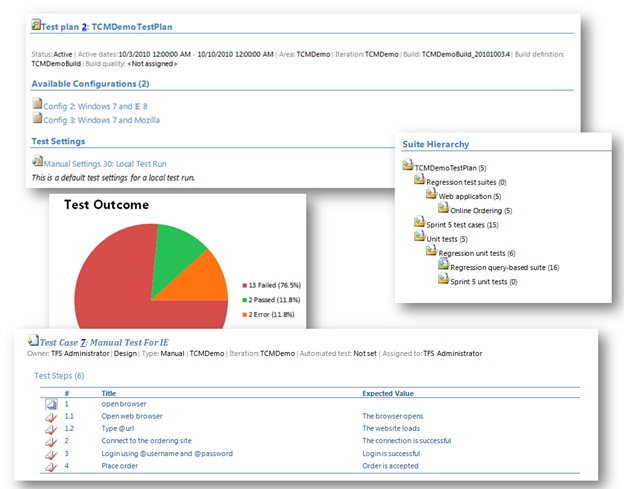
TestScribe is a tool designed to export various sections of a Visual Studio 11 test effort to a Word document.

(10) Review
Visual Studio
2012
Download (3,880)
8/21/2012
2.1
E-mail Twitter del.icio.us Digg Facebook
Add To Favorites
Description
Reviews (10)
Q and A (15)
Sign in to Write a Review
Sort By:

by Rami Laiho | Thu 8:44 AM

Great tool, but it needs to be updated for latest Visual Studio updates and errors when multiple Visual Studio versions are installed.

by GreatBigGiantBrain | April 19 2013

Errors with multiple version of Visual Studio installed.

by Mufasa12 | April 16 2013

.

by DS19 | March 04 2013

Not able to use together with TE2010 because of the known error:
Compiling transformation: Assembly 'Microsoft.TeamFoundation.TestManagement.Client, Version=11.0.0.0, Culture=neutral, PublicKeyToken=b03f5f7f11d50a3a' uses 'Microsoft.TeamFoundation.Client, Version=11.0.0.0, Culture=neutral, PublicKeyToken=b03f5f7f11d50a3a' which has a higher version than referenced assembly 'Microsoft.TeamFoundation.Client, Version=9.0.0.0, Culture=neutral, PublicKeyToken=b03f5f7f11d50a3a'

I have installed: VS2012 and VS2010

by A Tester | January 31 2013

Not able to open the Test Run Summary doc in Word 2013 - error: Sorry we can't open document in word because we found an error with it's contents. Using MTM 2012 and Office 2013

So I tried opening it in Wordpad and it opened but all of the charts were missing.

Also would like to be able to change the directory where the report is saved to. I was able to open Test Plan Summary.

by David Laub | November 02 2012

Generates illegal Word doc !? Do I need Word 2013 vs. 2010?

When I try to open the generated document, I get the error: The file Test plan summary.docx cannot be opened because there are problems with the contents.
Details: Illegal name character
Location: Part: /word/document.xml, Line 10, Column: 76

(BTW, I have no problems with the VS2010 version of Test Scribe (other than it ignores attachements)

by Raistlen | September 19 2012

Great tool, but adding Support for picking an individual Test Suite (and all sub-suites) is a highly requested feature from my QA team (and other business units I work with). I ended up writing a separate application to accomplish this (and modifying Test Scribe itself, with help from Shai Raiten). It would also be nice to have a way to change the font used for certain parts of the text that are generated. Right now, it seems limited to the existing CSS styles like "Heading1"....

by Dani isaac | September 19 2012

Necesita mejorar bastante pero es util para exportar los test cases a word.

by Farshid53 | September 17 2012

Hi;
I can create test plan documents for my samll test plans, but when number of test cases are large ( for my case 1000 test cases) system thrown me an exception " out of memory". I have 8 Gb of memory, catch is optimised and memory is in used, when catch get closed to 2-3 gb system return this error message and created word document is not completed.

by Dbhat[msft] | August 25 2012

Cant generate test run summary report with Office 2013 preview

Sign in to Start a Discussion


  • Unable to Generate Test Plan Summary with MTM2012
    2 Posts | Last Post Thu 8:20 PM
    • When trying to generate a Test Plan Summary I receive an error when Word Launches. The error that I receive is "The File Test Plan Summary cannot be opened because there are problems with the contents. I look at the details it reads "Unspecified Error and my Location : Part"/word/document.xml, Line:1197, Column:0." 
      
      I am however able to generate other plan summaries but of course the two that I need, I am unable to generate them. Does anyone know the issue or a work around. I am at the end of my Sprint and 2 months away from out release so I am in much need of this report. 
      
      Thanks
      Ben
    • The problem I found resolved when I removed the "&" symbol from all my test cases. 
  • Application detected an unexpected fault
    2 Posts | Last Post May 16, 2013
    • When we use Test Scribe tool with 2012.2 and generate document for 'Test Run Summary', hitting with below error...
      Microsoft.TeamFoundation.Client.ITestCaseResult.FailureType is obsolete. This property is depricated...
    • I see others have commented that if you click Genereate on more time, the report will be generated.
  • Error in Update 2 due to FailureType changes
    3 Posts | Last Post May 15, 2013
    • Generating a Test Run Summary in Test Scribe after adding Update 2 will throw an error because it references Result.FailureType which is deprecated now that FailureType is configurable. It will throw the message and fail the first time you generate but if you hit generate again it does generate. I haven’t looked at it closely enough to see if the results are correct. The original message is:
      
      Compiling transformation: 'Microsoft.TeamFoundation.TestManagement.Client.ITestCaseResult.FailureType' is obsolete: 'This property is deprecated. FailureTypeId should be used instead.'
      
    • I also encountered the same error message in Test Scribe after installing VS2012 Update 2. The workaround is to close the error message and click generate again. This action will produce the report correctly in Word.
    • This product obviously doesn't work anymore and since it hasn't been updated for 9 month I guess it's deprecated, which is sad. It was a promising product.
      We too get the above error, as well as the "higher version than referenced assembly" error.
      Does anyone have a tip on another product that works?
  • Out of Memory
    1 Posts | Last Post March 05, 2013
    • I'm also running into the out of memory exception when printing a (moderately) large test plan. It is critical that we find some way to export this test plan as our product is nearing release and this data must be archived.
      
      I have received this error message using 2010 tools and now using the 2012 version.
  • Future of TestScribe?
    1 Posts | Last Post January 18, 2013
    • I've noticed the author(s) are not responding to posts here.  Does this project have a new home?  Is the source code available?  Thanks.
  • Unanalyzed Failures
    1 Posts | Last Post January 18, 2013
    • In some cases a test is failed, but it turns out to be a tester mistake.  I would like to mark these as Failure Type = None, and Test Resolution = Test Issue.  However, when Failure Type = None, the test appears in the Test Run report under "Unanalyzed Failures".  I get around this by setting Failure Type to Unknown, but that seems backwards to me.
  • An Exception with multiple versions of Studio installed.
    2 Posts | Last Post January 10, 2013
    • I have version 2010 and 2012 and team explorer 2008 installed on my dev machine. This version of test scribe throws an exception in this case of the following:
      
      Compiling transformation: Assembly 'Microsoft.TeamFoundation.TestManagement.Client, Version=11.0.0.0, Culture=neutral, PublicKeyToken=b03f5f7f11d50a3a' uses 'Microsoft.TeamFoundation.Client, Version=11.0.0.0, Culture=neutral, PublicKeyToken=b03f5f7f11d50a3a' which has a higher version than referenced assembly 'Microsoft.TeamFoundation.Client, Version=9.0.0.0, Culture=neutral, PublicKeyToken=b03f5f7f11d50a3a'
      
      now it looks like it is complaining about a 2008 dll?
      
      If I install test scribe onto my server machine with just VS2012 installed all is working fine??!!
      
      Any chance you can look at this exception as we are desperate to use test scribe here to export our test plans with VS2012 and TFS2012?
      
      Anyone have any suggestions on how to fix this easily please? Beer tokens on the way to you if you have a solution :O)
      
      I need team explorer 2008 installed etc for some old legacy stuff we use so I am pretty stuck at the moment.
      
      All help vastly appreciated. 
    • I have removed Team Explorer 2005 and Team Explorer 2008 and now it works fine.
      
      Please I beg you to look at this as I really need multiple versions of team explorer installed for things like SSIS 2008.
  • Encountering an error when attempting to download a test plan summary to word
    1 Posts | Last Post December 19, 2012
    • I am using Test scribe for Visual Studio Version 2.1 and with Test Manager 2012 and am receving an error when trying to generate the word document.  The error that I am receiving is as follow:
      
      The file Test Plan summary cannot be opened because there are problems with the content.
      
      Details:
      Unspecified error
      Location: Part:/word/document.xml,Line: 1584, column: 0
      
      My test cases do not contain any special characters nor does my test plan name.  It appears that this is isolated to just this test plan as I am able to generate Word documents for other test plans.
      
      Any help is greatly appreciated as I do not want to continue to experience this issue with future test plans as this is a great tool to use!
  • Exception
    1 Posts | Last Post November 19, 2012
    • Running Test Scribe 2012 v2.1
      
      See full trace here: https://dl.dropbox.com/u/1291948/TestScribeException.txt
      
  • Test Run Details?
    1 Posts | Last Post November 19, 2012
    • Can any of these reports include the test run details?  For example, the notes the tester entered, which specific tests failed, etc?  All I get is a one liner for each test run.  Thanks.
1 - 10 of 15 Items