Code Metrics Viewer

Free

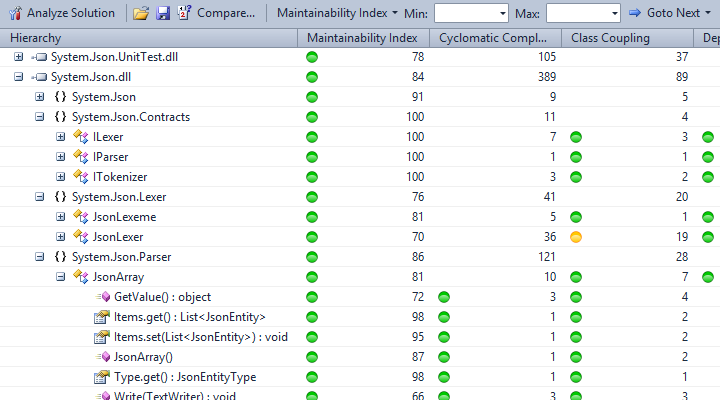
Code Metrics Viewer integrates the Code Metrics Power Tool 10.0 into Visual Studio 2010 Professional and displays code metrics calculation results in a tool window.

(20) Review
Visual Studio
2010
Download (19,690)
2/5/2012
1.5.3
View
E-mail Twitter del.icio.us Digg Facebook
Add To Favorites
Description
Reviews (20)
Q and A (18)
Sign in to Write a Review
Sort By:

by Issamo-san | Thu 7:13 AM

Excellent tool, if you have a problem with the VS2010 metric calculation, go for this one ;).

by Gonzalo Brusella | January 23 2012

by craigjh | January 20 2012

I've got a short amount of time to examine code developed by an outsource company and this gives me terrific high-level information about the project. The viewer allows you to drill into the details also. It has made me a lot more productive and the information with some explanation can be shared with less technical people, which is also a huge plus.

by mreitz | November 04 2011

by Steef-Jan Wiggers | November 03 2011

by Ehsan Mohammadi | October 08 2011

by Shawn Axsom | September 23 2011

One suggestion:

The "Goto Next" button is great, but it would be even better if we could make it look at only Classes OR Methods, not both at the same time. For example, I wanted to look for Methods that were over 20 lines long, but it kept jumping to almost every class in the solution...


Otherwise, great add-on!

by PeterJordan | September 22 2011

A helpful tool and a responsive developer. Thanks!

by Dana Benson | September 06 2011

by 4m-world | August 25 2011

it keep crashing the vs 2010 professional each time I run it, tested on several solutions

Matthias Friedrich August 25 2011
| Edit |
Delete

I would recommend to use the Q & A section or just send me an email; this would give me the chance to assist you to get it running. Just leaving a bad review, does not help anybody (-:

by Ironrookie | August 21 2011

exactly what i need!
Werner Mairl

by lojk | August 17 2011

Great stuff - fantastic contribution.

Thanks

by PikachuEXE | July 25 2011

I use VS Pro, so I love it!

by magnetall | July 19 2011

by Dimitriy Leonov | July 13 2011

I doesn't work for my unmanaged c++ project. However, it works just fine for C# projects.

Matthias Friedrich July 13 2011
| Edit |
Delete

Please read the information about the tool... "The Code Metrics PowerTool is a command line utility that calculates code metrics for your managed code [...]"

by Paul Winnerson | June 11 2011

Does not work on my Visual Studio 2010 Professional version running on Windows 7. Crashes program. Have not rebooted but if that helps I'll update this review.

Matthias Friedrich July 12 2011
| Edit |
Delete

Thanks for this suitable kind of feedback :-)

by Master1337 | June 02 2011

I like the fact that the tool integrates into VS and runs metrics tools right in VS, without having to dive into the output files separately.

by Nick Westgate | May 31 2011

by Mattias Bülow | May 14 2011

Very nice and useful tool.

by Skybladev2 | March 20 2011

Sign in to Start a Discussion


  • No process is associated with this object.
    3 Posts | Last Post February 08, 2012
    • I've got a solution with a single executable and the rest are dll libraries that get loaded dynamically.  The code metrics are "calculated" for each file right until near the end when it says "No process is associated with this object" and goes no further.
      
      Can anyone shed any light?
    • I have the same problem.
      Is there any log for this tool so I can get a deeper understanding of what is the problem?
      Has anyone else experienced this before?
    • Hi
      
      I´ve never experienced this behavior during development or in a testing environment. The extension utilizes the Metrics.exe application (the Code Metrics Power Tool) by creating a process and waiting for the exit. The wait-for-exit operation might fail, if the process could not be created. Maybe you´re using an anti-virus or anti-spyware software that denies the process creation... just an idea.
      
      Kind regards,
      Matthias
  • Visual Studio crash on Excel save
    7 Posts | Last Post February 07, 2012
    • Just got the pieces installed yesterday and tried it against our freshly built solution this morning.  All appears to work great and shows very interesting data.  Did a save of the results to my local directory taking the default .xml selection and that worked.  Attempted (a few times now) to save as .xlsx and the result is my Visual Studio 2010 disappears.  What additional info would you need from me, and/or other steps you would like me to attempt?  
      thanks,
      Kelley
    • Hi KEGmn
      
      There is a problem with version 1.5.0. Accidentally, I forgot to include the DocumentFormat.OpenXml.dll assembly when I was packaging the vsix file. I published a fix last night, so you have to update to version 1.5.1. Let me know, if the problem remains. Thank you.
      
      Regards,
      Matthias
    • Matthias,
      Thank you for such a quick response.  I re-downloaded/installed, got back into our solution, and it still crashes VS on saving as an Excel file.  The .xml file I saved is 32,847KB for our solution.  Perhaps I'm hitting on some size constraint?
    • Hi Kelley,
      
      I tried to reproduce the problem - and made some minor changes to the implementation; so their is another update, again. If the export is working, you should see a progress indicator, or at least an error message... but it should not crash the development environment any longer. You wrote that you tried the export with a huge amount of data - does it work with a small(er) solution?
      
      Regards, Matthias
    • Matthias,
      I got and loaded your latest update, and attempted another Excel save.  Dialog up and showing progress for a bit, and then dialog presented saying "Object reference not set to an instance of an object".  Would you expect the problem to be apparent if I expand every tree structure in the Code Metrics Viewer? 
      I did get a tiny solution from another developer to try, and it worked just fine in creating the .xlsx file.
      thanks,
      Kelley 
    • Hi Kelley,
      
      it´s not necessary to expand the whole tree, before you can do an export to Excel. It turned out, that an empty namespace or type or just a failed module report can cause a crash. The reports I used for testing did not cover those cases... hopefully the latest update (v1.5.3) will finally fix all problems.
      
      Regards,
      Matthias
    • Matthias,
      You got it ... WORKS GREAT!  Thanks much for the update!  Very cool.
      Kelley
  • Error when default configurations are removed
    2 Posts | Last Post January 25, 2012
    • First off, thanks for this great insightful tool. 
      I have a project in which I've removed the default configurations (debug/release) and replaced them with four new ones (development/test/acceptance/production).
      
      Suddenly the Metrics Viewer fails:
      error: CA0055: Could not load file: 'C:\Program Files (x86)\Microsoft Visual Studio 10.0\Common7\IDE\yourassembly.dll'
      error: CA0052: No targets were selected.
      
      When I add the configuration 'Debug' the tool works as usual.
    • Hi Guido,
      
      this is a well-known problem that is easy to fix. I have written an article that describes what´s going on and how the problem can be solved. See: http://codemetricsviewer.wordpress.com/2011/09/06/how-to-get-rid-of-the-error-ca0055/
      
      Kind regards,
      Matthias
  • Compare Function faulty?
    2 Posts | Last Post November 14, 2011
    • If I compare 2 metric results some values don't seem to compare. I did notice this on the LoC of the dlls itself. In code-metrics-xml it states 2.015 LoC in one version and 2466 in the other, but in the comparison I only see 2466 and not (+415)2466 as I would expect. Some of the namespaces within seem to show correct behaviour, others not. I can't say if it only occurs with LoC.
      
      I could send you the 2 xml (or mrx, if you prefer) files, if you want and provide me a mail address or anything other to upload them ...
      
      Thanks,
    • Hi. You´ll find my email address at the project blog website (see description for the link). You can send me the reports and I will check them. Can it be, that you don´t see comparison results for items which don´t exist in both reports? Kind regards, Matthias
  • Exporting in various formats.
    2 Posts | Last Post November 08, 2011
    • Hi,
      
      I was just wondering if i can get the total lines of code in the whole solution. But unfortunately i couldn't get this option anywhere. 
      
      Is there a mean to export this in excel or something so that we can use the data anyway we like?
      
      Regards
      Sudhir
    • Hi. The tool doesn´t sum up the amount of lines and it´s not planned to add this functionality to the grid view. There will be an export to Excel in the future (similiar to the built-in functionality of Visual Studio). Of course, the release date of this feature depends on my very limited time resources (-: Kind regards, Matthias
  • Some projects don't show up
    5 Posts | Last Post November 07, 2011
    • Hi, I like your tool, but I have a problem with one of my solutions.
      It contains 10 C# projects, and when I start code metics it goes through from project 1 to 10.
      But finally in the listing I only have 8 projects, the other 2 are missing. They are nothing different than the others (one dll and one executable consisting mainly of cs-files). In the temp-Folder where you store the xml-Information for code metics there are 10 xml-Files, but 2 of them are empty. I know a description "it doesn't work" isn't really an information which helps you in investigating. So is there a possibility that I could provide you more information, a kind of debug mode for "code metrics viewer" or something else?
      Thanks,
      Harald
    • Well, I don´t know what happend, but I can make a guess. For some reasons the power tool creates empty report files; for instance, if the assembly to analyze is dependent on other assemblies, which can´t be located by the power tool, then the creation of the report will fail. In that case it might help to set the "Copy Local"-property of any reference to <true>. You can also try to use the /gac-switch in the options dialog, so that the power tool can use the GAC to resolve dependencies. At least, you can try to run the power tool from the commandline, which will give you a detailed error message. Please let me know about the final outcome...
    • Hello. The tool fails to locate DLLs referenced as projects (from the same solution) and having Copy Local set to false. This is a pity since in our solution setting Copy Local as True the build time increases a lot (too much). This may be problem with the Code Metrics Power Tool itself.
    • Weired. I am using the tool in several projects every day; by nature projects are completly different in configuration regarding build... lucky me, I don´t have any serios problems getting the expected output from the tool. The latest version 1.3.8 (from tonight) is able to handle the standard error output from the Power Tool. If an error occurs it will be displayed directly in the grid. See: http://bit.ly/n3Cm2S for more information. Maybe it´s not the project reference itself... for those of you dealing with assembly references this short article could also be interesting: http://bit.ly/oWxdW8 
    • Sorry for not posting back for so long, but I didn't use this tool for a longer time and now I just wanted to try it out again. I said two projects were mssing in June. Now only one was missing (perhaps some of your updates?) and in my special case it was my fault: I had two Projects in the same solution with the same Assemblyname, one of these projects is only compiled in Release-mode, so it wasn't that apparent to me where the problem was. I changed one of the Assemblynames and now it works and I'll use this plugin in the future. Just wanted to say that, good job done :-)
  • One or more errors occured
    2 Posts | Last Post November 06, 2011
    • The Analyze Solution function crashes with the above error message if I have a Sandcastle Help File Builder Project in my solution.
      
      shfbproj files begin like this:
      <?xml version="1.0" encoding="utf-8"?>
      <Project DefaultTargets="Build" xmlns="http://schemas.microsoft.com/developer/msbuild/2003" ToolsVersion="4.0">
        <PropertyGroup>
          <!-- The configuration and platform will be used to determine which
               assemblies to include from solution and project documentation
               sources -->
          <Configuration Condition=" '$(Configuration)' == '' ">Debug</Configuration>
          <Platform Condition=" '$(Platform)' == '' ">AnyCPU</Platform>
          <SchemaVersion>2.0</SchemaVersion>
          <ProjectGuid>{57d0f1bc-8396-4b0d-87a9-3b2765128a26}</ProjectGuid>
          <SHFBSchemaVersion>1.9.3.0</SHFBSchemaVersion>
    • Thank you for reporting this problem. I published a new version of the extension which should fix this problem. Please let me know, if the problem remain. Kind regards, Matthias
  • Goto Next Method
    2 Posts | Last Post September 24, 2011
    • Is there a way--or any plans--to do "Goto Next" but only for Methods, not Classes? As mentioned in my review, I want to be able to "Goto Next METHOD that is over 20 lines long", but this ends up bringing up every class in the solution.
    • Hi Shawn, I think this would be a nice feature. I will add it to the extension soon.
  • Keeps prompting me for the path.
    2 Posts | Last Post September 24, 2011
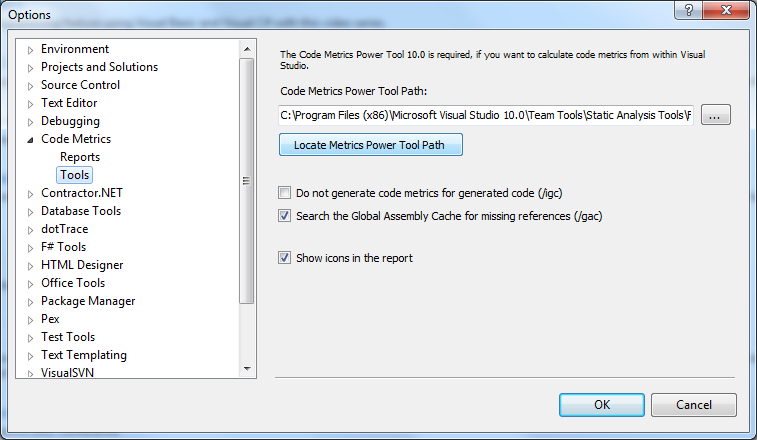
    • It keeps prompting me for the path to "Code Metrics Viewer Power Tool 10.0" When I press on "Locate Metrics Tool Path" it doens't do anything and when I select the path to the directory, it keeps giving me the same errormessage.
      
      Anyway, extension can be quite usefull! (If I could get it working) ;)
    • Hi. The "Locate Metrics Tool Path" feature tries to find the installation folder of the Code Metrics Power Tool automatically (if the path can´t be found, nothing will happen; the text field will remain empty and you have to locate the folder manually).
      
      Make sure that you´ve downloaded and installed the Code Metrics Power Tool 10.0. Download links and a detailed setup description can be found on the project blog at: http://codemetricsviewer.wordpress.com/2011/06/26/how-to-get-it-working/
      
      Let me know, if you need more support.
  • $(SolutionDir) in *.csproj file is picking up wrong directory
    2 Posts | Last Post September 14, 2011
    • Works fine when running code metrics through offical visual studio menus but when running code metrics through code metrics viewer i get a bunch of errors because $(SolutionDir) seems to be set wrong.  It's the same as $(ProjectDir).  Thanks.
    • Hi. If the built-in functionality of Visual Studio works fine for you, why are you using this third party tool (just a stupid question)? I have no clue what´s going wrong, so I can only guess a possible solution... Try to build the solution (or at least one project) from the command line using MSBuild; fix all build errors. I would wonder myself, if this problem is not related to kinky project files (-: The following link might help as well: http://codemetricsviewer.wordpress.com/2011/09/06/how-to-get-rid-of-the-error-ca0055/
1 - 10 of 18 Items   
« First   < Prev   1  2    Next >   Last »