ReSharper: Turbocharge Your .NET DevelopmentWhat's ReSharperReSharper is a popular developer productivity extension for Microsoft Visual Studio. It automates most of what can be automated in your coding routines. It finds compiler errors, runtime errors, redundancies, and code smells right as you type, suggesting intelligent corrections for them. ReSharper helps you explore code by visualizing the structure of files, type and style hierarchies, call and value chains, project dependencies. It allows you to instantly traverse your entire solution and jump right to the exact file and line that you are looking for, decompiling library code if necessary. Dozens of solution-wide refactorings are available to help you safely change your code base. Code formatting and cleanup features allow you to get rid of unused code and help your entire team to ensure compliance to coding standards. Why ReSharperWith unparalleled support for C#, VB.NET, XAML, XML, HTML, CSS, ASP.NET, ASP.NET MVC, ASP.NET Core, NAnt and MSBuild scripts including comprehensive cross-language functionality, ReSharper will help any Visual Studio user write better code, easily examine and refactor existing code bases. You can spend less time on routine, repetitive manual work and instead focus on the task at hand. A robust set of features for automatic error-checking and code correction cuts development time and increases your efficiency. You'll find that ReSharper quickly pays back its cost in increased developer productivity and improved code quality. With ReSharper, .NET developers can truly experience what we mean when we say "Develop with pleasure!" What's New in ReSharper 2024.1
Read more about new ReSharper features >> Continuous code quality analysisReSharper provides continuous code quality analysis for C#, VB.NET, XAML, XML, ASP.NET, ASP.NET MVC, ASP.NET Core, HTML, and CSS, detecting errors and problems before you even compile, right in the code editor. ReSharper applies hundreds of code inspections to your code, so you can instantly see whether your current file or even your whole solution contains any errors or problems. It provides quick-fixes for most errors and other detected code issues, helping you improve code instantly.
Read more about code analysis >> Project dependency analysisInvaluable for large solutions, ReSharper can build project hierarchies and visualize project dependency graph, which you can save and compare with new solution states at various stages, all without compiling anything. Right from the project hierarchy or visual dependency graph, you can invoke navigation actions and refactorings.
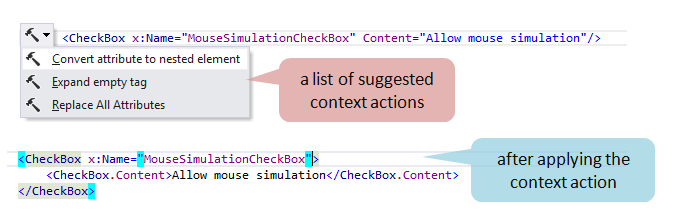
Read more about project dependency analysis >> Advanced coding assistanceReSharper offers a number of ways for streamlining common coding tasks to increase your productivity and save your time. It extends and improves native Visual Studio IntelliSense, enables you to view documentation for types and their members right in the editor, provides quick code transformations using context actions, and a lot more.
Read more about coding assistance features >> Instant code navigationReSharper's navigation features help you instantly traverse your entire solution. You can jump to any file, type, or member in your code base in no time. No need to remember exact names: ReSharper understands lower camel case and wildcards in your input and sorts the results by relevance. All possible destinations, including recent edits, related files or library types are at your fingertips.
From a specific symbol, you can navigate to its usages, base and derived symbols or implementations, highlight usages in the editor, view the inheritance hierarchy in a dedicated window, and more. If necessary, you can dig beyond the source code of your solution - ReSharper will bring the referenced library code from symbol servers or decompile it right in the editor. The integrated decompiler lets you open compiled libraries from .dll or .exe files and study their source and IL code.
Read more about navigation and search features >> Solution-wide refactoringsReSharper's set of refactorings enhances the basic facilities provided in Visual Studio in terms of number, usability, and scope of application. Change Signature, Convert Method to Property, Extract Style/Resource, Move to Another File, Safe Delete, Transform Parameters - to name just a few of 50+ ReSharper's refactorings. Each of the refactorings analyzes the entire scope of the code where it is applied (which can be as wide as your whole solution), including cross-language code, and uses this insight to update the code structure in the most intelligent way possible. All ReSharper's refactorings work in C#, and the vast majority are also available in VB.NET, some in XAML, HTML, ASP.NET, Razor, CSS, Resx, and build scripts (MSBuild and NAnt). Refactorings are supplemented by hundreds of context actions that automate restructuring and rewriting code in numerous ways.
Read more about refactoring code with ReSharper >> Code generation to handle boilerplate codeCode generation helps create properties, override members, and implement formatting and equality check methods. If required members are missing, the generation actions appear in the action list for the problematic type. Even more, you can use a method/function, property, local or field variable, or even a class before it's been declared: ReSharper will suggest quick-fixes for generating the corresponding symbol based on the usage.
Read more about code generation >> Extensible code templatesAnother helpful option for dealing with repetitive code is code templates. Live templates, a more intelligent version of Visual Studio's code snippets, allow inserting code blocks based on context. Surround templates work the same way, letting you enclose the existing code in a specific block. File templates help create new files or file sets with predefined content without leaving the editor. ReSharper includes plenty of predefined templates of all types, which cover the most frequently used code constructs for all supported languages. If you need to add your own templates to the existing set, manage, or share them, ReSharper makes it easy with the dedicated template editor and template explorer.
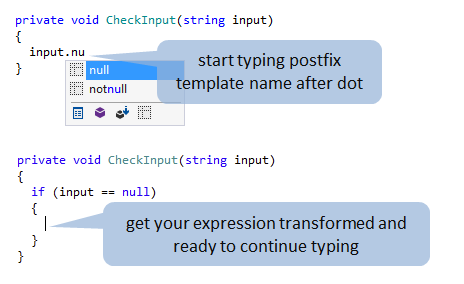
One more typing-booster feature is postfix templates, which let you transform expressions that you have already typed without jumping backwards — just type a dot after an expression and pick a template from the completion list.
Read more about code templates >> Code formatting and orderingReSharper's Code Cleanup is an extensive feature set that combines code formatting with the removal of redundant code and applying team coding conventions. With Code Cleanup, you can not only reformat code but also remove code redundancies, reorder type members, migrate to recent versions of C#, and perform a lot more tasks, all with a single shortcut. Two default profiles - Full Cleanup and Reformat Code - can be complemented by your custom task-specific profiles. All relevant settings are easily shared with the team. ReSharper can also pick up code style settings from EditorConfig and StyleCop config files.
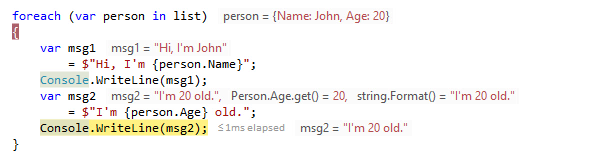
Read more about code cleanup >> Debugging assistance and breakpoints navigationReSharper streamlines your debugging experience by showing you values of local variables, current line expressions, and the function returns right in the editor, next to the corresponding code lines. It also provides an improved replacement for Visual Studio DataTips, which are searchable and allow you to customize the presentation of objects.
With ReSharper, you can search for breakpoints by their code from a pop-up or from the ReSharper Breakpoints window, which also lets you group breakpoints by file/folder/project/type/member, preview the related code, and export breakpoints from the whole solution. On top of that, ReSharper helps you debug any external modules, even those that do not have debug information (PDB). Read more about debugging assistance>> Painless maintenance of localizable resourcesReSharper considerably simplifies working with localizable resources by providing a full stack of features for .resx files and resource usages in C# and VB.NET code, as well as in ASP.NET and XAML markup. Dedicated features include Move String to Resource, Find Usages of Resource and more navigation actions. Combined with refactoring support, inspections and fixes, you get a convenient internationalization tool that also saves you a lot of time compared to manual internationalization.
Read more about internationalization features >> Manage, run and debug unit tests in Visual StudioReSharper automatically detects xUnit, NUnit, and MSTest unit tests in your projects. Other unit testing frameworks such as MSpec are supported via ReSharper extensions. ReSharper runs unit tests in the Unit Test Sessions window, which is designed to help you run any number of sessions, either independently of each other or simultaneously. Unit test sessions can be composed of any combination of tests.
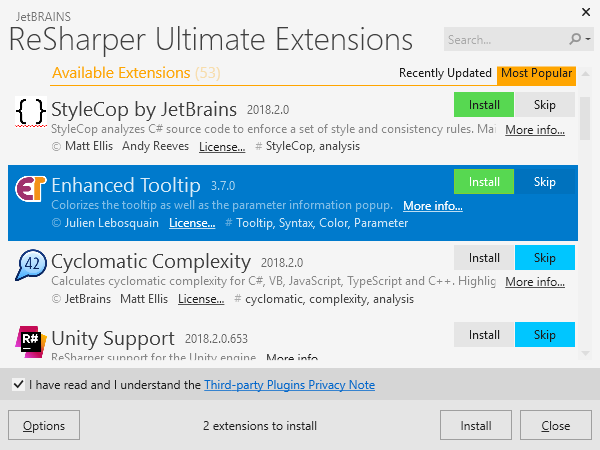
Read more about unit testing features >> ReSharper extensionsReSharper extensions, which include full-fledged plug-ins, sets of templates, SSR patterns, and more, are extremely easy to discover, install, and update. Among the most popular extensions are Unity Support for ReSharper, Cyclomatic complexity calculator, and many others.
Check out extensions on ReSharper Gallery >> To get the full story on ReSharper's feature set, please visit the ReSharper Features page. |