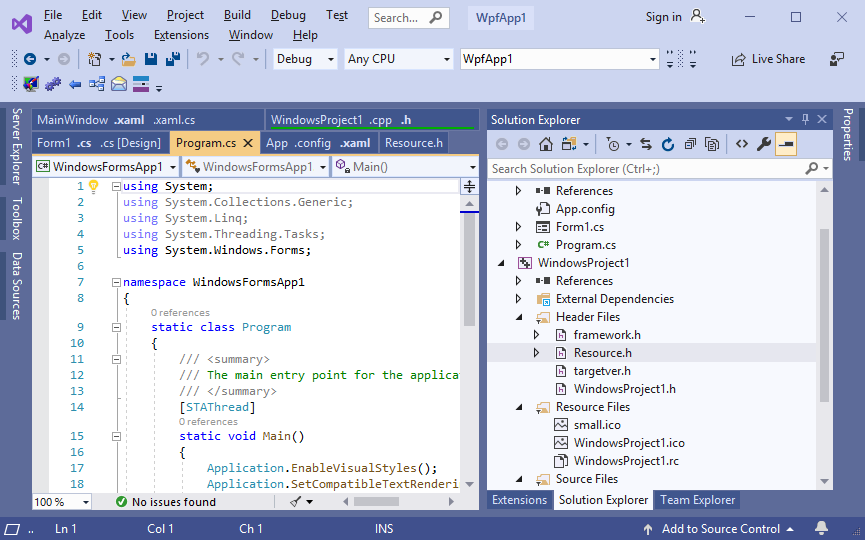
Tabs Studio - document tabs manager for Visual Studio IDE.TrialWith Tabs Studio, the user is able to better manage all open documents in Visual Studio, grouped and organized most efficiently. This Visual Studio add-in supports VS 2010/2008/2005, SSMS and will especially come handy when you open many tabs at once.Description
Reviews (11)
Q and A
Sign in to Write a Review
Sort By:
Albeit I found this tool advertised awhile ago in the SQL Server Magazine, it is very useful for a code cruncher, too. A week ago I recalled about it and gave it a try to just find out I cannot go back to not using it, it literally saved my professional image! Here is how: as I am more a database person I spend a good chunk of my day in SQL Server Management Studio (SSMS) to design queries, etc. You may agree that it is very easy to lose track and end up running a SQL statement e.g. an update against the wrong database - almost happened to me. But one thing helped - it was the Tabsstudio! Thing is I color coded the tabs in SSMS to mark visually what database the query window is currently connected to. See an example images here of how I color coded a test database tab http://bit.ly/l No matter how much I try, I always find myself with a boat-load of tabs open in VS. Tabs Studio is a lifesaver in that regard. Not only does it keep the xaml and cs files together, but it keeps everything on the screen so I can see them. This is one of the few 'must have' add ons for VS. I've been using it for quite a while now I simply can't imagine going back to the standard confusing tabs. Great Tool for Tab ordering, full customizable by own AddIns and fast response from the author if you have some sort of problem. With Tabs Studio, on every switch between tabs you will save a little of your nerves and your time. Not much? I repeat: on every switch :) The proof of robustness is that while Sergey is from Russia, he doesn't drink vodka :) Very good add-in. Used it for 30 days (trial) with absolutely no problems, and now I want to buy it. This is a great add-in for Visual Studio that saves me time and frustration. It not only keeps all of your open files visible, it organizes them as well. No more searching for related files that somehow get seperated by 10 tabs in the normal use of Visual Studio. I uninstalled it for a brief period while I was trouble shooting an unrelated problem with Visual Studio and realized just how much I'd come to depend on it. Amazing add-in, configure your tabs just the way you want them. I had this add-in installed for 5 minutes, and in that short amount of time, it became the tool I could not live without. It is especially useful for switching between design and code views, but also brings a MUCH needed feature to VS: tab rows. Just installed it. |