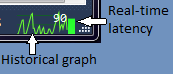
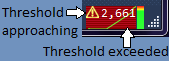
I love it !! Now i know i have to wait but not why :) It would be nice to have the name of the assembly where the time is spent, or the name of the window grabbing all this time.
It crashes VS 2012 everytime on exit. Is there a way I can collect logs for you to analyze where the problem might be? My only recourse is to disable or uninstall the add-in.
Thanks for the report. It took a while to get to the bottom of this but, after some help from a couple of other uses, I believe I have fixed it with the latest update, version 11.0.51209.0. Please update and let me know.
Monitor activity not showing in Visual Studio 2012 when opening directly some solution. If I open Visual Studio then some solution everything works fine :)
@Vrane,
I have been unable to reproduce the problem you described. When I open Visual Studio by double-clicking on a solution file, the monitor appears as normal. Is there anything else I might be missing?
For example, do you have any other extensions installed that might be interfering with it?
Background: The code in PerfWatson Monitor to add the graph to the status bar is a little fragile because extending the status bar in this way isn't officially supported. It tries to be "conservative" by failing silently if it can't find the right place in the visual tree. I've had problems in the past with ReSharper - it also adds indicators to the status bar.
- Paul
I tried a few times to reproduce the crash on exit with Update 1. However, I was unable to reproduce it. @Jsamuel, are you able to attach a debugger and get a callstack at the point of the crash? Do you have any other extensions installed that might be interfering with PerfWatson Monitor?
- Paul
Same issue (1 of the reviews also has the issue):
An unhandled exception of type 'System.AccessViolationException' occurred in PerfWatsonMonitor.dll
Additional information: Attempted to read or write protected memory. This is often an indication that other memory is corrupt.
PerfWatsonMonitor.dll!Microsoft.VisualStudio.Labs.ResponseTimeIntegration.Stop() + 0x13 bytes
PerfWatsonMonitor.dll!Microsoft.VisualStudio.Labs.PerfWatsonMonitorPackage.Dispose(bool disposing = true) + 0x16 bytes
Microsoft.VisualStudio.Shell.11.0.dll!Microsoft.VisualStudio.Shell.Package.Microsoft.VisualStudio.Shell.Interop.IVsPackage.Close() + 0x1a bytes
Arieh.
I thought I would try to isolate it by disabling all the other extensions, and I didn't get the crash.
It turns out that there is a 'conflict' with 'Visual Assist X'.
But if I re-enable VAX, I still don't get the crash. I only get the crash if I enable VAX and then enable PerfWatson Monitor (but if I do it the other way I don't get the crash).
So the work around for me is to:
- Enable PerfWatson Monitor
- Disable VAX
- Restart Visual Studio
- Enable VAX
If you need anything else I can still help (eg if you want a dump file just send me your contact details and I can forward you 1 - or tell me where to upload it).
Arieh.
Thanks Arieh.
I also have Visual Assist X installed and can confirm that the steps that you mention didn't work around the issue the first time I tried, but did after a second run through those steps.
Perhaps some random ordering of extension loading/unloading by VS2012?
I've managed to reproduce the crash and debug it. Here's what's going on:
Perf Watson Monitor makes use of Visual Studio's responsiveness service to monitor the UI thread. This service installs a hook on the "PeekMessage" API (and others). Visual Assist X also installs its own hook on the PeekMessage API. When Perf Watson Monitor shuts down, it calls into the responsiveness service to ask it to shut down. If no-one else is using the service, it attempts to undo its hook. As Arieh noted, the load and shutdown order is important. If Visual Assist X loads before Perf Watson monitor and also unloads first then, when the responsiveness service tries to undo its hook, it finds that the original hook procedure points into memory formerly occupied by one of the Visual Assist X DLLs. Since the DLL has been unloaded, this results in an access violation.
I think I know how to fix it and I'll post an update soon.
- Paul
I have published a new version, 11.0.51209.0 which should fix this crash.
In the end, I had to change the method I use for detecting UI responsiveness. The new results are not identical to the original mechanism, but they seem to be a reasonable indication of delays.
Do let me know if you have any further crashes.
- Paul
Just wondering whether this was in fact a VAX bug? Why was the hook pointing into 'memory formerly occupied by VAX'? Did it not undo its hook when it was unloaded?
Arieh.
I hadn't experienced the crash (I don't use VAX), but I upgraded to 11.0.51209.0 on general principles.
Now, if Visual Studio becomes unresponsive when it doesn't have focus, the graph will continue to report it as unresponsive until VS gets focus again.
Example: I open a large solution, then switch to Firefox on my second monitor and read something while I wait for VS to load. PerfWatson Monitor notices when VS goes unresponsive; the graph goes red and the number starts climbing. But unlike the previous version, 11.0.51209.0's graph stays red, and the number keeps climbing, even after VS later becomes responsive again. The graph only resets to green when I click back on Visual Studio to give it focus.
I used to use the graph to figure out when VS was responsive again and ready for me to get to work, but that doesn't work with the new version.
I'am using VS2012 Update 1 and everything works fine for 3 days.
But today I started VS and the graph is not visible anymore.
Re-installed the extension but with the same result.
What can I do?