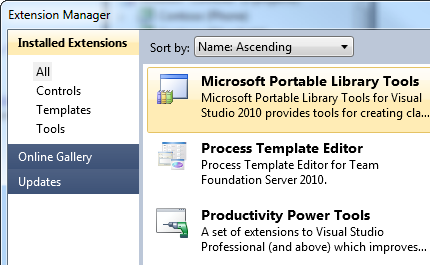
Microsoft Visual Studio 2010 (with SP1) must be installed before installing Portable Library Tools 2 for Visual Studio 2010. But I installed Microsoft Visual Studio 2010 SP1. What is problem?
Amazing tool. Still, there are some missing objects. Mainly: ObservableCollection (cannot be shared with PC .Net 4) WebClient
Edit: The latest release contains ObservableCollection! This is awesome! I'm actually able to share the same project between Windows Phone, PC and WCF service of the same application.
Great addition that was desperately needed for multi-platform. It's not perfect yet, but is a great stride forward to delivering a cross-platform runtime. Please keep adding namespaces such as the new ones introduced in .NET 4 and 4.5. Thank you!
It is great tool, but as the other said, please add the namespace System.XML.Linq and System.ComponentModel.DataAnnotations.dll since they are available in new .net framework. http://support.microsoft.com/kb/2600211
This is an extremely useful tool. It has helped me a lot when designing data models for projects where the target platforms have not yet been finalized and where leaving open the option to add additional platforms in the future is desirable.
Hi guys,
In the official release of the tools ICustomAttributeProvider interface was removed. We don't like this pesky interface as well, but the problem is that there is an API in the tools that is included and requires it. More specifically this is ServiceKnownTypeAttribute class which contract requires the method that you specify to take one parameter of type ICustomAttributeProvider.
Unfortunately this issue is breaking for us and we are forced to use the RC version of the tools.
Thanks for the heads up. I've filed a bug internally that is tracking this. We needed to remove ICustomAttributeProvider for a particular reason that we're not ready to discuss yet. I'll keep you posted.
Stefan,
We're still looking at the issue, however, I'm not sure there will be a solution anytime soon. We needed to remove ICustomAttributeProvidider for a particular reason that we can't avoid - we're still talking to WCF to work out a solution, however, it might take a new platform release to enable it.
David
Hi guys, I just started to play with the PLT yesterday and it's grand! I'm very happy for this and I see a lot of future for it... now I know this is a new endevor and as such a lot of stuff is still come (after BUILD) but I was wondering that just as you guys are adding XMSerialization to the table why leave JSON behind? specially when JSON is taking over all the scene in terms of api communication? Are u guys thinking in normalizing this scenario a bit for all platforms?
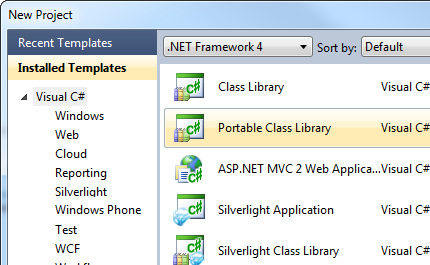
I've been trying to install the Portable Library Tools and create a Portable Class Library using Visual Studio 2010 Express for Windows Phone. It seems like it should work as PCL says it supports Visual Studio Express. Unfortunately, I run into issues as it won't recognize that VS 2010 SP1 is installed.
How would I go about installing the Portable Library Tools into Visual Studio 2010 Express for Windows Phone?
I've done the following
1. Installed Visual Studio 2010 Express for Windows Phone
2. Installed Windows Phone Developer Tools January 2011 Updates
3. Installed Visual Studio SP1
4. Attempt to install Portable Library Tools
At that point receive a "You don't have Visual Studio 2010 SP1". Any ideas? Or am I destined to have to purchase Visual Studio? The goal is to be able to build an SDK library that supports desktop .NET, ASP.NET as well as Windows Phone 7.
Portable Library Tools only works in Visual Studio 2010 Professional and above. (Unfortunately, Visual Studio Gallery doesn't show what edition an extension is available to, despite having this information)
If you are looking for a cheap way to get your hands on Visual Studio Pro, consider looking at one of the developer programs that we provide, such as BizSpark[1].
[1] http://www.microsoft.com/bizspark/
In some common classes i use the SerializabeAttribute in case of sharing between AppDomain [Mark Member as Serializable]. With a portable Lib this dosnt work:
[DataContract]
#if !SILVERLIGHT
[Serializable]
#endif
public struct PositionData: IEquatable<VersionizedKey> , IComparable<VersionizedKey>
{
Maby i can switch communication to wcf, but Is there another good and short workaround.
Thanks for your feedback. Given that serializable and AppDomain are platform-specific concepts (.NET Framework in particular), the way I would structure this is to have a .NET-only project that had a version of PositionData ("SerializablePositionData") that was designed for communication across AppDomains. I would then convert back and forth between it and the 'real' PositionData. This wouldn't be a type that I attempt to share between platforms.
We are trying to get unit testing to work on all of our class libraries built using the Portable Class Library, but got the following exception: System.BadImageFormatException: An attempt was made to load a program with an incorrect format. (Exception from HRESULT: 0x8007000B)
Is it even possible to Unit Test a class library build using the Portable Class Library?
More importantly Portable Class Library - Silverlight 4 and Silverlight for Windows Phone 7?
Or are we missing something?
Any help or information is much appreciated.
Our setup:
Windows 7 x64
Visual Studio 2010 Ultimate
Unit test project targeting Portable Library (Silverlight 4 and Silverlight for Windows 7)
- Compiled as Any CPU
- References (Copy Local)
- -- C:\Program Files (x86)\Microsoft Visual Studio 10.0\Common7\IDE\PublicAssemblies\Microsoft.VisualStudio.QualityTools.UnitTestFramework.dll
- -- C:\Program Files (x86)\Reference Assemblies\Microsoft\Framework\.NETPortable\v4.0\Profile\Profile4\mscorlib.dll
- -- C:\Program Files (x86)\Reference Assemblies\Microsoft\Framework\.NETPortable\v4.0\Profile\Profile4\System.dll
- -- C:\Program Files (x86)\Reference Assemblies\Microsoft\Framework\.NETPortable\v4.0\Profile\Profile4\System.Windows.dll
Sorry for the late reply, I missed this.
The .NET test library project should be able to unit test any Portable Library project that targets .NET. That error above could indicate that you don't have KB2468871 installed(http://go.microsoft.com/fwlink/?LinkId=210824).
Can you provide the exact repro steps that caused this error?
We are trying to Unit Test Portable Library that targets Silverlight and Windows Phone 7. We are able to get the Test project to have the Target Framework target each of the Portable Library Profile. When we targeted Silverlight and Windows Phone 7, we would get "System.BadImageFormatException: An attempt was made to load a program with an incorrect format. (Exception from HRESULT: 0x8007000B)" when Unit Testing a simple ObservarableCollection<string>: [TestMethod] public void Test() { ObservableCollection<string> col = new ObservableCollection<string>(); }
Just figure out a fix. Instead of referencing the dlls in C:\Program Files (x86)\Reference Assemblies\Microsoft\Framework\.NETPortable\v4.0\Profile\Profile4; we ended up referencing the dlls in C:\Program Files (x86)\Reference Assemblies\Microsoft\Framework\Silverlight\v4.0 instead. Is this the correct way to unit test the Portable Class Library?
I was very excited to found out about this Library Tools. But eveything changed when I find out that BitmapImage class is not supported.
Are there any plans on adding support for System.Windows.Media?
On MSDN is written that Silverlight and Windows Phone support it.
Thanks for trying it out. Due to the complexities around designing
We only currently support very little types in System.Windows.dll. We'd like to support more in the future, however, due to the complexities around designing and producing XAML, for the first release we only added enough types to support basic view models.
What's your scenario that involves sharing BitmapImage?
David, thank you for you fast reply.
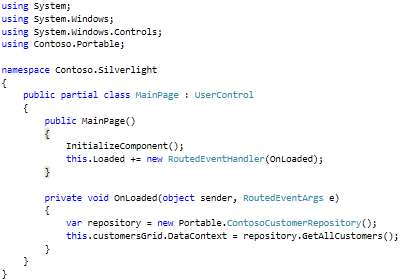
We are writing a class library, which should be shared among silverlight 4 and WP7 projects. This library implements MVVM Light Toolkit. One of the main models has a BitmapImage property. This model has to shared among SL and WP7 projects.
Can you give any info related to support for Mono ( and derivatives )? I thought the plan was to also be able to create Classes that work with Mono, as well? Thanks in advance.
http://tirania.org/blog/archive/2011/May-16.html
Thanks for your interest.
Currently, given recent events around Mono, existing plans were thrown up in the air. When we get updated information, I'll be sure to reply.
Hi,
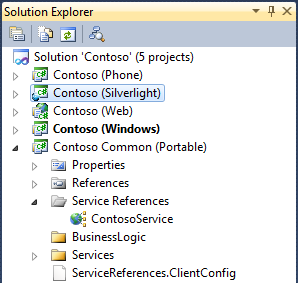
I created a new Portable Class Library project, i changed the properties of the project to target the Silverlight 4 and Windows Phone 7 frameworks, then i added a reference to the System.Windows assembly to be able to use the ObservableCollection. after that i tried to add a reference to a WCF service, the generated code doesn't use the ObservableCollection as a collection type, when i go to the Advanced settings in the Add service reference dialog the ObservableCollection is not shown in the list of the collection type. if i created a Silverlight Class Library or a Windows Phone Class Library project i can add a reference to the same WCF service and the generated code will use the ObservableCollection type.
Are there any plans to make a version of the tools - in particular the build targets - that can be used with the WindowsSDK - but without VS2010. We have a source code management server that builds our product on every checkin, and it seems overkill to have a VS2010 install on that machine just to compile code that was written using the Portable Library Tools. But that is what we're having to do because the installer refuses to install without VS2010 SP1 installed... We don't ever run VS2010 on that box - it just had to be there to make the Portable Library Tools installer happy :)
Yes, pass the /buildmachine switch to the installer PortableLibraryTools.exe. This removes the dependency on Visual Studio and will only install the build targets and reference assemblies. We probably should doc this. :)