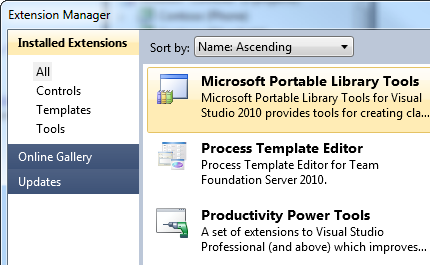
Microsoft Visual Studio 2010 (with SP1) must be installed before installing Portable Library Tools 2 for Visual Studio 2010. But I installed Microsoft Visual Studio 2010 SP1. What is problem?
Amazing tool. Still, there are some missing objects. Mainly: ObservableCollection (cannot be shared with PC .Net 4) WebClient
Edit: The latest release contains ObservableCollection! This is awesome! I'm actually able to share the same project between Windows Phone, PC and WCF service of the same application.
Great addition that was desperately needed for multi-platform. It's not perfect yet, but is a great stride forward to delivering a cross-platform runtime. Please keep adding namespaces such as the new ones introduced in .NET 4 and 4.5. Thank you!
It is great tool, but as the other said, please add the namespace System.XML.Linq and System.ComponentModel.DataAnnotations.dll since they are available in new .net framework. http://support.microsoft.com/kb/2600211
This is an extremely useful tool. It has helped me a lot when designing data models for projects where the target platforms have not yet been finalized and where leaving open the option to add additional platforms in the future is desirable.
My portable library project has reference to System.Xml.
When I added reference to the project to aspnet website and when I deployed it to II6 I got following error:
Could not load file or assembly 'System.Xml, Version=2.0.5.0, Culture=neutral, PublicKeyToken=7cec85d7bea7798e, Retargetable=Yes' or one of its dependencies. The given assembly name or codebase was invalid. (Exception from HRESULT: 0x80131047)
Description: An unhandled exception occurred during the execution of the current web request. Please review the stack trace for more information about the error and where it originated in the code.
I tried configure assembly binding in web.config, but I can't make it working. More details here: http://forums.asp.net/t/1678467.aspx/1?Could+not+load+file+or+assembly+when+referencing+PortableLibrary
We'll have clearer docs around this when we release, however, you need to have Update for Microsoft .NET Framework (KB2468871)[1] installed on the web server. You will also need to remove the the binding redirect - this will actually have the reverse effect of disabling the feature. :)
[1] http://www.microsoft.com/downloads/en/details.aspx?FamilyID=41bdce1f-3cb3-44bb-9b33-23a1b8c99ac3&displaylang=en
Hi. I'm still having this issue after removing the Library, reinstalling VS 2010 SP1 and then putting the library back on. I think there's something stuck in my solution somewhere. Any ideas where I should look?
David m. Kean - the link you supplied doesn't work. Could you let me know the correct one?
Thanks.
I posted this earlier but did not get a response...
When trying to deploy I select this prerequisite under the setup project properties: Microsoft .NET Framework 4 Client Profile (x86 and x64) and Update for .NET Framework 4 (KB2468871) But when I build the project I get this error and the final package does not strap the updates. "The version of the .NET Framework launch condition '.NET Framework 4 Client Profile' does not match the selected .NET Framework bootstrapper package. Update the .NET Framework launch condition to match the version of the .NET Framework selected in the Prerequisites Dialog Box." Can you provide some help?
You need to remove the '.NET Framework' launch condition or change it to 'Any' under the View -> Launch Conditions designer. Unfortunately, we couldn't get the update to be listed as one of the launch conditions. This won't affect the pre-install of .NET Framework if you run Setup.exe.
No, if the setup.exe is run, then these updates will still be pre-installed. What it means is that if someone double-clicks on the msi instead of the setup.exe to install then they won't be told to install the framework and/or updates.
(I'm a powershell dunce still, but ran across this today while writing some deploy scripts. It may be a powershell issue, but still thought it may be of interest)
This works:
----
$assem = [Reflection.Assembly]::LoadFrom(<path-to-net4-assembly>)
$assem.GetCustomAttributes($false)
----
However, if I substitute <path-to-net4-assembly> with <path-to-portable-assembly>, the GetCustomAttributes($false) fails with: "Could not load file or assembly 'System.Core, Version=2.0.5.0, Culture=neutral, PublicKeyToken=7cec85d7bea7798e, Retargetable=Yes' or one of its dependencies...".
Interestingly (oddly?), $assem.GetName() succeeds with either a net4 or portable assembly. Also, in the MSDN docs, GetCustomAttributes is marked as portable.
Ideas?
PS: Is there a more "official" way to give feedback than the Q and A area?
This is strange, I'm not an expert on PowerShell's environment, so can you try and few things and tell me the results:
1) Could verify that http://support.microsoft.com/kb/2468871 is installed on the box?
2) If so, can you try the same thing in a .NET Framework 4.0 Console application and see if that works?
3) Can you run the equivalent of Console.WriteLine(Environment.Version) in PowerShell and tell me the results?
If you would like to track this issue, feel free to file a bug over on http://connect.microsoft.com/VisualStudio.
Whoa -- the KB update did it. Nice catch!
I'm really excited about this project, especially with the new WinRT. I'm hoping to be able to use it to define service definitions across multiple platforms. Looking forward to see where it goes!
If my Portable Library (PL) has a reference to a System.Net object, the consuming .net4 library won't compile unless I add a reference to the System.Net assembly (which doesn't actually contain any of the objects I'm using).
For example, I have an interface that returns a WebRequest in my PL. I implement the interface in my .net4 library, add a "using System.Net;", and everything looks good, but compilation fails. If I add a reference to the .net4 System.Net assmebly (which doesn't contain WebRequest...), then everything compiles.
I can provide an example solution if needed (though I don't see anyway to attach a file to this thread).
David, thanks for trying it out.
What you are seeing is actually due to the how we make Portable Libraries work in .NET 4.0. I actually cover this exact scenario in our Channel 9 interview: http://channel9.msdn.com/Shows/Going+Deep/NET-45-David-Kean-and-Marcea-Trofin-Portable-Libraries. See minute 18:20. We're trying to make this scenario a little better in Dev11.
I have a persistence agnostic "entities" Library that only includes the entities as classes and their properties. These are the classes I serialize over a RESTful protocol.
I was really hoping that I could now add basic things like StringLength, Required etc to the library, and keep it portable on server and client.
It seems System.ComponentModel.DataAnnotations is not supported in a Silverlight/.Net4 portable library?
Please tell me it aint so - I just assumed this would be natural for people to want to do :-)
Thanks-
OK, fair enough (as long as it gets done in a sooner update rather than later ha ha ha).
So, pragmatically speaking, what are my options? 2 copies of each entity class file (they arent big, but I got a lot of 'em :-)). Is there a better way? with good 'ol #IF?
This really bums me out since for me, this is probably the biggest reason to use portable libraries- Domain Driven Design ya know :-)
Ive thought more about how best to workaround this: does this make sense?
Have all of the entity .cs files in a directory. Each .cs file has #IF SILVERLIGHT around the data annotations, so they are only specified for the silverlight build.
Have 2 projects, each with links to the entity files- one project for .Net4 server side, and one project for silverlight (the silverlight project defines SILVERLIGHT).
Build both projects.
Upside is it is "single source", downside is all the #IF stuff.
Is there a better way? I definitely dont want to have 2 copies of the .cs files.
Thank you so much for reading -
Joe
Hi David - Please take a quick read of ^^^ above and let me know if this is the best way to workaround unavailability of DataAnnotations?
Thank you, it is appreciated...
Hi, I have the same issue, I am trying to leverage Dto classes that I have used for a WPF/WCF application and I was hoping to be able to use the DataAnotations and the IDataErrorInfo in my Dtos. When I select .Net4 and SL, they are not available. Strange when SL fully supports both.
Thanks. Types and assemblies are not automatically sharable between platforms, hence why these are not available. We need to do work on our side to make them sharable; we need to verify that they can be consumed in a platform-agnostic way, write tests, fix any incompatibilities and add them to our reference assemblies. This takes time and work, so we focus on what we deem to be the more important APIs first.
Sometimes I need a value different from null, that is where DBNull can fit in.
I know I can define my own type to do it, but that's what DBNull supposed to be.
Also since every currently supported target framework uses DBNull how do I use my own define type that to interop with other .NET components that know what to do with DBNull?
I can't even define conversion operator for DBNull since it's unknown to PTL.
And you say it's not supported in Windows 8 Metro style applications, but it is supported in all target frameworks I can choose now, if you don't want it appears in a type library targeting Windows 8 Metro style application, why not make an additional option targeting it?
BTW, can Windows 8 Metro style applications interop with Metro style IE? If it happens, what do you use to represent a JScript "null" in CLR?
Every existing JavaScript(not only Microsoft JScript if you use Silverlight) variants' null represented as DBNull when invoked from CLR, I don't know how it's decided but that's how it works so far.
When trying to deploy I select this prerequisite under the setup project properties:
Microsoft .NET Framework 4 Client Profile (x86 and x64) and Update for .NET Framework 4 (KB2468871)
But when I build the project I get this error and the final package does not strap the updates.
"The version of the .NET Framework launch condition '.NET Framework 4 Client Profile' does not match the selected .NET Framework bootstrapper package. Update the .NET Framework launch condition to match the version of the .NET Framework selected in the Prerequisites Dialog Box."
Can you provide some help?
Can you guys please include Code Contracts? It seems like the better way to go than to constantly do:
if (myParam == null) throw new ArgumentException("...");
System.Diagnostics is already a supported namespace, so just throw the System.Diagnostics.Contracts namespace in there :)
Thanks for trying it out. Code Contracts is on our backlog for a future version. SerializableAttribute was removed deliberately because it has been replaced in favor of DataContractAttribute. COM isn't supported, hence why ComVisibleAttribute isn't available. What are your usages of these attributes? Do you have them because you actually need them, or are you just trying to convert existing code over to it?
I had an existing ReadOnlyDictionary class that I wrote. I modeled it heavily on the ReadOnlyCollection and I followed the "Microsoft All" Code Analysis ruleset. That lead to me adding the "ComVisible(false)" attribute and Code Analysis suggested I should add the Serializable attribute to my class. I'm not sure if DataContract is the right way to go here, but if it is then I should probably look at CollectionDataContract I assume (that way I can provide a KeyName and an ItemName)?
Apologies, I missed your reply. I can't give any information on when our next release will be, however, Code Contracts is currently below the cut line, so likely will not be included.
What I'm more or less looking for is a way to create an Xna library which can be shared between multiple platforms like 360, windows and windows phone 7. I've found that when I reference the xna assemblies, I can't target the mscorlib.dll. Then the System.IO.IsolatedStorage namespace cannot be found.
Is there a way to work around this?
Even though it isn't listed in the UI, Silverlight 5 is supported (just check Silverlight 4 which implies 5). Or is there something in particular available only in Silverlight 5 that you were hoping to use?
Thank you. I'll try with Silverlight4 option as you've suggested. At this point of time, there's nothing specific of SL5 that I'm trying to use of.
Because I dint see SL5 in the UI list, I thought I'll check here.
Thanks again.