Favorite Documents

VSIP Partner Free

Favorites menu for Visual Studio IDE.

(7) Review
Visual Studio
2012, 2010
Download (2,336)
6/12/2012
1.5
E-mail Twitter del.icio.us Digg Facebook
Add To Favorites
Description
Reviews (7)
Q and A (2)
Sign in to Write a Review
Sort By:

by Hi I'm JDK | January 24 2013

Amazing! Thanks!

by hybridview | August 31 2012

This is EXACTLY what I've been looking for. Allows me to bookmark key folders in my largest solutions for quick access. I've been wasting so much time and energy manually navigating to various related files...

FAVORITE FEATURES:
* Solution AND global level favorites.
* Integration into solution explorer means favorites can SELECT files/folders in the solution explorer (my favorite feature!).
* Customize the names/labels of bookmarks.
* Ability to group into folders.
* Nice and easy to use favorites manager.

by Corgalore | July 16 2012

Love this extension! I've been needing this for quite some time now as the built-in Recent Projects list is terrible. My only feedback would be to allow nested folders in the Manage Favorites interface.

by Indrajit Ghosh, Kolkata | February 13 2012

1. Nested folder creation should be allowed.
2. Context menu on document should be added for adding the document to the currently opened project. (Now I can only view the document).

by cori schlegel | January 19 2012

This is just what I've been looking for; thanks!.

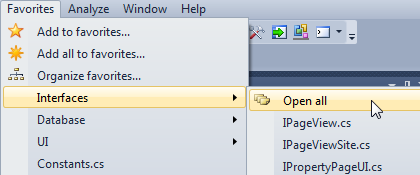
As far as I'm concerned it's missing just one feature that would make it a 5-start extension: Add all open documents. My usage is to group files that I commonly want to work with together when working on a particular area of an app, so I typically open them all one at a time; it would be great to be able to open the 7 or 10 files I need and then add them all to a favorite folder with one click.

**EDIT**
With Add All available this is one of my most-used extensions. Thanks!

by Viktar | October 19 2011

This one of most useful Visual Studio Add-ins. Well done.

by AdamCaviness | August 17 2011

Thank you! Just what I needed. Very pleasing, especially the considerations for locations and files.

Sign in to Start a Discussion


  • As a Pane instead of a Menu?
    2 Posts | Last Post January 24, 2013
    • 
      Cool!
      
      Rather than as a menu, can this be shown as a Pane docked along with the Solution Explorer?  I work with a team with a VERY LARGE code set with lots of annoying folders and nesting (annoying for navigating among them, at least).  The files I edit/refer to most are spread out all over the place and finding them is a hassle BUT I think I'm often working with the same set of files (but too many to fit nicely in the Tab Well as open documents).
      
      I'd like to set my favorites from the Solution Pane either with its context menu or drag and drop to this favorites pane.  Then I would switch to the favorites pane and have my working set in there.
    • Wow, I asked for this and it was available INSTANTLY!  I didn't even need an update!  What stellar service!
      
      (or ... Oops, that's already a feature)
  • Some Questions
    2 Posts | Last Post December 01, 2012
    • Hey there.
      
      At first i must say, that this is an awesome extension, especially according to my projects in the TFS2010.
      And this leads me to my first question:
      Is there any way to setup Favorites directly from the Sourcecode-Explorer?
      If i try this, the extension tells me * Sourcecontrol-Explorer is not a document and can't be added to favorites. * because of the missing context i think...
      
      And this one causes my next question:
      Are there future plans to add a 'Run with' feature?
      If i wanna bookmark some foreign project-types, not supportet by VS2010 by default, the extension opens the link with the VS2010 text-editor.
      My suggestion is to add an - as mentioned above - run with feature, which allows me to specify an application that executes my favorite.
      
      So long  
      
    • Angel,
      
      1. You can only create links to folders in Source Control Explorer. When you open this link later, the Source Control Explorer window is activated and the folder is selected. 
      
      2. I plan to add a feature to bookmark external files that will be opened with the default Windows handler for this file type. Will it suit your needs?