Editor GuidelinesAdds vertical column guides to the Visual Studio text editor. |


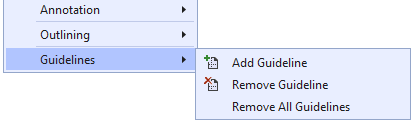
Editor Guidelines adds vertical column guides behind your code. This is useful if you are trying to tabulate columns of data or if you want to ensure that your lines don't extend beyond a certain length. You specify where the guides go and what color they should be. Looking for a version that works with Visual Studio 2022? Please go here to download that version. Note: This extension collects and transmits anonymized usage statistics to the extension author for product improvement purposes. Getting StartedAdd a new guideline via the context (right-click) menu on the editor surface. You will see a "Guidelines" flyout with three commands:
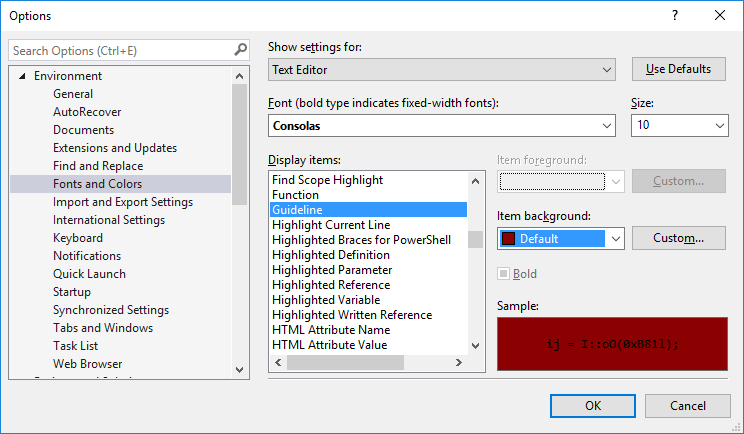
When "Add Guideline" is selected, a vertical dashed line will be drawn at the same position as the caret (insertion point). "Remove Guideline" will remove any guideline at the current insertion point. "Remove All Guidelines" does exactly that. ConfigurationYou can change the guideline color from the Fonts and Colors page in Tools/Options. Look for "Guideline" in the Text Editor category:
.editorconfig support (VS 2017 and above)For VS 2017 and above, the position of guidelines can be overridden via settings in .editorconfig files.
Set the You can set the guideline style like this: As shown, you can have different styles for different file types. There are three different drawing styles:
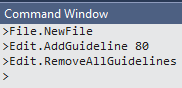
As the examples show, colors may be named or in RGB or ARGB (hexadecimal) format. The available color names are from WPF's Colors collection (System.Windows.Media.Colors). As the following example shows, you can set the style for each guideline separately. Three guidelines are defined. The first two define custom styles. The third, at column 132 doesn't specify a style, so it will be drawn using the default style which, if not specified via To learn more about .editorconfig see https://aka.ms/editorconfigdocs Note: When guidelines are set via .editorconfig they override any other guidelines set via the context menus or command window. AdvancedThese commands may also be accessed from Visual Studio's Command Window
Note that the column numbers used for the Edit.AddGuideline and Edit.RemoveGuideline commands refer to the right side of the given column of text. i.e. To place a guide to the right of column 80, use "Edit.AddGuideline 80". To place a guide to the left of the first column use "Edit.AddGuideline 0". SupportIf you find a bug in this extension or have a feature request, please visit https://github.com/pharring/EditorGuidelines to file an issue. |