Indent Guides

Free

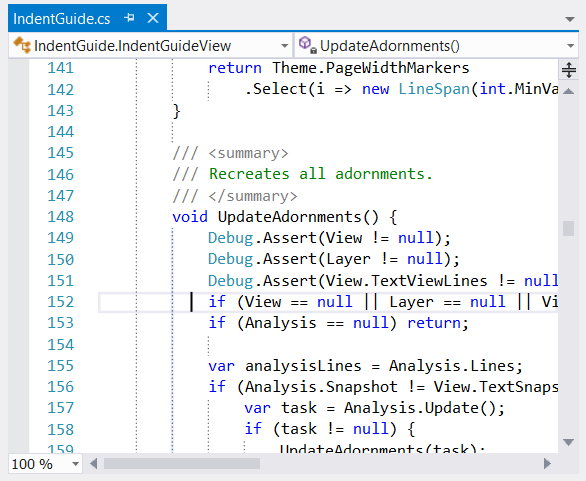
Adds vertical lines at each indent level.

(94) Review
Visual Studio
2012, 2010
Download (335,081)
4/22/2013
12.1
View
E-mail Twitter del.icio.us Digg Facebook
Add To Favorites
Description
Reviews (94)
Q and A (31)
Sign in to Write a Review
Sort By:

by Victor DelPrete | at 3:22 PM

Wow, 137kb. Impressive. Looks great too. Thanks!

by Brad Deem | May 03 2013

Thank you!

by Laurent Dané | April 16 2013

Elegant and very usefull ! Thanks a lot Steve !

by Vrane | April 01 2013

Excellent, i hope next VS release includes this tool :)

by vikram Bansod | April 01 2013

This should be included in Visual Studio by default. Thanks Steve , Nice Work!!

by Adrian Capitanu | March 16 2013

by domagoj.svagelj | March 11 2013

Simple, must have extension.

by Реснянский | March 08 2013

Must be VS feature out of box.

by MIkeTims | March 01 2013

Not the prettiest way of marking them but does the job and help you easily keep track of which code belongs to which brackets

by jaysonragasa.net | February 20 2013

the most important feature of every IDE, and VS2012 doesn't have it.

Thanks for making this one!

by PinkFloyd | February 01 2013

by Antonio Pérez Fuerte | January 18 2013

by Stu Beattie | January 09 2013

by Osama Al Shammari | December 30 2012

Thank you for this tool.

It's really useful when the code grows big, you would lose the sense in the code without such tool.

by ScruffyDuck | December 18 2012

Excellent!

by 夜泷月 | December 14 2012

很实用

by Jerry Batorski | November 29 2012

by Mauro_Rilla | November 28 2012

great extention

by Pavel Pontus | November 28 2012

by _wil_ | November 07 2012

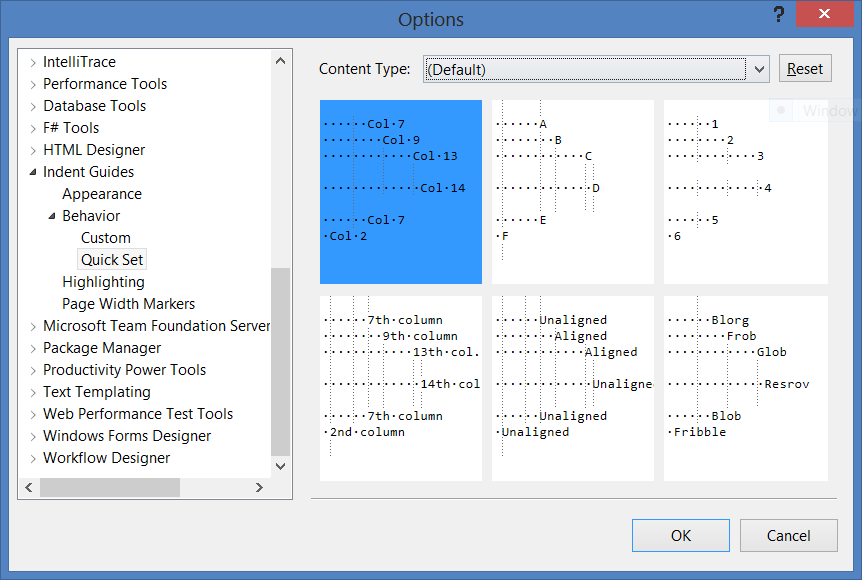
Almost perfect. Too bad setting a different line color cannot be done once for all the profiles (what do "Default", "Unaligned", "#1", "#2", .. "#30" mean by the way ?)

Zooba November 07 2012
| Edit |
Delete

Best way to do that is to delete the profiles, set it in default, and then recreate the profiles (sorry). Honestly, I wasn't even aware that people were using them :)

#1, #2... are the depths of lines, so if you want the 3rd line to be a different colour or to only be visible when highlighted you can modify #3. "Default" applies to all lines that haven't been set manually, and "Unaligned" is for lines that don't appear at multiples of your Indent Size setting.

1 - 20 of 94 Items   
Sign in to Start a Discussion


  • Enable per language?
    2 Posts | Last Post April 25, 2013
    • Great extension, thanks for taking the time to create it.  Is it possible to disable the extension per language?  I really only need it for CoffeeScript files, and the only way to found to turn it off for .cs was to first make a CoffeeScript Content Type and to then make all the lines in Default invisible.  I just figured there'd be a more elegant way to do that.
      
      Thanks!
    • I'm afraid not, you've found the most elegant way. You should only have to make the Default line style invisible and the rest will pick up the setting automatically - only lines that are already different to the default will keep their setting, and this is where that "Reset" button becomes useful.
      
      Glad you like it!
  • Insert lines at constant columns
    4 Posts | Last Post April 22, 2013
    • I usually try to wrap comments, documentation or partially other code at 100 characters to keep it readable on smaller screens. The 100 is just an even number that I can remember well and 80 seems a bit outdated these days. But I always need to move the cursor and watch the current column number in the status bar to see how long my line space is.
      
      It would be great if the extension could also add an additional line (or maybe multiple?) with customisable style at configurable columns. This line should always be visible, in every line of the document, not only where there's text.
      
      Maybe this could be specific to document types like .cs or .xaml if that's possible and doesn't get too complicated to set up.
    • That's certainly an idea that I've thought about before, but haven't taken the time to do (the line itself is incredibly easy - the options UI for it is much more involved...).
      
      The VS PowerTools extension has a similar feature, though it does not allow much styling of the lines. That's the one that I use myself at the moment.
    • VS PowerTools is a bundle of a whole lot of things which I've tried out and eventually dumped again. Most of it is not for me. I've searched the individual extensions and installed a few of them, the Guide extension being one of them. But I don't like that sparsely dotted line and one (actually two, for the UI of it) extensions less would be easier.
    • So I was working on another bug and I realized that this was easier even than I expected, so I went ahead and did it. There's a new beta at indentguide.codeplex.com that has this feature, so check it out and let me know what you think.
  • Threading exception...
    2 Posts | Last Post March 29, 2013
    • I encountered this today while editing an XML file.
      
      
      Exception Type: System.AggregateException
      Exception Message: A Task's exception(s) were not observed either by Waiting on the Task or accessing its Exception property. As a result, the unobserved exception was rethrown by the finalizer thread.
      Exception Stack Trace:    at System.Threading.Tasks.TaskExceptionHolder.Finalize()
      Inner Exception:
      Exception Type: System.InvalidOperationException
      Exception Message: The calling thread cannot access this object because a different thread owns it.
      Exception Stack Trace:    at System.Windows.Threading.Dispatcher.VerifyAccess()
         at System.Windows.DependencyObject.GetValue(DependencyProperty dp)
         at System.Windows.Controls.Panel.get_IsItemsHost()
         at System.Windows.Controls.Panel.VerifyBoundState()
         at System.Windows.Controls.Panel.get_InternalChildren()
         at Microsoft.VisualStudio.Text.Editor.Implementation.AdornmentLayer.RemoveTranslatableVisual(AdornmentAndData data)
         at Microsoft.VisualStudio.Text.Editor.Implementation.AdornmentLayer.RemoveAllAdornments()
         at IndentGuide.IndentGuideView.UpdateAdornments()
         at IndentGuide.IndentGuideView.UpdateAdornmentsCallback(Task task)
         at System.Threading.Tasks.Task.<>c__DisplayClassb.<ContinueWith>b__a(Object obj)
         at System.Threading.Tasks.Task.InnerInvoke()
         at System.Threading.Tasks.Task.Execute()
    • Thanks! I think I know what's going on here, so it should be easy to fix. Guess I'll have to get around to finishing up that next release now.
  • Exception in VS 2012 Ultimate RTM version with Indent Guide (12.1)
    2 Posts | Last Post March 03, 2013
    • I installed the latest Indent Guide (12.1) on top of VS 2012 Ultimate RTM. I get the following error on launch of VS as recorded in ActivityLog.xml:
      <entry>
          <record>572</record>
          <time>2013/01/02 18:23:17.890</time>
          <type>Error</type>
          <source>Editor or Editor Extension</source>
          <description>System.NullReferenceException: Object reference not set to an instance of an object.&#x000D;&#x000A;   at q.TextViewCreated(IWpfTextView textView)&#x000D;&#x000A;   at Microsoft.VisualStudio.Text.Editor.Implementation.WpfTextView.&lt;&gt;c__DisplayClassc.&lt;BindContentTypeSpecificAssets&gt;b__9()&#x000D;&#x000A;   at Microsoft.VisualStudio.Text.Utilities.GuardedOperations.CallExtensionPoint(Object errorSource, Action call)</description>
        </entry>
      
      Is this a known issue?
      
      Thanks.
    • Sorry for the delayed response - your question came in at a time when email notifications weren't being sent.
      
      The bit of the stack trace you have there doesn't seem to include my extension, but that does look like the point where I hook into the text view. There's a newer version at http://indentguide.codeplex.com/ that may have fixed this, but I don't recall specifically addressing the issue (I don't spend much time coding outside of work any more).
  • avoid taking preprocessor into account
    2 Posts | Last Post September 30, 2012
    • hi 
      
      Would you like to add an function to avoid broken highlight when encounter preprocessor def.?
      
      something like this:
      
      int i;
      |
      while(1){
      |
      |
      |   int x;
      |   |
      #ifndef XXX  //<---highlight been broken here
      |   
      |   
      
      
      thanks in advance.


    • Thanks! I wasn't entirely happy about the highlight not continuing through preprocessor commands, but there's quite a bit of work needed to make it happen (and it's probably all language specific, which I've been trying really hard to avoid).
      
      I've added an issue for this, and since I don't really have much else to work on for this it should be in v13 (though I don't have a planned release date yet).
  • VS 2012
    1 Posts | Last Post September 13, 2012
    • There's an improved release over on http://indentguide.codeplex.com/ for Visual Studio 2012. I will upload it here if/when I can provide different downloads for each version.
  • V12 not working in VS 11 Beta
    7 Posts | Last Post May 30, 2012
    • Hi,
      This is a great control and have used it for a while, when I moved to VS 11 Beta I was pleased to see that this tool was supported and worked well. I upgraded to V12 of indent guides this morning and nothing no guides at all tried both light and dark theme, un-installed it, reinstalled several times with and without admin permissions. Anybody else experienced this behaviour? 
      
      I have tried to go back to V11 from CodePlex but no joy this now no longer works either.
      
      
    • Yes, same here! I love this extension and now it gone, I tried the same as you and still nothing!
    • This is also happening to me in VS 2010 also. Tried different options and still get nothing.
    • I forgot to say that I am using VS 2010 SP1.
    • Thanks. It looks like the View Indent Guides menu item (inside Edit->Advanced when you've got an editor open) is deselecting when some people upgrade from an earlier version, so you may be able to use that menu to bring them back.
      
      Otherwise, a settings reset should fix all issues (though it will lose colours, but if you need to get it working...): delete HKCU\Software\Microsoft\VisualStudio\10.0\IndentGuide or ...\11.0\IndentGuide while VS is closed.
    • Deleting the registry keys has resolved the answer, many thanks
    • Working again, thanks. I feel stupid, for such obvious solution, actually I tried to find something like that but in the View menu! Thanks again...
  • Version 12 crashes when creating an EventHandler in WPF Designer
    4 Posts | Last Post May 30, 2012
    • The VisualStudio 2010 ActivityLog.xml provided the following information:
      
      VS Version: 10.0.40219.1
      
      System.InvalidOperationException: The current SynchronizationContext may not be used as a TaskScheduler.
      at System.Threading.Tasks.SynchronizationContextTaskScheduler..ctor()
      at IndentGuide.DocumentAnalyzer.Reset()
      at IndentGuide.IndentGuideView.UpdateAdornments()
      at IndentGuide.IndentGuideView.UpdateAdornments(Task task)
      at IndentGuide.IndentGuideView.View_LayoutChanged(Object sender, TextViewLayoutChangedEventArgs e)
      at Microsoft.VisualStudio.Text.Utilities.GuardedOperations.RaiseEvent[TArgs](Object sender, EventHandler`1 eventHandlers, TArgs args)
    • Thanks for that. I'll push out an update later today to fix it (or at least stop it from crashing).
    • I've fixed this issue and pushed the update to everyone. Now if we can't run the document analysis asynchronously, the exception is caught and the analysis is synchronous.
      
    • Great, thank you! I've done a quick check and it seems to be resolved now! :-)
  • I can't see the indent lines since the upgrade from version 11.0 to 12.0.
    7 Posts | Last Post May 29, 2012
    • I just upgraded to the newest version and now I can't see any indent lines at all.
    • I forgot to mention that I use VS2010 Professional SP1
    • Same problem here, also VS2010 Pro SP1, on Windows 7 Pro
    • Ok, it is now working, I un-installed it, and downloaded & installed from here, but now all the indent lines are the same black colour rather than different colours as before.
    • Same here... Tried what ProbablyMike suggested but it didn't work. Using VS2010 Pro SP1 as well.
    • Thanks guys. It looks like the View Indent Guides menu item (inside Edit->Advanced when you've got an editor open) is deselecting when some people upgrade from an earlier version.
      
      Otherwise, a settings reset should fix all issues (though it will lose colours, but if you need to get it working...): delete HKCU\Software\Microsoft\VisualStudio\10.0\IndentGuide while VS is closed.
    • Obviously the point of the first sentence is that you may be able to just select that menu to bring them back... forgot to write that the first time.
  • Logic for selecting indent to highlight
    2 Posts | Last Post February 18, 2012
    • Very nice.  Thanks!
      
      One thought; I did notice unexpected behavior regarding which indent is designated as current and therefore highlighted;
      
      if my editor caret is adjacent to, and to the right of, one of the brackets that defines a block, the highlight is applied to the indentation that is hierarchically 'higher' i.e. one extra tab/column to the left.   
      
      I realize that could be by design, but an option to adjust might be nice. Some other editors do work this way.
      
      I did also notice if the caret is in any blank line following an open bracket with no coded lines between, or if I am in a block that has only one coded line the same thing happens.  Its not much of an issue, neither condition is common.
      
      Wish I could insert an image here but I think this will do;
      
      COLUMNS >   1  2  3
      
                  if (someCondition)
                  {
                     foreach (int i in someCollectionOfInts)
                     { <-- If my caret is here it highlights column 1 instead of 
                           column 2.  An option to change that would be nice.
                        
                        // There is no place you can put the caret within this 
                        // next block that will highlight column 3.
                        if (someOtherCondition)
                        {
                           
                           doSomethingCool();
                        }
      
                     } <-- If my caret is here it highlights column 1 instead of 
                           column 2.  An option to change that would be nice.
                  }
    • So what's happening here is that the guideline will only be highlighted if it's been drawn on the line of text with the caret (excluding when "Visible at text" is on). I may be able to handle "guessing" when to highlight a guideline from an adjacent line, but there's no code analysis going on at all (only the leading whitespace is ever used) and I intend to keep it that way.
      
      I suspect that there may be too many cases that can't be handled. For example, if you put the caret before the first "//", should it highlight column 2 (the entire foreach block) or column 3 (from the foreach to the comment)?
      
      I've created an issue at the CodePlex site (http://indentguide.codeplex.com/workitem/33), so when I have a chance I'll try a few things out.
1 - 10 of 31 Items