Great tool that is really needed in business environment in order to be able to share the test scripts with a customer.
The most wanted feature is probably customization options. This is possible in a small way but not supported. Especially being able to start from a custom .docx file would be helpful. Other customizations can be handled.
That's why only four stars out of five, please add the feature and you definitely got five stars!
A very nice tool - a big step forward. I would like to see .sx files shared with scenarios from regulated environments. User documentation could suffice. Greg
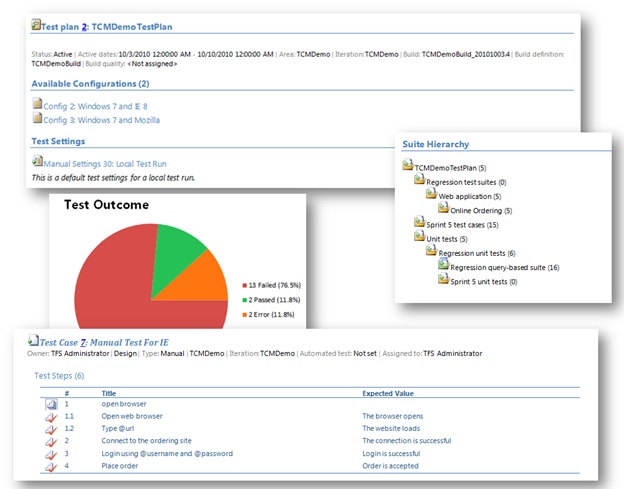
I love this tool. It makes really easy to generate Test Plan Summary which is important to avoid duplicate work and it changed the process to be more efficient because you don't have to write plain text document and enter the test steps again into MTM.
I think this has the potential to be a fantastically useful tool. There are a number of feature missing that would make it more suitable for me (eg: printing out and presenting to the business in a review session):
- Test Plan Summary - Test Case Parameters - Configuration values - Default Only. Not Test Case specific
- Test Run Summary - Complete list of Test Cases covered (don't care whether there are duplicates or not), both passed and failed. - List of failures regardless of whether they are Analysed or not. - Test Configuration. If I'm running a test across multiple configurations and it only failes on one, which one did it fail on? - Result Comments - I'd like to be able to see at a glance all the comments that all my testers are entering when failing test cases instead of having to navigate to each individual Test Run.
I look forward to seeing future versions of this tool :)
liked this tool though it doesn't generate Summary file sometimes but could get the doc. after retry. And also could able to customize the doc. using Sally Cavanagh suggestion in Q And A section as we have lot many testcases in our Test Plan and our requirement is to generate doc. for each suite.
I find this tool useful but we have over 1200 test cases and when we generate our test plan doucment it's over 1500 pages long. I'd like to have a way to filter what is output and possibly just select the output to be generated at the test suite level, area path level, or owner level. Thanks!
Regarding the reports of corrupted files, this is likely because you are using an older version of Office than 2010. Please see the Description tab which has been updated with a list of known issues. There is an easy workaround for the corrupted file messages which is posted there.
Agree with comment above it generates corrupt file. A popup messages comes up which is confusing. Rather test manager should create a file and notify user when done. a popup with cancel and stays on forever ! not good
It's a good start but needs some more features. It would be nice if the user can select the information that is displayed in the document. It also would be nice if I could generate a document for a single Test Case.
I am receiving an error when I select a number of test runs then click Generate.
The error is:
Application detected an unexpected fault. Running transformation: Microsoft.TeamFoundation.WorkItemTracking.Client.FieldDefinitionNotExistException: TF26027: A field definition Microsoft.VSTS.Common.Priority in the work item type definition file does not exist. Add a definition for this field or remove the reference to the field and try again.
at Microsoft.TeamFoundation.WorkItemTracking.Client.FieldDefinitionCollection.get_Item(String name)
at Microsoft.TeamFoundation.WorkItemTracking.Client.FieldCollection.get_Item(String name)
at Microsoft.VisualStudio.TextTemplating4758D4BCBD74F4B544B88472A141286B.GeneratedTextTransformation.TransformText() in c:\Users\sbraisby.LD\AppData\Local\Temp\a4c4qniu.0.cs:line 456
at Microsoft.VisualStudio.TextTemplating.TransformationRunner.RunTransformation(TemplateProcessingSession session, String source, ITextTemplatingEngineHost host, String& result)
Any ideas on a resolution for this?
Did you remove the "Microsoft.VSTS.Common.Priority" field from the Test Case work item type definition?
If you did then you will need to add it back. I always recommend that you hide fields from the UI rather than deleting them as many tools work from the fields that exist on a template.
We had the same problem with several of our TFS projects, and MrHinsh tip led me to the cause in our case. I checked the Test Case workitem type and the "Microsoft.VSTS.Common.Priority" was present, but it was not on the Bug workitem type. I added the field to the Bug type and gave it a defaultvalue rule so it always has a value. Here is the definition I used:
<FieldDefinition reportable="dimension" refname="Microsoft.VSTS.Common.Priority" name="Priority" type="Integer">
<DEFAULT from="value" value="1" />
</FieldDefinition>
Hi,
when I generate Test Plan Summary everything is ok. But when I try to generate Test Run Summary I get error : The Office Open XML Test run summary.docx cannot be opened (...)
Any ideas ?
I need a full package install to install Test Scribe on one of my dev servers that does not have Internet access, Does anyone have a full package exe that installs Test Scribe??
Previously i thought it is because of SP1 not installed my the machine but now i also have SP1 and still mtm.exe is not working,
if i uninstall Test Scribe MTM is working Fine.
Why is this happening ?
I have been able to do this although it is not easy..
1. Locate the file Microsoft.TeamFoundation.TestManagement.Tools.TestScribe.sx mine was under (C:\Program Files (x86)\Microsoft Visual Studio 10.0\Common7\IDE\PrivateAssemblies\TeamTest)
2. Take a copy of this and paste it to a folder you can work on it
3. Rename the copy to Microsoft.TeamFoundation.TestManagement.Tools.TestScribe.zip
4. Extract the file using winzip
5. This will create 2 folders (among other files) one called TestPlan and one called TestRunSummary
These 2 folders contain the code in .tt files which builds the document (i.e. the template) You can then edit these tt files to export other fields from your test plans / suites / test cases / test runs.
After you have finsihed editing you can then add all the files it extracted as part of step 4 to a new zip file, then rename this new zip file as Microsoft.TeamFoundation.TestManagement.Tools.TestScribe.sx and pase this over the original taken in step 1.
Hi - I need to edit the output like Sally has but I'm not sure exactly how to add Test Links to the document. I need all links under each test case to be under the test case name. Do you know I would pass into sprText function in the SprParagraph section in TestCaseSection.tt?
After re-zipping with Winzip, renaming to .sx and putting back in the correct folder, I get mtm.exe closed unexpectedly and cannot launch. This is without making any changes to the files, so running steps 1-4 and then doing the last step in Sally's post above.
I see in the code TestSuiteSection.tt, it tries to create a heading with an Image named TestSuiteStatic_32.png, but that file is not located in the Images directory, could this cause any of the corruption issues?
I am not sure on the mtm.exe closed unexpectedly and cannot launch, I had an issue with the mtm when I had two copies of the .sx file under the C:\Program Files (x86)\Microsoft Visual Studio 10.0\Common7\IDE\PrivateAssemblies\TeamTest even if they had different names.
I had had no end of issues with parameters, and to this day still cannot get the parameters out into the documents. Try the msdn articles under here http://msdn.microsoft.com/en-us/library/microsoft.teamfoundation.testmanagement.client.itestbase_members.aspx there is a bit under there for getting the links to a test case
I have been playing with "OutcomeSummary.tt" file to customize the outcome generated in word format. My test run has comments entered in few steps and images as attachments in other steps. Is there a good way to grab that the execution of run with comments and attachment and publish in word document generated?
Thanks
it took me a while...when your MTM crashes after you re-zip the .sx file, simple repeat the process:
1. Rename .sx file to .zip
2. Open the archive in WinZip and open/edit a .tt file in Notepad
3. When closing .tt file, WinZip will ask you if you want to re-compress the .zip file (yes will do the trick)
4. Change the .zip extension to .sx
5. Run MTM and celebrate you customized summaries.
Hi,
I've wrote couple of articles on how to change Test Scribe Template:
1. http://blogs.microsoft.co.il/blogs/shair/archive/2011/10/16/how-to-change-test-scribe-template.aspx
2. http://blogs.microsoft.co.il/blogs/shair/archive/2011/10/18/test-scribe-developer-guide.aspx
Enjoy
Has anyone been able to alter the template to show only the cases in each root suite? This is my biggest complaint with this template. I don't want to see cases repeated, only in which root suite they belong. This also makes the document much longer than it needs to be and in effective for test case reviews, etc... If anyone has a saved version or can tell me how to go about changing this it would greatly appreciated.
We are experiencing out of memory exceptions, when executing, Test Scribe with over a few thousand test cases. We've seen this across multiple machines. Any ideas?
I've also noticed this. It seemed to stem from how I had my suites listed. It correctly identifies that 0(zero) tests actually live in the main suite or other further down the tree hiearchy, but when displaying the each plan area (suite) it will include all the test that it can see in the suite and below. This is how I saw the duplication occuring. So the document showed all 18 tests for the first suite and then named each suite again showing the same test as per suite. Really the first suite should have been listed with the plan as it didn't contain ant tests. I also saw that the configurations tab only seems to shows those listed as default for the plan and not those that were actuallt selected for being run with the test case.
Hi,
I'm running windows 7 x64, after installing Test Scribe i can no longer run MTM. i get the following exception
Application: mtm.exe
Framework Version: v4.0.30319
Description: The process was terminated due to an unhandled exception.
Exception Info: System.Reflection.ReflectionTypeLoadException
Stack:
at System.Reflection.RuntimeModule.GetTypes(System.Reflection.RuntimeModule)
at System.Reflection.RuntimeModule.GetTypes()
at System.Reflection.Assembly.GetTypes()
at System.ComponentModel.Composition.Hosting.AssemblyCatalog.get_InnerCatalog()
at System.ComponentModel.Composition.Hosting.AssemblyCatalog.GetExports(System.ComponentModel.Composition.Primitives.ImportDefinition)
at
Hello,
I'm also running on Windows 7,x64 and get the same error. I also get the following info in the event viewer:
Faulting application name: mtm.exe, version: 10.0.30319.1, time stamp: 0x4ba21172
Faulting module name: KERNELBASE.dll, version: 6.1.7600.16385, time stamp: 0x4a5bdbdf
Exception code: 0xe0434352
Fault offset: 0x0000b727
Faulting process id: 0x1e7c
Faulting application start time: 0x01cb0f16445e8f6b
Faulting application path: C:\Program Files (x86)\Microsoft Visual Studio 10.0\Common7\IDE\mtm.exe
Faulting module path: C:\Windows\syswow64\KERNELBASE.dll
Report Id: 83747deb-7b09-11df-9ef0-000fb5fb3b57
Hello,
I am able to run "Microsoft Test Manager 2010" access TFS server to view the test cases. But after installing "Test Scribe" add-on, MTM (Microsoft Test Manager 2010)crashes.
It is really a very frustating experience. I wonder why such un-tested software is released. And, no technical user manual is made available to resolve such issues.
Pls. help.
Riaz
We also have machines that crash when Test Scribe is installed. The patch has not helped. The machines are running Windows 7 Professional (32 bit), Test Professional 2010 (version 10.0.30319), Microsoft Visual Studio Team Explorer, Office 2007. It crashes Test Professional when Test Scribe is installed so Test Scribe has been uninstalled.
I've had the same problem. What is the best way to uninstall Test Scribe? It doesn't appear in "Programs and Features". A "repair" install of MTM hasn't fixed things either. I guess last resort is to completely uninstall and re-install MTM. What a pain !!
Any suggestions?
If I attempt to open the .docx file created using "Test Scribe",I receive the error message: "There was an error opening the file". I am using MS Word 2003 with the "Fileformatconverters.exe" patch installed. I can open other .docx files. The file can be opened in Word 2010, but there are limited licenses where I am working. Have only just started using MS Test Manager 2010, so any help would be appreciated.
Greetings, I'm trying to create a report where I've got a bug linked to a test result and every time i try to do that i get the error message
Running transformation: System.NullReferenceException: Object reference not set to an instance of an object.
at Microsoft.VisualStudio.TextTemplatingD82DB8563BC01773343455788E121EF4.GeneratedTextTransformation.TransformText() in c:\Users\jgaines\AppData\Local\Temp\oc4vf0te.0.cs:line 456
at Microsoft.VisualStudio.TextTemplating.TransformationRunner.RunTransformation(TemplateProcessingSession session, String source, ITextTemplatingEngineHost host, String& result)
Hopefully someone can tell me how to fix this.