Great tool that is really needed in business environment in order to be able to share the test scripts with a customer.
The most wanted feature is probably customization options. This is possible in a small way but not supported. Especially being able to start from a custom .docx file would be helpful. Other customizations can be handled.
That's why only four stars out of five, please add the feature and you definitely got five stars!
A very nice tool - a big step forward. I would like to see .sx files shared with scenarios from regulated environments. User documentation could suffice. Greg
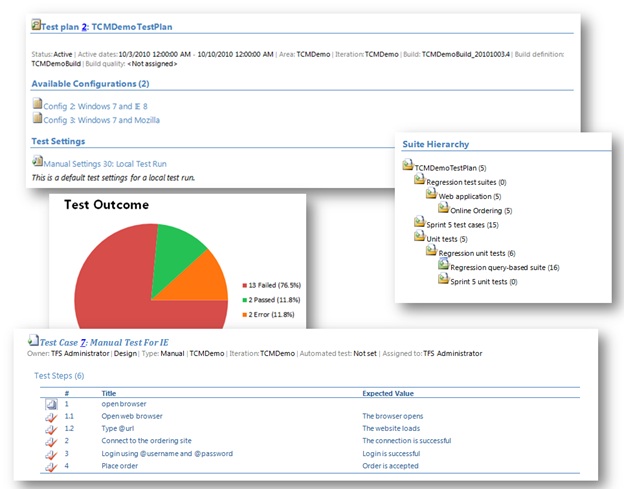
I love this tool. It makes really easy to generate Test Plan Summary which is important to avoid duplicate work and it changed the process to be more efficient because you don't have to write plain text document and enter the test steps again into MTM.
I think this has the potential to be a fantastically useful tool. There are a number of feature missing that would make it more suitable for me (eg: printing out and presenting to the business in a review session):
- Test Plan Summary - Test Case Parameters - Configuration values - Default Only. Not Test Case specific
- Test Run Summary - Complete list of Test Cases covered (don't care whether there are duplicates or not), both passed and failed. - List of failures regardless of whether they are Analysed or not. - Test Configuration. If I'm running a test across multiple configurations and it only failes on one, which one did it fail on? - Result Comments - I'd like to be able to see at a glance all the comments that all my testers are entering when failing test cases instead of having to navigate to each individual Test Run.
I look forward to seeing future versions of this tool :)
liked this tool though it doesn't generate Summary file sometimes but could get the doc. after retry. And also could able to customize the doc. using Sally Cavanagh suggestion in Q And A section as we have lot many testcases in our Test Plan and our requirement is to generate doc. for each suite.
I find this tool useful but we have over 1200 test cases and when we generate our test plan doucment it's over 1500 pages long. I'd like to have a way to filter what is output and possibly just select the output to be generated at the test suite level, area path level, or owner level. Thanks!
Regarding the reports of corrupted files, this is likely because you are using an older version of Office than 2010. Please see the Description tab which has been updated with a list of known issues. There is an easy workaround for the corrupted file messages which is posted there.
Agree with comment above it generates corrupt file. A popup messages comes up which is confusing. Rather test manager should create a file and notify user when done. a popup with cancel and stays on forever ! not good
It's a good start but needs some more features. It would be nice if the user can select the information that is displayed in the document. It also would be nice if I could generate a document for a single Test Case.
first of all, great little feature. However i do believe there are some features missing (in my case at least):
1-
no multi line support when exporting to word. more info on multi line in sp1 can be found here
http://blogs.msdn.com/b/bharry/archive/2011/10/19/multi-line-test-steps-available-in-microsoft-test-manager-among-other-things.aspx
2-
there is a possibility for a test run summary, but I am more interested in a test case summary. how many (% of) testcases have passed, failed or are still active. I don't need a report on all test runs, but the last run for each testcase.
If this could be added onto the tool it would be an awesome tool!
First of all awesome program that I've used in the past with Word 2010. Second I'm having an issue similar to 2007 Word users but with 2013 Word as when I open the word document I get, "We're sorry. We can't open Test run summary because we found a problem with it's contents." If I hit OK nothing happens and I'm left with a blank document. Are there any work arounds or do you know that it simply does not work with Office/Word 2013?
Thanks,
-G
I have the same issue, and compatibility mode doesn't kick in from Word... I'm not rolling back to Office 2010 just to be able to open these Test Scribe reports.
I need a full package install to install Test Scribe on one of my dev servers that does not have Internet access, Does anyone have a full package exe that installs Test Scribe??
Dear All,
I have generated test plan report by Test Scribe. But unable to trace/locate the report. Can any one tell me from where i can locate the same.
I am getting below error on installation
Setup has detected that the file 'C:\Users\MAHESH~1\AppData\Local\Temp\VSD3CF4.tmp\OpenXMLSDK\openxmlsdkv2.msi' has changed since it was initially published.
I had resolved this problem, the reason for that error is that, when installing the Test Scribe, system needs the internet access to download needed file(s). Hope this can help u.
Okay - I figured it out. The install file is not good and you may need to lower your UAC settings to start.
Then you need to download the SDK separately from here: http://go.microsoft.com/fwlink/?LinkId=179720. Once you've installed that you can launch the Test Scribe exe.
When I use TestScribe to create a Word 2010 document with the test plan details, the individual test case titles and expected values are unformatted HTML (for example, <HTML><BODY><P>Log Out</P></BODY></HTML>). Is there a reason it does this or a simple solution?
Previously i thought it is because of SP1 not installed my the machine but now i also have SP1 and still mtm.exe is not working,
if i uninstall Test Scribe MTM is working Fine.
Why is this happening ?
We are experiencing out of memory exceptions, when executing, Test Scribe with over a few thousand test cases. We've seen this across multiple machines. Any ideas?
We too are experiencing a Out of Memory exception. I've been able to make a copy of our Test Plan and it seems that when I cut it down to under 1400 test cases it will run just fine, anthing over that and I am getting the error. Multiple people are seeing this error and we need to find a solution.
Anyone have any thoughts?
I am receiving an error when I select a number of test runs then click Generate.
The error is:
Application detected an unexpected fault. Running transformation: Microsoft.TeamFoundation.WorkItemTracking.Client.FieldDefinitionNotExistException: TF26027: A field definition Microsoft.VSTS.Common.Priority in the work item type definition file does not exist. Add a definition for this field or remove the reference to the field and try again.
at Microsoft.TeamFoundation.WorkItemTracking.Client.FieldDefinitionCollection.get_Item(String name)
at Microsoft.TeamFoundation.WorkItemTracking.Client.FieldCollection.get_Item(String name)
at Microsoft.VisualStudio.TextTemplating4758D4BCBD74F4B544B88472A141286B.GeneratedTextTransformation.TransformText() in c:\Users\sbraisby.LD\AppData\Local\Temp\a4c4qniu.0.cs:line 456
at Microsoft.VisualStudio.TextTemplating.TransformationRunner.RunTransformation(TemplateProcessingSession session, String source, ITextTemplatingEngineHost host, String& result)
Any ideas on a resolution for this?
Did you remove the "Microsoft.VSTS.Common.Priority" field from the Test Case work item type definition?
If you did then you will need to add it back. I always recommend that you hide fields from the UI rather than deleting them as many tools work from the fields that exist on a template.
We had the same problem with several of our TFS projects, and MrHinsh tip led me to the cause in our case. I checked the Test Case workitem type and the "Microsoft.VSTS.Common.Priority" was present, but it was not on the Bug workitem type. I added the field to the Bug type and gave it a defaultvalue rule so it always has a value. Here is the definition I used:
<FieldDefinition reportable="dimension" refname="Microsoft.VSTS.Common.Priority" name="Priority" type="Integer">
<DEFAULT from="value" value="1" />
</FieldDefinition>