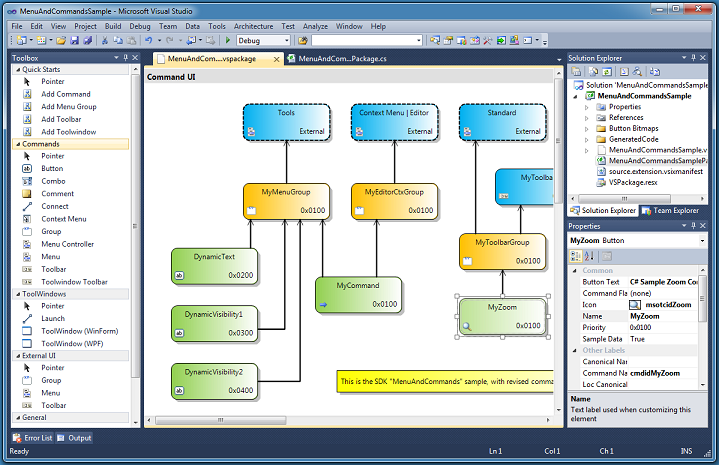
- double-clicking an element on the design surface doesn't always take you to the code-behind - changing the element name automatically changes description menu/button label etc - you can't enter a function key in the key bindings (F1 etc) - while you CAN copy/paste one or more elements, it has never worked properly for me (you see them, but don't seem to be able to use them, though it may be my own fault)
There needs to be more information on how to add "locations" that don't appear in the location property of an External Group, or a way to add them to the dropdown box.
I'd REALLY like to see a VB version of this fantastic tool.
Comes in very handy (but always rebuild the solution after changes to the Command UI)!
I have just recently released my extension String Resource Builder at Visual Studio Gallery (http://visualstudiogallery.msdn.microsoft.com/74ecfb4f-6245-4942-a5b2-67aaacd49415) and the source at CodePlex (http://stringresourcebuildr.codeplex.com) for those who are interested in an example.
Does away with the cumbersome manual management of lots of boilerplate declaration code, as well as providing a visual overview of your extension's structure. This really helps a lot, especially when your extension is getting larger.
At this point, you can add both a .bmp and a real .png to your project, use the .bmp in the editor, it will be replace the bmp with the png in the final generated code.
Great Product, as someone who use to have to bugger around with the xml before this makes it so much easier. I have 2 complaints though. First, allow png images to be used. Visual studio supports them and that way we can use transparency. Second, please untabify your templates, some lines you use spaces others you use tabs, just always use spaces.
I really love the extension because it makes developing VSPackage UI elements so easy(no need hand coding the .VSCT file any more) so that I can focus on the app business logic.
It's been a very long time since any updates were made to this wonderful tool. In spite of a number people asking about it being updated (more features, bug fixes, or compiled for VS 2012), myself included, nobody from the team seems to answer the questions any more.
If development of this tool has been abandoned, could the source code be open sourced, so that interested community members could at least take over development. I believe that the tool was actually written by a 3rd-party, but surely the source code has to be available somewhere.
It's so frustrating to have such a USEFUL tool languish as it was two years ago. Even more so, when no answers are forthcoming. :-(
Just created a VSPackage builder project named 'My.Sample.Extension' and built it.
16 build errors;)
BTW, is there any documentation/support forum but "VSPackage Builder Readme.docx" file?
Thanks for the heads-up on this; I've added this bug to the v2 queue. In addition to the readme, a magazine article was published earlier in the month (http://www.devx.com/VS_2010/Article/45656). Feel free to post questions here or send email to the vspbfeed alias mentioned in the readme.
-James
Ok. I think the best way will be to distinguish the default namespace and the name of the extension itself. Also, ability to change it via designer will be a very nice addition.
BTW, is there any detailed "writing VS 2010 extension" guidelines|faq on best practices?
Thanks:)
I ran into the same issue. I just replaced in the *.tt files all occurences of .SafeProjectName by .SafeProjectName.Replace(".", string.Empty) except for the namespaces (meaning especially for the GUIDs and class names). Then I just had to edit the My.Sample.ExtensionPackage.cs to fit the GUID, class name and base class name.
First : I love the VSBuilder, great work!
Second the bug : Command Flags member StrechHorizontally of Combo element should be StretchHorizontally - wrong code in the vsct is generated, have to change it every time the vsct file is generated through the builder
Third the request : if you have a Button element and specify the DynamicItemStart Command Flags member,
then it should be possible to define a range of ids that aren't used for later creating the dynamic added menu commands
Fourth a question : when will the next version be published?
Keep up the good work,
Thomas.
Thanks for reporting the bugs; I'll add them to the VS Package Builder backlog. We don't have a date for the next version yet but I will keep you posted.
-Gary Horen
Program Manager
Visual Studio Platform
Hi guys!
Just found this project, seems to be exactly what I need. However, it also seems the project is not in Microsoft focus of development... Nevertheless, expecting an answer to the above questions after six month wouldn't seem too much to ask for, wouldn't it? And as the last update of the builder was already more thant 2 years past, I'm afraid hoping for an update is ... hopeless ;-)
Is there any hope for a VS 11-compatible version soon? Currently, VSPackage Builder extensions can't be upgraded to work in VS 11 Beta. After opening the .csproj file in VS 11 and letting it upgrade, .vspackage files don't have a designer, and the following error is listed: A processor named 'VSPackageDesignerDirectiveProcessor' could not be found for the directive named 'VSPackageDesigner'.
If you need to make a VSPackage Builder extension work in VS 11 Beta now, do you have to rewrite it using the the old-school "Visual Studio Package" template? Or am I missing some "obvious" way to use VSPackage Builder in VS 11?
I guess we could just take all the code files that were generated for us by the builder, we just lose the design surface functionality. Future changes would then have to be made manually.
But I'm with you, I hope there'll be a VS 2012 compatible version released, or the source code made available.
This is probably a silly question, but how do I actually export this as an extension when I'm finished? I made a couple of custom panels and buttons in the Tools menu and debugging it works great, but how do I actually get these to appear in a new visual studio project? Exporting it just packages up all of the code behind the panels and opening it again just opens the project - this isn't what I want.
You would use the VSIX file that the package creates. It'll be in your bin\debug, or bin\release folder, depending on whether you have the debug or release configuration set for your project.
You can place it in a local folder on the machine you want to install it on, or you could put it into a file share on a server. Or you could eail the VSIX file to a colleague.
How do I force calls to xyzQueryStatusHandler of ToolWindow ToolBar buttons?
I want to adapt the enabled state while using controls (e.g. DataGrid) of the ToolWindow (focusing other window panes raises the calls).
Hi,
i use your VSPackage Builder tool to design packages. It work great.
But im not able to design a context menu in the code window of visual studio 2010:
AddinGroup -> Cmd1
Cmd2
How i have to design this, which properties ?
I have sucessfully created commands, but it is directly under the root of the context menu without a SubMenu-AddinGroup, like this:
... other entries ...
Cmd 1
Cmd 2
... other entries ...
Do i miss a property in the designer ?
Use
external menu
> menu group, placeholder for your group
> menu group, your grouping menu (parent of the menu's )
> place here your buttons (or like you call it commands)
Hope this helps.
Jan.