Great tool! Simple, no problems. The only thing I would have to say is to make the dialogs more elegant looking, but besides that everything works great.
No idea where I am going wrong to get this to work. Surely it should be as simple as logging in. With that said here is what I have done:
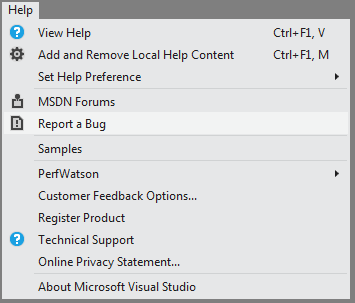
While in VS2012 with an open project: - Help > Report a Bug - Dialog box opens up with some information and two tick boxes; "I accept the Privacy statement" & "Don't show this again and automatically sign in" - Check both of these as true - Click "Next" - Enter my email address and password; The one I am messaging on now. - Click "Sign in" - Receive a message "Your user account is not registered with Connect. Please us the Connect link above to register your account." - Account is already registered with Connect.
Please advise.
Many Thanks
P.S. Using VS2012 Premium, Windows 7 Professional - VS2010/2008 are also installed if this has any affect.
To investigate the issue, please open a connect bug using MS Visual Studio Connect web site. The error you’re experiencing probably has nothing to do with your machine settings but an incompatibility between connect web-site and web-services. Your account settings will help us pinpoint the issue.
The Feedback Tool appears as a simple Web view of the Connect website. It appears to automatically use the wrong credentials to sign in. Which is exactly the problem I am having with Team Foundation Service.
Once again, things have been made complicated because you don't understand how your own credentialing functions operate. And the Feedback Tool seems to be a waste of space that just opens a website in Visual Studio. Showing pages that recommend that you install the Feedback Tool.
I recommend removing the Feedback Tool as it is a bother and a distraction. Instead, spend some effort to simplify the gargantuan and complex bug reporting system that has just about become a black hole of effort.
Hi Beh, We like to understand why this is happening, the tool installs correctly in our labs. Could you please tell us what error message you run into, and which OS you’re on? Thanks.
I'm sure this tool is great, but it won't let me sign in to Windows Live in order to use it. This is kind of funny because I have used the exact same credentials to sign in and supply this review. Of course since Microsoft wrote the software, no information about the actual problem is given, just a useless error message asking me to "try again later".
Andrew, could you please try to log-in to http://connect.microsoft.com/VisualStudio with your Live account? The Feedback tool uses MS Connect services for the log-in process.
The menu entry "Help > Report a bug" normally opens an Internet Explorer tab that opens this URL: http://connect.microsoft.com/VisualStudio/
This works well apart from the fact that the IE tab cannot open the file open dialog (see http://connect.microsoft.com/VisualStudio/feedback/details/735891/cannot-add-files-to-a-feedback-element-from-within-vs-11)
This extension installs a more interactive plugin that provides the same functionality and supplies more information to Microsoft.
As a member of the Microsoft product team, I love working with VS11 Beta bug and performance reports submitted using this tool. The information it provides allows us to much more easily reproduce the problems reported to us, so we can spend more time fixing product isues, and less time trying to find repro steps.
*Note* This tool will only work if you have the VS 11 Beta installed on your machine - it uses instrumentation that is only available in the Beta to help us quickly take action on your reports.
We are actively reading the Q&A section for this extension, so if you run into issues installing or using the tool let us know, and we'll try to help wherever we can.
I get the same as GordonBeeming. I just wanted to add that my environment is win 7 v6.1 SP1 and VS2010 ultimate v10.0.40219.1 SP1Rel was running at the time that I double clicked the vsix file and got 'The extension manifest is invalid'.
--------------------------- Visual Studio Extension Installer --------------------------- The extension manifest is invalid. --------------------------- OK ---------------------------
Only in VS 2012, I am getting the below mentioned error. In VS 2010, it compiles without any problem. Please help me in this regard.
error C2664: 'std::_String_alloc<_Al_has_storage,_Alloc_types>::_String_alloc(const MySysAllocator<Type> &)' : cannot convert parameter 1 from 'std::_Wrap_alloc<_Alloc>' to 'const MySysAllocator<Type> &'
with
[
_Al_has_storage=false,
_Alloc_types=std::_String_base_types<char,MySysAllocator<char>>,
Type=char
]
and
[
_Alloc=std::allocator<char>
]
and
[
Type=char
]
Reason: cannot convert from 'std::_Wrap_alloc<_Alloc>' to 'const MySysAllocator<Type>'
with
[
_Alloc=std::allocator<char>
]
and
[
Type=char
]
No user-defined-conversion operator available that can perform this conversion, or the operator cannot be called
C:\Program Files (x86)\Microsoft Visual Studio 11.0\VC\include\xstring
I'm experiencing the same issue that was reported back in August where it refuses to log into Connect. Yet I can switch to the Connect site and be automatically logged in. The feedback tool refuses to recognize my login. We have a picky proxy here so i changed the defaultproxy in the config to use the default credentials and it still didn't help.
Hi
This tool took 4 hours to record a 260MB trace file...
Then it took 1 minute to fail to upload it :(
This was the message - http://i.imgur.com/9gyJW.png
I can't find the trace file now - where would it have saved the trace file? Can I submit the trace file manually somehow?
Stuart
Lucky guess on my part! If you start creating a new dummy report, it turns out you can double-click any of the attachments to open then. From there you can deduce that the files are stored in %localappdata%\VSFeedbackTool\Feedbacks.
Visual Studio Feedback Tool is designed to be used with Visual Studio 11 Developer Preview.
If you need to report an issue for the earlier version of Visual Studio, please use the Microsoft Connect website.
If you try to install this extension for the earlier version of Visual Studio, an error message saying "The extension manifest is invalid" will be displayed.
Such unclear message is displayed every time user tries to install an extension that is built for the next VS version. We are aware of this issue; The error message should be improved starting the next Visual Studio version.
Why is it saying that it is an update to Visual Studio 2012 RTMREL, then?
And why is it still trying to update me with a tool for which the license agreement ended five months ago?
To be precise: here is what I see in teh license agreement. This is clause 1 (well, the second clause 1), and clause 2.
1. TERM. The term of this agreement is until 30/06/2012 (day/month/year).
2. PRE-RELEASE SOFTWARE. This software is a pre-release version. It may not work the way a final version of the software will. We may change it for the final, commercial version. We also may not release a commercial version.
Hi,
I tried to take a screenshot of VS running on my secound display, but as I viewed the created Screenshot, I saw that it contained the right range, but the wrong display. (with a maximized window)
I tried the same with a not maximized window, and just got a grey area.
As I moved teh window between the two Displays, the Screenshot only contained part of the window.
I am lost on how to actually install this tool. Its is not a recognised extension in vs11RC on Win8 so clicking Open as it suggests does nothing. All the tool I load in to VS are via NUGet, so there are no options to import there. Please help before I forget the bug I am trying to report
Sunraybrett,
It sounds like your file association for .vsix is broken. You should be able to install the extension by running "<VSInstallPath>\Common7\IDE\vsixinstaller.exe <VSIXPath>"
I've used the Feedback Tool several times in the past with no problems, and have been registered on Connect for Visual Studio for many years. Today I tried to use the feedback tool to report a bug, but it won't accept my login. It just says "Your account is not registered with Connect. Please use the Connect link above to register your account."
Has something broken on the server end?
Thanks Nathan. It seems to be working now.
Amused that I encountered a bug I wanted to report in VS, but then encountered a bug in the feedback tool. And then when I first tried to report that bug here, there was a bug in this site too which prevented it being submitted... just one of those days I guess!
i'm having trouble uploading a 3MB video. I have successfully uploaded smaller files, and I can see (in procmon.exe) that it's uploading successfully, but after couple of minute or so it gets to the end of the file:
1:50:53.7205688 PM VSFeedbackTool.exe 20960 ReadFile C:\Users\piersh\Documents\Expression\Expression Encoder\Output\WIBBLER 5-10-2012 1.23.09 PM\ScreenCapture_5-10-2012 1.20.59 PM.wmv END OF FILE Offset: 2,870,158, Length: 65,536, Priority: Normal
but then it pops up a generic error popup in the systray and nothing is added to the bug entry.
Hi Spongman,
The newest version of the tool has a better upload mechanism now, and we have plans to update the tool (pretty soon) so that we can identify file upload errors better.
If you continue to have errors with the updated version, please feel free to contact me.
Thanks,
--Selma Ikiz
This tool is totally cool. Do you have any plans to make it available to developers so we can include it in our apps?
If not, do you know of something else along these lines?
Hi Casterle,
currently, we do not plan to ship this tool as a product or widget.
Have you seen the Feedback Client for TFS (http://blogs.msdn.com/b/visualstudioalm/archive/2011/09/20/feedback-on-working-software.aspx) ?
thanks,
Selma