

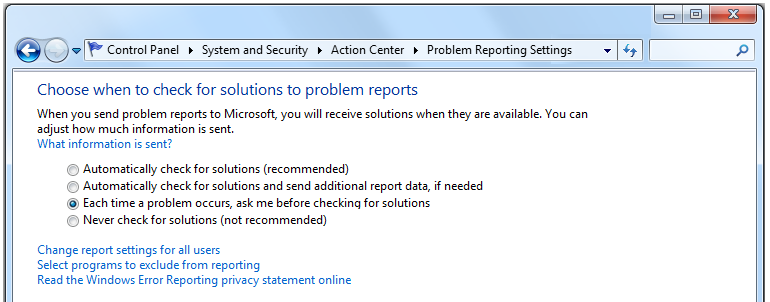
The Visual Studio team no longer collects PerfWatson reports for Visual Studio 2010. Your reports helped us to identify the issues affecting you most, and you can see improvements in Visual Studio11 Beta.The PerfWatson extension is included in the VS11 Beta release. If you would like to use PerfWatson to automatically report on any responsiveness issues you are encountering, please download and try out the VS11 Beta. What is Visual Studio PerfWatson?Would you like your performance issues to be reported automatically? Well now you can, with PerfWatson extension! Install this extension and assist the Visual Studio team in providing a faster future IDE for you. At channel9.msdn, Cameron McColl talks about why the PerfWatson extension was created. He also shows some collected data and explains how it's used to drive performance improvements and make Visual Studio faster. We’re constantly working to improve the performance of Visual Studio and take feedback about it very seriously. Our investigations into these issues have found that there are a variety of scenarios where a long running task can cause the UI thread to hang or become unresponsive. Visual Studio PerfWatson is a low overhead telemetry system that helps us capture these instances of UI unresponsiveness and report them back to Microsoft automatically and anonymously. We then use this data to drive performance improvements that make Visual Studio faster. Here’s how it works: when the tool detects that the Visual Studio UI has become unresponsive, it records information about the length of the delay and the root cause, and submits a report to Microsoft. The Visual Studio team can then aggregate the data from these reports to prioritize the issues that are causing the largest or most frequent delays across our user base. By installing the PerfWatson extension, you are helping Microsoft identify and fix the performance issues that you most frequently encounter on your PC. To allow PerfWatson to submit performance reports to Microsoft, please make sure that Windows Error Reporting (WER) is enabled on your machine, please seehow to configure WER setting session. PerfWatson employs the WER service to send the collected data to Microsoft. Using PerfWatsonPerfWatson is an automatic feedback service. Once it is installed, all you need to do is use the product, and it will automatically create an error report for every UI delay you experience in the product. It stores these error reports in%LOCALAPPDATA%\PerfWatson. This data is then submitted to Microsoft on next Visual Studio launch. If your Windows Error Reporting permissions are set to Automatically check for solutions and upload data, the performance reports will be submitted to Microsoft automatically. Otherwise, PerfWatson will prompt the user for permission to send the collected data. This prompt can be disabled by checking “Do not show this dialog again. Report problems automatically” on the dialog. 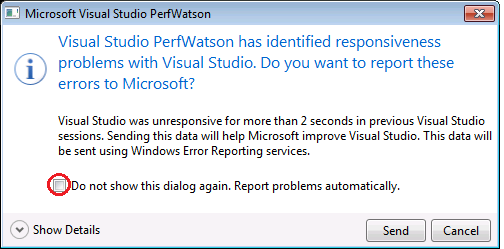 Note: The prompt for user consent can be re-enabled through the Visual Studio Help menu. 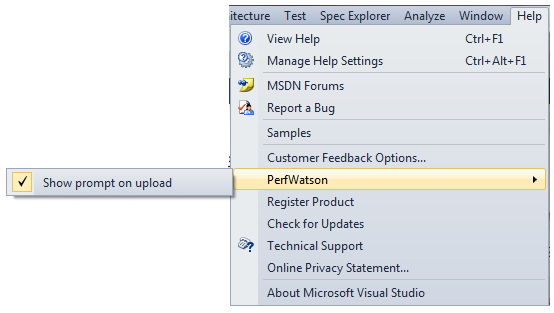 How to configure/change WER settings?If Windows Error Reporting is disabled on the machine,PerfWatson extension will prompt a warning and stop working. If you’re not planning to enable your WER, please uninstall the PerfWatson extension. 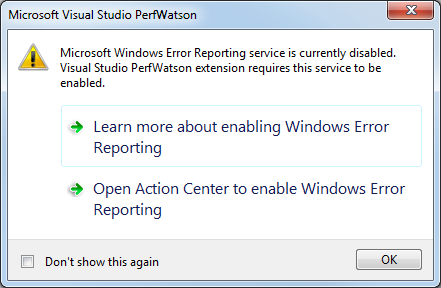
Supported PlatformsBefore installing the extension there are a few limitations you should be aware of. The extension requires diagnostic services/libraries on the OS that weren’t introduced until Vista, hence PerfWatson is not supported for Windows XP. |